Did you know that consumer spending on 4K Ultra HD Blu-ray surged by 19.5% in the UK in 2025? This growth is fuelled by a boutique collector market that demands premium navigation and flawless interactivity. For global distributors, the challenge lies in moving beyond basic scripts to implement BD-J interactive menu programming that performs reliably across every hardware profile, from standalone players to the latest gaming consoles.
We recognise the pressure of a looming shipping date and the anxiety of a disc potentially failing quality control due to a minor coding oversight. It’s a high-stakes environment where the distinction between standard HDMV and Java-based environments can mean the difference between a successful launch and a costly re-pressing. You need a workflow that guarantees stability without sacrificing the high-end features your audience craves.
This guide provides a professional roadmap for mastering BD-J in 2026. You’ll discover how to transform your physical media into a robust, Java-powered platform; we’ll also provide a clear decision framework for choosing the right authoring path and preparing your assets for global distribution compliance.
Key Takeaways
- Understand how BD-J interactive menu programming functions as a sophisticated application layer to provide advanced interactivity beyond standard disc navigation.
- Evaluate the technical trade-offs between HDMV and BD-J frameworks to select the most efficient mastering path for your specific release.
- Master the integration of Xlets and Bonus View to deliver high-end features like picture-in-picture commentary and dynamic UI logic.
- Identify the critical steps in the Java compilation process to ensure your disc assets meet strict global distribution and quality control standards.
- Minimise the risk of playback failures and ‘Black Screen’ errors by adopting a professional, hardware-tested approach to menu coding.
What is BD-J Interactive Menu Programming?
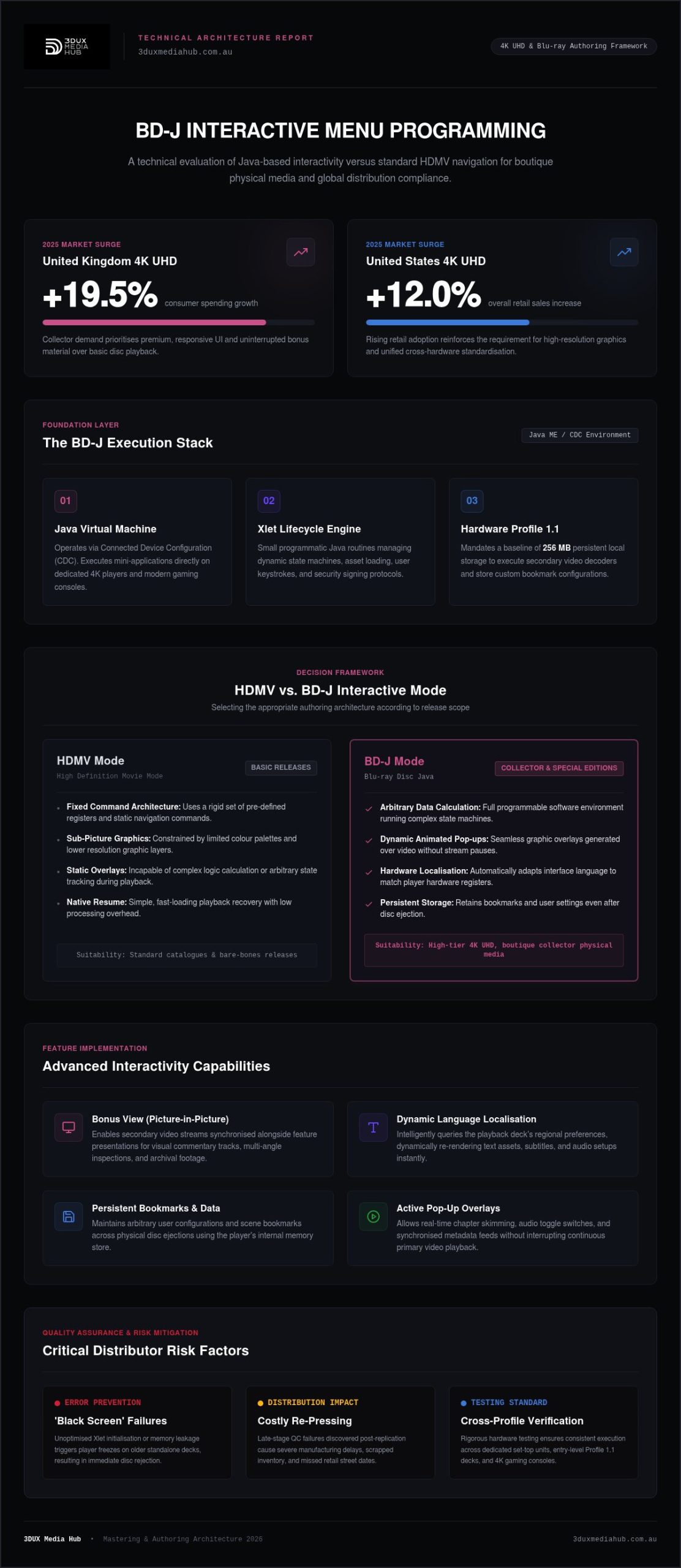
BD-J, or Blu-ray Disc Java, represents the advanced interactive layer that defines the modern high-definition viewing experience. Unlike the static, pre-rendered menus found on legacy DVD formats, BD-J interactive menu programming creates a mini-application that runs directly on the disc player’s hardware. This technology is built on Java Micro Edition (Java ME), specifically utilising the Connected Device Configuration (CDC). It allows for a sophisticated level of logic and responsiveness that standard video formats cannot match.
For 2026 releases, this platform is essential for distributors targeting the growing collector market. With 4K UHD sales increasing by 12% in the US and 19.5% in the UK during 2025, consumers expect more than just a simple “Play Movie” button. BD-J provides the infrastructure for complex features such as Bonus View (Picture-in-Picture) and dynamic content updates, ensuring the physical disc remains a premium, high-value asset in a digital-heavy world.
The Shift from DVD to Java-Based Interactivity
The transition from DVD to Blu-ray required a total rethink of user interface design. Legacy systems relied on sub-picture overlays, which were restricted by low-resolution graphics and limited colour palettes. High-definition media demanded a system that could handle high-resolution assets and complex branching without stuttering. By adopting Java, the Blu-ray Disc Association ensured a level of cross-platform standardisation. Whether a viewer uses a dedicated 4K player or a gaming console, the Java Virtual Machine on the device interprets the disc’s code to provide a consistent, high-quality experience.
BD-J vs. Standard High-Definition Movie Mode (HDMV)
Distributors typically choose between two authoring frameworks based on the project’s scope. HDMV (High Definition Movie Mode) is the “lite” version of disc navigation. It uses a fixed set of registers and commands, making it efficient for straightforward releases with basic menus. While HDMV loads quickly and handles native resume functions well, it cannot support the advanced state machines required for modern special editions.
BD-J is the preferred choice for premium titles because it allows for arbitrary data calculation and complex UI layering. Professional authoring houses use BD-J interactive menu programming to implement features that HDMV simply cannot handle, including:
- Animated Pop-up Menus: Seamless overlays that appear during playback without interrupting the video.
- Advanced Localisation: Dynamic UI changes based on the player’s language settings.
- Persistent Storage: Custom bookmarking and user settings that remain saved even after the disc is ejected.
While the technical overhead for Java programming is more significant, the result is a robust, future-proof product that meets the rigorous standards of global distribution.
Key Capabilities of the BD-J Platform
The true power of the platform lies in its ability to execute complex code through Xlets. These small Java applications act as the engine for the disc, managing everything from basic navigation to sophisticated state machines. Unlike simpler formats, BD-J interactive menu programming allows a disc to function as a dynamic software environment. This capability is what enables the premium features that modern collectors expect from high-end 4K UHD and Blu-ray releases.
Xlets and the Application Lifecycle
Xlets manage the transition between the main feature and interactive layers. They control when assets load and how the player responds to user input. Security is a paramount concern in this environment; applications must be digitally signed to gain access to the player’s local storage or network features. Professional authoring ensures that these Xlets are optimised to manage system resources efficiently. This prevents sluggish performance or crashes on older Profile 1.1 hardware, which only requires 256 MB of persistent local storage.
Advanced Interactivity: Beyond Simple Buttons
The platform moves far beyond traditional menu structures. It supports dynamic overlays that allow viewers to access chapter markers or audio settings without pausing the film. Distributors can implement interactive trivia tracks, synchronised metadata displays, and even custom games that react to the viewer’s progress. Integrating high-quality interactive Blu-ray menu design is essential for creating a cohesive, premium feel that justifies the price point of boutique physical media.
Advanced hardware profiles unlock even more potential. Profile 1.1, known as Bonus View, enables secondary video and audio decoders for picture-in-picture commentaries. Profile 2.0, or BD-Live, leverages the player’s internet connection to provide live updates or social features. While BD-Live requires a minimum of 1 GB of local storage, it offers a unique way to keep physical content relevant through downloadable extras. If you are looking to maximise the potential of your next release, our professional authoring services provide the technical expertise needed to implement these features flawlessly.
One critical advantage of BD-J is its access to persistent storage APIs. Because a Java Virtual Machine shuts down completely when a disc is stopped, native “resume” functions don’t exist as they do in HDMV. Expert programmers must write custom bookmarking algorithms that save the user’s position to the player’s internal memory. This ensures a seamless experience where the viewer can pick up exactly where they left off, even after a full power-down. This level of detail is a hallmark of broadcast-grade mastering.
BD-J vs. HDMV: Choosing the Right Framework
Distributors must decide between HDMV (High Definition Movie Mode) and BD-J early in the mastering process. This decision dictates the project’s budget, timeline, and technical complexity. While both frameworks deliver high-definition menus, they serve different commercial objectives. HDMV is a scripted environment using fixed registers. In contrast, BD-J interactive menu programming offers a fully programmable Java environment. Choosing the wrong path can lead to unnecessary costs or a product that fails to meet consumer expectations.
When to Stick with HDMV
HDMV is the industry standard for straightforward, budget-conscious releases. It is ideal for “movie-only” discs or titles with basic static menus. Because HDMV relies on pre-defined Player Status Registers (PSRs), it loads almost instantly. It also carries a lower risk of technical glitches on legacy hardware. If your distribution deadline is tight, HDMV allows for a faster turnaround. The testing phase is significantly shorter because the logic is less complex. It’s a safe, reliable choice for mass-market titles where advanced interactivity isn’t a priority.
When BD-J is Non-Negotiable
For boutique labels and premium 4K UHD releases, BD-J is essential. Collectors expect a sophisticated, responsive user interface that mirrors the quality of the film itself. If your project requires complex subtitle switching, multi-language audio tracks, or seamless branching for different movie cuts, Java is the only solution. These high-end masters often require professional video encoding services to ensure the visual data integrates perfectly with the interactive layer. BD-J handles these assets with a level of precision that HDMV cannot match.
Cost considerations are a major factor in this decision. HDMV projects primarily involve graphic design and basic scripting. BD-J requires significant programming hours to develop and debug custom Xlets. However, the investment pays off in global compatibility. A well-programmed Java menu ensures that your disc behaves predictably across diverse hardware brands. Before committing, verify your target market’s hardware profile. If your audience uses modern 4K players or gaming consoles, the power of BD-J interactive menu programming will provide the premium experience they demand. It’s about aligning the technical framework with the value of the content.
The BD-J Programming and Mastering Workflow
Professional disc mastering is a methodical process. It requires a balance between creative UI design and rigid technical architecture. Unlike simple DVD menus, BD-J interactive menu programming demands a software development mindset. We begin by defining the interactive feature set and mapping the user journey. Every Xlet must be purpose-built to handle specific tasks without taxing the player’s CPU. Once the logic is sound, Java code is compiled into JAR files, ready for integration with the primary media assets.
The final assembly involves multiplexing (muxing) the video, audio, and Java streams into a unified Cutting Master Format (CMF). This stage is critical. If the muxing parameters are off by even a few milliseconds, the disc can suffer from buffer underflows or navigation lag. It’s a high-stakes technical operation that requires broadcast-grade precision. To ensure your master is ready for the global stage, you can book a technical consultation with our authoring team.
Design and Asset Preparation
Efficiency starts at the design phase. We organise assets to ensure high-speed loading and seamless menu transitions. Large graphics are optimised to prevent memory bottlenecks on older Profile 1.1 hardware. Motion graphics are developed to complement the Java layer, creating a fluid interface that feels modern. A vital part of this preparation is ensuring audio conforming for international film release is correctly integrated. The menu logic must account for multiple language tracks and subtitle streams, allowing for instant switching without playback interruption.
Testing and Quality Control (QC)
We don’t rely on emulators alone. While software emulators are useful for initial debugging, they don’t replicate the firmware quirks found in standalone players or gaming consoles. Rigorous testing on a hardware matrix is mandatory. This includes current industry-standards like the Panasonic DP-UB820 and Sony UBP-X800M2. Utilising professional 2026 Blu-ray quality control services is the only way to identify unhandled Java exceptions before they reach the replication plant. A single error can lead to a total disc rejection, costing distributors thousands in wasted materials. We finalise every project as a verified CMF image, ensuring it meets all BDA technical specifications for error-free replication.
Why Professional BD-J Programming is Vital for Distributors
Handing over a high-value film master to an inexperienced coder is a significant commercial risk. Amateur Java programming frequently results in the dreaded ‘Black Screen’ error, where the player’s Virtual Machine crashes due to an unhandled exception. This isn’t just a technical glitch. It is a critical failure that can lead to entire batches of discs being returned by retailers. Professional BD-J interactive menu programming eliminates these traps by implementing robust error-handling protocols and state-machine logic that accounts for every possible user interaction.
Global distribution adds another layer of complexity. While 4K UHD discs are technically region-free, standard Blu-ray assets still require careful management of PAL and NTSC standards alongside region coding. A ‘safe pair of hands’ is required to navigate these variables. 3DUX Media Hub leverages over 20 years of industry experience to streamline this transition. We ensure your assets move from the edit suite to the retail shelf without technical bottlenecks, protecting your investment and your reputation with collectors.
Technical Compliance and Global Standards
Navigating the Blu-ray Disc Association (BDA) specifications requires deep technical expertise. These standards are updated frequently to accommodate new hardware profiles and security requirements. We utilise broadcast standards conversion services to prepare international assets, ensuring frame rates and resolutions are compliant with every target territory. This meticulous approach future-proofs your release for the evolving 4K UHD market, where technical flaws are immediately spotted by an observant audience.
Maximising the Value of Your Physical Release
In a market where boutique labels are thriving, premium interactivity is a key differentiator. A polished, responsive user interface justifies the higher price point of physical media. It transforms a simple movie disc into a sophisticated, branded experience that builds long-term loyalty with your customers. When the navigation is seamless and the features are rich, the consumer perceives the product as a luxury item rather than a commodity. Ready to start? Organise a technical consultation with 3DUX Media Hub today to ensure your next release meets the highest professional standards.
Mastering the Standard for Premium Media
The surge in high-end physical media sales highlights a clear market demand for sophisticated, responsive user experiences. Implementing BD-J interactive menu programming allows you to meet these expectations by transforming standard discs into dynamic, Java-powered platforms. We’ve established the critical importance of choosing the correct framework. Hardware-based testing remains the only way to avoid expensive disc recalls and ensure player compatibility.
Relying on seasoned experts ensures your release maintains technical compliance across all global territories. 3DUX Media Hub brings 20+ years of technical mastering expertise to every project. We offer a safe pair of hands for your high-value assets. Our team specialises in fast turnaround for high-stakes distribution. We ensure every master undergoes comprehensive broadcast-grade QC before replication begins. This methodical approach protects your investment and enhances brand loyalty.
Secure your film’s global release with professional BD-J authoring from 3DUX Media Hub. We look forward to helping you deliver a flawless interactive experience to your audience.
Frequently Asked Questions
What exactly is the difference between BD-J and standard DVD menus?
DVD menus rely on simple sub-picture overlays with limited colour palettes and basic navigation logic. In contrast, BD-J interactive menu programming creates a sophisticated software environment using Java ME. This allows for animated overlays, complex state machines, and dynamic asset loading that DVD simply cannot handle. While DVD is a linear format, BD-J operates as a mini-application, providing a responsive and modern interface that aligns with high-definition standards.
Do all Blu-ray players support BD-J interactive features?
Every Blu-ray player includes a Java Virtual Machine by specification, but the level of support depends on the hardware profile. Profile 1.1 (Bonus View) is required for picture-in-picture, while Profile 2.0 (BD-Live) adds network connectivity and 1 GB of local storage. Modern 4K UHD players typically follow Profile 6.0 standards. Professional authoring ensures your disc logic detects these hardware limitations gracefully to prevent playback errors on older units.
Is BD-J programming necessary for a 4K UHD disc release?
It isn’t strictly mandatory, as 4K UHD discs can still utilise the simpler HDMV mode for basic navigation. However, for distributors targeting the collector market, BD-J is the industry standard. It enables the advanced features, such as seamless branching and custom bookmarking, that boutique audiences expect from premium physical releases. If your release requires complex localisation or interactive bonus content, Java is the only way to deliver that high-end experience.
How much does BD-J menu programming typically add to the authoring timeline?
Implementing Java-based interactivity adds significant time to the production schedule compared to standard HDMV scripting. The process involves custom coding, JAR compilation, and extensive hardware testing to ensure stability. While a basic disc might be mastered in days, a complex BD-J project often requires several weeks of development and quality control. We recommend factoring in this additional lead time early in your distribution planning to avoid shipping delays.
Can BD-J menus be updated after the disc has been replicated?
The physical data on a pressed disc cannot be altered once it leaves the replication plant. However, BD-J menus designed with BD-Live capabilities can fetch dynamic updates from a remote server. These updates are saved to the player’s local storage, allowing distributors to refresh trailers, add new bonus content, or provide live event links. This flexibility keeps the physical asset relevant long after the initial retail launch.
What is an Xlet and how does it function on a Blu-ray player?
An Xlet is a small Java application designed to run within the restricted environment of a Blu-ray player. It functions similarly to an applet, managing its own lifecycle through states such as loaded, started, and paused. Xlets control the disc’s interactive logic, from button sounds to complex menu animations. Professional programmers sign these applications digitally to grant them permission to access the player’s persistent storage and network interfaces.
Why should I choose a professional authoring house over DIY software for BD-J?
DIY software often lacks the robust multiplexing and hardware-testing capabilities required for commercial distribution. Professional authoring houses use industry-standard tools like Scenarist to ensure strict spec compliance. This reduces the risk of disc rejection during quality control, which can be a costly setback for distributors. We provide a safe pair of hands by testing your project on a diverse matrix of standalone players and gaming consoles.
Does BD-J affect the video bitrate or overall picture quality?
The interactive layer runs as a separate graphical plane and does not directly reduce the video bitrate or picture quality. However, the total data throughput must remain within the Blu-ray specification’s buffer limits. Professional authoring involves careful management of the multiplexing process to ensure that Java assets and high-bitrate video streams coexist without causing playback stutters. This ensures that your 4K UHD master maintains broadcast-grade visual integrity.