A single two-frame timing error or an awkward line break can instantly trigger an automated QC rejection from global streaming networks. Broadcast compliance isn’t just about transcribing dialogue; it requires engineered subtitle timing, absolute file integrity, and exact technical precision. In an industry governed by strict platform specifications, mastering the best practices for subtitle creation is the difference between a seamless multi-territory launch and a costly operational delay.
Every post-production team understands the headache of subtitles drifting out of sync after frame-rate conversions, unreadable text cluttering the screen, or untangling conflicting standards between OTT services, broadcast deliverables, and disc authoring masters. When global release windows hit, you don’t have time to patch broken cue chains or decipher vague ingestion failure logs.
By locking down professional standards from the start, you’ll ensure your subtitle assets achieve frame-accurate timing, comply with strict reading speeds, and clear rigorous quality control on the first pass. Here is your complete 2026 technical checklist to build bulletproof localisation workflows and guarantee flawless playback across every delivery pipeline.
Key Takeaways
- Master frame-accurate synchronisation by locking start cues within two frames of dialogue initiation and maintaining strict duration thresholds to prevent cognitive fatigue.
- Implement industry best practices for subtitle creation across line lengths, limiting text to two lines and 37 to 42 characters for seamless readability.
- Condense spoken dialogue strategically to honour natural reading speeds without sacrificing narrative subtext, character voice, or dramatic pacing.
- Eliminate playback drift by matching subtitle container formats and timecode bases directly to your master project frame rates, including 23.976, 24, and 25 fps.
- Prepare rock-solid distribution masters by integrating broadcast-grade quality control and graphic bitmap rendering for 4K UHD and Blu-ray disc authoring workflows.
Core Timing and Synchronisation Rules for Broadcast and Streaming
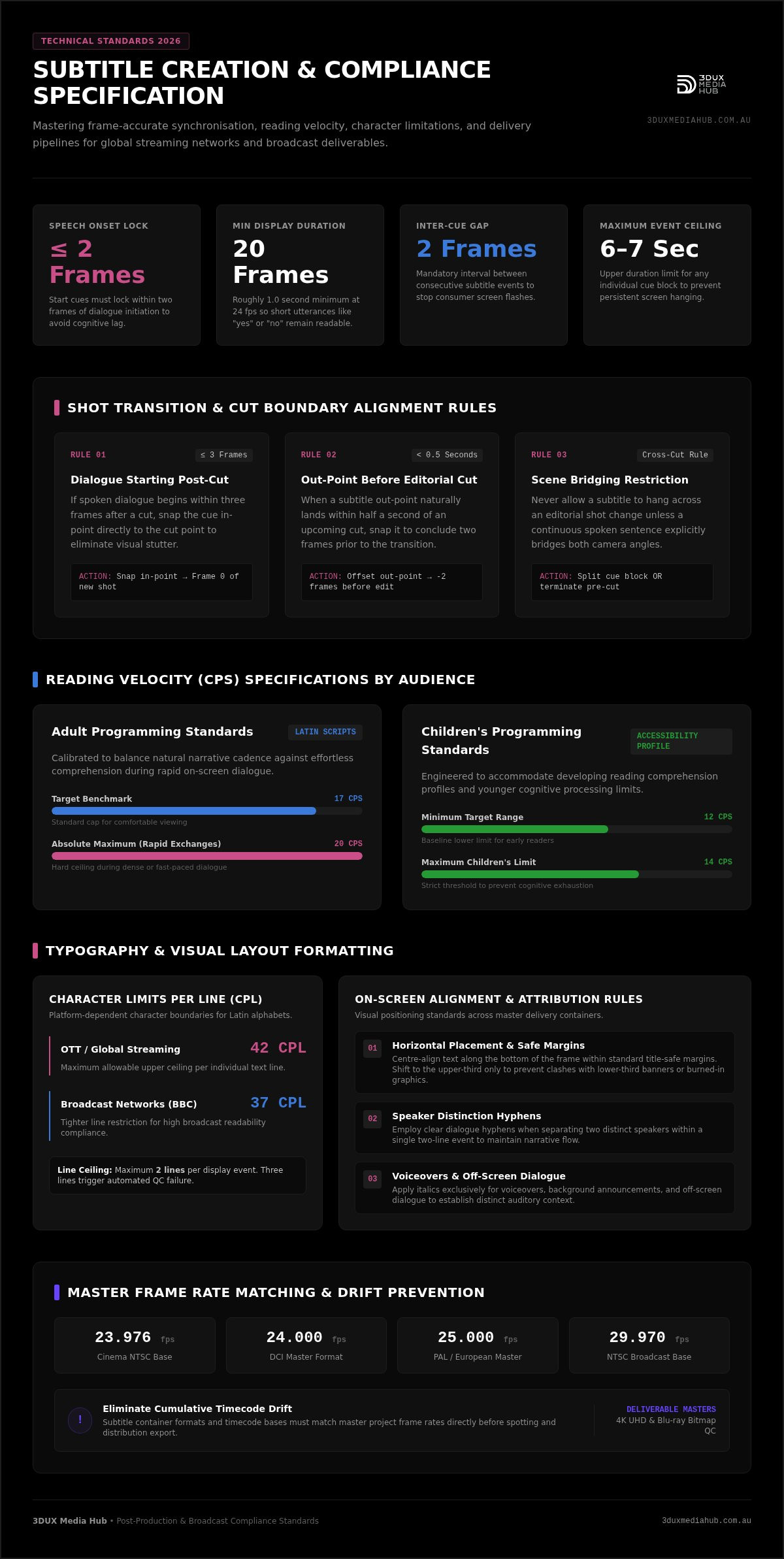
Automated transcription algorithms often claim to eliminate manual timing, but automated timecodes consistently fail automated broadcast quality control. Applying rigorous best practices for subtitle creation requires locking subtitle start cues directly to speech onset within two frames of dialogue initiation. If text appears earlier, viewers anticipate lines prematurely; if it appears late, it creates noticeable perceptual lag. As detailed in the Wikipedia overview of subtitling, synchronisation must respect human cognitive processing and visual cadence. A single cue must also maintain a minimum screen duration of roughly one second (or 20 frames at 24 fps) so viewers can register short words like “yes” or “no” without visual strain.
Temporal alignment becomes even more complex when managing variable frame rates. Converting projects across 23.976, 24, 25, and 29.97 fps can introduce cumulative timecode drift that knocks entire dialogue reels out of sync. Spotting pipelines must mathematically lock cues to project timecode bases before delivery.
Shot Changes and Frame Accuracy
Shot transitions dictate strict placement boundaries. If a dialogue event starts within three frames after a cut, snap the in-point directly to the cut point to prevent distracting visual jumps. Never let a subtitle hang across an editorial cut unless the spoken sentence clearly bridges both scenes. When an out-point lands within half a second of a transition, snap it to finish two frames before the edit. Crucially, always enforce a minimum two-frame gap between consecutive subtitle events. Without this tiny interval, adjacent cues run together and cause annoying display flashes on consumer television screens. When re-versioning deliverables across territories, partnering with specialised broadcast standards conversion services ensures these frame-accurate offsets survive every technical transcoding pass.
Reading Speed, CPS, and On-Screen Duration
Pacing dictates viewer engagement. Delivering industry-standard files requires balancing character density against screen real estate:
- Adult programming: Cap reading speeds at 17 characters per second (CPS) for Latin scripts to ensure effortless reading, never exceeding 20 CPS during rapid exchanges.
- Children’s programming: Target 12 to 14 CPS to accommodate developing reading comprehension and accessibility profiles.
- Duration boundaries: Enforce a strict ceiling of six to seven seconds per individual event to eliminate screen hanging.
- Visual proportion: Balance screen time directly with syllable counts so dense legal or narrative blocks feel proportionate on screen.
Adhering to these best practices for subtitle creation ensures dialogue remains legible, rhythmic, and fully compliant across global platforms.
Typography, Line Breaks, and Visual Layout Standards
Visual formatting directly impacts viewer retention and technical pass rates. Even with perfect timing, clunky typography or careless line distribution will trigger immediate rejection from global streaming platforms and broadcast networks. Professional subtitle rendering demands strict visual containment, ensuring dialogue remains readable without masking critical cinematography. These core visual rules form the baseline for quality control:
- Maximum line count: Restrict every display block to a maximum of two lines. Three lines create visual clutter and occlude key on-screen action.
- Horizontal positioning: Centre-align text along the bottom of the frame within standard title-safe margins, reserving upper-third placement strictly to avoid clashing with lower-third identification banners or burned-in graphics.
- Speaker attribution: Use italics for voiceovers and off-screen dialogue, and employ clear dialogue hyphens when separating two distinct speakers within a single two-line event.
Character Limits and Line Length Balancing
Line capacity depends heavily on delivery distribution channels. Standard streaming platforms enforce an upper ceiling of 42 characters per line (CPL) for Latin alphabets, while broadcast environments like the BBC require a tighter 37 CPL constraint, and legacy CEA-608 limits text to 32 CPL. Adhering to technical W3C guidelines on captions and subtitles ensures formatting supports cognitive processing across all platforms.
Visual shape matters. Strive for a bottom-heavy pyramid or balanced lines. Never split words mechanically simply to equalise visual line lengths. Line breaks must follow syntactic and grammatical logic:
- Split lines naturally at punctuation marks, conjunctions, or prepositions.
- Never separate titles from proper nouns (for example, keep “Inspector” and “Moran” on the same line).
- Keep verb compounds and auxiliary pairings intact to protect cognitive rhythm.
Font Selection, Safe Areas, and Visual Contrast
Clean typography is non-negotiable. Choose sans-serif typefaces with clear glyph definition, such as Arial, Roboto, or Tiresias Screenfont. Confine all text within an 80 percent title-safe boundary box to prevent edge clipping across older consumer screens.
Contrast requirements also shift during high-dynamic-range grading. In 4K UHD authoring pipelines, pure white text (100% white) against HDR master footage can cause blinding glare. Professional encoders cap subtitle nit levels to prevent visual fatigue, pairing text with subtle, semi-transparent drop shadows or slight edge bounding to maintain legibility over white backgrounds. For studios preparing commercial masters, partnering with a specialist media hub for professional video encoding and disc authoring ensures your subtitle assets pass platform colour grading and visual QC checks without costly rework.
Mastering these layout fundamentals represents one of the most critical best practices for subtitle creation, establishing a clean, uniform presentation across domestic and international screens.
Linguistic Translation and Dialogue Condensation Strategies
Subtitling is an exercise in dynamic balance. While automated engines attempt direct verbatim transcription, literal speech often breaks CPS limits and overwhelms viewers. People speak faster than they read. Dialogue regularly clocks between 180 and 240 words per minute, whereas comfortable reading speeds sit closer to 140 to 160 words per minute. Meeting rigorous broadcast benchmarks requires disciplined condensation that preserves dramatic intent while respecting visual real estate.
Failing to edit spoken dialogue leads to unreadable cues that violate core industry criteria. For instance, the FCC closed captioning quality standards mandate complete synchronicity and accuracy without obstructing comprehension. Professional translators condense spoken words into clear, rhythmic text, ensuring complex narrative beats land cleanly.
Preserving Idiomatic Meaning and Cultural Context
Literal word-for-word translation ruins dramatic impact. Effective localisation translates underlying emotional intent rather than executing robotic conversions. Cultural humour, regional slang, and idiomatic expressions require resonant equivalents that make sense to the target audience. A local colloquialism translated word-for-word leaves international audiences confused; adapting it to a matching cultural concept preserves the original tone.
Franchise releases and episodic series demand strict terminological consistency. Subtitling teams rely on comprehensive show glossaries to standardise recurring character titles, fictional technologies, and catchphrases across seasons. When re-versioning feature projects, pairing translated text with synchronised audio conforming for international film release ensures dialogue and mixed audio tracks remain lock-stepped across foreign language deliveries.
Condensing Dialogue Without Sacrificing Narrative Intent
Trimming spoken lines requires editorial discipline. To trim text without losing meaning, apply these practical editing strategies:
- Prune speech clutter: Remove verbal fillers, false starts, throat-clearing, and redundant affirmative responses (such as “well”, “um”, or “you know”) whenever dialogue exceeds safe reading speeds.
- Switch to active voice: Convert passive phrasing into concise, active-voice constructions to save character space without shifting tone.
- Protect plot clues: Retain subtle exposition, technical exposition, and narrative twists; never compromise plot-critical information merely to shorten a line.
- Maintain character voice: Preserve idiosyncratic vocabulary and sentence structure for distinct personalities while stripping out disposable adverbs.
Applying these best practices for subtitle creation ensures dialogue remains punchy, natural, and fully synchronised with on-screen performance.
Subtitle Delivery Formats and Compliance Verification Checklist
Formatting errors in delivery files cause immediate ingestion failures at major streaming and broadcast hubs. Even when text and timing are immaculate, packaging subtitles into the wrong container or misconfiguring timecode flags will halt distribution. Implementing professional best practices for subtitle creation requires matching the output container directly to the technical delivery specification of the receiving platform.
Deliverables fall into distinct container classes across broadcast, OTT, and physical disc authoring workflows:
| Format | Target Platform | Positioning Support | Timecode Base |
|---|---|---|---|
| SRT (.srt) | Web / Social Video | None (centre-bottom only) | HH:MM:SS,MS (millisecond) |
| WebVTT (.vtt) | HTML5 / HLS Streaming | Full CSS line & cue positioning | HH:MM:SS.MS (millisecond) |
| IMSC1 / TTML | Tier-1 OTT / IMF Packages | Advanced styling & XML regions | Frame-accurate SMPTE |
| EBU-STL / BDN XML | Broadcast & Blu-ray Authoring | Graphic bitmaps & teletext rows | Frame-locked (24, 25 fps) |
Choosing Between SRT, WebVTT, STL, and TTML Formats
Plain-text SubRip (.srt) remains common for basic web delivery, but it lacks structural styling and positioning data. It cannot reliably elevate lines to prevent covering lower-third graphics. In contrast, WebVTT handles precise coordinate positioning for streaming video players. For premium streaming platforms, XML-based profiles like SMPTE-TT and W3C IMSC1 (including the latest IMSC 1.3 recommendation) serve as the mandatory interchange standard for Interoperable Master Format (IMF) packages.
Physical disc mastering requires dedicated formats. Blu-ray and 4K UHD authoring pipelines rely on BDN XML and rendered PNG bitmap streams to lock typographic rendering directly into the video stream, bypassing consumer television rendering inconsistencies.
Quality Control Checkpoints to Prevent Rejection
Automated ingestion engines run strict validation scripts. Pre-flight checks must verify these technical flags before delivery:
- Encoding format: Save text files as UTF-8 without Byte Order Mark (BOM) to eliminate corrupt character glyphs and broken accent marks.
- Framerate integrity: Match the subtitle timecode base directly to project video masters (23.976, 24, 25, or 29.97 fps) to stop progressive drift.
- Event verification: Audit files for zero-duration events, overlapping in/out timecodes, and unclosed styling tags.
- Asset separation: Deliver forced narrative (FN) tracks as distinct, isolated files rather than embedding them inside primary SDH files.
For high-value projects, pairing file verification with rigorous Blu-ray quality control services guarantees full specification compliance. To protect your masters against ingestion failures, contact 3DUX Media Hub for broadcast QC compliance across every deliverable.
Seamless Master Integration: Authoring and Localisation Solutions
Connecting linguistic translation directly with downstream post-production prevents the common disconnect between text editors and technical authoring suites. Delivering a flawless entertainment asset requires synchronising subtitle tracks alongside multi-channel audio conforming and high-bitrate video encoding. Rather than treating subtitles as an isolated afterthought, implementing true best practices for subtitle creation means integrating timed text into the master authoring environment right from the start.
Multi-format releases demand unified asset management across both streaming and physical distribution pipelines. Integrating subtitles directly into mastering authoring software eliminates downstream conversion errors, ensuring graphic and text assets remain locked to the final picture.
Synchronising Subtitles Across Multi-Territory Masters
International distribution often involves theatrical cuts, censor edits, and territory-specific opening cards. Subtitle timing must adapt across every cut variant without introducing sync offsets. Forced narrative layers require dedicated authoring treatment so that non-dialogue elements, such as foreign signs, dates, and translated on-screen graphics, appear automatically even when standard dialogue subtitles are disabled.
Physical disc mastering requires an extra technical leap. Disc authoring pipelines convert text XML files into pre-rendered graphic bitmap streams to preserve precise typography, kerning, and edge anti-aliasing across domestic hardware. Aligning these rendered streams with precision video encoding services ensures subtitle streams multiplex smoothly into transport streams without causing buffer underflows or timing glitches during 4K UHD and Blu-ray playback.
Partnering with Post-Production Localisation Specialists
Mitigating distributor rejection risks requires comprehensive, end-to-end technical quality control. Automated tools easily miss subtle errors such as overlapping cues during shot transitions, text collisions with lower-third visual elements, or unrendered font glyphs. Verifying assets requires experienced eyes running rigorous multi-format checks.
Film and television distributors across Australia rely on specialised post-production workflows to manage multi-language asset packages. Backed by over 20 years of technical post-production and media authoring experience, dedicated facilities ensure every subtitle stream integrates cleanly with target video and audio specifications. Implementing rigorous best practices for subtitle creation protects high-value assets and ensures immediate compliance with strict global streaming and broadcast networks.
Engage 3DUX Media Hub for professional subtitle and mastering solutions that guarantee first-pass quality control clearance across physical media, broadcast, and digital platforms.
Elevate Your Master Deliverables with Broadcast-Grade Precision
Passing global distribution QC requires treating timed text with the exact same engineering rigour as picture and multichannel audio. Rigorously applying the best practices for subtitle creation ensures your assets preserve frame-accurate synchronisation, syntactic readability, and container integrity across every delivery channel. From snapping cues cleanly to editorial shot cuts to formatting IMSC1 XML profiles for IMF packages, technical discipline eliminates costly ingestion rejections.
Backing your release with over 20 years of entertainment mastering and post-production pedigree, 3DUX Media Hub provides comprehensive technical compliance across 4K UHD authoring, Blu-ray mastering, video encoding, and broadcast standards. As a trusted national delivery partner for film and television distributors across Australia, our dedicated workflows ensure your assets clear quality control on the very first pass. Don’t leave your release schedule to chance. Master your content with 3DUX Media Hub and distribute your projects with complete technical confidence.
Frequently Asked Questions
What is the standard character limit per line for professional subtitles?
The standard ceiling for streaming platforms is 42 characters per line (CPL) for Latin alphabets, allowing a maximum of two lines per event. Broadcasters enforce stricter boundaries, such as the BBC’s 37 CPL constraint or legacy teletext formats capping lines at 32 CPL. Adhering to these limits preserves screen space and prevents text from spilling outside the safe action area during multi-format distribution.
How do characters per second (CPS) affect subtitle legibility?
Characters per second dictate whether an audience can comfortably read dialogue without missing on-screen action. Industry standards cap reading speeds at 17 CPS for adult programming and 12 to 14 CPS for children’s content, with an absolute platform threshold of 20 CPS. Exceeding these limits creates visual exhaustion, forcing viewers to speed-read rather than immerse themselves in the performance.
Can automatic AI transcription pass broadcast quality control checks?
Automated AI speech recognition almost never passes tier-one broadcast quality control on its own. While AI handles raw phonetic transcription, automated pipelines consistently fail reading speed thresholds, misplace shot-boundary snaps, and hallucinate syntactic line breaks. Following best practices for subtitle creation requires professional human post-editing to balance dramatic pacing, correct homophones, and conform timecodes to master video frames.
What is the technical difference between SDH subtitles and closed captions?
Closed captions originate as legacy broadcast data streams (like CEA-608 or CEA-708) embedded in video lines, often restricted in positioning and font rendering. Subtitles for the Deaf and Hard of Hearing (SDH) deliver comparable accessibility information, including speaker tags and sound effects, but render as modern timed text or graphic streams. SDH assets offer superior font customisation and support high-resolution 4K master playback.
How should subtitles handle shot changes and scene cuts?
Subtitles must never straddle a shot cut unless dialogue visibly flows across both scenes. If speech begins within three frames after a cut, snap the in-point directly to the edit. When dialogue concludes within half a second before a scene change, snap the out-point two frames before the transition. This prevents jarring visual flicker caused when eyes try to re-read text across sudden shot shifts.
What file formats are required when submitting subtitles to streaming distributors?
Streaming distributors require XML-based timed text containers rather than basic SRT files. Global platforms mandate TTML profiles, specifically W3C IMSC1 (including IMSC 1.3) or SMPTE-TT, packaged directly inside Interoperable Master Format (IMF) delivery bundles. For web streaming, WebVTT handles coordinate-based positioning, while physical authoring requires BDN XML alongside rendered bitmap streams. Mastering best practices for subtitle creation ensures you supply the exact format mandated by distributor delivery specs.
What are forced narrative subtitles and when must they be used?
Forced narrative (FN) tracks provide on-screen translations for essential non-spoken information or foreign dialogue when viewers watch content in their primary language. Common uses include translating foreign language conversations, on-screen text, dates, locations, and alien dialects. These events must be delivered as a dedicated, standalone subtitle asset so distribution players display them automatically without requiring viewers to turn on full dialogue subtitles.