
A 4K export isn’t automatically ready for streaming. 4K video encoding for streaming platforms starts with an approved master, then applies the codec, container and settings required by the destination. Get those choices wrong and a file can lose picture quality, fail compatibility checks or be rejected at delivery.
It can be difficult to know which specifications matter most. Bitrate affects image quality and file size, while frame rate, colour and audio settings also shape the final encode. Encoding a finished programme for delivery is a different workflow from using hardware to encode a live stream.
This guide covers the steps from master file to delivery-ready encode, including how to interpret platform requirements and check the finished package. You’ll learn which technical variables affect quality and compatibility, and how encoding, audio preparation and broadcast-quality QC fit together. 3DUX Media Hub provides video and audio encoding from SD to 4K, helping prepare content for distribution.
Key Takeaways
- Distinguish a finished-programme encode from a live encoder so you can plan the right delivery workflow.
- Use the approved master’s frame rate and colour characteristics to inform encoding decisions before export.
- For 4K video encoding for streaming platforms, match codec and bitrate choices to the destination’s current profile rather than relying on a universal setting.
- Preflight video, audio, subtitles, metadata, file naming and folder structure against the distribution brief.
- For multiple deliverables or complex specifications, align encoding, audio preparation, localisation and QC within one controlled release workflow.
What 4K video encoding for streaming platforms actually involves
4K encoding compresses picture and sound, then packages them for a defined digital delivery workflow. The source is an approved master; the output is an encoded asset built to meet the destination’s technical profile. That profile can cover more than image dimensions. It may also specify the codec, container, frame rate, colour characteristics, audio configuration and accompanying delivery materials.
Think of it as a controlled preparation step, not simply choosing “4K” in an export menu. The encode needs to preserve the intended picture and sound while meeting the platform’s compatibility and delivery requirements. As requirements vary by destination, use its current delivery specification for exact settings rather than relying on a generic preset.
How file-based 4K encoding differs from live streaming
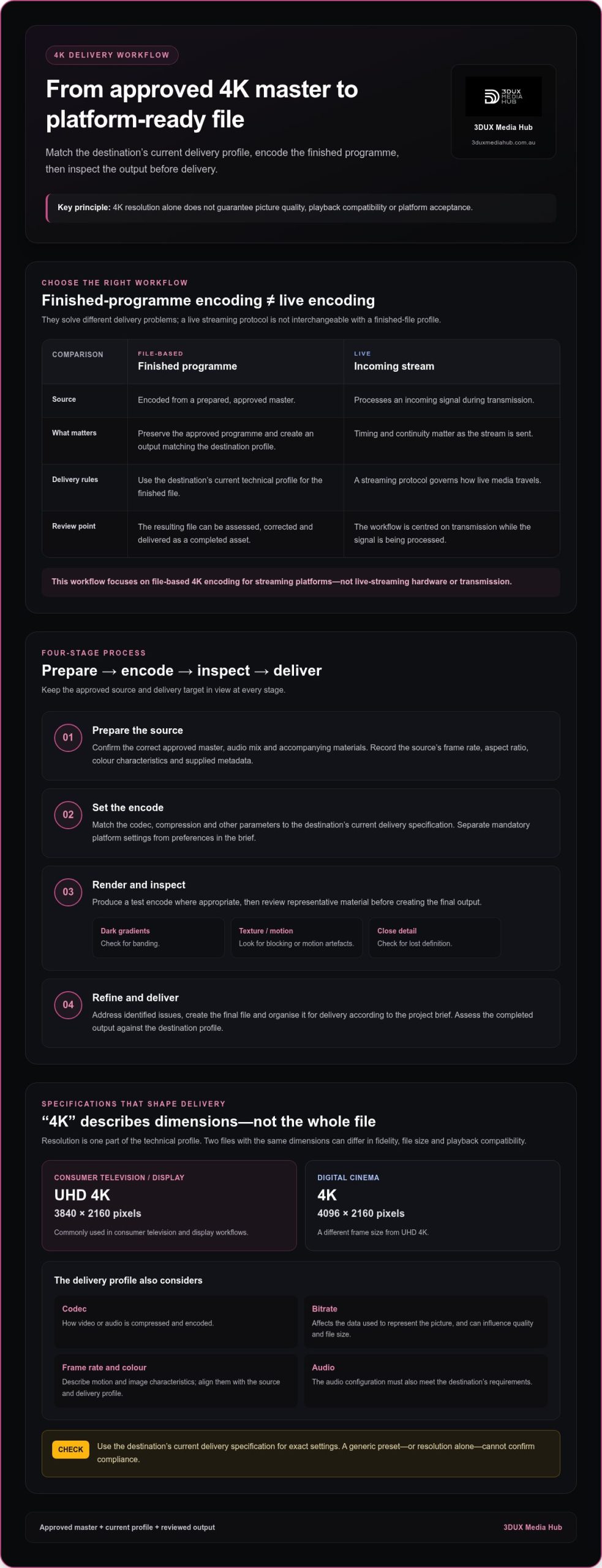
A finished film or television programme is encoded from a prepared master. The source can be reviewed before encoding, and the resulting file can be assessed, corrected and delivered as a completed asset. The workflow centres on preserving the approved programme while creating an output that matches the destination profile.
Live encoding works differently. An encoder processes an incoming signal during transmission, where timing and continuity matter as the stream is sent. A streaming protocol governs how live media travels. It isn’t interchangeable with the profile for a finished file. This guide focuses on file-based 4K video encoding for streaming platforms, not live-streaming hardware or transmission.
What “4K” tells you, and what it doesn’t
For consumer television and display workflows, UHD 4K commonly refers to 3840 × 2160 pixels. Digital cinema 4K uses a different frame size, 4096 × 2160. The distinction matters when identifying the source and intended format. Understanding 4K Resolution provides an overview of these formats and their technical context.
Resolution describes pixel dimensions. It doesn’t tell you how the image was compressed, how much data was allocated, how motion is represented or how colour is encoded. Nor does it specify the sound format. Two files with the same UHD dimensions can therefore differ in visual fidelity, file size and playback compatibility.
- Codec: determines how video or audio is compressed and encoded.
- Bitrate: affects the data used to represent the picture and can influence quality and file size.
- Frame rate and colour: describe motion and image characteristics that need to suit the source and delivery profile.
- Audio: must also meet the destination’s requirements.
Platform compliance depends on the complete delivery profile, not resolution alone. Check the current specification before encoding, then assess the output against it. “4K” is one part of a delivery-ready asset, not a guarantee of quality or acceptance.
How a finished 4K programme becomes a streaming-ready file
A dependable delivery starts before encoding. Review the approved master, distribution brief and destination profile together. This gives the workflow a clear target: preserve the programme’s intended picture and sound, create the required file, then review it before delivery. 4K video encoding for streaming platforms is a managed process, not a one-click export.
Start with the approved master and delivery brief
First, identify the approved picture master and record its frame rate, aspect ratio, colour characteristics and audio mix. Note the metadata supplied with the programme, too. These details describe the source and help prevent avoidable changes during encoding. An encode can’t restore fine detail, correct colour information or other characteristics that aren’t present in the master.
Separate mandatory platform settings from preferences in the creative or distribution brief. If requirements differ, resolve the delivery target before rendering rather than guessing at a compromise. For wider context on how encoding fits into mastering and distribution, see this professional video encoding services guide.
With the source and target established, the workflow typically moves through these stages:
- Prepare the source. Confirm that the correct approved master, audio mix and accompanying materials are in use.
- Set the encode. Choose the codec, compression and other parameters to match the destination’s current delivery specification. Organisations such as MPEG publish video coding standards; its MPEG Video Coding Standards page is a reference for the standards behind common encoding formats.
- Render and inspect. Produce a test encode where appropriate, then review it before creating the final output.
- Refine and deliver. Address identified issues, create the final file and organise it for delivery according to the project brief.
Encoding settings aren’t chosen in isolation. A codec or compression approach that suits one source and destination may not suit another. The platform profile sets the technical boundaries, while the source and brief inform how to work within them. Keep the current specification with the delivery materials so decisions can be traced to the intended target.
Render, review and refine the encode
A test encode can reveal problems before the final file is produced, particularly in programmes with challenging scenes. Inspect representative material: dark gradients can expose banding, textured or fast-moving images may show blocking or motion artefacts, and close detail can reveal lost definition. Review picture and sound in playback, not just in an export report.
Encode quality is judged in playback, not by settings alone. If review identifies a visible issue, adjust the relevant encoding decision and reassess the output. Broadcast-quality QC supports a controlled review, while audio preparation helps keep the sound aligned with delivery requirements.
For projects with demanding delivery requirements, professional video and audio encoding can bring mastering, encoding and QC into a coordinated workflow.
Choosing 4K codecs, bitrate and adaptive renditions without guesswork
Codec and bitrate decisions affect compatibility, picture quality and file size. For 4K video encoding for streaming platforms, start with the destination’s current delivery profile, then assess what suits the source. A general preference for a newer codec can’t override what the platform accepts.
How to assess H.264 and HEVC/H.265 for delivery
Both codecs compress video, but they differ in how they balance compression and playback support. HEVC can offer greater compression efficiency in some workflows, while H.264 is widely established. Actual results depend on the encoder, settings and source material. Neither codec guarantees a particular picture quality or compatibility across every platform and device.
This comparison is a starting point, not a specification. Confirm the accepted codec profile and file requirements in the platform’s current documentation. HEVC’s technical framework is defined in the ITU-T H.265 (HEVC) Standard. For a closer look at how the codec works, the HEVC encoding technical primer covers the mechanics.
| Codec | Practical consideration |
|---|---|
| H.264/AVC | Widely established; check the platform’s accepted profile and settings. |
| HEVC/H.265 | Can compress efficiently; confirm support for the required profile and playback targets. |
HDR isn’t an automatic result of a 4K encode. It depends on the source and the destination’s specifications for colour and dynamic range. Check those requirements separately, including any associated metadata, rather than assuming UHD dimensions indicate HDR delivery.
Why bitrate ladders matter to adaptive streaming
Bitrate is the amount of data used to represent video over time. Raising it may help retain detail, but can increase file size and delivery demands. Reducing it can make compression artefacts more visible. The right balance depends on the programme’s visual complexity, motion, frame rate, codec and platform profile. A fast-moving, highly detailed scene may respond differently to compression than a static interview shot.
Adaptive streaming uses a set of encoded renditions, often at different resolutions or bitrates. This set is called a bitrate ladder. During playback, a compatible player can switch between available renditions as network conditions change, helping maintain playback when bandwidth fluctuates. The ladder is a delivery design decision, not simply a collection of exports.
There’s no universal 4K bitrate ladder. Use the platform’s current requirements and consider the content when selecting rendition levels. Review the outputs in playback: inspect detailed and fast-moving scenes for artefacts, and check that transitions between renditions remain acceptable. A planned ladder aligned to the platform profile supports consistent delivery without guesswork.
A practical checklist for platform-ready 4K video delivery
A successful export is only one checkpoint. Before release, compare the finished encode and its supporting assets with the platform’s current profile and the project’s distribution brief. Requirements can differ, so use the current specification for exact settings, naming rules and file structure. This preflight helps catch mismatches while there’s still time to correct them.
Check the encoded picture and sound
Review the file in playback, then verify its technical properties against the approved source and delivery requirements. A practical picture and sound check includes:
- Picture: Confirm resolution, frame rate and aspect ratio. Check colour characteristics against the intended profile, and watch for visible artefacts or unexpected changes.
- Audio: Compare the output with the approved mix. Check synchronisation, channel configuration, dialogue clarity, levels and continuity across the programme.
- Playback: Review scenes with fine detail, movement and dark gradients. These can reveal encoding issues that may not be obvious from a file report alone.
A delivery-ready encode meets the required specification and has been checked in playback. Both parts matter. A file can have the expected technical properties yet still contain audible or visible issues. Conversely, a file that looks and sounds right may still fail a profile requirement.
Validate files and supporting assets
Check that the file opens and plays through, then confirm it’s the correct version and runtime for the delivery brief. Verify naming conventions, metadata and the required folder structure. If subtitles, captions or language assets are part of the package, confirm that each is present, correctly labelled and associated with the intended programme version.
- Match each video and audio asset to the correct version and programme.
- Check that filenames and folder organisation follow the delivery instructions.
- Confirm required metadata and subtitle or language assets are included.
- Record QC findings, resolve identified issues and retain a clear record of the final check.
Keep the specification and distribution brief alongside the QC record. That gives the review a clear reference point and helps prevent a corrected file from being mistaken for an earlier version. For transferable QC principles, the broadcast QC and delivery guide can provide useful context. Apply only principles relevant to the streaming package, as disc-specific requirements aren’t streaming requirements.
A consistent preflight makes 4K video encoding for streaming platforms easier to manage across complex delivery packages. 3DUX Media Hub provides coordinated video and audio encoding with broadcast-quality QC as part of its media services.
When professional 4K encoding supports a smoother platform release
Specialist support is useful when delivery involves more than one straightforward export. Complex source masters, multiple platform deliverables, tightly defined technical profiles or several language versions can create dependencies across the workflow. A change to one asset may affect how another is labelled, reviewed or packaged. Coordinating those details helps keep the work aligned with the distribution brief.
Professional 4K video encoding for streaming platforms treats the encode as part of a controlled distribution process. It connects source assessment, project-specific encoding decisions and quality review rather than relying on a generic preset. The right approach is shaped by the approved material and the destination’s current technical specification.
What an encoding project needs to move efficiently
Clear inputs give the workflow a firm starting point. Useful project materials include:
- Approved master: the correct picture and sound source, with version and runtime identified.
- Platform specification: current technical requirements for each destination.
- Distribution brief: required outputs, naming conventions, file structure and delivery notes.
- Language assets: approved audio, subtitle or other localisation materials required for each version.
Be precise about which deliverable relates to each version, language and platform. For example, if several language assets accompany a programme, clear labels and version details help prevent mismatches during review and handover. They also make it easier to track corrections without confusing a revised file with an earlier export.
Settings should follow the actual distribution specification, not assumptions based on another platform or a previous release. The current profile is the reference for codec, packaging and other technical details. This keeps decisions project-specific and helps avoid unnecessary review cycles caused by unclear targets.
From technical encode to global distribution
A distribution package may involve video and audio encoding, audio preparation, content localisation and broadcast-quality QC. These tasks are connected: the programme version, sound mix and language assets must correspond, and the final files need to be assessed against the relevant delivery requirements. If a project also calls for standards conversion, include that work in the wider delivery plan.
3DUX Media Hub provides video and audio encoding from SD to 4K, broadcast-quality QC, standards conversion and content localisation for film and television distribution. The company’s principals bring more than 20 years of industry experience to this technical work, supporting project-specific requirements without treating every release as the same export.
For a project with multiple outputs, complex source material or detailed platform requirements, outline the approved master, destination profiles and required language assets at the outset. Discuss your 4K encoding requirements with 3DUX Media Hub to bring the technical elements of your distribution workflow into focus.
Set your next release up for success
Before encoding begins, turn the platform’s current delivery profile into a clear project plan. Confirm who owns each decision, which master and version are approved, and what the receiving platform expects. This gives creative, distribution and technical teams a shared reference point, especially when requirements change or the release includes several deliverables.
Use that plan to define acceptance criteria before files are rendered. Make sure the review process accounts for both technical compliance and how the finished assets perform in playback. This grounds decisions in the actual destination and gives teams time to resolve issues.
For 4K video encoding for streaming platforms, a well-defined brief is a practical first step towards a controlled release. If you’re preparing a distribution project, discuss your 4K encoding requirements with 3DUX Media Hub.
Frequently Asked Questions
Can the same 4K video file be used on every streaming platform?
Sometimes, but don’t assume one file will meet every destination’s requirements. A service may accept a different codec profile, audio layout, caption format or metadata structure from another. For example, a release going to two platforms may need separate audio or subtitle packages even if the picture encode is shared. Compare each destination’s current specification with the delivery brief, then identify which assets can be reused and which need separate outputs.
Is 4K the same as UHD for streaming delivery?
Not always. “4K” is often used informally, while a delivery profile defines the exact raster and associated image properties expected. A source labelled 4K may not match a platform’s required UHD dimensions or aspect ratio. Check the file’s actual properties against the profile rather than relying on a filename or production label. This is particularly useful when a project includes cinema and consumer-display versions of the same programme.
Does a 4K video need to be encoded in HEVC?
No. HEVC/H.265 is one possible choice, but the destination’s accepted profile and playback targets determine whether it fits the job. H.264/AVC may be more suitable where a platform specifies it or broad compatibility is a priority. For a multi-destination release, map each output to its required codec before encoding. Don’t convert a master to HEVC simply because the programme is 4K; confirm the delivery profile first.
What bitrate should I use for 4K streaming video?
There isn’t one bitrate that suits every title. The appropriate setting depends on the platform profile, codec, frame rate and visual demands of the programme. A detailed, fast-moving sequence can expose compression artefacts that aren’t obvious in a low-motion scene. Use the destination’s stated range or target as the starting point, then review representative scenes in the encoded output. More data alone doesn’t guarantee a better-looking result.
What is an adaptive bitrate ladder in 4K streaming?
An adaptive bitrate ladder is a set of versions of the same programme prepared for different playback conditions. A player can move between available renditions as a viewer’s connection changes. For instance, a viewer whose bandwidth drops may switch to a lower-bitrate version, then return to a higher one when conditions improve. The ladder isn’t a single 4K file; its rendition choices need to suit the platform and the content.
How can I tell whether a 4K encode is ready for delivery?
Readiness means the file and its supporting assets match the release requirements, and the programme has been reviewed in playback. Confirm the correct version and runtime, then check for issues such as a late audio shift, missing subtitle file or mismatched filename. Compare the technical report with the delivery brief, and record any corrections. A successful export only confirms that a file was created, not that every release requirement has been met.