
A technically clean master can still fail delivery. Compliance testing for broadcast is a specification-led process, not a universal pass-or-fail exercise. Each broadcaster or platform may set different requirements for file formats, metadata and track layouts.
If you’ve faced a long delivery document and wondered what to check first, start by identifying the requirements that apply to this title and delivery route. A master may look and sound right in the edit suite yet contain problems in the exported file, such as an incorrect track layout or a missing asset. If responsibilities are unclear, fixes and re-exports can disrupt delivery milestones.
This checklist explains how to turn the applicable specification into a repeatable test plan, catch technical and asset issues before hand-off, and identify when specialist QC, encoding or standards conversion can help. Automated checks provide useful evidence, but they don’t guarantee acceptance.
We’ll cover picture, audio, file structure and delivery assets, along with practical steps for reviewing the final export. 3DUX Media Hub supports film and TV delivery with broadcast-quality QC, video and audio encoding, standards conversion and localisation. Its more than 20 years of industry experience supports preparation of assets for delivery.
Key Takeaways
- Build a test plan from the destination’s current specification, tailored to the broadcaster, platform, programme type and delivery route.
- Use compliance testing for broadcast to check picture, sound, captions, file structure and accompanying assets. Record the method and result for each check.
- Keep technical conformance separate from editorial approval and rights or documentation checks. A technical pass alone doesn’t confirm final acceptance.
- Make each test repeatable by recording the specification, naming the master version and retaining the source files used for the run.
- Identify where broadcast-quality QC, encoding, standards conversion or localisation can address delivery requirements before hand-off.
What compliance testing for broadcast checks before delivery
Compliance testing for broadcast checks a delivery package against the receiving broadcaster’s or platform’s stated technical and asset requirements. The applicable specification is the reference point for every test. It defines what to inspect, how deliverables should be prepared and what evidence to record.
There isn’t one universal pass standard. Requirements can differ by broadcaster, platform, programme type and delivery route. A long-form programme may have different instructions from a trailer, and one file-based delivery route may require different package elements from another. Use the brief for the specific hand-off rather than reusing a checklist from a previous job without reviewing it.
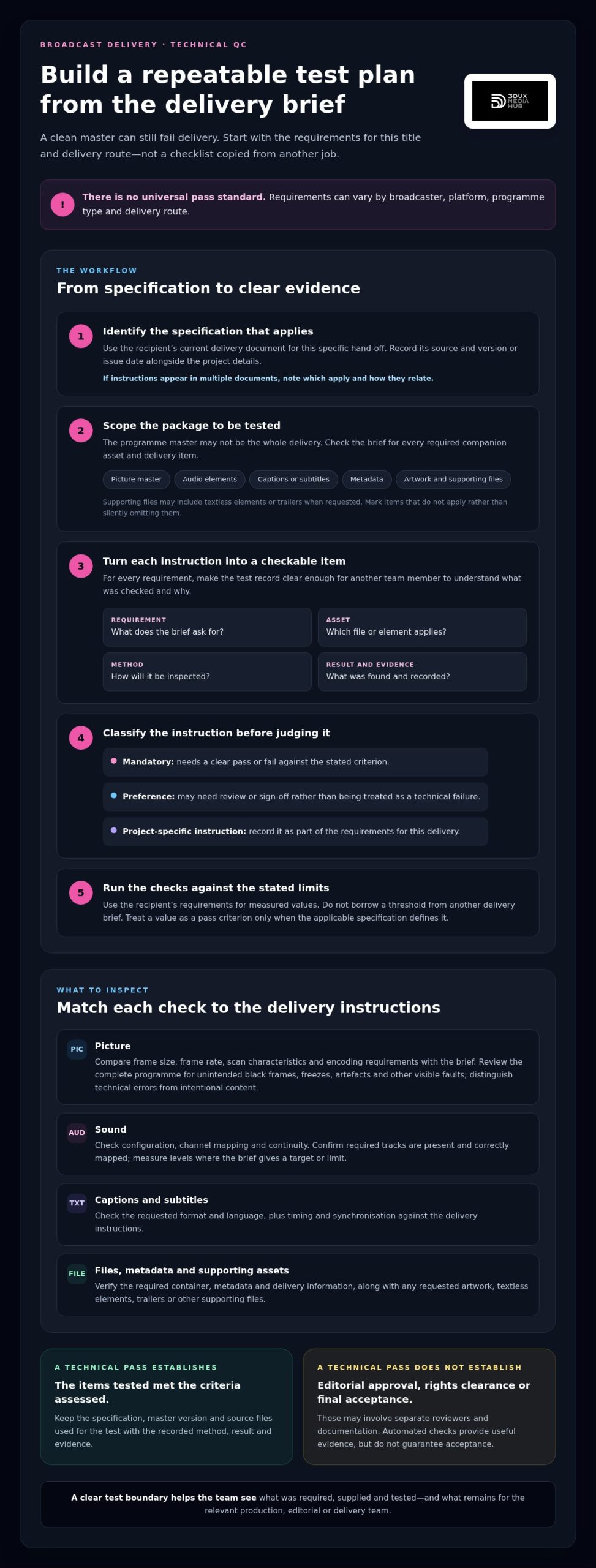
A technical pass has a defined scope. It means the items tested met the criteria assessed; it doesn’t confirm editorial approval, rights clearance or final acceptance. Those decisions may involve separate reviewers and documentation. Keeping the outcomes distinct shows what QC established and what remains with the relevant production, editorial or delivery team.
What makes a broadcast compliance test specification-led?
Start with the recipient’s current delivery document. Record its source and version or issue date alongside the project details, so the team can identify which requirements governed the test. If instructions appear in multiple documents, note which ones apply and how they relate to each other.
Turn each applicable instruction into a checkable item. A useful test record names the requirement, the asset it applies to, the inspection method, the result and any evidence. For example, if the brief specifies an audio track layout, compare the delivered file’s tracks with that layout and record the finding.
Classify each item as mandatory, a preference or a project-specific instruction. Mandatory criteria need a clear pass or fail. A preference may need review or sign-off rather than being treated as a technical failure. This distinction helps prioritise corrections and prevents assumptions from becoming delivery rules.
Which delivery assets may need checking?
The package may include more than the programme master. Depending on the delivery brief, the test plan could cover:
- The picture master, including specified file characteristics and playback integrity.
- Audio elements, such as required language versions, track layout or mix elements.
- Captions or subtitles, including requested files and their relationship to the programme.
- Metadata and delivery information that must accompany the media.
- Artwork, textless elements, trailers or other supporting files when requested by the recipient.
This isn’t a universal asset list. Check the brief for each title and delivery route, then mark items that don’t apply rather than silently omitting them. That creates a clear record of what was required, supplied and tested.
The result is a scoped technical assessment, not blanket approval of the whole programme or its rights position. A precise test boundary gives production and delivery teams a shared view of what the checks cover and a reliable starting point for resolving exceptions before hand-off.
Which video, audio and asset checks belong in broadcast compliance testing?
A useful test plan turns each delivery requirement into a specific inspection, rather than relying on a general impression that the master looks and sounds right. In compliance testing for broadcast, check the programme and each required companion asset against the destination’s instructions. Record the specification reference, inspection method, result and evidence so another team member can understand what was tested and why.
Use the recipient’s stated limits for measured values. Don’t apply a loudness, video-level or timing threshold from another delivery brief simply because it’s familiar. Regulatory rules and delivery requirements also serve different purposes. For example, the Federal Communications Commission (FCC) Media Bureau outlines the FCC’s role in administering broadcast rules in the United States. The recipient’s delivery document remains the reference for its requested file and asset checks.
How should teams check picture and sound?
Compare the encoded file with the specified frame size, frame rate, scan characteristics and encoding requirements. Review the complete programme for unintended black frames, freezes, artefacts and other visible faults, distinguishing technical errors from intentional content. For audio, check configuration, channel mapping, continuity and levels against the destination’s requirements. Treat a value as a pass criterion only when the applicable specification defines it.
- Picture: Check file characteristics against the brief, then review playback for picture integrity and unintended interruptions.
- Sound: Confirm required tracks are present, correctly mapped and continuous. Measure levels where the brief gives a target or limit.
- Captions and subtitles: Check the requested format, language, timing and synchronisation against delivery instructions.
- Files and metadata: Verify the container, naming, duration, track labels and required metadata fields where specified.
- Companion assets: Confirm each requested file is present, readable and associated with the correct programme.
A compact test matrix makes results easier to review. For example:
Requirement: Frame rate | Method: Inspect file properties | Result: Pass, fail or review | Evidence: QC report or captured property
Requirement: Audio channel layout | Method: Inspect track map and play back channels | Result: Pass, fail or review | Evidence: Track map and listening notes
Requirement: Subtitle synchronisation | Method: Check against programme playback | Result: Pass, fail or review | Evidence: Timecode and observation
Requirement: Required companion files | Method: Compare package contents with brief | Result: Pass, fail or review | Evidence: Asset inventory
How should captions, metadata and files be checked?
Don’t stop at confirming that a caption or subtitle file exists. Check that its language and format match the delivery instructions, then review timing and synchronisation against the programme. Compare filenames and track labels with the brief, and inspect specified metadata fields for accuracy and completeness. Finally, open each required companion asset and verify that it belongs to the right title and version.
For picture and sound checks that need specialist review, 3DUX broadcast-quality QC provides a structured delivery assessment. A documented matrix makes exceptions visible and gives the team a clear basis for correction before hand-off.
Does passing broadcast compliance testing guarantee delivery acceptance?
No. A technical pass doesn’t guarantee editorial approval or final acceptance. It records that the tested files met the checks and criteria in the test plan for the version assessed. The recipient determines whether the delivery is accepted and what remediation, if any, is required.
Acceptance can involve reviews beyond technical QC. A file may meet technical requirements while a separate review identifies an editorial, rights, documentation or operational issue. Technical standards, such as those published through SMPTE Standards, can inform interoperable media workflows, but they don’t replace a recipient’s specific delivery instructions or acceptance process.
What can a technical compliance pass establish?
A pass establishes that the defined checks were completed against the recorded criteria, using the tested version. It gives the delivery team traceable results, issue notes and supporting evidence, such as a QC report or inspection record. The test scope should name the files and elements assessed. If captions, metadata or companion assets weren’t included, the report mustn’t imply they passed.
Technical conformance: Were the tested files checked against the technical requirements in scope, and what results or exceptions were recorded?
Editorial review: Has the recipient completed any content review or approval it requires? This is separate from technical file checks.
Rights and documentation: Are the required rights information and delivery documents complete and acceptable to the recipient?
These are distinct review tracks, even when they relate to the same programme. A QC report can document what was tested and support the hand-off; it can’t replace an editorial decision or rights clearance. State the boundaries clearly so no one mistakes a technical result for approval of matters outside its scope.
Why might a technically compliant delivery still be returned?
The tested package may differ from the one ultimately sent. A later export, revised caption file or updated metadata can introduce changes after QC. A test against an outdated specification may also miss a newer requirement. An exception that hasn’t been documented and approved by the recipient can leave an otherwise clean result short of the required delivery.
To reduce ambiguity, tie every report to a named file version and retain the specification reference used. If requirements change or an exception is agreed, record the change and assess whether affected checks need to be repeated. A pass is evidence about a specific test run, not a blanket sign-off on future revisions.
In practice, compliance testing for broadcast gives teams a record of technical checks and outstanding issues. The recipient determines acceptance and any required remediation. Keep those responsibilities visible in the hand-off, and route return notes to the person responsible for the relevant technical, editorial or documentation item.
How to run a repeatable broadcast compliance test before hand-off
A repeatable workflow makes each test traceable from the delivery brief to the final hand-off. Keep the test plan, master version and source files together for every run. If an export changes, treat it as a new version and record what was retested.
- Collect the delivery inputs. Gather the recipient’s current specification, delivery brief, asset inventory and relevant project notes. Record the specification’s source and version or issue date.
- Build the test matrix. Map each applicable requirement to the asset, inspection method, result and responsible owner. Separate mandatory criteria from preferences, and flag unclear instructions for resolution before testing rather than assuming a threshold.
- Identify the exact test version. Give the master a clear version identifier and record the source files used for that test run. Include relevant captions, audio elements, metadata and companion assets in the inventory when the brief requires them.
- Run and document the checks. Test the identified files against the matrix. Record pass, fail or review for each item, with evidence such as a QC report, observation or relevant timecode.
- Assign and correct defects. Log each issue against the file version and requirement, noting its location, severity and owner. Link the correction to the original finding so the team can track its status.
- Retest affected deliverables. After a correction or re-export, check the revised asset and any connected elements that may have changed. Update the version identifier and results. Don’t carry a pass forward from an earlier master.
- Prepare the hand-off record. Retain the specification reference, test matrix, issue log and final results alongside the named delivery version. Make unresolved exceptions visible rather than presenting the package as fully cleared.
How do you prepare a test plan from delivery requirements?
Make the matrix practical enough that another operator can follow it without guessing. For an audio track requirement, identify the relevant file, the check to perform and who records the result. If the brief is ambiguous, document the question and its resolution before testing. An assumed requirement can send the test down the wrong path.
How should teams manage failures and retests?
Use one issue record per defect, with the affected version, timecode or file location, specification reference, severity and assigned owner. Close an issue only after checking the correction. If encoding changes are part of the fix, video encoding for global distribution provides relevant context. Where conversion is a separate delivery requirement, standards conversion can address it.
A controlled process is especially useful when delivery requires specialist preparation. Engage 3DUX for broadcast-quality QC and delivery support to help check and prepare film and TV assets against the applicable requirements.
How 3DUX supports broadcast compliance testing and delivery readiness
A well-prepared delivery needs more than an export. It needs technical checks matched to the recipient’s requirements, plus any encoding, conversion or localisation those requirements call for. 3DUX Media Hub supports film and TV delivery with broadcast-quality QC and related preparation, helping producers and distributors address technical requirements before hand-off.
The process starts with the delivery brief. Its requirements define the scope of the checks and show whether the master needs further technical preparation. This keeps work focused on the destination’s needs rather than a generic checklist that may not fit.
Which technical services can support delivery readiness?
Broadcast-quality QC checks for technical issues within the agreed test scope. If the delivery brief calls for a particular file format or parameter, video and audio encoding can prepare assets accordingly. Standards conversion addresses a separate requirement when material needs conversion for its intended destination. Content localisation supports delivery when language elements are part of the brief.
These services are complementary, not interchangeable. QC assesses the defined deliverables; encoding prepares media to meet specified format requirements; conversion addresses a standards or format change; and localisation adapts content elements for the intended audience. The right combination depends on the recipient’s instructions and the assets already available.
3DUX Media Hub brings more than 20 years of industry experience to complex delivery workflows. That experience supports practical coordination between QC and preparation, but doesn’t guarantee recipient acceptance. Acceptance remains the recipient’s decision.
What information helps scope a delivery project?
A clear project brief helps establish the assets, checks and preparation involved. Gather the recipient’s current specification, target format, asset list and named master version. Include relevant delivery dates and known issues, such as a required re-export or an element still being prepared. These details give the workflow useful context and help identify dependencies early.
Before sharing materials, organise project information so each file can be matched to the programme and version. Include:
- The recipient specification and delivery route.
- The target format and any stated technical requirements.
- A list of masters and companion assets, with version identifiers.
- Known technical issues, open questions and relevant delivery dates.
For example, if the brief specifies a format the current master doesn’t meet, encoding or standards conversion may be needed before final QC. If language-specific assets are requested, localisation may form part of preparation. Clear inputs align the work to the specification without assuming requirements that aren’t in the brief.
For support with a broadcast delivery project, discuss your broadcast delivery project with 3DUX Media Hub. Sharing the specification, asset list and current master version gives the team a practical starting point for scoping QC and any required preparation.
Build delivery checks into the next hand-off
Make delivery readiness a planned production step, not a final hurdle. Assign responsibility for maintaining the current specification, tracking master versions and resolving issues before the delivery window becomes tight. This gives everyone a clearer view of what remains and who owns the next action.
Use compliance testing for broadcast as a repeatable checkpoint in your workflow. Each test can inform preparation for the next delivery and help your team refine its hand-off process as requirements and projects change. Focus on clear evidence, controlled revisions and a practical route from detected issue to resolved item.
3DUX brings more than 20 years of industry experience across broadcast-quality QC, encoding, standards conversion and localisation. These capabilities support delivery preparation, while acceptance remains with the receiving broadcaster or platform.
Discuss your broadcast delivery requirements with 3DUX and take the next step towards a more controlled hand-off. Share the applicable requirements and project details to start a conversation about technical support for your delivery.
Frequently Asked Questions
What does compliance testing for broadcast include?
Compliance testing for broadcast covers the checks named in the recipient’s delivery specification. These may include picture, audio, captions or subtitles, file structure, metadata and required companion assets. Not every package needs every category. For example, a brief may request a programme master and subtitle file but no trailer. Record the requirement, outcome and exact file version so a later revision isn’t mistaken for the one tested.
Is broadcast compliance testing the same as quality control?
Not exactly. QC is a broad term for inspecting media for technical faults or presentation problems, such as a missing audio channel or visible glitch. Compliance testing applies defined delivery criteria to a particular destination. Teams may use QC tools and review as part of compliance work, but should label findings by purpose. A creative presentation note isn’t automatically a specification failure.
Can one broadcast master meet different broadcasters’ requirements?
Yes, sometimes, but don’t assume a file prepared for one destination fits another. Compare the briefs side by side. One may require a different audio track arrangement, caption file or metadata field. The same master might remain suitable, while separate delivery versions or companion assets are needed. Keep test results destination-specific so a pass for one recipient isn’t carried over to another without checking its criteria.
What happens if a broadcast delivery fails a compliance test?
Treat a failed test as a specific defect, not an automatic reason to rebuild the programme. Compare the finding with the relevant instruction, locate it in the file or asset, and identify which element needs correction. For instance, a mislabelled audio track may need a track fix, while a missing companion file may only need to be supplied. Retest the affected deliverable and retain both results.
How often should a programme be retested after revisions?
Retest whenever a revision could affect a checked requirement or asset. A new export can change file properties; an audio adjustment may affect track configuration or levels; an updated caption file can alter timing. Use the change and the specification to identify affected checks rather than automatically repeating every inspection. Record the revised version and its results separately so the current delivery status is clear.
Does a compliance pass guarantee that a broadcaster will accept the programme?
No. A pass records the outcome of checks within a defined technical scope and against a particular specification version. A broadcaster may also carry out editorial, rights, scheduling or operational reviews, which sit outside those checks. A changed file or different requirement can affect the result too. Keep test evidence with the delivery records, but treat final acceptance and any requested remediation as the recipient’s decision.
Should captions and subtitles be included in broadcast compliance testing?
Yes, if the delivery specification requires them. Check the requested file type and language, then verify timing and synchronisation against the relevant programme version. For example, subtitles aligned to an earlier edit may no longer match after a scene change. Record which caption or subtitle version was assessed and note any editorial or linguistic review separately from technical compliance checks.