
A director’s cut isn’t a simple re-encode of the theatrical release. Treat it as a distinct version: every part of director’s cut Blu-ray authoring, from picture and audio assets to menu navigation and quality control, should support that distinction.
If viewers can’t tell which cut they’ve selected, or the wrong version plays by default, the release experience suffers. Approved assets, clear version labels and tested playback paths matter as much as the encode. Late changes can also affect subtitles, chapters, menus and QC, creating avoidable rework.
This guide explains how to prepare a director’s cut Blu-ray release. You’ll learn what to organise across picture, audio, subtitles and chapters, how to label cuts in the menu, and where to set approval gates before authoring is locked. It also covers encoding and playback checks that can catch version mix-ups and technical issues before delivery. When authoring, menu design, encoding and broadcast-quality QC are planned as connected steps, the result can present the approved cut clearly and consistently.
Key Takeaways
- Plan around the approved director’s cut and release brief, accounting for changes to scenes, sequence, duration, sound or credits.
- Match the picture master with its associated audio and subtitle assets so the selected version is coherent from playback through navigation.
- Compare single-cut, multi-cut and separate-release approaches for viewer clarity, menu complexity, asset control and approvals.
- Use a release checklist to organise version labels, runtimes, credits, chapter references and sign-offs before authoring is locked.
- Director’s cut Blu-ray authoring connects encoding, menu design and quality control around approved assets and distribution requirements.
Why director’s cut Blu-ray authoring needs version-specific planning
A director’s cut needs a disc presentation built around the approved version and its release brief. In director’s cut Blu-ray authoring, editorial identity is a production requirement, not a label to add after encoding. The cut may change scenes, their order, runtime, sound elements or credits. The release team needs a clear record of which version has been approved and what distinguishes it.
A new cut is an editorial version, not simply a picture-quality upgrade. A higher-resolution or cleaner encode can present the same edit differently, while a director’s cut may change the content and structure viewers experience. The overview of Director’s Cut provides useful context on why alternate versions exist. For the disc, the release brief should identify the specific approved version.
Keep that identity consistent through the workflow. Use the same version name in the asset inventory, review materials and intended menu presentation. This gives editorial, post-production and authoring teams a shared reference for picture, sound, subtitles, credits and navigation. It also separates creative approval, confirming the intended cut, from the technical preparation of its Blu-ray assets.
What makes a director’s cut a separate release version?
Editorial changes can affect more than runtime. A reordered sequence may move key moments to different points in playback. Added or removed scenes can change where chapters make sense, and credits may differ. The approved cut and release brief determine which changes apply to a particular title.
Record the approved version name, picture reference and runtime alongside review notes. This gives the authoring workflow a stable target. Technical teams can then prepare the correct materials without treating asset preparation as a substitute for creative sign-off.
What can go wrong when versions are not clearly controlled?
Ambiguous filenames such as “final” or “final revised” leave reviewers unsure which picture they’re watching. Outdated notes may refer to scenes or timings that no longer match the current edit. Confusion can carry into approval, chapter planning and menu labels, making it harder to know whether feedback applies to the intended cut.
Use a simple version-control record to connect each review item to its source:
- Picture: identify the approved master and version label.
- Sound: associate the corresponding approved audio materials with that picture.
- Review: date or identify notes against the version they assess.
This gives the release team a reliable reference before authoring begins. It also makes later changes easier to assess: the team can identify which assets, approvals and presentation elements relate to the version being updated.
How director’s cut Blu-ray authoring connects picture, sound and navigation
The approved picture master is the reference point for the release’s other timed assets. Audio tracks, subtitles and chapter markers must correspond to the same cut, not just a similarly titled version. In director’s cut Blu-ray authoring, this alignment matters because editorial changes can shift scene timings and affect the full viewing experience.
Encoding and authoring are connected, but they do different jobs. Encoding prepares picture and sound assets for the intended delivery requirements. Authoring organises those assets into a disc structure, including playback paths, menu choices and chapter access. Professional authoring systems, such as those described by Professional Blu-ray Authoring Systems, support this structured stage. They don’t replace the need for approved, correctly matched source materials.
Keeping picture, audio and subtitle versions aligned
Use the project brief to record each approved asset’s version or identifier. Match the picture master with its intended language and audio materials, then note any changes that affect timing. If a scene has moved or changed length, review subtitle cues and chapter references against the revised picture. A filename alone is a weak control if it doesn’t clearly identify the asset and its approval status.
For practical tracking, include the approved picture reference, audio and subtitle versions, and relevant change notes in one project record. This gives reviewers and the authoring team a consistent basis for checking sync and alignment. It also distinguishes an approved revision from a working file without relying on memory or scattered email notes.
Planning viewer navigation for one or more cuts
Menus should make the available version clear before playback begins. If the release brief calls for more than one cut, give each a distinct, plain-language label, such as “Director’s Cut” and “Theatrical Cut”. If the release presents one version, focus navigation on that approved cut rather than suggesting that other versions are available. The release brief should determine the final menu structure.
Chapter navigation is part of the viewer-facing structure. Chapter points should reflect meaningful moments in the approved edit, not timings copied from another cut. A changed sequence can make old references confusing, even when the chapter count stays the same. Review chapter names and placement against the final picture, then test the route from menu selection to playback and back through navigation.
Menu behaviour and layout need the same version-aware planning as the underlying assets. The interactive Blu-ray menu guide explores menu design in greater detail. 3DUX Media Hub’s Blu-ray authoring brings picture, sound, encoding and navigation together around the project’s approved assets and requirements.
Director’s cut vs theatrical cut: choose a Blu-ray presentation approach
The decision is not simply whether both edits can be authored. It’s how viewers should encounter them and how the release team will manage each version from approval through delivery. For director’s cut Blu-ray authoring, compare approaches against the distributor’s objectives, approved assets and technical requirements. No single structure suits every release.
Use this comparison to frame the decision. It describes workflow considerations, not disc-capacity limits or a prescribed configuration.
| Approach | Viewer clarity | Menu complexity | Asset control and approvals |
|---|---|---|---|
| One cut | One version is presented, reducing the chance that viewers select the unintended edit. | Navigation can focus on the approved cut and its chapters. | Approval and asset tracking centre on one version and its associated materials. |
| Multiple cuts | Viewers can choose between versions if each option is named clearly and consistently. | The menu needs distinct choices and playback paths that lead to the intended edit. | Each cut needs its own approved references and review. Changes to one version must not be mistaken for changes to another. |
| Separate release for each version | Each release can foreground a single cut and its intended presentation. | Each menu can be planned around that release’s version and navigation brief. | Separate release identities call for controlled assets, artwork and approval records for each version. |
When should viewers choose between cuts in the menu?
A menu selection works well when the distribution plan calls for viewers to access more than one cut within the same presentation. Label each option explicitly and use the same names in the menu and review documentation. Viewers should be able to identify the selected version before playback, rather than infer it from a runtime or a vague “alternate” label. Multiple cuts are an option, not a default requirement.
When might separate releases make more sense?
Separate releases may suit a distribution plan that treats each cut as a distinct product. This gives each version its own release identity, while requiring separate asset references, artwork and approval decisions to be coordinated. Keep those identities aligned so reviewers know which cut and presentation they’re approving. Let the distributor’s objectives and approved specification guide the decision.
Before authoring begins, capture the chosen approach in the release brief. Record the intended cut or cuts, how viewers will access them, and which release identity applies. This gives the authoring team a clear basis for structuring menus and review materials. For broader context on format and delivery considerations, the 2026 Blu-ray and 4K UHD buying guide covers additional authoring factors that can inform release planning.
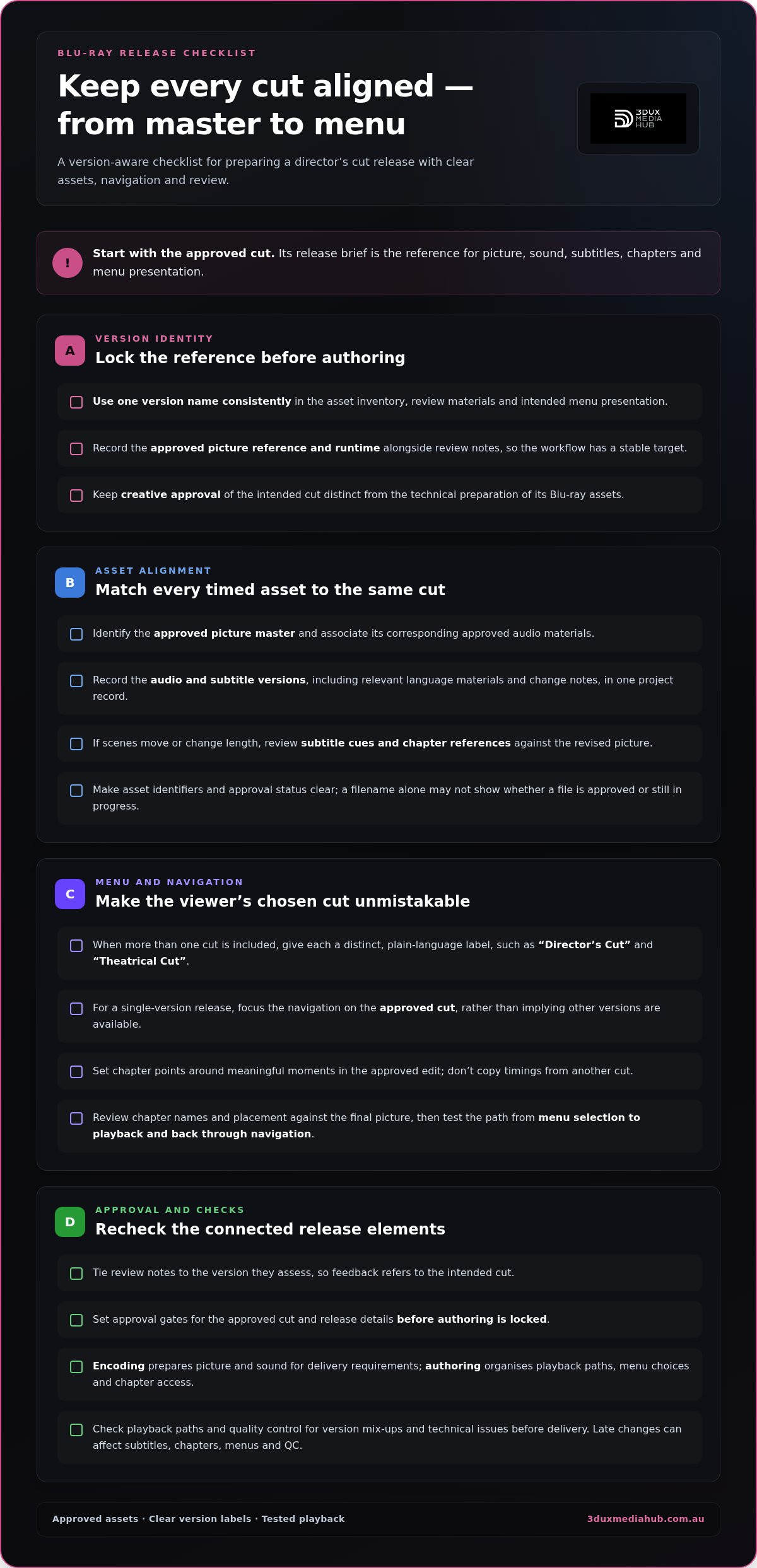
Prepare director’s cut Blu-ray assets with a release-ready checklist
A controlled handover reduces uncertainty before authoring and helps prevent superseded materials from re-entering the workflow. For director’s cut Blu-ray authoring, make the release brief the single reference for version identity, approved assets, required navigation and sign-off status. Update it whenever a decision changes.
Create a controlled asset and version inventory
Use one inventory to identify each asset and its current revision. Record known differences from the theatrical cut that could affect timing, subtitles or chapter placement. Use consistent filenames and keep one approval record for project handovers. Mark superseded files clearly in the record so the team can distinguish them from current materials.
- Set the release brief. State the intended release approach, approved version label, distribution requirements and required playback or menu behaviour.
- Identify the picture. Record the approved cut’s master reference and runtime. Note relevant differences from other versions, including changed scenes or sequence, where they affect navigation or timing.
- Match associated assets. List the audio materials and subtitle files intended for this picture, including language and revision identifiers where applicable.
- Capture credits and chapter references. Provide the approved credits and chapter points for this cut. Flag references that changed during editorial revisions for review against the current picture.
- Track changes and approvals. Log updates, dates or revision identifiers, decisions and approvers in the same project record. Mark replaced assets as superseded and keep them out of the active handover set.
- Review the authored presentation. Check that menu labels identify the intended cut and that selecting an option leads to the correct playback. Review picture, sound, subtitles, chapter points and credits against the approved references.
- Record corrections and sign-off. Track feedback through resolution, then document final approval against the authored version and its associated assets before delivery.
Review, approve and quality-check the authored version
Quality control should test the complete presentation, not just whether individual files appear in the project. Confirm that the chosen menu option starts the intended cut, then review the authored playback against the approved picture and related materials. Check chapter access and credit presentation alongside picture, sound and subtitle alignment. These checks can expose mismatched references before final sign-off.
Keep findings specific: identify the affected version, asset or playback point, describe the correction and record its resolution. This creates a clear trail when changes follow review. For a closer look at distribution-focused checks, see Blu-ray quality control for film distribution.
3DUX Media Hub’s Blu-ray authoring team prepares and quality-checks authored presentations around approved materials and delivery requirements.
How 3DUX Media Hub delivers director’s cut Blu-ray authoring
A director’s cut release needs more than a technically prepared picture file. Its authoring structure, menu presentation and review process must reflect the approved version. 3DUX Media Hub brings Blu-ray authoring, video and audio encoding, menu design and broadcast-quality QC together as connected parts of release preparation. Project scope is tailored to the approved assets and delivery requirements.
This is project-based work. The release brief defines what the authoring workflow needs to support, whether the presentation is built around one cut or includes multiple versions. 3DUX provides authoring services, not physical disc replication. The focus is preparing and quality-checking the authored release presentation.
What the project workflow brings together
Work begins with the project’s approved source materials and intended release structure. Encoding prepares the relevant picture and sound assets for authoring. Menu design organises viewer choices, and quality control reviews the authored presentation against project requirements. Keeping these activities connected helps assess changes in context, rather than treating a revised picture, menu or audio asset as an isolated update.
Clear communication is central to a version-sensitive release. The project team needs to know which cut is current, which materials have changed and where review or approval is required. Consistent version references in handovers and feedback keep those decisions visible throughout authoring. The principals bring over 20 years of industry experience to this work, supporting a practical, technically informed approach to release preparation.
Scope follows the project, not a one-size-fits-all package. The approved assets, required navigation and distribution specifications shape the authoring work. If the release brief changes, the team can assess the impact on affected materials and review points, keeping everyone aligned on what the authored presentation is intended to deliver.
Move from release brief to authoring discussion
A useful starting brief outlines the intended cut or cuts, the approved picture and associated audio or subtitle assets, desired menu behaviour and distribution requirements. Include known revisions and current approval status where available. These details give the discussion a clear foundation and help define how authoring, encoding, menu design and QC fit together for the release.
For director’s cut Blu-ray authoring, the aim is a presentation that identifies the intended version clearly and reflects the project’s approved materials. Share your release brief with 3DUX Media Hub’s Blu-ray authoring team to discuss your project.
Set your release up for a confident handover
Give the release team a clear decision path before authoring begins. Name who approves the cut, who signs off the authored presentation and how revisions are recorded. These decision points keep creative intent visible during technical preparation and make it easier to assess a change before it reaches final review.
For director’s cut Blu-ray authoring, a well-defined brief is more than an asset list. It connects the intended viewer experience with the materials and approvals needed to build it. Set expectations early, keep version decisions traceable and use the release objective as the reference point for the work.
With the project requirements clear, the next step is to shape an authoring approach around them. Plan your director’s cut release with 3DUX Media Hub and put the approved vision on a clear path to delivery.
Frequently Asked Questions
Can a director’s cut and theatrical cut appear on the same Blu-ray?
Yes. A release can present both cuts on one Blu-ray if that structure suits the approved release specification. Each version needs a clear identity and a playback path that takes viewers to the cut they select. The project team should also define how each version’s associated materials and approvals are tracked. A single-cut presentation or separate releases may suit other distribution plans.
What assets are needed for director’s cut Blu-ray authoring?
Typically, the team needs the approved picture master, its runtime and version identifier, plus the associated audio and subtitle materials. Include approved credits and chapter references, along with the release brief and distribution requirements. For director’s cut Blu-ray authoring, an inventory that identifies asset revisions helps distinguish current files from working or superseded versions. The exact handover depends on the release structure and approved materials.
Can a Blu-ray menu let viewers choose between different cuts?
Yes. A menu can present separate choices for different cuts when that is part of the release plan. Name each selection clearly and make sure it leads to the intended version, rather than relying on viewers to infer the difference from a description or runtime. The menu is a navigation layer, not a way to create a missing edit. Each cut needs its corresponding approved playback materials.
Do subtitles need to be revised when a director’s cut changes scene timings?
They may need revision or reconforming. If a scene is added, removed or shifted, subtitle cues can appear too early, too late or against the wrong dialogue. Review the subtitle file against the approved cut, even if most of the edit is unchanged. Check the start and end of changed scenes, transitions around them, and any dialogue or on-screen text affected by the edit.
What is the difference between a director’s cut and an extended cut?
A director’s cut generally refers to a version reflecting the director’s intended or approved edit. An extended cut describes a version with additional material or a longer runtime, but that label alone doesn’t establish who approved the edit or why it was created. The terms can overlap, and release usage varies. For a specific title, rely on the approved version name and release documentation rather than assuming the labels mean the same thing.
Does authoring a director’s cut require a new Blu-ray master?
Not always a newly created picture source, but the authored master must represent the approved cut. If the edit has changed, the team needs the correct approved picture materials and must build or update the Blu-ray authoring output to match them. Existing audio, subtitle or chapter assets may also need review against the revised edit. The work depends on which source assets are current and what the release specification requires.
Does Blu-ray authoring include physical disc replication?
No. Authoring prepares the disc’s encoded content, menus, navigation and quality-checked presentation. Replication is the separate manufacturing of physical discs. 3DUX Media Hub provides Blu-ray authoring and related technical preparation, not physical disc replication. Keep the two stages distinct in the release plan so authoring deliverables and physical manufacturing requirements are managed separately.