
A delivery can be technically sound and still come back for review if an asset is missing, mismatched or labelled incorrectly. The challenge is that asset delivery specifications for post-production vary by destination, format and release territory. General format guidance can help with planning, but it can’t replace the requirements in the delivery brief.
When picture, audio, text and documentation all need to line up, use the brief as your starting point. Turn each requirement into a clear action, then check every file against its intended destination before submission.
This guide shows you how to build a practical asset checklist, organise a complete handover and catch inconsistencies before technical review. It also explains how audio conforming, subtitle integration, encoding and standards conversion fit into a coordinated delivery workflow. With the right preparation, your package is easier to review and better aligned with the brief.
Key Takeaways
- Use the delivery brief to turn destination-specific requirements into a practical checklist, rather than relying on general asset delivery specifications for post-production.
- Group picture, audio, text, artwork, metadata and documentation, then identify the title, version, language, territory and intended use for each asset.
- Compare the destination’s requirements for file format, resolution, frame rate, colour and audio configuration before export.
- Before delivery, check the manifest, filenames, version identifiers, duration, synchronisation and required files to catch issues before technical review.
- Coordinate encoding, localisation and QC to manage complex versions and prepare a more consistent handover.
What asset delivery specifications mean in post-production
An asset delivery specification is the destination-specific set of requirements for the files, metadata and handover needed to submit content for review or distribution. Requirements vary because each destination, format and use can call for different versions, technical characteristics and supporting materials.
The brief is the working authority. It identifies what to prepare, how assets should be supplied and which technical checks they must pass. Asset delivery specifications for post-production therefore cover more than the video file. They may also apply to audio, subtitles, artwork, metadata, naming conventions and documentation.
Think of preparation as a workflow: source materials are edited and finished into post-production masters, then used to create delivery-ready files and supporting assets for a particular destination. The Digital Intermediate (DI) process is one stage in this broader path, where footage can be manipulated, colour graded and finished before delivery versions are prepared. A master is not automatically a compliant delivery file. Check each output against the applicable brief.
What information belongs in a delivery brief?
Capture the details that define the handover, so each asset can be tied to its intended use:
- Destination: the platform, broadcaster, physical format or other distribution route.
- Content identity: title, episode or segment, version and any cut-specific identifier.
- Scope: required deliverables, territories, languages and intended uses.
- Technical acceptance: required file characteristics, metadata fields and any stated QC criteria.
Keep mandatory requirements distinct from project notes and optional materials. Record who owns the brief, its revision date and any approved changes. This gives the team a clear reference if instructions are updated or appear to conflict.
Why do post-production delivery requirements differ?
A streaming platform, broadcaster and physical format can each require a different combination of picture, audio, text and supporting files. Distribution purpose matters too: a version prepared for one territory or language may need corresponding localisation assets, while another handover may call for a different master or configuration.
General recommendations for a codec or resolution can help with planning, but they can’t replace destination instructions. Similar file labels don’t guarantee identical acceptance criteria. If a broad guideline differs from the applicable brief, follow the brief and its approved revisions. This keeps exports tied to the actual delivery, rather than assumptions about what a destination usually accepts.
Build a complete post-production asset inventory before export
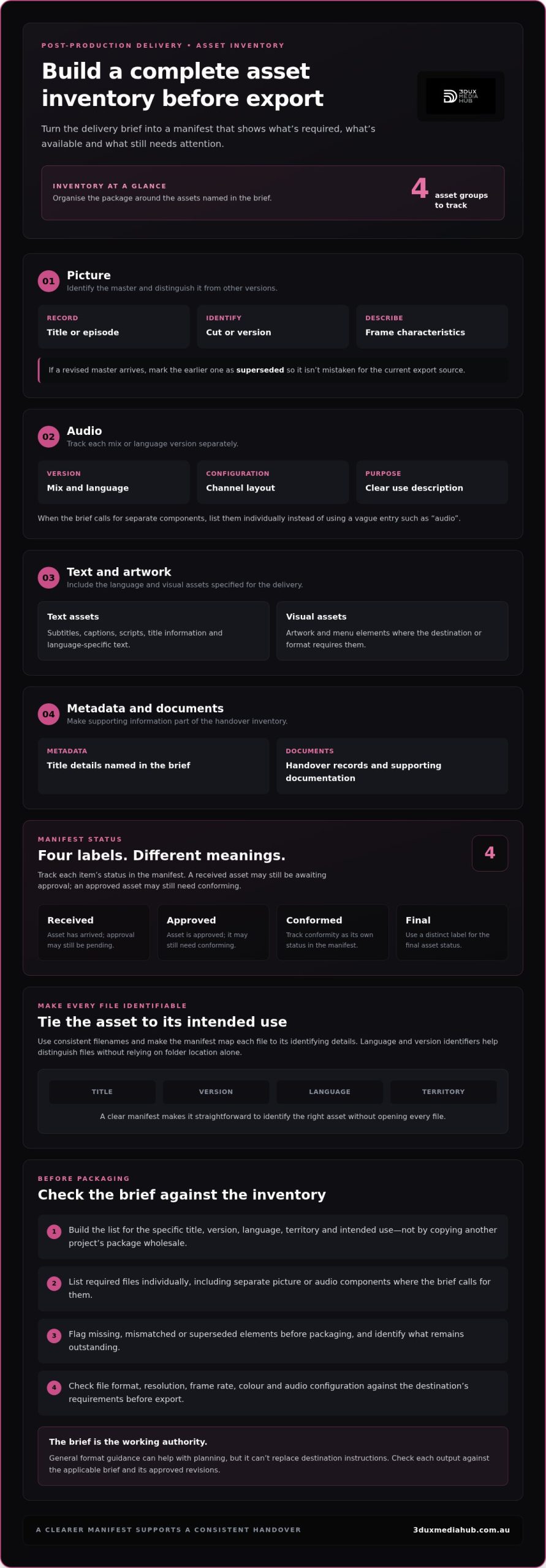
Before exporting, turn the delivery brief into an inventory showing what’s required, what’s available and what still needs attention. Not every project needs the same files. Build the list for the specific title, version, language, territory and intended use, rather than copying a previous project’s package wholesale.
A manifest makes the inventory useful to the whole team. Give each item a clear identifier and track its status, such as received, approved, conformed or final. These labels aren’t interchangeable: an asset can be received but still awaiting approval, or approved but not yet conformed to the delivery version. A structured approach to ordering and tracking assets is also reflected in MovieLabs’ industry-standard delivery framework.
Picture and audio assets to track
For picture, record the master’s identity and the characteristics needed to distinguish it from other versions. Note the title or episode, cut or version, frame characteristics and status. If a revised master arrives, mark the earlier one as superseded so it can’t be mistaken for the current export source.
Track audio separately. Record each mix or language version, its channel layout and a clear description of its intended use. If the brief calls for separate components, list them individually instead of using a vague entry such as “audio”. Flag missing, mismatched or superseded picture and audio elements before packaging.
Text, artwork and metadata to organise
Include the text assets specified for the delivery, such as subtitles, captions, scripts, title information and language-specific text. List artwork and menu elements where the destination or format requires them. Inventory supporting documentation too, so it’s clear what accompanies the media and what remains outstanding.
Use consistent filenames and make the manifest map each file to its title, version, language and territory. For example, distinguish language files with language and version identifiers instead of relying on folder location alone. The inventory should make it straightforward to identify the right asset without opening every file.
- Picture: master identity, version and frame characteristics.
- Audio: mix, language, channel layout and description.
- Text and artwork: required language assets, artwork and menu elements.
- Metadata and documents: title details and handover records named in the brief.
For packages that include physical UHD deliverables, the 4K UHD authoring guide provides further context. A well-maintained inventory also gives encoding and QC teams a clear view of what’s ready for the next stage. For coordinated support with post-production asset preparation, start with a structured manifest.
Match file formats and technical specifications to the destination
Translate the approved delivery brief into a specification matrix before export. Record the required value for each output and where that value came from. The same title may need different files for different destinations, so don’t treat a familiar codec, resolution or bitrate as a universal setting. Check the current destination documentation and note the brief revision that governs each delivery.
Use a table like this as a working template. Every value is brief-dependent, not a preset recommendation.
| Specification | What to record or verify | Required value |
|---|---|---|
| Container and codec | File wrapper and video encoding requirements | Copy from the current brief |
| Resolution and frame rate | Picture dimensions and frame-rate requirement | Copy from the current brief |
| Bitrate | Any stated target, range or encoding constraint | Copy from the current brief |
| Colour | Required colour characteristics and any specified handling | Copy from the current brief |
| Audio | Format, channel configuration, sample rate and synchronisation criteria | Copy from the current brief |
Which picture and sound parameters need checking?
Compare export settings with the active requirements for the destination. Check picture format, frame rate, resolution and colour characteristics, then verify audio format, channel configuration and sample rate where specified. Confirm synchronisation against the picture as well. A file can appear technically plausible and still be wrong for its intended delivery if a parameter was carried over from an earlier version or another destination.
Don’t prescribe one codec, bitrate or setting for every job. The correct value is the one stated for that output in the approved brief and current destination documentation. If instructions conflict, resolve which approved revision applies before encoding.
How do language and version requirements affect assets?
Map each language and content version to its associated picture, audio, subtitle and metadata components. This makes it easier to spot a mismatched subtitle, an audio track assigned to the wrong cut or metadata that doesn’t identify the intended language. Audio conforming aligns the required audio elements with the picture version; subtitle integration ensures the relevant text assets are prepared for the specified output.
For international release workflows, see the audio conforming guide. Keep the specification matrix alongside the asset manifest so each export can be checked against its own requirements. The correct master is the one that satisfies the approved destination brief.
Validate, label and package files for a clean handover
A final QC pass checks that the package is complete, correctly identified and aligned with the approved delivery brief. Follow a consistent sequence so technical faults, editorial notes and missing assets are visible before the handover leaves your team.
What should a pre-delivery QC pass cover?
Work through these checks in order, recording any exceptions against the relevant file or requirement:
- 1. Reconcile the manifest. Compare the package with the latest approved manifest and brief. Confirm that each required file is present and its metadata matches the intended title, version and language.
- 2. Check file identity and duration. Verify filenames, version identifiers and running times against the approved materials. Look for superseded versions or assets assigned to the wrong cut.
- 3. Inspect playback and technical integrity. Review picture and sound playback, check for visible or audible faults, and confirm synchronisation. Assess the files against the destination’s specified acceptance criteria.
- 4. Separate exceptions by type. Record technical faults, such as a missing file or sync issue, separately from creative approval notes. Identify the affected asset and action needed, so the right issue can be resolved without ambiguity.
- 5. Reconcile the final package. Confirm all required files and supporting documents are included, then update the manifest to reflect what’s actually being handed over.
This approach helps distinguish technical acceptance from creative sign-off. They’re related, but answer different questions: does the package meet delivery requirements, and is the content approved?
How should files be named and handed over?
Adopt a consistent naming pattern that identifies the title, version, language and asset type. Keep names readable and aligned with the manifest. A clear folder structure should group related materials logically, without making the recipient guess which file is current. Include the final manifest and any relevant supporting notes.
Use the agreed secure transfer method, then verify the transfer is complete and the received package matches the submission record. Retain a record of what was sent, when it was sent and which manifest revision describes it. For further context on technical inspection, read the broadcast QC guide.
For coordinated support with encoding and broadcast-quality checks, plan your delivery QC with 3DUX Media Hub.
Prepare your post-production delivery with an experienced technical partner
Specialist support can be useful when a delivery involves multiple versions, languages or destinations, or when encoding and QC requirements need coordination. Each extra version adds relationships to manage: picture must match the intended audio, subtitles and metadata, while every output needs to meet its own approved brief.
3DUX Media Hub provides post-production, video and audio encoding, content localisation and broadcast-quality QC for film and television distribution. Coordinating these stages keeps the handover connected: encoding prepares files for their intended delivery, while QC checks them against the applicable technical requirements. The workflow is tailored to the project, rather than based on an assumption that every title needs the same package.
Where can post-production support reduce delivery friction?
For multi-destination releases, coordinated encoding and QC can help align finished assets with each destination’s requirements. Localisation may involve subtitle integration and audio conforming, preparing the required language components in relation to the intended picture version. Standards conversion can also be part of preparing content for different distribution requirements.
For more detail on encoding workflows, see professional video encoding services. Bringing these disciplines into one project workflow makes it easier to track which outputs are prepared, reviewed and ready for handover.
What information helps scope a delivery project?
A clear starting package helps the technical team understand the work and identify the assets that need attention. Useful inputs include:
- The current delivery brief, including its revision or approval status.
- An asset inventory showing what’s received, approved, conformed or final.
- The required content versions and how they differ.
- Languages and associated picture, audio, subtitle or metadata components.
- Intended destinations and any destination-specific QC requirements.
These details help shape an appropriate workflow, whether the project centres on encoding, localisation, QC or a combination of stages. The asset delivery specifications for post-production remain the reference point: prepare each output against the requirements that apply to its destination, rather than a generic preset.
Have a delivery brief or complex package to prepare? Discuss your project requirements with 3DUX.
Make your next delivery clear from brief to handover
A reliable delivery starts with the approved brief. Turn its requirements into an asset inventory, match every file to the right destination and version, then validate the package before submission. These steps make asset delivery specifications for post-production practical and help teams catch missing or mismatched assets before technical review.
For complex releases, coordinated post-production, encoding, localisation and QC can help align picture, audio and language assets with their intended delivery. 3DUX Media Hub supports film and television distribution with these connected technical services.
Have a project in progress? Discuss your post-production delivery requirements and take the next step towards a complete, well-prepared handover.
Frequently Asked Questions
What are asset delivery specifications in post-production?
Asset delivery specifications are the destination-specific requirements for the files, metadata and handover submitted for review or distribution. They define what to prepare and the technical criteria each item must meet. Requirements can cover picture and audio formats, versions, language assets, naming and supporting documents. Use the current approved brief as your reference, because general format guidance may not match the acceptance requirements for a particular destination.
Which assets are usually included in a post-production delivery package?
A delivery package may include picture masters, audio mixes, subtitles or captions, artwork, metadata and supporting documentation. The exact combination depends on the brief, destination, format and intended use. List each required item against its title, version, language and territory, then track whether it’s received, approved, conformed or final. Don’t assume a previous project’s package is a complete template for the next delivery.
How do I know which video format and codec to deliver?
Use the current destination documentation and approved delivery brief to identify the required container, codec, resolution, frame rate, bitrate and colour characteristics. These values are destination-dependent, so there isn’t one setting that suits every delivery. Record the applicable requirement beside each output in a specification matrix, then compare the export settings against it before encoding. If instructions appear inconsistent, establish which approved revision governs the delivery.
Do audio and subtitle assets need to match the picture version?
Yes. Audio and subtitle assets should correspond to the intended picture version, language and use. A mix or subtitle file associated with a different cut can create editorial or synchronisation problems, even if the file itself is technically sound. Map each language version to its picture, audio, subtitle and metadata components. If versions change, review the related assets and update the manifest so it reflects the correct associations.
How should post-production files be named for delivery?
Use a consistent naming convention that identifies the title, version, language and asset type. Keep filenames readable and ensure they agree with the manifest, so a recipient can distinguish the intended file without relying on folder location alone. For example, identify a language and cut in the filename where relevant. Avoid ambiguous labels such as “final” on their own, especially if revised or superseded files remain in the working folders.
What should quality control check before assets are delivered?
Quality control should compare the package with the latest approved brief and manifest, then check file completeness, metadata, version identifiers and duration. Review playback for picture and sound integrity, and check synchronisation against the intended version. Record technical faults separately from creative approval notes, identifying the affected asset and required action. Before handover, confirm the final package matches the manifest and retain a record of what was submitted.
What happens if a delivery brief changes during post-production?
Record the change, its approval status and the brief revision that now applies. Then assess which exports, language assets, metadata, QC checks and handover documents are affected. Update the specification matrix and manifest, and clearly mark superseded files so they aren’t selected by mistake. Recheck revised outputs against the current requirements before submission. Keeping a change record gives the team a clear basis for the final package.