
A subtitle file can look clean in an editor and still fail when it reaches the delivery workflow. Common subtitle formatting errors may affect readability, disrupt sync or cause a file to be rejected. A visual check in an editing interface is not enough: the asset also needs to meet the applicable technical and delivery requirements.
Small faults can make dialogue harder to follow. Use this checklist to review line breaks, timing, character encoding, cue structure and on-screen placement before release. Keep general readability decisions separate from platform- or distributor-specific rules, which can vary between deliveries.
Review subtitle assets in context, not just in the file editor. Check the file itself, watch it against the programme, and confirm how subtitle integration and broadcast-quality QC fit into the localisation and delivery workflow.
Key Takeaways
- Spot common subtitle formatting errors that make dialogue harder to read, and distinguish them from translation or transcription issues.
- Review cue order, in and out times, overlaps and gaps to identify timing shifts before they affect playback.
- Separate subtitle syntax faults from character-encoding and format incompatibilities. Changing a file extension alone won’t convert its contents.
- Use a pass-by-pass QC process, combining automated checks with human review and playback in the intended delivery environment.
- Integrate subtitle checks into localisation and release QC so file-level fixes support a clean, properly prepared asset.
Common subtitle formatting errors that make dialogue hard to read
Start with a visual review. Look for:
- Line breaks that split phrases in awkward places.
- Cues with too much text or inconsistent line presentation.
- Punctuation, italics or speaker changes handled inconsistently.
- Subtitles that obscure important signs, captions or action.
Subtitle formatting QC reviews how timed text is structured and presented, so viewers can read it clearly and the asset meets its delivery brief. It differs from translation QC, which checks meaning and phrasing, and transcription QC, which checks whether dialogue has been captured accurately. Timing faults concern when cues appear and disappear; formatting faults concern how cues look and read. The issues can overlap, so assess each separately before release.
Line length, line count and reading speed all affect readability, but there is no single limit for every delivery. Follow the receiving platform or distributor’s specification, then assess the text in context. Language, screen content and scene pace matter too: a layout that reads well in one scene may feel crowded in another.
Poor line breaks, overcrowded cues and inconsistent punctuation
Break lines at natural phrase boundaries. Splitting “We should leave / before the storm” interrupts the thought and forces viewers to reconnect it. Overcrowded cues create a similar problem by asking viewers to read too much while the scene continues. Check punctuation and line presentation across the full programme, not just in isolated cues. For SRT deliveries, the SubRip (.srt) file format reference outlines the format’s basic structure. Readability decisions still need to be made during QC.
Don’t apply a universal character or line limit. Follow the delivery brief, then review each cue in context. Even a short line can be difficult to read if it splits a name, phrase or sentence at the wrong point.
Unclear speaker changes, italics and on-screen text
Make speaker changes clear through cue structure and punctuation where possible. Add labels only when they help identify the speaker; unnecessary labels take up space and compete with dialogue. Apply italics and other emphasis consistently, following the relevant style guide.
Compare subtitles for dialogue, signs and captions against the picture. Check that they don’t cover information viewers need to follow the action, and assess placement during playback. A file may look tidy in an editor but become difficult to read over the actual image. Review visible formatting in the rendered programme, not just in the text file.
Subtitle timing and cue structure errors to catch during QC
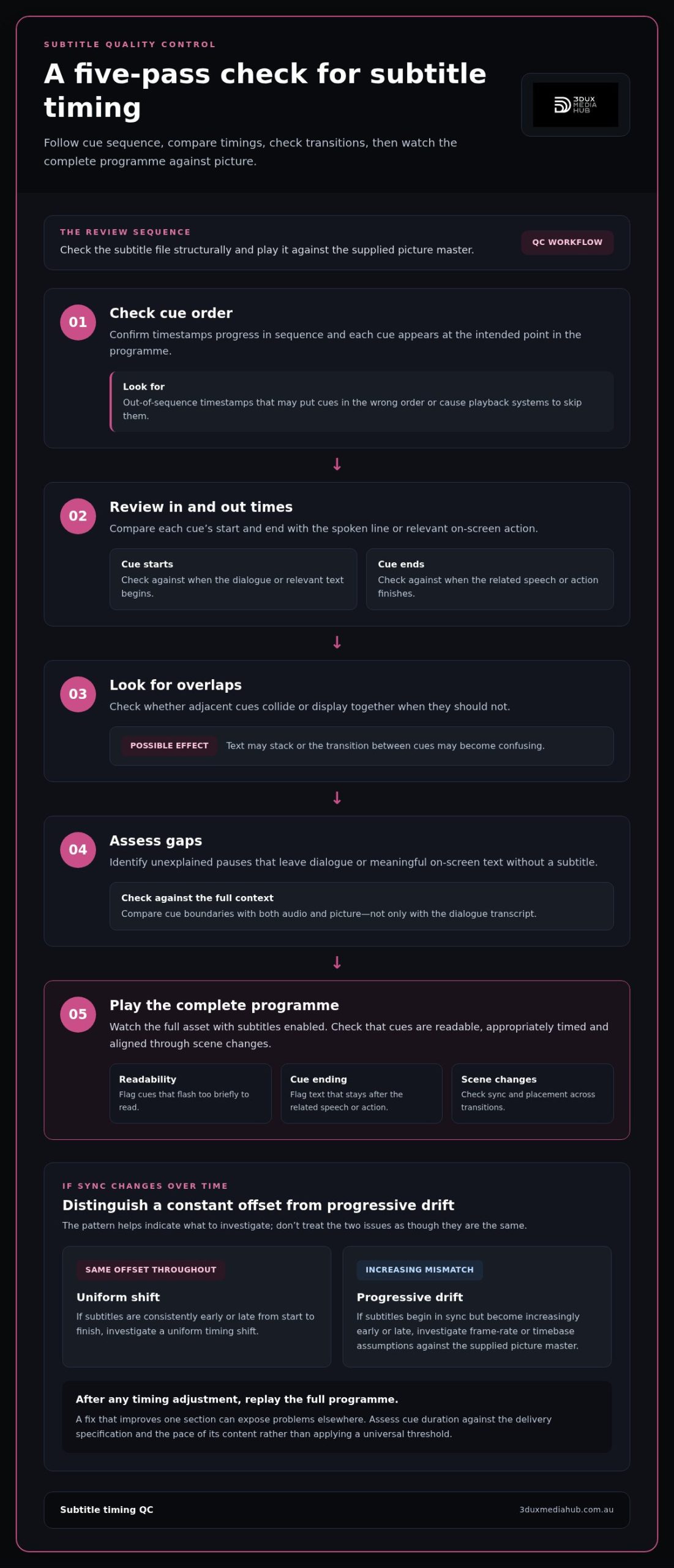
A well-formatted cue can still appear too early, disappear too soon or drift out of sync as the programme progresses. Timing QC needs both a structural check of the subtitle file and playback against the supplied picture master. The W3C Captions and Subtitles Guide provides useful guidance on timed text and presentation. Use the applicable delivery brief for destination-specific requirements.
Review cue timing in this order:
- Check cue order. Confirm timestamps progress in sequence and each cue appears at the intended point in the programme.
- Review in and out times. Compare each cue’s start and end with the spoken line or relevant on-screen action.
- Look for overlaps. Check whether adjacent cues collide or display together when they shouldn’t.
- Assess gaps. Identify unexplained pauses that leave dialogue or meaningful text without a subtitle.
- Play the programme. Watch the complete asset with subtitles enabled. Check that cues are readable, appropriately timed and aligned through scene changes.
Overlapping, out-of-order or mistimed subtitle cues
Out-of-sequence timestamps can make cues appear in the wrong order or cause a playback system to skip them. Overlaps may stack text or create a confusing transition. An unexpected gap can leave dialogue unsupported. Flag cues that flash too briefly to read or remain visible after the related speech or action has finished. Rather than applying a universal duration threshold, assess each cue against the delivery specification and the pace of its content.
Compare cue boundaries with the audio and picture, not just the dialogue transcript. A subtitle may need to align with a visible sign or other relevant on-screen text as well as speech. Check subtitle timing in context: timestamps alone can’t show whether a cue reads naturally against the picture and sound.
Timing drift and frame-rate mismatches
A constant offset and progressive drift suggest different problems. If subtitles are consistently early or late by roughly the same amount from start to finish, the cues may have a uniform shift. If they begin in sync but become increasingly early or late, investigate the frame-rate or timebase assumptions used for the subtitle file and compare them with the supplied picture master. Don’t correct one pattern as though it were the other.
After any timing adjustment, replay the full programme. A correction that improves one section can expose problems elsewhere, particularly if the original issue came from a mismatch across the asset. Include playback in subtitle integration and broadcast-quality QC. For releases that need these checks within a wider workflow, see subtitle integration and QC.
Subtitle file and character errors that can break delivery
A subtitle file can look readable in a text editor yet fail validation or render incorrectly in the delivery workflow. Separate structural faults from character-encoding problems and format incompatibilities. This helps identify whether the issue is in the file syntax, how the text is stored or the format expected by the receiving system.
| Issue type | What to check | Possible result |
|---|---|---|
| Syntax or structure | Cue numbering, timestamp structure, cue separation and supported markup. | Cues may be rejected, skipped or displayed incorrectly. |
| Character encoding | Accented letters, punctuation, symbols and language-specific scripts after export. | Characters may appear as question marks, boxes or garbled text. |
| Format incompatibility | Whether the file format matches the delivery specification and target workflow. | The asset may fail to import or behave differently in playback. |
SRT, WebVTT and other subtitle format problems
SRT and WebVTT organise cue data differently. Renaming an SRT file with a WebVTT extension, or the reverse, doesn’t convert its contents. Use a proper conversion process when a different format is required, then validate the result. Check cue numbering, timestamp syntax, blank lines or separators, and any markup against the selected format’s rules.
Open the exported file in the intended delivery workflow, not just the application used to create it. Confirm that cues load, timing is interpreted correctly and supported formatting appears as expected. Some deliveries may call for a format such as SMPTE-TT. Use it when the receiving specification requires it, and validate the output against that requirement. No single subtitle format suits every release.
Character encoding, special characters and language-specific text
Review the exported file for accented characters, apostrophes, quotation marks, symbols and non-Latin scripts. Compare them with the approved text. Garbled characters, sometimes called mojibake, can indicate an encoding mismatch or a problem introduced during export or transfer.
Unicode is the character standard used to represent text across languages, while UTF-8 is a common way of encoding Unicode text. These concepts can help diagnose character issues, but don’t assume every delivery workflow uses identical settings. Follow the receiving specification and inspect the exported file in the target workflow. Common subtitle formatting errors that survive an editor preview can become obvious at this stage. Recheck after any conversion or encoding change: a successful save alone doesn’t prove the delivery asset is correct.
A practical pre-delivery subtitle formatting checklist
Run QC in distinct passes. Automated validation can quickly flag structural faults, but it can’t judge every editorial choice or confirm how subtitles appear over the final picture. Use this checklist to catch common subtitle formatting errors and record what was reviewed.
Pass 1: Confirm the source file and delivery brief
- Check the subtitle language, file format, filename and delivery version against the release materials.
- Record the receiving platform or distributor specification, its version or date, and applicable subtitle requirements in your QC notes.
- Compare line presentation, timing and supported markup with that specification. Don’t assume requirements carry over unchanged between deliveries.
Pass 2: Run automated file checks
- Scan for blank cues, malformed timestamps, unexpected overlaps and cues that appear out of sequence.
- Flag unexpected characters or markup the target workflow may not support.
- Open the exported file in the intended workflow to confirm it imports and its structure is interpreted as expected.
Automated checks are useful for identifying patterns and syntax faults. They won’t reliably identify every awkward line break, unclear speaker change or context-specific placement issue. Treat the results as a first pass, not sign-off.
Pass 3: Review the text and rendered playback
- Have a reviewer check language, punctuation, speaker clarity and consistency against the applicable style guide.
- Watch the complete programme with subtitles enabled in the intended playback context.
- Assess legibility, line breaks, placement and timing across dialogue, scene changes and busy imagery.
- After making corrections, replay the affected sections, then complete a final full-programme playback.
Keep the final QC notes with the delivery asset. Record the file reviewed, specification reference, version, issues found and corrections made. This creates a traceable handover and helps prevent an earlier subtitle version from being mistaken for the approved one.
For a broader view of release checks, see the 2026 Blu-ray quality control guide. Subtitle checks can also be part of a wider localisation and delivery workflow, as outlined in subtitle integration and QC.
How professional subtitle integration supports a cleaner release
Correcting a subtitle file is only one part of preparing film and television assets for distribution. The subtitle track needs to match the correct programme version, language and delivery package. If it belongs to a different edit, even accurate, well-timed cues can conflict with the picture or dialogue.
Professional subtitle integration brings these elements together within the localisation and release workflow. It connects editorial review with technical preparation, then checks how subtitles behave alongside the asset they’re intended to accompany. This can reveal issues a file-only inspection won’t show, such as mismatched versions or text that becomes difficult to read against the imagery.
From corrected subtitle file to distribution-ready asset
Align the subtitle asset with the picture master and associated delivery materials. Keep version details clear, particularly if the programme has multiple edits or language tracks. Changes after QC, whether to the picture, subtitle text or timing, may affect the review. Recheck the relevant elements and assess the final assembled asset again.
Subtitle checks can also sit alongside broader localisation and asset-alignment work. For more context, see this film localisation and audio conforming guide.
When to include specialist subtitle integration and QC
A coordinated workflow is especially useful for multilingual releases, multiple programme versions or deliveries with detailed technical specifications. Each version can introduce its own alignment and review needs. File-level corrections remain important, but they don’t replace editorial review, integration with the correct programme asset or playback assessment against the receiving specification.
3DUX Media Hub provides content localisation, subtitle integration and broadcast-quality QC for film and television release workflows. Subtitle formatting checks are one part of a broader review that considers both the subtitle asset and its place in the delivery package. Assess the final asset against the applicable platform or distributor requirements.
Preparing film or television assets for distribution? 3DUX Media Hub can support your release workflow with content localisation, subtitle integration and broadcast-quality QC.
Make subtitle QC part of every release
Readable subtitles depend on more than clean formatting. Check cue presentation and timing against the programme, validate file structure and characters in the delivery workflow, then review the complete asset against the receiving specification. These steps help catch common subtitle formatting errors before they affect viewing or create delivery issues.
File-level checks are essential, but they work best alongside editorial review, subtitle integration and playback QC. The subtitle track must match the correct programme version and remain clear in context. If anything changes after review, repeat the relevant checks.
3DUX Media Hub provides subtitle integration, content localisation and broadcast-quality QC for film and television assets, backed by more than 20 years of industry experience. Explore 3DUX Media Hub content localisation and QC services to support your release workflow.
A structured QC process and the right expertise help prepare subtitle assets for a cleaner release.
Frequently Asked Questions
What are the most common subtitle formatting errors?
Common subtitle formatting errors include awkward line breaks, overcrowded cues, inconsistent punctuation, unclear speaker changes and text that obscures important on-screen information. File issues can include malformed timestamps, cue structure problems and incorrectly displayed characters. Separate formatting faults from translation or transcription mistakes, then check timing during playback. A subtitle can be technically valid yet difficult to read, so review both the file and its presentation over the picture.
How do you fix subtitles that are out of sync?
First, identify whether every cue has a similar offset or whether the mismatch grows over the programme. A consistent offset may call for shifting the cues; progressive drift suggests checking frame-rate or timebase assumptions against the supplied picture master. Make a measured correction, then review the beginning, middle and end in playback. Complete a full playback pass afterwards to catch timing faults introduced or exposed by the change.
Can subtitle formatting requirements vary between platforms?
Yes. Receiving platforms and distributors can specify different file formats, cue structures, markup, line presentation and other delivery requirements. Don’t assume a file prepared for one destination will suit another. Record the applicable specification and version in your QC notes, then assess the exported asset against it. Readability still matters, but platform-specific rules should guide technical decisions such as supported formats and syntax.
Why do special characters appear incorrectly in an SRT file?
Incorrect characters in an SRT file can result from an encoding mismatch during export, transfer or opening in another application. Accented letters or punctuation might appear as question marks, boxes or garbled text, sometimes called mojibake. Check the original text and inspect the exported file in the intended workflow. Unicode and UTF-8 are relevant when diagnosing character handling, but follow the receiving specification rather than assuming one setting suits every delivery.
What is the difference between SRT and WebVTT subtitles?
SRT and WebVTT are separate timed-text formats with different syntax and cue structures. Their timestamps, file conventions and supported markup aren’t interchangeable simply by changing the filename extension. If a delivery requires another format, convert the file properly, then validate the output in the intended workflow. Check that cues load, timing is interpreted correctly and any required styling works as expected.
How can I check whether subtitle line breaks are correct?
Read each cue in context and break lines at natural phrase boundaries, rather than splitting names or connected thoughts awkwardly. Check that line length and cue density follow the delivery brief, then watch the subtitles over the picture to assess readability. A technically neat file can still be difficult to follow if breaks interrupt reading or compete with important imagery. Check for consistency across different scenes too.
What should a subtitle QC check include before delivery?
A pre-delivery subtitle QC check should confirm the language, format, filename, version and receiving specification. Inspect cue order, timestamps, overlaps, gaps, blank cues, characters and supported markup. Then review the text for readability and consistency, and play the complete programme with subtitles enabled in the intended context. Record issues, corrections and the specification used. If any asset changes after QC, review the affected elements again before release.