
What can make a dual-layer DVD master fit on paper but falter during playback? Capacity is only one part of creating a dual-layer DVD master. The authored navigation, content allocation and layer-break position also affect the finished disc. A rushed check can leave costly rework close to delivery.
If you’re unsure how to fit the programme and menu assets, or where the layer transition should sit, a clear workflow helps. This guide explains how to prepare, author and check a master against the delivery specification, with playback behaviour in mind from the start.
We’ll cover capacity planning, video and audio encoding, menu and navigation checks, and layer-break placement once the rest of the authoring is settled. You’ll also see why testing the authored output and checking playback across representative players matter before distribution. Bringing authoring, encoding and quality control into one process helps catch specification issues before they become delivery problems.
Key Takeaways
- Start with the delivery brief, then map the programme, audio, subtitles, menus and extras before encoding.
- Use an asset plan to assess whether the project fits a dual-layer DVD workflow.
- When creating a dual-layer DVD master, plan the layer transition around programme structure and playback requirements.
- Check content, navigation, language selection and technical compliance against the project specification.
- Record key authoring decisions and version details to support a clear delivery handover.
Creating a Dual-Layer DVD Master: What the Format Changes
A dual-layer DVD master is authored DVD-Video content prepared for a disc that stores data across two layers. The format provides more room than a single-layer plan, but it also adds decisions about capacity, structure and playback. “Master” can refer to the authored DVD-Video project or a disc image prepared for delivery. It is not the same as a replicated physical disc.
Before work begins, establish what the delivery brief means by “master”. It may specify an authored image, particular files or another deliverable. Use the distributor’s requirements to determine the handover format, and the project specification to guide capacity planning and technical checks.
How DVD-9 layers affect authored content
DVD-9 commonly refers to a dual-layer DVD-Video disc, but terminology can vary between briefs and delivery workflows. Confirm the intended format rather than relying on the label alone. DVD+R DL technology describes dual-layer recording, including the Opposite Track Path (OTP) and Parallel Track Path (PTP) arrangements. The applicable option depends on the authoring and delivery requirements.
Capacity is shared across the whole authored project, not reserved for the main feature. Video, audio streams, subtitles, menus, navigation and extras all use space. A dual-layer DVD has a nominal capacity of 8.5 GB, but not all of that is available for programme content. Plan against the project’s usable capacity and delivery specification, not the headline figure.
When a dual-layer master is the right format
Compare the complete project with the available single-layer capacity before choosing a format. A long programme, higher-bitrate encoding, multiple language tracks, subtitles and bonus material can all increase the space required. Consider them together. Lowering the video bitrate to make everything fit may affect picture quality, while removing or restructuring assets can change the intended package.
A dual-layer format may suit a project whose authored content exceeds a single-layer plan, but it is not automatically the better choice. If the complete package fits the specified single-layer format at acceptable encoding settings, that may be the appropriate delivery. The distributor’s specification takes precedence.
For creating a dual-layer DVD master, separate two decisions: whether the assets fit the format, and whether the finished authored project meets delivery requirements. Keeping these checks distinct helps identify capacity and specification issues before final verification. A larger disc is not a substitute for a sound authoring plan.
Prepare Video, Audio and Assets Before Dual-Layer DVD Authoring
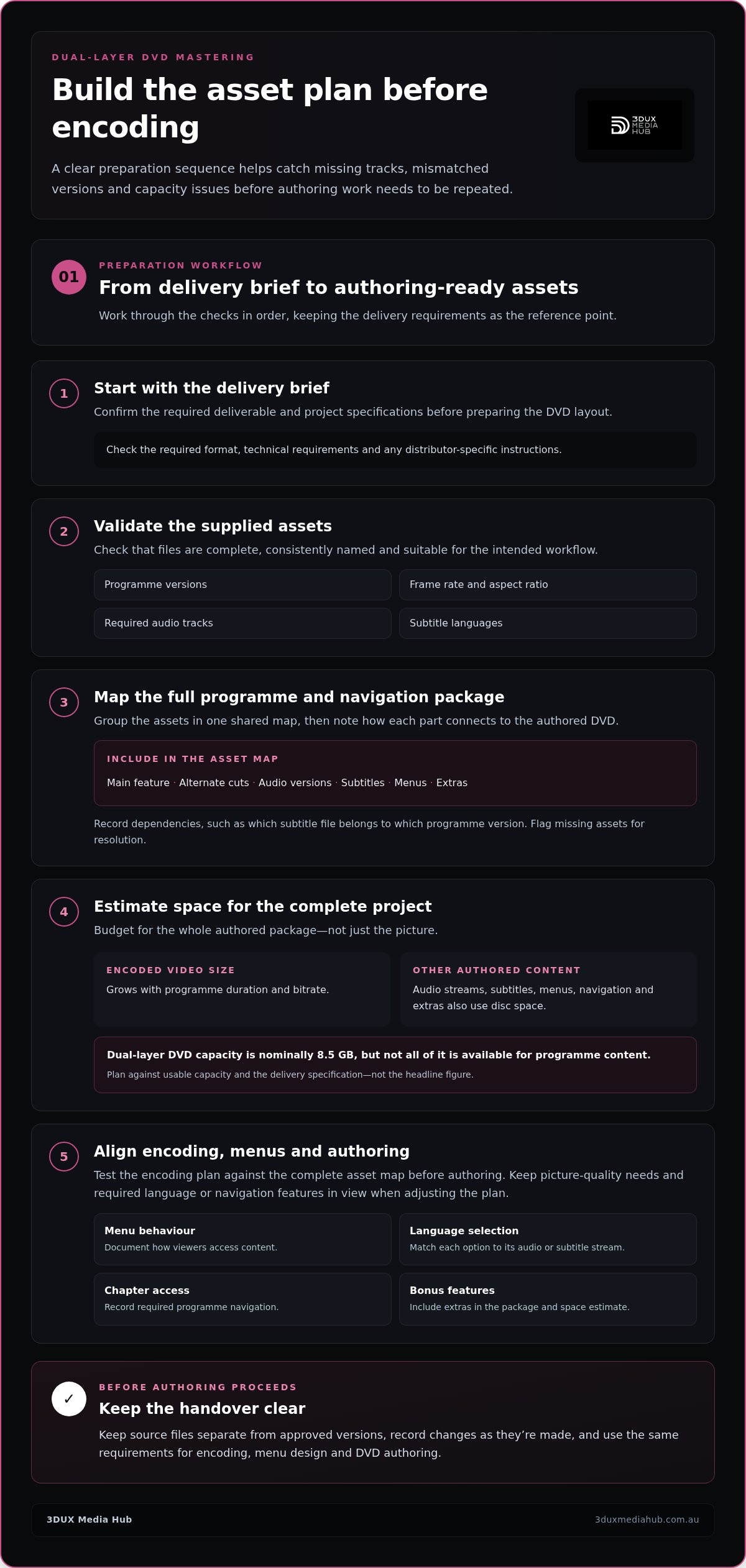
Good authoring starts before a project reaches the DVD layout. Review the delivery brief, validate the supplied assets, then map the full programme and navigation package. This sequence can catch missing tracks and mismatched versions before encoding or menu work needs to be repeated.
Build a checklist that records each programme version, its frame rate and aspect ratio, required audio tracks, subtitle languages and distributor-specific requirements. Check that files are complete, consistently named and suitable for the intended workflow. Document the required menu behaviour, language selections, chapter access and bonus features too. A menu option is only useful if its corresponding audio, subtitle or extra asset is present and correctly identified.
Plan the asset map before encoding
Group the main feature, alternate cuts, audio versions, subtitles, menus and extras in one asset map. Note dependencies, such as which subtitle file belongs to which programme version, and flag gaps for resolution. This gives encoding and authoring a shared reference, helping prevent a menu from pointing to the wrong version or a language option from having no matching stream.
Next, compare the complete package with the delivery requirements. Keep source files separate from approved versions, and record changes as they’re made. A tidy handover at this stage makes later authoring checks more precise.
Plan encoding around programme duration and disc space
Duration and bitrate determine encoded video size: at the same bitrate, a longer programme generally produces a larger file; for the same duration, a higher bitrate also increases file size. Audio streams, subtitles, menus and other authored assets add to the total, so estimate the whole project rather than budgeting for picture alone.
Quotable rule: “Encoded video size grows with both programme duration and bitrate, while every additional audio stream takes a share of the disc-space budget.”
Use bitrate comparisons as planning illustrations, not fixed settings. The right choice depends on the source, programme length, picture-quality needs and delivery specification. Test the encoding plan against the complete asset map before authoring, then adjust it without compromising required language or navigation features. For a broader discussion of encoding for distribution, see Professional Video Encoding Services: Mastering for Global Distribution in 2026.
Once the plan is coherent, video and audio encoding, menu design and DVD authoring can proceed against the same requirements. DVD authoring and encoding support can bring these preparation steps together.
Plan the DVD Layer Break Without Disrupting Playback
The layer break is the point where playback moves from the first recording layer to the second. The player’s laser must refocus, so a brief pause may occur. Its duration and visibility depend on the authored structure and playback equipment. Careful planning can place the transition at a less distracting moment, but cannot guarantee an imperceptible change on every player.
Plan the break after the programme structure and navigation are settled. A transition near a chapter boundary or scene change may work, but the position must also suit the disc format and authoring requirements. Check that menu links and chapter points continue to lead to the intended content across the transition.
OTP and PTP: what the authoring choice means
Opposite Track Path (OTP) runs the first layer in one direction and the second in the opposite direction. Parallel Track Path (PTP) runs both layers in the same direction. These describe different ways of organising data across two layers. They are not interchangeable options for every disc or authoring workflow.
Confirm which structure applies to the specified DVD format and delivery. The DVD+R DL technology overview explains the recording terminology, but check project requirements against authoritative DVD-Video documentation and the distributor’s specification before authoring.
Choose and test a suitable transition point
Assess candidate positions against both the programme and the authored navigation. A chapter boundary or quiet scene change may provide a natural point. A sudden cut, important line of dialogue or critical visual moment may make the transition more noticeable. Don’t select a position solely because it is technically convenient.
- Review candidate points against the programme’s scene and chapter structure.
- Check that chapter access and navigation behave as intended around the transition.
- Test the authored result on suitable playback equipment and record any pause, glitch or other observed behaviour.
Testing matters. A transition that appears acceptable in one playback setup may behave differently in another. Record the chosen point, the authoring structure and test observations so the decision is clear during review and handover.
In creating a dual-layer DVD master, layer-break planning connects disc structure to the viewer’s experience. Treat it as an authoring decision to test, not a promise of seamless playback.
Verify a Dual-Layer DVD Master Before Delivery
Authoring checks confirm that the DVD has been built as intended. Final verification confirms that the completed output behaves correctly and meets the distributor’s requirements. Keep these stages distinct: a project can pass an encoding check and still contain a faulty menu link, missing subtitle or incorrect delivery file.
Successful encoding alone doesn’t verify a DVD master. The authored output must also pass content, navigation, playback and specification checks.
Run functional and playback checks
Test the completed authored output from the viewer’s perspective. Start playback from the beginning, use chapter access at different points, follow menu links and test return navigation. Confirm that each route reaches the intended programme or menu, including paths to bonus material where applicable.
Then review the programme and its selectable features:
- Content: Check programme versions, opening and closing points, and the presence of expected extras.
- Navigation: Test menus, chapter access, language selection and return paths.
- Audio and subtitles: Confirm selected tracks play correctly and subtitles are available, legible and synchronised.
- Playback continuity: Review the programme for interruptions, including at the layer transition, and note any unexpected pause or glitch.
Test in relevant hardware and software playback environments. A result from one setup does not establish consistent behaviour everywhere, so use representative scenarios that reflect the project’s intended use.
Review compliance and record QC outcomes
Compare the final authored files and disc structure with the distributor’s stated delivery specification. Check the required format, file set, naming, versions and technical parameters against the brief. Don’t assume a successful playback test means the delivery package is complete. Functional performance and specification compliance are separate checks.
Keep a clear QC record. Log what was tested, the playback environment, any defects found, corrective actions and the final check outcome. If a correction changes the authored output, recheck the affected functions and confirm that the final version is the one prepared for handover. This gives the delivery team a traceable record instead of relying on memory or informal notes.
For related quality-control principles, see 2026 Blu-ray Quality Control for Film Distribution. The same disciplined approach helps make creating a dual-layer DVD master more dependable: test the authored result, then assess compliance independently. DVD authoring and quality control can support a coordinated delivery workflow.
Complete the Dual-Layer DVD Mastering Workflow for Distribution
A dependable handover comes from connecting each stage: review the specification, prepare and validate assets, encode video and audio, author the DVD, plan the layer break, then complete QC. Authoring checks confirm that menus, streams and navigation are built correctly. Final verification tests the finished output against playback scenarios and delivery requirements. Both stages matter.
Document key decisions as the project progresses. Record approved asset versions, encoding choices, menu and language configuration, layer-break position, final master version and QC outcome. Clear version control helps the receiving team identify the correct deliverable and understand what was checked.
What to include in a DVD master handover
Make the handover specific enough for another team member to identify the approved package without guesswork. Include:
- The agreed deliverables and applicable technical specifications.
- Programme, audio, subtitle and menu asset versions, including language elements.
- The final authored master’s version identifier and layer-break decision.
- QC status, test notes, corrections and any approved project notes.
Keep the authored master and its handover documentation distinct from physical disc replication. Replication is a separate production stage. Authoring prepares the DVD-Video content and required delivery files.
When specialist DVD authoring support helps
Complex menu structures, multiple language assets and tight delivery specifications can make the workflow harder to coordinate. Video and audio encoding affect the project’s space budget; authoring determines how content and navigation are organised; QC checks the completed output. Coordinating these technical stages can reduce avoidable hand-offs and keep decisions consistent from preparation through verification.
For creating a dual-layer DVD master, the aim isn’t simply to fit content onto two layers. It’s to deliver an authored package that follows the brief, supports the intended navigation and has been checked before handover. 3DUX Media Hub brings DVD authoring, menu design, encoding and broadcast-quality QC together for film and television distribution.
Planning a DVD mastering project? Discuss your project with 3DUX Media Hub to align authoring and QC with its delivery requirements. For related guidance, read Professional Disc Authoring Australia.
Deliver a DVD Master Ready for Distribution
Creating a dual-layer DVD master takes more than allocating content across two layers. Start with the delivery specification, validate and map every asset, then coordinate encoding, authoring and layer-break planning. Finally, check the authored output for content, navigation, playback behaviour and compliance before handover.
Keep a clear record of approved versions, language elements, authoring decisions and QC results. This gives the delivery team a reliable reference and helps distinguish the final master from earlier project files. A carefully planned transition and tested navigation also help confirm that the programme works as intended across representative playback conditions.
3DUX Media Hub brings DVD authoring, video and audio encoding, menu design and quality control together to support the mastering workflow. For a practical discussion about your project’s requirements, discuss your DVD authoring and mastering requirements.
Frequently Asked Questions
What is a dual-layer DVD master?
A dual-layer DVD master is authored DVD-Video content prepared for a disc that stores data across two recording layers. Creating a dual-layer DVD master involves organising the programme, menus, navigation, audio and subtitle streams into the structure required by the project. The master is the digital authored output or image prepared for delivery, as defined by the brief. It is distinct from manufacturing or replicating physical discs.
How much content can a dual-layer DVD hold?
A dual-layer DVD has a nominal capacity of 8.5 GB, with about 7.95 GB of usable space. The amount available for programme content depends on the disc format and the complete authored project. Video, audio streams, subtitles, menus, navigation and extras all use space, while encoding choices affect file size. Plan around the full asset package, then check the finished structure against the distributor’s delivery requirements.
What is the difference between OTP and PTP on a dual-layer DVD?
OTP means Opposite Track Path: data on the second layer follows the opposite direction to the first layer. PTP means Parallel Track Path: both layers follow the same direction. These terms describe how data is arranged across the disc’s layers, not two universally interchangeable authoring choices. The applicable structure depends on the disc format, authoring workflow and project specification, so verify the required approach before finalising the master.
How do you choose a layer-break point for a DVD?
Choose a candidate point that fits the programme flow and the project’s authoring requirements. A chapter boundary or scene change may be suitable, but avoid placing the transition in the middle of critical dialogue, action or a key visual moment. Check that chapter access and navigation still work around the break. Then test the authored transition on suitable playback equipment and record any pause or other observed behaviour.
Can a dual-layer DVD play in every DVD player?
No single test can establish that a dual-layer DVD will play identically in every DVD player. Compatibility and playback behaviour can vary with the player, disc format and authoring. Test the finished output on representative hardware or software playback environments relevant to the project. Check programme playback, menus, chapter access and the layer transition, and document any differences. This helps identify issues without making a universal compatibility guarantee.
Does creating a dual-layer DVD master include disc replication?
No. Creating a dual-layer DVD master covers digital preparation, including authoring the DVD-Video structure and preparing the agreed master files or image. Physical disc replication is a separate production stage that manufactures copies from the required production materials. Keep the distinction clear in the delivery plan: identify the required digital deliverables, then treat physical manufacturing as a separate step in the overall distribution workflow.
How do you check a dual-layer DVD master before delivery?
Check the authored content, menus, chapter access, audio selections and subtitle availability and synchronisation. Test playback continuity, including the layer transition, on suitable representative equipment. Then compare the authored files and disc structure with the distributor’s delivery specification. Record the version tested, playback scenarios, defects, corrections and final QC outcome. If a correction changes the output, recheck the affected functions and confirm the approved master is the one prepared for handover.