What if a commentary track is cleanly recorded but falls out of sync in the final release? A picture change or frame-rate mismatch can shift timing and turn a prepared asset into a delivery risk. That’s why audio commentary track integration belongs in the mastering and authoring workflow, not as a late-stage add-on. Distributors also need consistent asset, language and track labelling, plus playback checks that catch issues before delivery.
This guide takes you from supplied commentary audio to an authored, quality-checked release. You’ll learn how picture lock, audio preparation and synchronisation fit together, why format-specific requirements matter, and how to identify tracks clearly across deliverables. The practical checks cover sync drift, levels, missing sections and playback faults, helping you prepare, conform, encode, author and QC commentary tracks with greater confidence.
Key Takeaways
- Keep the picture reference stable before synchronising commentary, and use editorial references, frame rate and programme duration to guide alignment checks.
- Plan audio commentary track integration around the release format, with track identification and authoring tailored to the relevant delivery requirements.
- Check asset integrity, sync, track labels and authoring details systematically to catch issues before final playback review.
- Review representative scenes and transitions across the programme, not just the opening, to help identify drift, dropouts or other playback faults.
- Coordinate audio conforming, encoding, authoring and QC as connected stages from supplied asset to distribution-ready master.
What audio commentary track integration involves in a film release
Audio commentary track integration is the process of preparing, synchronising, identifying and authoring supplementary spoken audio alongside a film’s main programme. It links an approved commentary asset to the correct picture version, then carries that track through mastering and delivery checks so viewers can select and play it as intended.
In practical terms, commentary integration makes supplementary spoken audio correctly timed, clearly labelled and playable with its intended programme. The release format and delivery requirements determine the authoring and playback checks. The basic goal remains the same. Audio commentary may feature directors, performers, historians or critics, adding context alongside the film.
What makes a commentary track different from the main soundtrack?
The main soundtrack carries the film’s dialogue and other programme audio. A commentary track is additional spoken material intended to play with the picture, such as an interview, production insight or scene-specific observation. It isn’t an alternate-language version, which presents the film’s dialogue in another language, or audio description, which conveys key visual information for audiences who are blind or have low vision. Record the track’s purpose and language in the project asset plan.
Where commentary integration fits in the delivery pipeline
Integration starts with editorial preparation: establish the intended programme version and provide usable picture references with the commentary asset. Audio conforming prepares and aligns the material to the programme. Encoding and authoring then incorporate the approved track into the required release deliverable, while QC checks track identity, synchronisation and playback. These stages are connected, but their precise order and requirements depend on the project and format.
Clarify the picture version, commentary language, track name and delivery formats early to reduce avoidable rework. A picture change after audio preparation, for example, means sync should be reviewed again. For related guidance on preparing audio elements for release, see the film localisation audio conforming guide. The aim is a controlled hand-off from editorial through conforming, authoring and QC, with each stage using consistent asset information.
How to prepare and synchronise an audio commentary track
Reliable audio commentary track integration starts with the right source materials and picture reference, not with disc authoring. Treat preparation, synchronisation and encoding as distinct checks within one coordinated workflow. A locked picture is especially important: even a small editorial change after the audio export can affect sync and require another review.
Prepare the source audio and picture references
Before conforming, record each asset’s version, language, intended use and associated picture reference. Confirm that the commentary matches the intended editorial version and covers the expected programme duration. Note any planned gaps, edits or known timing differences so they’re visible to the mastering workflow. If an editor supplies an AAF or OMF, it can help preserve session structure for audio conforming, but it doesn’t replace checking the final audio against picture.
Check synchronisation before authoring
Use agreed reference points to assess alignment, then listen for drift, edits, missing sections and inconsistent levels. Check the timecode and frame-rate information against the picture reference and the exported audio timeline. Don’t assume a universal sync tolerance. Follow the applicable delivery specification and project requirements.
A practical preparation workflow is:
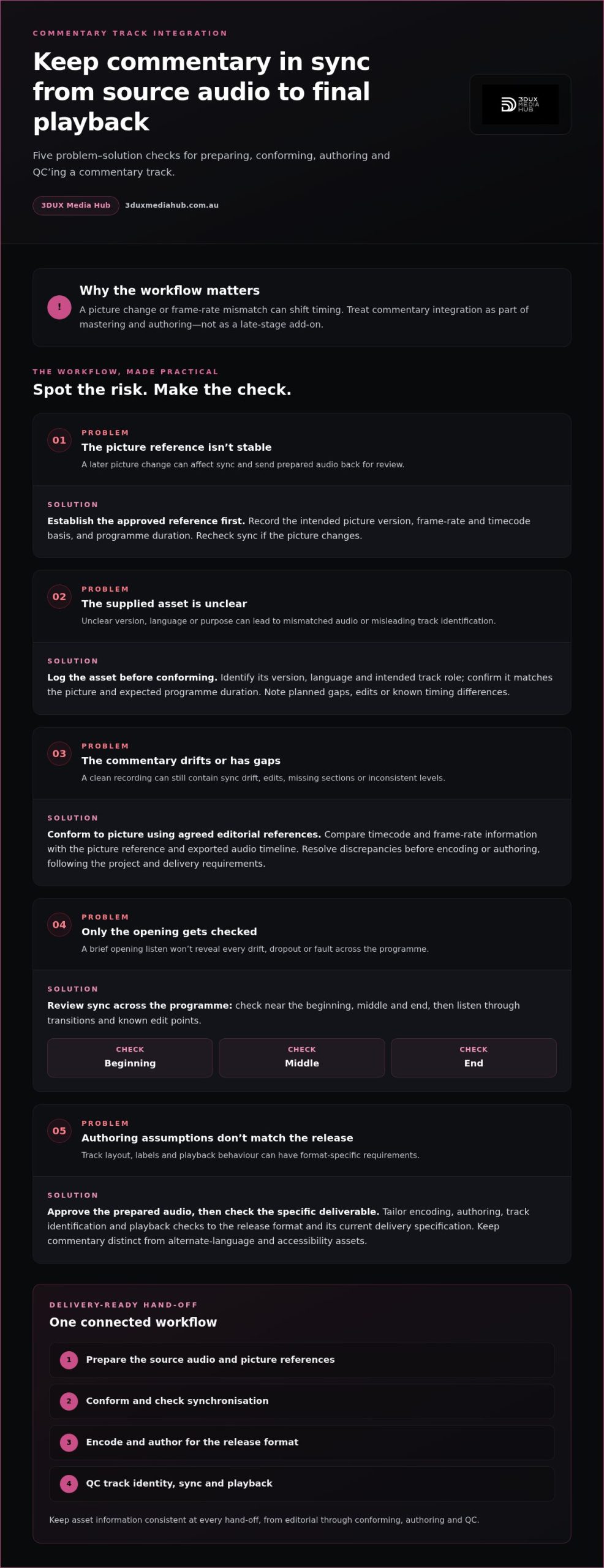
- Establish the reference. Record the approved picture version, its frame-rate and timecode basis, and the programme duration.
- Log the commentary asset. Identify its version, language and intended track role, and note any gaps or edits.
- Conform to picture. Align the commentary using agreed editorial references, resolving discrepancies before encoding or authoring.
- Review across the programme. Compare sync near the beginning, middle and end, then listen through transitions and known edit points. A brief opening listen won’t reveal every drift or dropout.
- Approve the prepared audio. Once the commentary has been checked against the intended picture, move to format-specific encoding and authoring decisions.
This separation matters. Source preparation establishes what the audio is and how it relates to picture; encoding and disc authoring determine how the approved audio is packaged for a particular release. Assess track layout, labelling and playback behaviour against that release’s current delivery specification rather than assuming the requirements are identical across formats.
Keep commentary distinct from accessibility assets in the delivery plan. The Federal Register notice on audio description and captioning concerns notice of their availability in US cinemas, not commentary synchronisation. It highlights why asset purpose and identification should be clear, while delivery requirements remain specific to each release.
For a connected approach to conforming, encoding, authoring and QC, explore audio and video mastering services.
Choose the right commentary-track approach for each release format
The same approved commentary asset can require different authoring tasks depending on the release. Physical media presents the track within an authored disc experience; digital delivery may use a different package structure and metadata model. Plan audio commentary track integration around the intended format and distributor requirements, rather than applying one assumed workflow to every output.
Use this comparison to plan the checks. It’s a workflow guide, not a substitute for the current delivery specification.
| Delivery context | Track identification | Authoring considerations | Playback checks |
|---|---|---|---|
| Blu-ray and DVD | Make the commentary’s purpose and language clear in the approved track name and menu wording. | Map the commentary to the correct selectable audio option and confirm its presentation in the authored disc experience. | Test menu selection, track playback and return to the main programme on the authored version. |
| Digital delivery | Check audio identification and language metadata against the required package and delivery instructions. | Prepare the audio and package structure according to the relevant distributor specification; don’t carry over disc assumptions. | Verify that the delivered package recognises the commentary correctly and that playback selection works as required. |
Commentary considerations for Blu-ray and DVD authoring
For disc releases, viewers should be able to identify and select the commentary through the authored experience. Check menu wording, track mapping and playback behaviour against the approved project specification. A label that suggests the wrong language or track purpose can cause confusion. Confirm format-specific requirements against current delivery documentation instead of assuming codec, channel or track-count limits.
Commentary considerations for digital delivery
Digital packages can organise audio assets and selection information differently from physical discs. Check that the commentary is correctly identified, its language metadata is accurate and the required package supports the intended playback selection. Set encoding according to the applicable delivery specification. A preset used for another platform or release isn’t a reliable substitute.
For both routes, maintain a clear link between the approved audio asset, its track label and the final authored or packaged deliverable. Then test the result in the relevant playback environment, including selection and playback of the commentary alongside the programme. Requirements can differ between deliverables of the same title, so record the specification used for each output.
For broader context on physical-media workflows, see the professional disc authoring guide. A format-aware approach ties authoring decisions to the destination and makes final review more meaningful.
Use this checklist to prevent commentary sync and QC failures
A disciplined QC pass checks more than whether the commentary plays. Review the asset, its relationship to picture, how it’s identified in the authored deliverable and how it behaves during playback. Record findings against the approved master and requirements for each delivery format, so any correction can be traced to the right version.
Audio and synchronisation checks
- Asset integrity: Confirm the commentary version and language match the project plan. Check that it relates to the intended programme and is complete, with no unexpected gaps or missing sections.
- Sync: Compare commentary with the approved picture at reference points near the beginning, middle and end. Listen for drift and check whether timing changes across the programme.
- Audio quality: Listen for drop-outs, clipping, unintended silence and abrupt edits. Check levels across the track for distracting changes.
- Transitions: Review representative scenes and transitions, including edits, credits and other identified programme changes. A short opening listen alone won’t reveal every issue.
Authoring, playback and final QC checks
- Track identification: Confirm the commentary appears under the intended menu label or delivery metadata, with the correct language and track mapping.
- Selection and playback: Select the commentary in the specified playback environment. Confirm it starts, remains synchronised and plays as intended alongside the programme.
- Navigation: For an authored disc, test selection and return behaviour through the menu and programme. Check that selecting commentary doesn’t inadvertently start another audio option.
- Final record: Log results against the approved master and applicable delivery requirements. Note the asset and master versions reviewed, any faults found, and whether corrections were retested.
Keep checks format-aware: expected menu behaviour for a disc may differ from selection behaviour for a digital package. For wider disc-focused checks, see the Blu-ray quality control guide. A consistent QC record connects audio conforming, authoring and final playback review without treating them as isolated tasks.
Commentary preparation and release checks can be handled together through 3DUX mastering and QC support.
Take commentary integration from prepared audio to distribution-ready master
A reliable hand-off keeps the approved commentary, picture reference and release requirements aligned from source through final master. Audio commentary track integration is more controlled when every stage uses the same version information, rather than relying on informal notes or assumptions.
Build a clear hand-off between audio, authoring and QC
Keep a concise record of the approved audio version, language, track label, picture reference and sync review. Pass these details, along with the relevant delivery requirements, into authoring and QC. Each stage then has a clear basis for its work, making it easier to trace a correction to the right asset or master.
If an audio asset, picture edit or label changes after approval, reassess the affected checks. A revised picture may need another sync review; a changed track name may require updates to menus, metadata or QC records. Approval should apply to the version actually being prepared for delivery.
Prepare the release package for its intended destination
Before sign-off, compare the final master with the distributor’s current delivery specification. The approved package should reflect the intended format, with audio identification, authoring and playback behaviour checked for that destination. Keep project records clear about which master was reviewed and which requirements informed approval.
Audio conforming, encoding, authoring and QC are connected parts of release preparation. Conforming aligns the prepared commentary with the intended programme; encoding and authoring prepare the relevant deliverable; QC checks the result against project requirements. Settings and packaging depend on the destination, so avoid carrying assumptions from one format into another.
3DUX Media Hub provides audio and video encoding, Blu-ray and DVD authoring, and broadcast-quality QC as part of mastering workflows. Its technical services support global distribution of entertainment content, with requirements tailored to project deliverables. For more on the encoding stage, see the guide to professional video encoding services.
Ready to plan commentary delivery for an upcoming release? Discuss your project requirements and delivery goals with 3DUX.
Prepare commentary for a confident release
Reliable audio commentary track integration depends on a controlled hand-off from approved audio and picture references through conforming, encoding, authoring and QC. Keep track labels and language clear, match the commentary to the intended programme, and check sync and playback against the requirements for each release format.
These connected steps help distributors catch issues before the master is delivered. 3DUX Media Hub brings audio conforming, authoring, encoding and broadcast-quality QC together to support entertainment releases for global distribution. Its principals have more than 20 years of industry experience.
For a coordinated workflow shaped around your release, discuss your commentary integration and mastering requirements with 3DUX Media Hub. Clear references, format-aware checks and well-managed technical hand-offs help prepare commentary to reach audiences as intended.
Frequently Asked Questions
What is an audio commentary track?
An audio commentary track is supplementary spoken material intended to play alongside a film, rather than replace its main soundtrack. It may feature a director discussing production choices, performers sharing insights or a historian offering context about particular scenes. It’s distinct from alternate-language dialogue and audio description. For release preparation, identify the commentary’s language, purpose and associated picture version so it can be labelled and presented correctly.
How do you add an audio commentary track to a Blu-ray?
Prepare the approved commentary audio against the correct picture version, check synchronisation, then include it as a selectable audio option during Blu-ray authoring. Map it to the intended track label and menu selection, following the project’s current delivery specification. Before approval, test the authored disc’s menu and playback behaviour, and listen across the programme for sync drift, missing sections or audio faults. Exact authoring requirements depend on the project specification.
How do you keep an audio commentary track in sync?
Use a stable, approved picture reference and check the commentary against agreed timing points. Confirm that the audio and video refer to the same programme version, frame-rate basis and timeline. Review alignment near the beginning, middle and end, then listen around edits and transitions. If picture changes after the audio is prepared, reassess sync against the revised master. Follow the delivery specification for acceptance criteria rather than assuming one tolerance suits every release.
Can an audio commentary track be included with digital delivery?
Yes, a commentary track can be included with digital delivery when the package and distributor requirements support it. The audio asset may be handled differently from a disc-authoring workflow, so check the required package structure, track identification and language metadata. Confirm that playback allows the intended commentary selection and that the prepared audio matches the approved programme. Encoding settings and delivery details should follow the applicable specification, not defaults borrowed from another format.
What audio format should a commentary track use?
There isn’t one audio format that suits every final delivery. For video projects, an uncompressed 24-bit WAV at 48 kHz is a common master-audio hand-off, but the required encoding and package settings depend on the destination specification. Keep the prepared source asset distinct from the encoded release track. Before encoding, confirm the intended format, channel layout and other technical values against current project and distributor requirements.
What should be checked during commentary-track quality control?
Check that the correct commentary version, language and programme are present, then review sync at multiple points rather than listening only to the opening. Listen for drift, drop-outs, clipping, unintended silence and abrupt edits. Confirm the track label, language metadata and authoring or package mapping. Finally, test selection and playback in the specified environment, including relevant transitions and credits. Record results against the approved master and delivery requirements.
Does an audio commentary track need its own menu option?
For a disc release, the commentary should be clearly identifiable and selectable in the authored experience, with menu wording and track mapping aligned to the approved project specification. Digital delivery may present track selection through a playback interface and metadata rather than a disc menu. In either case, make the track’s purpose and language clear, then test that the intended option plays correctly with the programme.