A colour value can change meaning when its colour space changes. Colour space conversion for video maps encoded values through the source and destination colour definitions, while accounting for colours the destination gamut cannot represent. In 8-bit video, each component has 256 distinct values, so rounding during conversion can affect precision.
It’s easy to assume that changing a colour-space setting simply relabels an image, or that a wider gamut automatically preserves every colour. In practice, the conversion method and destination limits matter. This guide explains how video values move between absolute colour spaces, what happens when colours fall outside the destination gamut, and how repeated calculations or rounding can introduce visible errors. You’ll gain a clearer basis for understanding colour-management choices in video workflows and assessing their effect on image accuracy.
Key Takeaways
- Track the source and destination colour definitions: a conversion recalculates colour values, rather than simply relabelling them.
- Assess the destination gamut before conversion, because colours outside its range must be mapped or clipped.
- Limit repeated conversions and rounding to help preserve tonal precision through the video workflow.
- Match the video-range interpretation to the signal so that levels are mapped correctly alongside colour values.
Converting between absolute colour spaces
Colour values only have meaning within the colour space that defines them. The same RGB triplet can represent different visible colours in different spaces. Absolute colour spaces anchor values to defined colour characteristics, allowing meaningful comparisons. Colour space conversion for video recalculates values; it does not simply change a label. The source and destination primaries and white points affect the result.
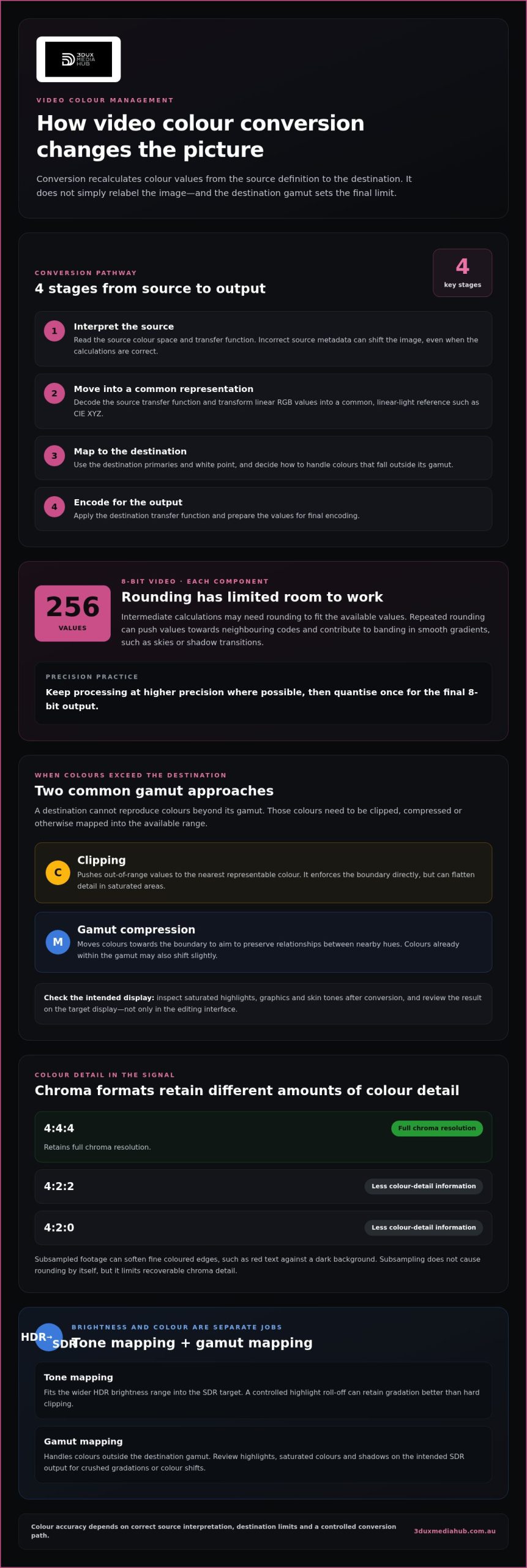
A typical conversion starts by interpreting the source encoding. The system decodes its transfer function, transforms linear RGB values into a reference space such as CIE XYZ, then maps them to the destination primaries and applies the destination transfer function. Incorrect source metadata can shift the image, even if the calculations themselves are correct.
Colour modelling has a long history. In 1853, Hermann Grassmann published a theory of colour mixing that included three laws known as Grassmann’s law. Early colour spaces often used two components and largely ignored blue light. Modern video uses defined colour models and standards. xvYCC, for example, is an international digital video colour-space standard published as IEC 61966-2-4.
For a video workflow, the conversion sequence is:
- Interpret the source colour space and transfer function.
- Transform source values into a common, linear-light representation.
- Map values to destination primaries and encode for the output space.
- Handle colours beyond the destination gamut before final encoding.
HDR-to-SDR conversion involves more than changing RGB values. Tone mapping fits the wider brightness range into the SDR target, while gamut mapping handles colours outside its range. A controlled highlight roll-off can retain gradation better than hard clipping. Review the result against the intended image.
For example, an HDR highlight may exceed the SDR display range. Tone mapping compresses it into the available range while preserving differences around it. Review the colour space conversion for video on the intended SDR output, paying particular attention to highlights, saturated colours and shadows. These checks can reveal crushed gradations or colour shifts.
Gamut limitations
A gamut is the range of colours a system can represent. Displays, cameras and delivery formats may each cover a different range. Conversion cannot make a destination reproduce colours beyond its gamut. Those colours must be clipped, compressed or otherwise mapped into the available range.
Clipping is direct: values outside the destination boundary are pushed to the nearest representable colour. This can flatten detail in saturated areas, such as vivid stage lighting or a highly coloured graphic. Gamut compression instead moves colours towards the boundary, aiming to preserve relationships between nearby hues. The trade-off is that colours already within the gamut may also shift slightly.
xvYCC is an international digital video colour-space standard published as IEC 61966-2-4. Its encoded values can describe colours beyond the traditional RGB range used by standard video systems. That expanded encoding doesn’t guarantee a wider visible gamut by itself. The source, signal path, processing software and display must interpret xvYCC correctly; otherwise, out-of-range values may be clipped or misread.
Consider a saturated red title graphic created in an extended gamut and played on a narrower-gamut display. If the playback chain treats the signal as conventional RGB, the red may lose detail or look different from the intended appearance. Correct metadata and compatible processing help the system distinguish extended values from ordinary ones. The display still sets the final limit on visible colours.
For a dependable conversion, assess the destination before choosing a mapping approach:
- Identify the source and target colour spaces, including the intended display.
- Inspect saturated highlights, graphics and skin tones after conversion.
- Choose clipping for hard boundary enforcement or compression to retain colour relationships.
- Review the result on the target display, not only in the editing interface.
When converted content also needs market-specific versions, content localisation can support adapting video materials for different audiences. Keep gamut treatment consistent across each version so graphics and footage retain a coherent appearance.
Rounding errors in 8-bit colour
Conversion precision depends on both the maths and the encoded output. In 8-bit video, each component has 256 distinct values, so intermediate results may need rounding.
Accumulated rounding in 8-bit colour
Accumulated rounding occurs when successive calculations repeatedly approximate colour values to fit a limited digital range. Each small adjustment can move a value towards a neighbouring code, and later conversions may compound that change. A smooth gradient can then show banding, especially in skies or shadow transitions. Keep processing at higher precision where possible, then quantise once for the final 8-bit output.
Chroma subsampling also affects conversion quality. 4:4:4 retains full chroma resolution, while 4:2:2 and 4:2:0 store less colour-detail information relative to luma. As a result, converting subsampled footage can soften fine coloured edges, such as red text against a dark background. Subsampling doesn’t cause rounding by itself, but it limits recoverable chroma detail.
Washed-out and incorrect colour errors
Washed-out or shifted colour usually points to a signal interpretation mismatch, not simply rounding. If software applies the wrong colour matrix, transfer function or range, it can miscalculate luma and chroma. Blacks may look grey, whites may lose distinction, or skin tones may shift. Compare the source metadata with the conversion settings before adjusting the image by eye.
Video colour-space standards describe how encoded values should be interpreted, including how colour components relate to the signal’s characteristics. A conversion must use the correct interpretation at both input and output. For example, choosing the wrong matrix can decode the same pixel values into different hues. The standard setting needs to be correct during decoding, processing and encoding, not just at export.
When diagnosing a conversion, inspect a known reference frame and look for consistent symptoms:
- Raised blacks or crushed shadows can indicate a range mismatch.
- Shifted hues can point to an incorrect matrix or colour-space interpretation.
- Banding across gradients can reveal accumulated rounding or limited precision.
- Soft coloured edges can reflect chroma subsampling in the source.
Correct the signal interpretation before applying creative grading. Otherwise, a grade may disguise the error in one scene while making it worse elsewhere.
How do limited and full video range affect colour space conversion?
Video range determines how digital code values represent brightness, from black through midtones to white. Full range uses the available code span, while limited range reserves values around the active picture range. The decoder must interpret the source correctly before colour calculations begin. Otherwise, the same pixel values can produce different black levels, contrast and highlights.
Range and colour space describe different parts of the signal. Range defines how brightness values are mapped; a colour matrix defines the relationship between luma and chroma. Changing the matrix will not fix a range mismatch. For example, footage encoded as limited range but interpreted as full range can look washed out, with raised blacks and subdued contrast.
A conversion should account for both the source and destination ranges. First, decode the source values using the intended range. Then perform the colour-space transformation. Finally, encode the result using the target range. This order prevents range remapping from being mistaken for colour correction and helps preserve the intended relationship between shadow detail, midtones and highlights.
- Confirm the source range from reliable file metadata or the known export settings.
- Set the decoder to match the source before adjusting colour or contrast.
- Choose the target range required by the playback workflow.
- Review black, white and midtone details after encoding the output.
For example, a video may look grey in the shadows after export. If the editor treated limited-range footage as full range, the black point may be mapped incorrectly. Conversely, decoding full-range footage as limited can crush shadow and highlight detail. A scope or reference frame can help identify these shifts, but the settings still need to match the actual signal.
Keep range conversion separate from creative grading. A contrast adjustment may disguise incorrect decoding in one scene, then clip detail elsewhere. Validate the encoded file in its intended playback path: a correct timeline preview does not prove the export uses matching range flags or interpretation.
For video workflows where range and format changes need careful handling, use professional standards conversion to prepare the output for its delivery requirements.
3DUX Media Hub: 4K UHD Authoring
3DUX Media Hub provides 4K UHD Authoring for projects that need a prepared UHD master for delivery. Once colour-space conversion, gamut handling and video range are defined, authoring is the next step in shaping the finished title for its intended format.
Video and Audio Encoding supports preparing media across file formats from SD to 4K. For projects requiring physical-format authoring, Blu-ray and DVD Authoring provide additional delivery options. Content Localisation can also help adapt video materials for different audiences.
Turn to 3DUX Media Hub when your workflow moves from colour-management decisions to preparing a finished video for UHD or other supported formats. Contact 3DUX Media Hub to discuss your project.
Set up your next delivery with confidence
Make the next step a clear delivery brief. Record the source format, intended destination and colour-management decisions alongside the master, giving the finishing workflow a defined reference. This provides everyone working on the asset with a shared basis for preparing and reviewing the output.
Colour space conversion for video is one part of a larger delivery chain. The final format and destination shape what needs to happen next, whether you’re preparing a UHD title or encoding media for another workflow. 3DUX Media Hub offers 4K UHD Authoring, Blu-ray and DVD Authoring, and Video and Audio Encoding to support those stages.
Bring your project requirements together before production handoff, including the intended format and any localisation needs. A well-defined brief helps keep technical decisions connected to the finished deliverable. Plan your video delivery with 3DUX Media Hub, and move your project towards its next format with a clear direction.
Frequently Asked Questions
What colour spaces and colour gamuts are commonly used for video?
Rec. 709 is widely associated with standard dynamic range television, while Rec. 2020 defines a broader colour space used in UHD workflows. DCI-P3 is another common gamut, particularly in cinema and display contexts. These names describe different colour capabilities, not automatic quality levels. For example, placing Rec. 709 footage in a Rec. 2020 container doesn’t create colours absent from the original image.
How do RGB, YCbCr and YUV differ in video colour representation?
RGB represents colour through red, green and blue components, making it a natural fit for displays and graphics. YCbCr separates luma from two colour-difference components, supporting video compression strategies. YUV is a related representation traditionally associated with analogue systems; digital video commonly uses YCbCr. An RGB graphics overlay may therefore need a correctly defined conversion before it is combined with YCbCr footage.
How do you convert video between RGB and YCbCr?
Convert using the matrix appropriate to the source and target video standards, while preserving the intended transfer function and range. For RGB-to-YCbCr conversion, the matrix derives luma and colour-difference components from RGB values. The reverse operation reconstructs RGB from those components. Compare a colour chart before and after conversion, checking neutral grey and saturated patches for unintended shifts.
What are the BT.601, BT.709 and BT.2020 video colour standards?
BT.601, BT.709 and BT.2020 are ITU-R recommendations defining colour-related parameters for different television systems. BT.601 is associated with standard-definition digital television, BT.709 with high-definition television, and BT.2020 with ultra-high-definition systems. Their colour primaries and matrix characteristics differ. Selecting the wrong one can alter hues, so match the setting to the programme’s actual encoding rather than its file extension.
How do transfer functions such as gamma, sRGB and PQ affect video conversion?
A transfer function describes how signal codes relate to displayed light. Gamma-based curves and sRGB are common in graphics workflows, while PQ is designed for HDR luminance representation. If conversion treats encoded values as linear light, brightness and contrast can change incorrectly. For example, a computer-generated logo composited into video needs compatible transfer handling to avoid looking brighter or darker than the surrounding footage.
How do you convert video between Rec. 709 and Rec. 2020?
Use a colour-managed transform that interprets the Rec. 709 source, maps its colours into the Rec. 2020 destination, then encodes the output with the required transfer characteristics. A wider destination gamut cannot recover colours missing from the source. For a Rec. 709 interview delivered in a Rec. 2020 project, check skin tones and graphics after transformation, and retain the correct colour-space metadata.