A non-standard aspect ratio means the picture’s shape doesn’t match the delivery specification, which can lead to distortion, cropping or incorrect bars. A 16:9 frame is standard for UHD and high-definition broadcast TV and movies, while common HD aspect ratios also include 1.78, 1.85, 2.39 and 2.40. Aspect ratio and framing are among the common broadcast QC rejections, alongside audio channel assignment errors and incomplete textless backgrounds.
A QC flag doesn’t always mean the programme itself is faulty. It may point to a mismatch between the master and its delivery requirements, such as incorrectly scaled footage or audio channels in the wrong order.
This article explains what common broadcast QC rejections mean, why they happen and how they can affect delivery. You’ll learn what QC checks in picture shape and framing, stereo and multichannel audio, and textless sequences, so you can pinpoint the issue and understand what needs correcting.
Key Takeaways
- Compare integrated loudness and true-peak readings with the delivery specification to catch audio-level issues before submission.
- Check that the picture’s aspect ratio and framing match the required master, so the image isn’t stretched, cropped or positioned incorrectly.
- Verify each surround channel’s assignment and playback role; a correctly mixed track can still fail QC if channels are mapped incorrectly.
- Review textless sequences against the programme’s texted shots to spot missing backgrounds or shots that appear out of order.
Incorrect stereo and multichannel audio exports
Audio exports can fail QC when loudness, true peaks or channel layouts miss delivery requirements. North American broadcast audio typically targets -24 LKFS/LUFS, with true-peak limits usually between -1.0 and -2.0 dBTP. These measurements describe different things: integrated loudness reflects perceived programme level, while true peak captures inter-sample peaks that can distort playback.
A file can meet its loudness target and still fail because its channels are wrong. A stereo export may have left and right reversed, duplicated, or collapsed into mono. A 5.1 movie mix has six channels, so incorrect ordering can send dialogue, effects or music to the wrong speaker. The result may be a delivery rejection or an unintelligible mix.
For US broadcast QC, the CALM Act loudness range is -22 to -26 LKFS/LUFS. ATSC and broadcaster delivery specifications also affect technical acceptance, including the required audio format and channel configuration.
Common broadcast QC rejections also include excessive peaks. Some television networks limit audio peaks to -12 or -10 dBFS, while the supplied market guidance gives -1.0 to -2.0 dBTP as usual true-peak limits. Don’t treat these measurements as interchangeable: follow the delivery specification’s stated meter and limit.
Caption and subtitle failures commonly involve timing and synchronisation. A subtitle appearing a few frames after spoken dialogue can fail QC; a mismatch between 23.976 fps and 24.0 fps can also cause subtitle drift.
File delivery can fail when the codec, container or metadata doesn’t match the distributor’s technical schedule. A schedule may specify ProRes 4444 XQ, IMF or DCP. Check the export against that named format, then confirm audio-language labels and channel mapping match the actual tracks.
Before submission, compare the final file with the delivery specification. Measure loudness and true peak, audition each channel, then inspect captions, subtitles and metadata in the exported master. These steps can catch configuration errors that a timeline preview may miss.
Framing and aspect-ratio inconsistencies
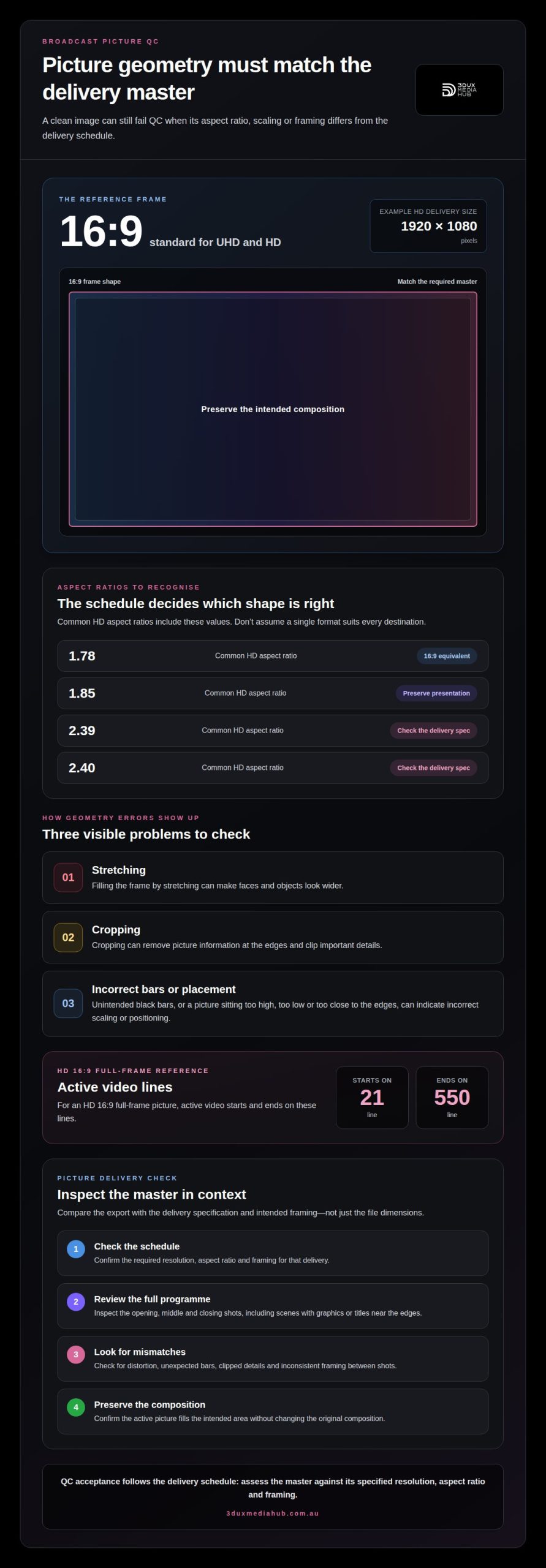
Broadcasters set picture requirements in the delivery schedule, covering frame size, aspect ratio and framing. The required master governs acceptance. A clean image can still fail if its geometry differs from the specification. For HD delivery, a distributor may request 1920×1080 pixels.
Aspect-ratio errors usually appear as stretching, cropping or incorrect letterboxing. A 1.85 image placed in a 16×9 container, for example, needs the intended presentation preserved. If it’s stretched to fill the frame, faces and objects look wider. If it’s cropped, picture information at the edges disappears. QC assesses whether the delivered image matches the intended composition, not merely whether the file has the expected dimensions.
Framing can also fail when picture content sits too high, low or close to the edges. In an HD 16×9 full-frame picture, active video starts on line 21 and ends on line 550. Mispositioned images, unintended black bars or edge cropping can signal incorrect scaling or placement. These issues may become more obvious when the master is viewed at its intended display size.
To reduce the risk of rejection, compare the export with the delivery specification and intended framing. Inspect the opening, middle and closing shots, as well as scenes with graphics or titles near the edges. Look for distortion, unexpected bars, clipped details and inconsistent framing between shots. Check that the active picture fills the intended area without changing the original composition.
Broadcasters’ video technical specifications vary by delivery. The schedule defines the required resolution, aspect ratio and framing, so assess the master against those details rather than assuming one format suits every destination. A focused picture delivery check can help identify geometry errors before submission.
Surround-channel assignment errors
A 5.1 export can contain the intended mix yet fail if its channels are mapped incorrectly. Common labels include left, right, centre, low-frequency effects, left surround and right surround. A mapping error can place dialogue in a surround channel or send effects to the centre speaker. The file’s track order and channel labels must match the delivery specification.
Track names alone don’t confirm correct assignment. A channel labelled “centre” may still carry left-channel audio. Audition each output channel separately and compare what you hear with its label. Dialogue should remain intelligible through the designated dialogue channel, while surround ambience should retain its intended spatial position.
Film packages may require isolated 5.1 surround and stereo tracks. They can also include an M&E track, which carries the full mix except dialogue so dialogue can be added for dubbing. If the M&E contains dialogue, or the stereo printmaster is supplied in place of the required surround mix, downstream dubbing or playback workflows are affected.
US network and cable delivery requirements depend on each delivery schedule’s channel layout and audio specifications. Certain global streaming platforms typically require an integrated loudness target of -27 LKFS, so a mix prepared for one destination may need a different deliverable for another.
Before export, compare channel labels, track order and language metadata with the delivery specification. Then test the rendered file, not just the mixing session:
- Solo each channel and confirm its audible content matches its label.
- Check that dialogue, effects and music appear in their intended channels.
- Play the complete export through a surround monitoring chain.
- Confirm any required stereo or M&E tracks are separate and correctly identified.
These checks can reveal routing errors that a full-mix audition may hide. Even a well-balanced mix needs accurate channel mapping for reliable broadcast and localisation.
Textless background completeness
Textless material allows distributors to replace on-screen wording for another language without rebuilding the shot. It provides the picture elements behind titles, credits, signs or graphics. If a location caption appears over a landscape, for example, the textless version should show the same landscape without the caption. Missing or mismatched backgrounds can disrupt localisation and lead to a QC rejection.
Order matters. Textless sequences should contain each texted shot without its text, arranged in the same order as in the programme. A missing shot leaves no clean background for its corresponding title. An out-of-order shot makes it harder to match the clean image to the original scene. QC can compare the programme with the supplied sequence to identify gaps.
Textless material usually begins after 10 to 60 seconds of black following the programme. That transition separates the main programme from its additional material. Review the end of the programme and the start of the textless section in the rendered master. Confirm the black interval and sequence placement match the delivery specification.
Check every texted shot against its textless counterpart. A title card needs a clean version; a graphic over moving footage needs the corresponding footage without the graphic. If several shots carry text, keep each clean shot in the same sequence as its on-screen version. This makes the material easier to use for localisation, without requiring a new search through the programme.
- Build a shot-by-shot comparison of texted and textless material.
- Confirm each clean shot retains the original framing and action.
- Check the sequence order against the programme’s shot order.
- Play through the transition from programme to textless material.
Use this comparison before delivery to catch missing backgrounds while the master is still being prepared. Prepare textless assets for localisation as part of a complete delivery workflow.
3DUX Media Hub: 4K UHD Authoring
3DUX Media Hub provides 4K UHD Authoring for projects that need a finished UHD master prepared for delivery. If QC findings point to issues in an exported file or delivery package, Video and Audio Encoding can support the technical preparation of files across formats. Blu-ray and DVD Authoring are also available when those formats are part of the required delivery.
For titles prepared for audiences in different languages, Content Localisation supports adapting content for those markets. The appropriate service depends on the deliverable: authoring for a disc or UHD master, encoding for a file export, or localisation for language versions.
Contact 3DUX Media Hub to discuss your project’s authoring, encoding or localisation needs.
Turn QC feedback into a stronger delivery workflow
Use each QC report to improve the handover between finishing, mastering and delivery. Record the issue, the affected asset and the corrective action, then carry that information into the next version. This turns common broadcast QC rejections into useful production feedback rather than a last-minute obstacle. A consistent review process also helps teams identify recurring workflow gaps before preparing another master.
When the next step involves preparing a finished deliverable, 3DUX Media Hub offers 4K UHD Authoring, Blu-ray and DVD Authoring, and Video and Audio Encoding. These services support projects that need authored masters or encoded files for delivery.
Contact 3DUX Media Hub for help with your project’s authoring or encoding requirements. A clear delivery plan gives your team a practical starting point for the next master.
Frequently Asked Questions
My QC report says my film has a non-standard aspect ratio, what does this mean?
A picture geometry rejection means the delivered picture shape doesn’t match the ratio expected for the master. The issue may lie in the image itself or in how it sits inside the video frame. For example, a correctly proportioned widescreen image can still be flagged if the file’s frame or presentation doesn’t meet delivery requirements. Compare the report’s finding with the intended master before changing the original composition.
What are the correct “specs” for a 5.1 mix?
A 5.1 mix is a six-channel surround mix, but there isn’t one universal delivery layout for every programme. The required channel order, track layout and accompanying stereo version depend on the delivery specification. Film packages may request isolated 5.1 and stereo tracks. Treat the specification as the reference for the export, and confirm the rendered file’s labels correspond to its actual audio content.
What happens if I have a project QC’d and it is rejected?
A rejection identifies a delivery issue to correct before acceptance. Use the report to locate the affected file, timecode or technical category, then correct the relevant master or metadata. An audio-routing note, for example, calls for reviewing the exported tracks, while a picture-framing note points to image geometry. Re-export the corrected deliverable and submit it for another review.
What is an “M&E” track and what can cause it to be rejected?
An M&E track contains the full mix without dialogue, allowing dialogue to be added when dubbing a programme into another language. It may be rejected if dialogue remains audible, required effects or music are missing, or the track is incorrectly identified in the delivery package. Listen alongside the full mix and check that the M&E supports the same scene without its original dialogue.
What are the most common reasons broadcast TV programmes are rejected by QC?
Common broadcast QC rejections include picture geometry that misses delivery requirements, audio that exceeds specified limits, incorrect channel mapping and incomplete textless material. A rejection may also involve a mismatch between the delivered file and its technical schedule, such as the required format or metadata. Treat the QC report as a set of specific findings, not as evidence that every part of the programme needs revision.
What audio loudness and peak limits are required for broadcast delivery?
North American broadcast audio typically targets -24 LKFS/LUFS, while true-peak limits are usually between -1.0 and -2.0 dBTP. Some television networks limit audio peaks to -12 or -10 dBFS. These values describe different measurements, so don’t substitute one for another. The delivery specification determines which loudness and peak limits apply to the particular programme and destination.