
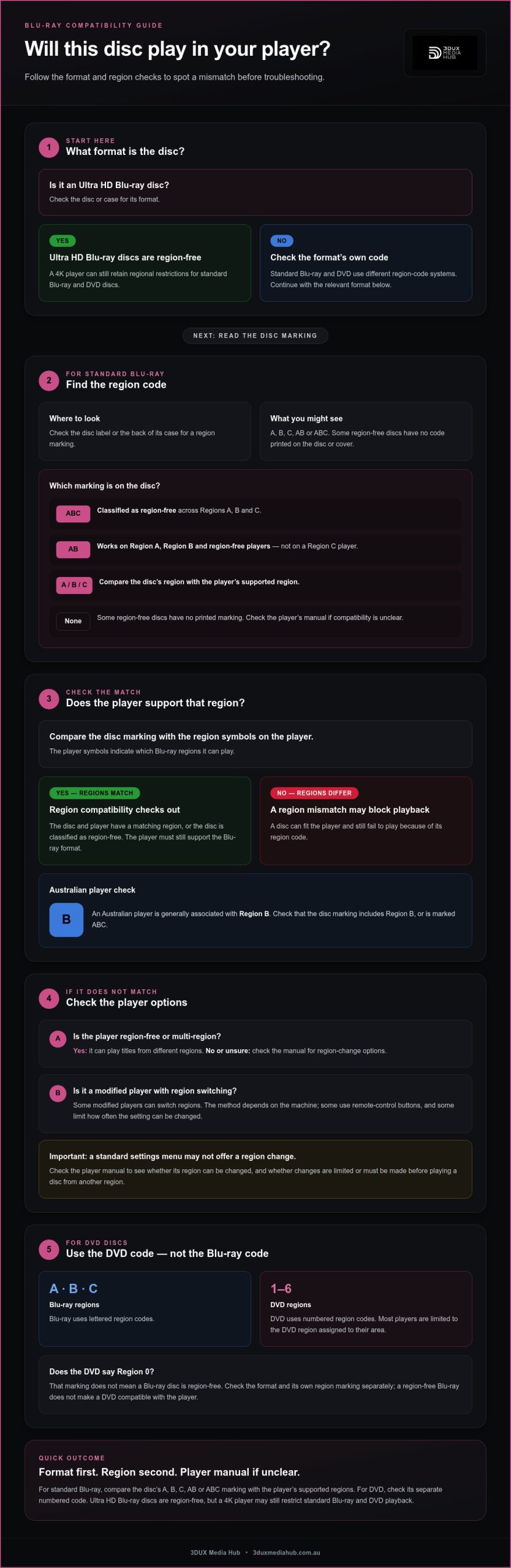
A Blu-ray player’s region isn’t always changeable through its settings. With Blu-ray region coding explained in practical terms, the key rule is clear: players generally play discs from the same region, while some modified players can switch regions and some limit how often you can change the setting. Ultra HD Blu-ray discs are region-free, but a 4K player can still retain regional restrictions for standard Blu-ray and DVD discs.
A disc from overseas may fit your player but still fail to play. Blu-ray region coding can restrict playback, so check both the disc’s region and the player’s compatibility.
This guide to Blu-ray region coding explained covers how Regions A, B and C affect playback, where to find a disc’s code, and what to check when a disc won’t play. It also explains how player region changes work, why DVD codes differ, and how Ultra HD Blu-ray fits in. Use these checks to assess compatibility before buying or playing a disc.
Key Takeaways
- Match a Blu-ray disc’s region marking with the player’s supported regions before playback; Region A, B and C cover different parts of the world.
- Look for a region-free or multi-region player if you need to play discs from different regions.
- Some modified players can switch regions, but the method and any change limits depend on the player.
- Ultra HD Blu-ray discs are region-free, but a 4K player may still enforce regional codes for standard Blu-ray and DVD discs.
- Check the disc or case for its region marking, then consult the player’s manual if playback compatibility is unclear.
What Are Blu-Ray Region Codes and How Do You Get Around Them?
Blu-ray region codes can restrict which players will play a disc. Compatibility depends on the disc’s code and the player’s region settings.
Region-free Blu-ray discs
A region-free Blu-ray disc can play on players from different regions, as long as they support the Blu-ray format. That matters when a disc and player come from different markets.
Some discs show “ABC”, meaning they’re classified as region-free across Regions A, B and C. Others have no region marking on the disc or cover. Some Blu-ray discs are encoded as Region 0, making them suitable for players worldwide. These markings describe the disc’s region compatibility; they don’t replace the need for a compatible player and format.
Region coding helps manage release dates, prices and content by market. It can also restrict consumers and retailers to discs authorised for their location, for example to prevent viewers accessing a film before its local release. A region-free disc avoids that regional restriction, but still needs a compatible Blu-ray player.
For region-coded discs, a region-free or multi-region player can play titles from different regions. Modified players may offer region switching, depending on the machine. Some players also limit how often you can change the region setting.
Blu-ray and DVD code differences
Yes. Blu-ray and DVD region codes use different systems, so a code for one format doesn’t establish compatibility for the other. Blu-ray discs use Regions A, B and C, while DVDs use numbered region codes from 1 through 6.
A DVD marked Region 0 has no region code embedded or is encoded for Regions 1 through 6. That DVD marking doesn’t mean a Blu-ray disc is region-free. Check the format and its own region marking before buying or playing an imported title. A Blu-ray player may play DVDs, but most are limited to the DVD region assigned to their area.
For example, a Blu-ray player that plays a local Region B Blu-ray may reject an imported DVD assigned to another region. Blu-ray and DVD use separate code systems. A region-free Blu-ray disc does not make a DVD compatible with that player. Check the disc’s format and region separately.
Checking a disc’s region code
Check the Blu-ray disc’s label or the back of its case for a region code. Look for A, B, C, or a combination such as AB or ABC. Some region-free discs have no code printed on either surface, so the absence of a marking can be useful information.
Next, compare the disc’s marking with the region symbols on the player. The symbols indicate which Blu-ray regions it can play. An AB disc works on Region A, Region B and region-free players, but not on a Region C player. This check can reveal a region mismatch before you troubleshoot other playback problems.
If the disc and player regions differ, look for “region free” or “multi-region” when choosing a player. Check the manual to see whether its region can be changed. Some modified players switch regions using remote-control buttons; others limit changes or require you to switch before playing a disc from another region. A standard settings menu may not offer this option.
Blu-ray region-code categories and geographic coverage
Blu-ray discs use four region-code categories: A, B, C and A/B/C. The letter indicates the market or markets where a disc is intended to play.
Where the regions apply
Use these broad geographic groupings to interpret the code printed on a disc:
- Region A: North and South America, Japan, South Korea, Taiwan, Hong Kong, Macau and areas of Southeast Asia.
- Region B: Most of Europe, Africa, the Middle East, Australia, New Zealand and associated territories.
- Region C: China, Russia, India and other parts of Asia outside the areas assigned to A or B.
- A/B/C: A disc marked ABC is classified as region-free across the three Blu-ray regions.
These groupings are useful for an initial compatibility check, but regional boundaries do not always follow a simple continent-by-continent pattern. Japan and South Korea, for example, use Region A, while Australia and New Zealand use Region B. Mainland China uses Region C, but Hong Kong and Macau use Region A.
How to read overlapping descriptions
Geographic summaries vary in detail. Region A is often summarised as the Americas and Southeast Asia, while more detailed lists also name Japan, Taiwan, Hong Kong, Macau and Korea. Region B is commonly grouped as Europe, Africa, the Middle East, Australia and New Zealand; some descriptions also specify French territories and Greenland.
That’s why checking a country is more useful than relying on broad labels such as “Asia” or “Europe”. Asia includes locations assigned to different regions, and Europe’s grouping also has exceptions in some summaries. Check the specific country and the disc’s printed code instead of assuming nearby markets share a region.
Using the code when selecting a disc
Start with the location where you’ll play the disc, then compare its assigned region with the disc marking. An Australian player is generally associated with Region B, making a Region B disc the straightforward regional match. A Region A disc from Japan or the United States may have a different regional designation, despite being a Blu-ray.
For a title intended for several markets, look for an ABC marking. It indicates classification across Regions A, B and C, rather than a single region. An AB disc covers Regions A and B but excludes Region C. A buyer in China should therefore distinguish AB from ABC, while a buyer in Australia should check that the marking includes Region B.
Use the region category as a compatibility guide, not a substitute for checking the specific disc and player. The same country-level check can help distinguish Blu-ray coverage from DVD region assignments, which use a separate system.
How disc and player region compatibility works
Playback depends on the Blu-ray disc’s region and the player’s supported region. Matching them is the first compatibility check.
Disc and player compatibility
A Blu-ray player generally plays discs assigned to its own region, unless the disc or player is region-free. This matters for titles from another market: a disc can fit the drive but still fail the regional check.
An AB disc plays on Region A, Region B and region-free players, but not on Region C players. A Region B player, for example, can play an AB disc. A Region C player cannot, even though the disc covers two regions.
Player symbols show which Blu-ray regions the machine supports. Compare them with the disc marking before playback. If they do not match, the manual can explain the player’s regional settings and supported formats.
Compatibility can also involve a player’s country code, not just its region. The United States country code cited for Blu-ray region checks is 21843, hexadecimal 5553. Japan’s cited code is 19024, hexadecimal 4a50. As a result, some American discs may not play on devices or software installed in Japan, and the reverse can also occur.
How Blu-ray region coding works
Blu-ray region coding checks the disc’s regional permissions against the player’s settings. The system uses three regions, labelled A, B and C; ABC discs are classified across all three.
When a disc loads, the player checks whether its region setting is compatible with the disc’s coding. A mismatch can stop playback before the film begins. The country where you bought a title does not establish compatibility on its own; the disc code and player settings matter.
Changing a player’s region depends on the machine. Some modified Blu-ray players switch regions using remote-control buttons. You may need to change the setting before playing a disc from another region, rather than switching during playback.
Some players also limit how many times their region setting can change before locking. The Xbox Series X and PlayStation 5 are examples of Blu-ray players that can’t facilitate multiple regions. A setting change therefore isn’t available on every device.
For a computer or standalone player, consult the device manual for its regional controls. Computer-drive behaviour can vary by device documentation. Separately, a 4K Blu-ray player can retain region coding for standard Blu-ray discs, so its 4K capability alone doesn’t establish compatibility with every standard Blu-ray region.
Ultra HD Blu-ray region coding
Ultra HD Blu-ray separates the 4K disc’s region compatibility from standard Blu-ray and DVD coding. The distinction matters when an imported disc is intended for a 4K player.
Ultra HD Blu-ray discs are region-free
Ultra HD Blu-ray movie discs are region-free, so a compatible player can play them regardless of the country where they were purchased. A 4K title bought overseas doesn’t require a matching Blu-ray region code.
That removes one regional barrier for international releases. For example, a 4K Blu-ray purchased in another market can play on a device that supports Ultra HD Blu-ray, even if the disc’s country of sale differs from the player’s market.
Format support is essential. A standard Blu-ray player that does not support Ultra HD Blu-ray cannot play an Ultra HD disc just because it is region-free. Region coding and the player’s ability to read the format are separate compatibility checks.
A 4K player still has regional limits
A 4K Blu-ray player can retain region coding for standard Blu-ray and DVD discs. Its ability to play region-free Ultra HD titles doesn’t automatically make it multi-region for older formats.
For instance, a 4K player may play an imported Ultra HD Blu-ray while rejecting a standard Blu-ray from another region. The same player may also restrict DVDs according to the DVD region assigned to its market. Each disc format has its own compatibility check.
This is the practical difference to remember when a case contains several formats. Confirm whether the disc is Ultra HD Blu-ray, standard Blu-ray or DVD, then consider the player’s support and applicable regional coding. The “4K” label on a player describes its Ultra HD capability, not universal playback for every disc type.
What to check before playback
Use this short check before buying an imported title or loading it into a 4K player:
- Identify the format printed on the disc or case: Ultra HD Blu-ray, standard Blu-ray or DVD.
- For an Ultra HD Blu-ray, make sure the player supports Ultra HD Blu-ray playback.
- For a standard Blu-ray, compare its A, B or C code with the player’s supported regions.
- For a DVD, check the DVD region separately; the Blu-ray code doesn’t determine DVD compatibility.
This format-by-format check avoids a common assumption: that “4K” means every disc from every region will play. Ultra HD Blu-ray’s region-free status applies to the Ultra HD disc format. Standard Blu-ray and DVD regional restrictions can remain in place on the same 4K player.
If a title will not play, identify its format first rather than assuming every disc is Ultra HD. A mismatch between a standard Blu-ray’s region and the player, for example, is different from trying to play an Ultra HD disc on a device without Ultra HD Blu-ray support.
How does Blu-ray region coding work?
Blu-ray region coding checks a disc’s regional permissions against the player’s settings. The check can involve both the region and a country code, so matching A, B or C alone may not explain every playback result.
Region coding is designed to help manage release dates, prices and content by market. It can restrict buyers to discs authorised for their location and is used in an attempt to prevent early access to films released later locally. In practice, a disc’s intended market can affect playback on a player configured elsewhere.
Country codes add another layer. A Blu-ray region check can use the player’s country code as well as its region. This is why some American discs may not play on devices or software installed in Japan, and vice versa, even though both markets use Region A. The region letter matters, but it may not be the only check.
Video formats can affect playback too
Regional releases can also use different video rates. Film-sourced Blu-ray material is described as running at 24 frames per second. Region A video-sourced material may use 29.97 frames per second or 59.94 interlaced fields per second. Region B video-sourced material may use 25 frames per second or 50 interlaced fields per second.
Those differences matter because a television may not display every video format in the same way. For example, a connected television intended for North American use may not display Region B video-sourced material at 25p or 50i. A disc can therefore present a compatibility issue beyond its region letter. The video source and the display’s supported formats are relevant parts of the playback chain.
Separate the checks when diagnosing a problem. First compare the disc’s region with the player’s supported region. Then consider whether country-code settings or the video format could explain playback or display trouble. A Region B disc on a Region A player points to a regional mismatch; Region B material at 25p on a North American television points to a display-format issue.
What this means for releases
For international distribution, region coding and video format are distinct technical considerations. A release intended for Region A and Region B markets may need appropriate regional permissions and video-version planning. The choices depend on the target markets, disc format and playback equipment expected there.
For a Blu-ray release with multiple market requirements, plan your Blu-ray release with the intended regions and playback formats in view.
3DUX Media Hub: 4K UHD Authoring
3DUX Media Hub provides 4K UHD Authoring for projects being prepared for Ultra HD Blu-ray release. If your release also needs standard Blu-ray or DVD versions, its authoring services can support those formats too.
For international releases, Content Localisation can adapt content for different markets. Video and Audio Encoding supports the preparation of picture and sound assets for delivery. These services are relevant when a project needs format-specific authoring, localised content or encoded media files, rather than help changing a player’s region settings.
Contact 3DUX Media Hub to discuss authoring and encoding for your release.
Plan your next release with confidence
Having Blu-ray region coding explained gives you a clearer basis for planning a release across formats and markets. Align the intended audience, disc format and deliverables before authoring begins, so technical decisions support the release plan.
For projects moving into disc production, 3DUX Media Hub offers 4K UHD Authoring, Blu-ray and DVD Authoring, and Video and Audio Encoding. These services support the preparation of masters and media assets for the formats selected for your release.
Bring your project requirements together, including the formats you’re preparing and the markets you’re targeting. Contact 3DUX Media Hub to discuss the authoring and encoding work for your release. A clear production plan is a practical way to move the project forward.
Frequently Asked Questions
Can you change the region on your Blu-ray player?
Sometimes, but it depends on the player. Some modified Blu-ray players let you switch regions using remote-control buttons, while other models do not support multiple regions. A player may also limit how often its region setting can change before locking. If you are considering a disc from another region, check the manual for the player’s region controls and restrictions before changing settings.
What are Blu-ray regions A, B, and C?
Regions A, B and C are Blu-ray playback categories assigned to discs and players. Region A covers the Americas and several Asian markets; Region B includes Australia, New Zealand, Europe, Africa and the Middle East. Region C covers China, Russia, India and other parts of Asia. These groupings help explain how the categories relate to a disc’s intended playback markets.
Which countries are in Blu-ray Region A?
Region A includes the United States, Canada, Japan, South Korea and Taiwan, as well as North and South America. Hong Kong and Macau also use Region A. This helps when comparing an imported title’s market with the player’s supported region. For example, a disc purchased in Japan is Region A, even though Japan is geographically separate from the Americas.
Are all Blu-ray discs region locked?
No. Blu-ray discs can be region-coded, but some are classified as region-free. An ABC marking means the disc is classified for Regions A, B and C. Some region-free titles have no region code printed on the disc or case. Check the disc and packaging rather than assuming every title has the same restrictions, particularly when choosing an imported release.
How can I tell which Blu-ray region my player supports?
Look for Blu-ray region symbols on the player, packaging or in its documentation. The symbols indicate the regions the device supports; the manual can clarify how its settings work. For a computer drive, consult the documentation for that specific device, as compatibility can vary. A “4K” label alone doesn’t tell you whether standard Blu-ray playback supports multiple regions.
Can a Blu-ray player be made region-free, and how?
Some modified Blu-ray players can play discs from multiple regions or switch regions using remote-control buttons. This depends on the machine, and some players limit changes before locking. A player marketed as “region free” or “multi-region” is designed for discs from different regions. Standard player settings do not provide this capability on every model, so consult the device’s manual.
Are 4K Ultra HD Blu-rays region-free?
Yes. Ultra HD Blu-ray movie discs are region-free, so a compatible Ultra HD Blu-ray player can play them regardless of where the discs were purchased. The important distinction is the disc format: standard Blu-ray and DVD discs can remain region-coded in a 4K player. A 4K player’s format support doesn’t automatically remove those other regional restrictions.
What happens when you play a disc from another Blu-ray region?
Playback can be blocked if the disc’s region is not supported by the player. For example, a Region C player will not play an AB disc. As this guide to Blu-ray region coding explains, the disc and player must be compatible, although region letters may not cover every country-code check. Identify the format and marking, then compare them with the player’s documentation.