Free software doesn’t make a Blu-ray project cost-free. The community-maintained tsMuxeR fork is free to use, while professional authoring and encoding fees depend on the source material, deliverables, menu requirements and technical scope; pricing is provided after a quote request. This Blu-ray authoring price guide separates software costs from the work involved in producing a finished master.
It’s reasonable to want a clear starting point before choosing a workflow. Free tools can suit hands-on projects, while paid authoring software and professional services offer different options depending on your production’s requirements.
Here, you’ll see the free and paid tool options, what affects authoring and encoding costs, and which materials help define a project’s scope. Use this guidance to decide whether to manage the workflow yourself or bring in technical support.
Key Takeaways
- Free authoring software can reduce tool costs, but it doesn’t remove the time and technical work involved in preparing a finished Blu-ray master.
- Define the required deliverables, menus, encoding and localisation early to understand what the project’s scope includes.
- Prepare the source video and audio files, along with clear output requirements, to make a quote more precise.
- Upscaling standard-definition footage doesn’t make it high definition, so the source format matters when planning image quality.
- Licensing, region coding and copy-protection requirements can affect the authoring workflow and overall project scope.
Starting prices for Blu-ray encoding and authoring
There’s no single starting figure for every Blu-ray project. Source quality, encoding needs, menu complexity and deliverables determine the work involved. This Blu-ray authoring price guide helps distinguish software access from the labour required to prepare a finished master.
The exact figure depends on your project requirements and is provided in a quote for your case.
DIY Software and Professional Services
The community-maintained tsMuxeR fork is free to use, making it an option for people handling parts of the workflow themselves. Version 2.7.2 was released in April 2026. Free software doesn’t remove the need to prepare assets, configure the project and test playback. Compare the time and expertise required with the work included in professional authoring and encoding.
Professional services can cover a defined set of technical deliverables, from encoding to an authored master. Check whether the scope includes menu implementation, navigation setup and quality control. A project with approved assets and simple navigation, for example, differs from one that needs new encoding and customised menus. Compare equivalent outputs, not just a tool’s cost with a service quote.
Comparing Quotes and Fees
For U.S. quotes, provide each provider with the same project brief. Include source formats, running time, audio and subtitle versions, menu needs and the final deliverable. Ask for an itemised scope that separates encoding, authoring, menu design and review. This makes differences between quotes easier to identify, even when providers describe similar work using different package labels.
Check how the quote treats revisions, supplied artwork and additional versions. A translated menu may need separate text integration, while an approved design may only need implementation. List each expected output, then compare what is included and excluded. A Blu-ray authoring price guide is most useful when it helps you compare matching scopes, rather than headline figures alone.
Authoring Inclusions and Separate Services
Authoring builds the disc structure and playback navigation from supplied assets. Encoding, menu design, localisation, quality control and master preparation can be scoped as separate tasks. Spell out what you need, such as chapter navigation, a motion menu or a tested master. This keeps technical deliverables distinct from creative work and physical disc production.
File handling can also affect the workflow. FAT32 does not support files larger than 4 GB, so large source assets may need another transfer approach. For disc writing, the product page recommends 4-8x speed rather than maximum speed. Treat these practical details as part of planning. A second use of this Blu-ray authoring price guide can help you build a more complete project checklist before comparing quotes.
What does Blu-ray authoring include, and what services are usually priced separately?
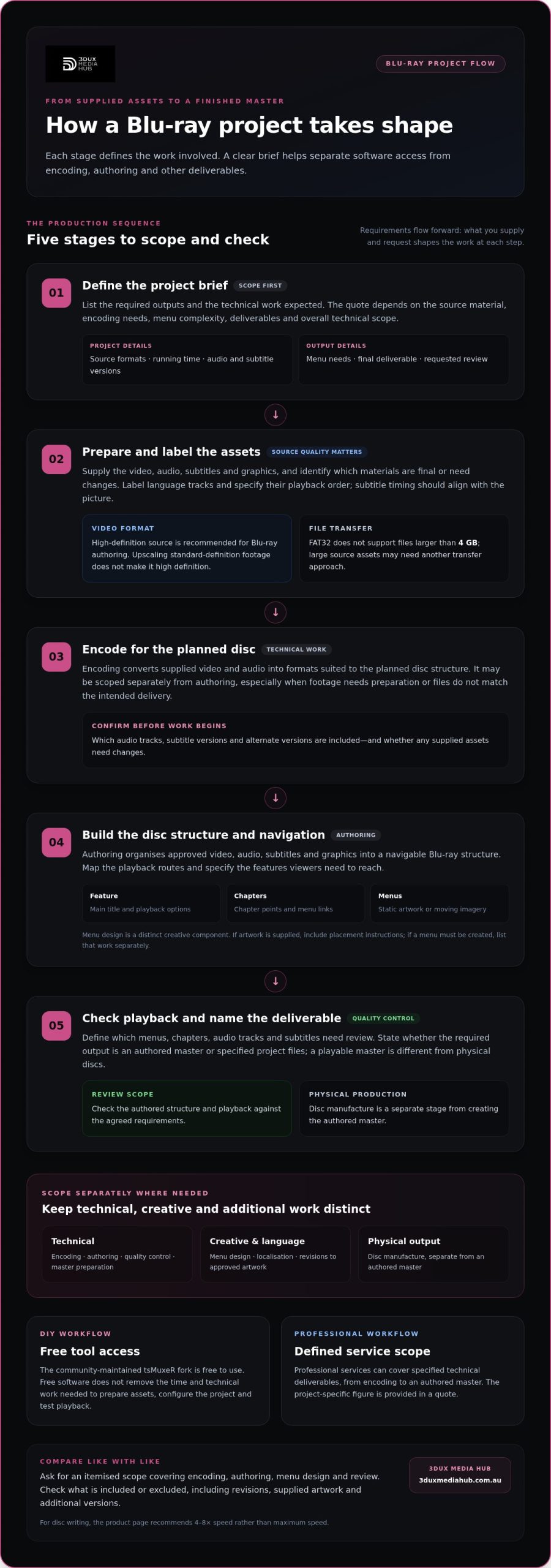
A Blu-ray project moves through distinct stages, from preparing assets to building and checking the disc structure. A clear scope separates authoring from creative, technical and physical deliverables. That distinction helps you see what the quote covers and which items need separate treatment.
Disc structure and navigation
Authoring organises approved video, audio, subtitles and graphics into a navigable Blu-ray structure. Work can include setting up the main feature, chapter points, menu links and playback options. A film with a main menu and chapter selection, for example, needs a different navigation map from a title that plays straight through. Identify each required route in the brief.
Menu design is related to authoring, but it’s a distinct creative component. A static menu uses still artwork, while a motion menu incorporates moving imagery. Both need navigation elements that connect viewers to features and chapters. If you’re supplying finished designs, include the artwork and instructions for button placement. If the menu needs to be created, list that work separately in the project scope.
Encoding and source preparation
Encoding converts supplied video and audio into formats suitable for the planned disc structure. It may be scoped separately from authoring, particularly when footage needs preparation or supplied files don’t match the intended delivery. Disc Makers recommends submitting high-definition video for Blu-ray authoring. Upscaling standard-definition video doesn’t make it high definition, so source resolution matters to the expected picture quality.
Audio tracks, subtitles and alternate versions also affect preparation. For a project with multiple language tracks, provide clear labels and define the playback order. Subtitle files should be in the intended language, with timing aligned to the picture. State whether these assets are final or need changes. This makes it easier to distinguish supplied materials from additional work.
Quality control and final deliverables
Quality control checks the authored structure and playback, rather than changing the creative content by default. The scope can identify which menus, chapters, audio tracks and subtitles need review. It should also name the final deliverable, such as an authored master or specified project files. A request for a playable master differs from a request for physical discs.
Physical disc manufacture is a separate production stage from creating the authored master. So are localisation tasks, such as translating on-screen menu text, and revisions to approved artwork. List each required output and service before work begins. For a coordinated workflow, Blu-ray authoring services can bring the disc structure, menus and encoding requirements into one project scope.
What are the differences in price and features between DIY Blu-ray authoring software and professional services?
DIY authoring trades service fees for software setup, technical labour and responsibility for the final result. Professional services bring skilled work together around the project’s deliverables. The right route depends on your experience, source files, menu requirements and the level of quality control the release needs.
DIY software: lower tool costs, more hands-on work
The community-maintained tsMuxeR fork is free to use, and version 2.7.2 was released in April 2026. A free tool can help with specific authoring tasks, but it doesn’t complete every step automatically. You’ll need to organise assets, set up navigation, prepare the disc structure and test playback. Software cost is only one part of the DIY workload.
Check the workflow’s practical limits before committing. FAT32 does not support files larger than 4 GB, so large source files may need another transfer method or file system. For disc writing, the product page recommends 4-8x speed rather than maximum speed. These details affect handling and testing, not the creative decisions behind menus or chapter navigation.
Professional services: scoped technical delivery
A professional workflow puts encoding, authoring and quality checks in skilled hands. Menu design can also be included in the same production plan. For example, a feature with chapter selection, multiple audio tracks and a motion menu needs coordinated setup and review. The quote reflects the agreed work, condition of the source material and final deliverables, not software access alone.
Compare the service scope with the tasks you’d otherwise manage yourself. Include asset preparation, encoding, menu implementation, navigation checks and master delivery. A project with approved artwork and ready-to-use files differs from one needing additional technical preparation. The more steps you retain in-house, the more time and expertise your team must allocate.
Choose by capability and project risk
DIY can suit a technically confident editor with a simple playback structure and time for testing. Professional authoring is a stronger fit when the release needs coordinated encoding, polished menus or a carefully reviewed master. Either way, define the playback experience first. List the feature, chapter points, audio options and subtitle requirements before selecting software or services.
What technical specifications and files are needed for a Blu-ray authoring quote?
A useful quote starts with a clear inventory of source files and intended outputs. State the picture, sound, language and menu requirements so the scope reflects the actual work.
Video files and picture requirements
Supply the original, highest-quality video available, rather than a compressed preview. According to Disc Makers, Blu-ray authoring should use high-definition video because upscaling standard-definition footage doesn’t make it high definition. Include the video’s resolution, frame rate, running time and file format in your project notes. These details help define encoding needs and clarify expected picture quality.
Identify each video asset by version and purpose. Label the main feature separately from trailers, bonus content or alternate cuts, for example. Note whether picture editing is complete and whether the files have already been encoded. This helps a quote distinguish authoring from video preparation or encoding needed before the assets are ready.
Audio, subtitles and language versions
List every audio track, its language and intended playback order. A feature might include an original-language mix and a commentary track, for example. State whether each track is final and provide the corresponding file or source asset. This makes clear how viewers should select audio through the disc menus.
For subtitles, identify each language and supply the timed subtitle files or relevant text assets. Indicate whether timing is final and whether translated text needs localisation. A project with several language versions involves different preparation from a single-language release. Clear labels help map supplied materials to the intended viewing options.
Menus, chapters and navigation
Describe the required menu structure in plain terms. Specify whether viewers need a main menu, chapter selection, bonus-feature access or direct playback. A chapter list should identify the intended points using timecodes or clear scene descriptions. Include approved artwork, logos and button labels when available.
Also state whether the menu should be static or use motion. Provide relevant design files and explain which assets are approved. If menu text appears in multiple languages, list each version. These decisions affect the authoring setup and help define whether menu design or localisation is part of the work.
Delivery details for the quote
Finish the brief by naming the required deliverable, such as an authored master, and listing quality-control expectations. State whether source files are final, how they’ll be transferred and who supplies artwork, subtitles and audio. Don’t send only a trailer or sample when the quote covers a full feature. A complete inventory gives the quote a defined technical scope.
Before sending files, organise them into labelled folders for video, audio, subtitles and artwork. Add a document matching each filename to its role, language and version. This simple step reduces asset confusion and supports accurate planning for the Blu-ray authoring workflow.
What licensing, region-code, and Blu-ray Disc Association requirements can affect authoring costs
Licensing, region settings and Blu-ray Disc Association (BDA) specifications can change a project’s technical scope. Their effect depends on the release plan, supplied rights information and required disc behaviour. Set out the intended markets and playback expectations before authoring begins. These details help distinguish creative work from compliance-related preparation and identify requirements that could affect the workflow.
Licensing and copy protection
Rights information can determine whether a title needs copy protection and which arrangements apply. Blu-ray titles were once described as incurring copy-protection costs of thousands of dollars per title. That historical figure is not a current authoring quote. Treat protection as a separate scope item and identify the rights holder’s requirements before work starts.
For a quote, document the title, intended release and any supplied instructions about protection. A rights holder may provide technical delivery requirements alongside approved assets, for example. Keep those instructions with the project brief. If protection is part of the delivery, list it separately from video encoding, menu design and disc authoring so the quote distinguishes each task.
Region settings and intended markets
Region-code decisions relate to where a title is intended to play. Tell the authoring team which markets the release targets and whether it needs region-specific versions. One planned release and several market versions can require different project setups. Don’t assume a region setting also settles distribution rights; those are separate considerations.
Include market and playback instructions in writing, then match them to each version’s assets. A release with translated menus, for example, may need separate text and navigation review for each language version. Clear version labels help prevent assets or settings from being assigned to the wrong deliverable. The quote can then account for the actual versions required.
BDA specifications and authoring scope
BDA requirements matter because the authored structure must match the intended Blu-ray format and playback experience. Identify the requested format, disc structure and deliverables in the brief. Don’t assume a generic authoring workflow covers every title. A feature with menus, subtitles and multiple audio tracks needs its elements organised and tested against the agreed specification.
Before seeking a quote, gather the rights instructions, target markets, region expectations and technical delivery notes. Keep each item linked to the relevant title or version. Separate confirmed requirements from creative preferences, such as menu style. This gives the authoring scope a practical basis and limits confusion between licensing, technical compliance and design tasks. Discuss Blu-ray authoring requirements for a project with defined market, licensing or specification needs.
Keep the requested format, disc structure and deliverables together with rights, market and playback instructions so the quote reflects the full scope. The authoring and replication of optical discs was described as involving upfront costs of thousands of dollars. Treat that figure as a broad cost context, not a project-specific estimate, and ask providers to separate authoring tasks from replication in their quote.
3DUX Media Hub: 4K UHD Authoring
3DUX Media Hub provides 4K UHD Authoring for projects that need a professionally prepared ultra-high-definition master. Turn to this service when your source assets and delivery requirements call for specialist authoring rather than a DIY workflow. The project scope can also include Blu-ray and DVD Authoring, Video and Audio Encoding, or Content Localisation, depending on the required outputs.
To make the next step practical, organise your source files and note the intended formats, language versions and deliverables. That gives the project a clear technical starting point for discussing the work and preparing a quote. Whether you need a UHD master or an authored Blu-ray release, the workflow can be scoped around the materials and requirements you provide.
Contact 3DUX Media Hub to discuss your authoring requirements.
Set your project up for its next stage
Use this Blu-ray authoring price guide to turn your requirements into a clear production brief. The next useful step is deciding what you want the finished master to do: deliver a 4K UHD presentation, support a Blu-ray or DVD release, or prepare video and audio for authoring. The exact service price depends on the project’s assets, technical scope and deliverables, with the figure provided in a quote for your case.
3DUX Media Hub offers 4K UHD Authoring, Blu-ray and DVD Authoring, and Video and Audio Encoding. Bring your project requirements together, including source formats, languages and intended outputs. A focused brief helps align the technical work with the release you’re planning, whether you’re moving from a DIY workflow or scoping a new title.
Contact 3DUX Media Hub to discuss your authoring project and its requirements. A defined scope is a practical first step towards a master prepared for its intended release.
Frequently Asked Questions
How much does professional Blu-ray authoring cost in the United States?
Professional Blu-ray authoring costs depend on the project scope, source assets and required deliverables. A simple title with prepared materials needs different work from a release requiring encoding, menu creation, localisation or extra quality checks. The exact figure is provided in a quote for your case. To help define the scope, specify the feature length, audio and subtitle versions, menu requirements, target format and final master deliverable.
What are typical Blu-ray authoring prices for simple, standard, and complex projects?
There isn’t a reliable price tier that applies uniformly to simple, standard and complex projects. A simple project may use approved assets and straightforward navigation; complexity increases with additional versions, bespoke menu requirements, encoding or localisation. Compare quotes against the same deliverables and identify what each includes. For example, clarify whether menu design, quality control and master preparation are included in the scope or treated as separate tasks.