One master rarely fits every destination. Broadcast delivery asset preparation aligns audio, picture, metadata and supporting files with the needs of live, on-demand and personalised delivery. For a U.S. broadcast example, the target is -24 LKFS under the ATSC A/85 loudness standard; other platform requirements vary with their ingest workflows.
Broadcast delivery asset preparation involves more than exporting the right file. A delivery package may need the correct format and channel mapping, accurate metadata, captions, textless elements and accompanying graphics. Latency and transcoding matter too, especially when the same programme must support a live feed and later on-demand use.
This guide explains how to prepare assets for different delivery paths, what to consider when creating platform versions, and how requirements shape quality control and technical workflows. It covers audio compliance, formats, metadata and supporting materials, so each asset is ready for its destination while maintaining a consistent audience experience.
Key Takeaways
- Map audio channels and loudness targets to each destination’s delivery specification before creating final masters.
- Match picture formats and file conversions to the receiving platform, then run quality checks on every deliverable.
- Build metadata, captions and rights documentation into the workflow so assets are ready for downstream use.
- Prepare distinct versions where live, on-demand and personalised distribution have different technical or supporting-asset needs.
- Coordinate creative and engineering teams early to manage latency, transcoding and consistent playback across delivery paths.
Audio loudness compliance and channel mapping
U.S. broadcasters specify delivery formats individually; picture examples include 1080i, 1080p and 4K. Caption formats also depend on each broadcaster’s delivery specification, alongside requirements for audio, channel layout and the master file.
Audio loudness requirements
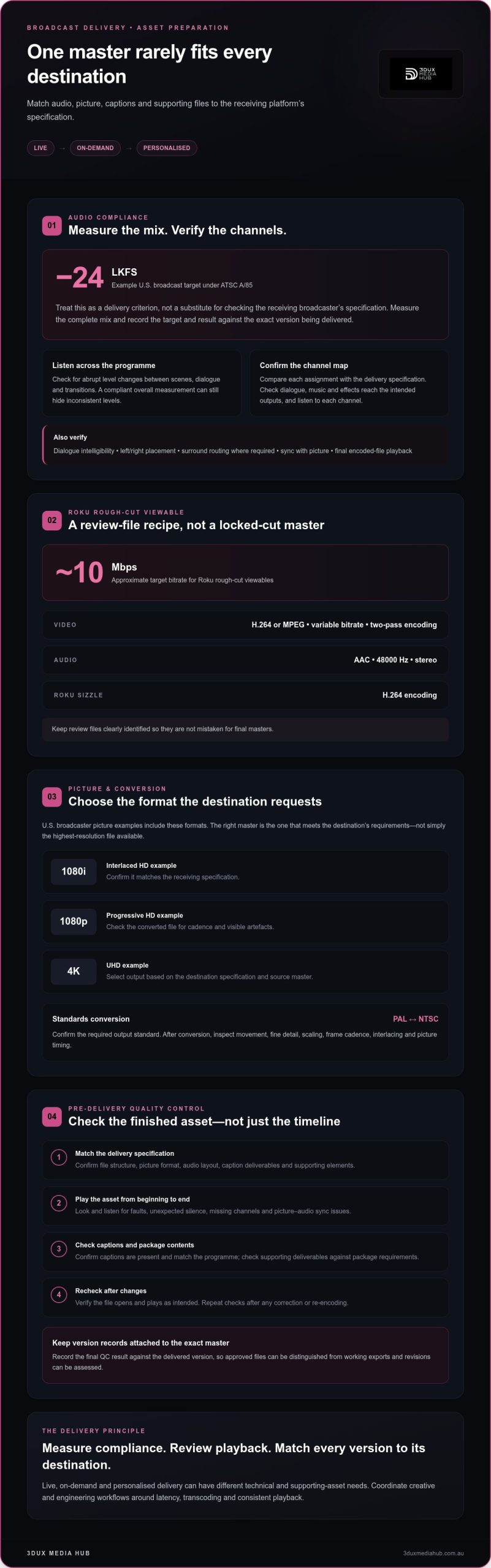
For U.S. broadcast, -24 LKFS is an example target under the ATSC A/85 audio loudness standard. Treat it as a delivery criterion, not a substitute for measuring the programme and matching the receiving broadcaster’s specification.
Measure the complete mix, then listen for abrupt changes between scenes, dialogue and transitions. A compliant overall measurement can still hide inconsistent levels within the programme. Check the final encoded file as well, because processing or conversion can change how the audio sounds.
Record the applicable target and measurement result against the version being delivered. This gives the team a clear reference when revisions are made and helps prevent an earlier mix from being mistaken for the approved master.
Channel mapping and audio stems
Channel mapping specifies which audio signal is assigned to each channel in the delivered file. Compare the assignments with the broadcaster’s specification, then confirm dialogue, music and effects reach the intended outputs. An error can send a valid mix to the wrong channel or leave an expected channel empty.
Separate audio stems let post-production teams review or adjust distinct elements. Label each stem clearly and align its start point with the picture master. If a Pro Tools session accompanies delivery, organise track names and session media so the intended mix and its components are easy to identify.
Before export, listen to each channel. Check dialogue intelligibility, left and right placement, surround routing where required, and sync with picture. Then compare the exported file with the session output. This catches routing mistakes that a loudness measurement alone cannot reveal.
Master specifications and quality control
Video and audio master specifications define the file structure and presentation required for ingest. Confirm the requested picture format, audio layout, caption deliverables and supporting elements against the broadcaster’s specification. The right master is the one that meets the destination’s requirements, not simply the highest-resolution file available.
Pre-delivery quality control should examine the finished asset, not just the project timeline. Check playback from beginning to end for picture or audio faults, sync issues, missing channels and unexpected silence. Confirm captions are present and match the programme, then verify that the file opens and plays as intended.
- Match the exported picture and audio to the delivery specification.
- Review channel assignments, dialogue clarity and picture-audio sync.
- Check captions and supporting deliverables against the package requirements.
- Repeat checks after any correction or re-encoding.
Link the final QC result to the exact master version. This record helps distinguish approved files from working exports and makes revisions easier to assess. A consistent workflow combines technical measurement with playback review, considering both measurable compliance and the viewing experience before delivery.
Broadcast file preparation and format conversion
A delivery file must meet the receiving network’s specification, including picture, audio and timed-text requirements. Create separate versions when rough-cut review and locked-cut delivery have different requirements.
Network formats and split tracks
Network-specific formats define how each asset must be packaged for ingest. Check the requested file container, picture encoding, audio layout and caption deliverables together. A file may play correctly yet fail ingest if its tracks or timed text do not match the network’s expected structure.
Prepare split tracks as separate, clearly labelled elements when the specification requires them. Use the required timed-text format for captions and label each language accurately, such as English or Spanish. Keep language, track labels and programme version consistent throughout the delivery package. This reduces ambiguity during review or localisation.
Rough-cut viewables and locked-cut masters have different purposes. Roku rough-cut viewables should target approximately 10mbps, using H.264 or MPEG video with variable bitrate, two-pass encoding. The audio should be AAC at 48000 Hz in stereo. Roku sizzle deliverables should use H.264 encoding. Keep review files clearly identified so they aren’t mistaken for final masters.
HD and UHD format conversion
HD and UHD delivery can involve formats such as 1080i, 1080p and 4K. Select the output based on the receiving specification and the source master, then review the converted file for scaling, frame cadence, interlacing and visible artefacts. Conversion should preserve the intended presentation rather than simply change the file label.
Regional standards can affect conversion workflows. PAL and NTSC are broadcast standards used in standards conversion, so confirm which output the destination requires. Conversion may change picture timing or scanning characteristics, so inspect movement and fine detail after processing.
For a locked cut, treat the approved picture as the reference for every version. Check duration, picture start and end points, audio synchronisation and caption timing after conversion. If the edit changes, regenerate and review dependent files against the revised master. Standards conversion can support delivery workflows that require output for different broadcast standards.
Keep a version record identifying the cut, language and destination for each file. For example, distinguish a rough-cut review export from a locked English master and its localised versions. Clear naming and tracking help teams send the right asset to each network and reduce confusion at handover.
Latency, transcoding, metadata, and platform constraints
Each distribution path processes media differently. A live streaming feed prioritises timely delivery, while on-demand services can prepare files before playback. Transcoding creates versions suited to platform requirements, but each conversion adds processing and can affect picture, sound or synchronisation. Map the workflow from master file to destination, including where metadata is added and where quality checks take place.
Latency is the delay between a source event and its appearance for viewers. In a live programme, encoding, transmission and platform processing all contribute. Trace each stage to identify where delays occur, then balance delivery speed with stable playback. On-demand delivery follows a different path: files can be transcoded and checked before release rather than processed in real time.
Metadata provides the descriptive information that helps a programme appear correctly in a platform’s catalogue and viewer dashboard. Use structured fields and keep them consistent across the master, delivery package and platform record. Align the programme title, episode identification, synopsis and language labels, then confirm each value belongs to the correct version.
Metadata enrichment adds useful detail for discovery and downstream handling. A localised version, for example, needs language information that matches its audio and timed-text assets. Keep descriptions and identifiers aligned across versions. Incomplete metadata, or metadata attached to the wrong file, can make a technically sound programme difficult to identify or display correctly.
Rights information also travels through the workflow. Music cue sheets document each song’s title, composer, duration and rights owner. Stock and archival logs record the source, licence terms and duration of third-party footage. Link these records to the relevant programme and version so downstream teams can understand the material’s rights context before reuse.
Advertising adds another metadata dependency. Centralised infrastructure can support real-time targeting of tailored advertising or editorial variations to specific audience segments. Teams need to connect each asset to the correct audience rule without confusing versions. A live stream, catch-up file and personalised variation may share a programme master, but each still needs clear identification.
- Map each platform’s ingest and transcoding steps from source master to playback.
- Keep programme metadata consistent across files, versions and catalogue records.
- Link cue sheets and footage logs to the assets they describe.
- Test the delivered version, metadata and playback path together.
Production and distribution teams should coordinate metadata, rights and downstream workflows before adapting content for local audiences. Agree who supplies each field, how changes are passed on, and which version is current. A clear handover helps prevent scheduling decisions from relying on stale metadata or an outdated asset.
Preparing versions for multiple distribution platforms
Each destination may need a separate version, even when all versions start from one approved master. A clear packaging plan links the correct file and supporting assets to each distribution path.
Textless masters for international distribution
A textless master removes on-screen graphics, lower thirds and subtitles that would otherwise remain fixed in the picture. International distributors can use it to add localised text without obscuring English-language titles or duplicating graphics.
Prepare the textless master alongside the version containing the original graphics. Keep picture edits aligned and identify both versions clearly. Check that every text element intended for replacement has been removed while essential visual content remains. A textless master is especially useful when one programme needs multiple language versions.
Platform-specific delivery requirements
How do broadcast delivery requirements differ between networks, streaming platforms and local stations? They cover broadly similar areas, but details vary according to each organisation’s ingest workflow. A network may specify particular delivery files and supporting elements; a streaming platform may tailor requirements to its processing; local stations may have their own packaging needs.
Build a destination matrix before creating versions. Record each recipient’s required master, audio and caption assets, metadata, textless elements and delivery method. Package files separately, using names that identify the programme, language and destination. This prevents a file prepared for one platform from being sent as though it suits every recipient.
Hybrid delivery can combine a linear feed through traditional channels with availability on streaming platforms, catch-up services or companion apps. This supports more than one viewing path, but each path still needs assets that meet its ingest requirements.
Delivery errors, missed specifications and deadlines
What are common broadcast asset delivery errors, and how can they be fixed? Frequent problems include the wrong file version, missing supporting assets, mismatched captions or incorrect packaging. Compare the delivery with the recipient’s specification, correct the affected item, then repeat quality control on the revised package.
What are the risks of missing broadcast delivery specifications or deadlines? A file that fails ingest may need correction and resubmission, potentially delaying its planned use. Missing assets can also leave downstream teams without what they need for localisation or scheduling. Early checks give the team time to resolve issues before handover.
Use a final handover checklist for every destination:
- Match each file to the correct recipient and version.
- Include required captions, textless elements and supporting assets.
- Confirm packaging and metadata identify the intended programme and language.
- Complete quality control after corrections, not just before them.
Hybrid delivery can also help maintain service continuity if one distribution path encounters problems. Preparing a linear feed and corresponding IP versions as distinct deliverables helps teams switch paths or maintain access another way. Keep versions and supporting files organised together, with clear destination labels. This makes handover easier to follow and helps prevent a last-minute substitution from sending the wrong asset onward.
Preparing assets for live, on-demand, and personalized delivery
A single programme may need to support live distribution, on-demand reuse, personalised advertising and short-form viewing. Plan for these pathways during production, not just when the final master is ready. Create distinct versions and supporting assets based on how each destination will ingest and use them.
Live delivery depends on a coordinated path from programme output through encoding and distribution. Align the live feed, graphics and metadata, then test how they appear to viewers. A delay or mismatch at one stage can affect the experience. Map each handover and decide which version will serve as the reference for later reuse.
On-demand reuse gives teams time to prepare and review assets before release. Start with the approved programme master, then create the versions required for each platform and audience. Keep supporting materials with their matching version, including descriptions and localised text. This helps prevent a later ingest from pairing the programme with outdated or mismatched information.
Personalised delivery can use centralised infrastructure to target tailored advertising or editorial variations to audience segments in real time. This workflow depends on identifying each asset and its intended use. Organise variation files clearly and link them to the main programme. Test each route so editorial changes or advertisements appear in the right context.
Supporting assets are part of the delivery package, not optional extras. Production delivery requires supporting text, graphics, posters, trailers and featurettes. Build a package checklist that assigns each item to a programme version and destination. For international use, match localised graphics and text to the relevant language version while keeping the underlying programme identifiable.
Include technical preparation in the production plan. Productions are advised to allow an additional one or two weeks after picture lock for technical preparations. Use this time to assemble versions, check supporting files, test ingest and resolve mismatches before delivery. Early coordination between production, creative and engineering teams makes workflow changes easier to track.
Consistent audience experiences across linear and IP delivery require ongoing optimisation, testing and coordination between creative and engineering teams. Test the complete path, not just an individual file. Review how each version appears on its intended service, and confirm supporting assets remain aligned after revisions. This provides a practical basis for adapting workflows as audience behaviour and delivery models evolve.
For projects requiring audience-ready language versions, coordinate content localisation as part of the asset workflow.
3DUX Media Hub: 4K UHD Authoring
3DUX Media Hub prepares 4K UHD masters for projects that need a professionally authored delivery asset. Its 4K UHD Authoring service fits when a finished programme needs technical preparation for that format, while Video and Audio Encoding supports delivery across file formats from SD to 4K.
For projects targeting physical disc formats, Blu-ray and DVD Authoring can prepare those masters. Content Localisation supports adapting content for different audiences. These services address the asset preparation stage, not live streaming distribution.
Share your project requirements with 3DUX Media Hub, or visit 3duxmediahub.com.au to discuss the next step.
Plan the next delivery workflow
Make broadcast delivery asset preparation an early production decision, not a final export task. Start the next project by mapping its destinations, versions and handovers. That gives creative and technical teams a shared plan before assets move into downstream workflows.
When authored masters or encoded files are part of your delivery needs, 3DUX Media Hub offers 4K UHD Authoring, Blu-ray and DVD Authoring, and Video and Audio Encoding. These services support technical asset preparation, rather than replacing a broadcaster’s or platform’s own distribution requirements.
Bring your project requirements together and identify the deliverables that need authoring or encoding. Contact 3DUX Media Hub to discuss your project and its next steps. A clear workflow starts with knowing where each asset needs to go.
Frequently Asked Questions
What is broadcast delivery asset preparation?
Broadcast delivery asset preparation is the process of making programme files and supporting materials ready for a broadcaster or platform to receive and use. It connects the finished programme with its destination’s technical and operational needs. For example, a live programme may need a different delivery path from an episode prepared for on-demand viewing. The work includes creating required versions and making sure each package is identifiable and ready for ingest.
What files and technical specifications are required for broadcast delivery assets?
The required package depends on the destination’s delivery specification. It may include a picture master, audio tracks, captions, metadata, textless elements and supporting materials such as posters or trailers. Specifications define file formats, track layouts and other ingest details. For a localised programme, organise the language assets as a matching set so captions, audio and descriptive information correspond to the same version.
What are the steps in preparing video assets for broadcast delivery?
Start by identifying each destination and recording its requirements. Select the approved picture master, then create the required output versions and supporting assets. Check that captions, audio and metadata match each version, and include rights records with relevant material. Run technical and playback checks on the final exports, correct faults, then package and label approved files for handover. Keep a version record to distinguish final assets from working files.
What are common broadcast delivery specifications for resolution, frame rate, loudness, and colour?
Common picture formats include 1080i, 1080p and 4K, while frame rate and colour settings depend on the recipient’s specification. For U.S. broadcast, -24 LKFS is an example loudness target under ATSC A/85. Treat these as destination requirements rather than universal settings. Before export, compare the requested picture, frame rate, colour and audio criteria with the master, then review the finished file for playback issues.
How are broadcast delivery assets packaged, named, and transferred?
Package files so each programme version and its supporting assets are easy to identify together. Use consistent names that distinguish the programme, cut, language and destination, and include a manifest describing the package contents. For example, label a localised episode separately from its original-language master. Transfer the package using the recipient’s designated delivery method, then record the handover and the exact files sent.
What copyright, clearance, and compliance requirements apply to broadcast delivery assets?
Keep rights documentation with the programme materials. Productions should obtain signed appearance releases from talent and interviewees. Music cue sheets document each song’s title, composer, duration and rights owner; stock and archival logs record footage sources, licence terms and duration. These records help downstream teams understand the material’s rights context. Also check technical compliance against the recipient’s specification, including required captions, audio and supporting files.