
What if the most expensive part of your production is the one thing that causes a global distributor to reject your master? With the 4K Blu-ray market seeing renewed sales growth as of 2026, the technical precision of your interactive Blu-ray menu design is now the primary factor separating premium releases from amateur efforts. You understand that collectors demand a seamless experience, yet the fear of “laggy” Java-based interfaces or navigation errors remains a persistent headache for distributors aiming for a global scale.
It’s time to eliminate the guesswork and ensure your physical media release stands out. This guide will help you master the technical and creative requirements of professional menu design. We’ll provide a clear framework for briefing motion graphics artists and explain how to organise assets for both 4K UHD and standard Blu-ray. You will gain a firm grasp of the BD-J versus HDMV debate and learn how to optimise your menus to pass every rigorous QC check. Let’s look at the standards required to deliver a world-class viewer experience.
Key Takeaways
- Understand why high-end interactive Blu-ray menu design remains the gold standard for boutique and studio releases in 2026.
- Master the technical requirements for 4K UHD HDR asset preparation to ensure broadcast-grade quality for every motion menu.
- Prioritise navigation logic and remote control ergonomics to eliminate user frustration and ensure player compatibility.
- Implement a structured authoring workflow that moves seamlessly from UI prototyping to final mastering and technical QC.
- Optimise your release for global markets by accounting for text expansion and multi-page localisation requirements.
Defining Interactive Blu-ray Menu Design: The Gateway to Premium Physical Media
Interactive Blu-ray menu design is the functional interface layer that enables users to navigate content using a standard remote control. In 2026, as the 4K UHD market experiences a significant resurgence, these menus have transitioned from simple utility to a vital component of the premium physical media experience. For boutique labels and major studios alike, a sophisticated menu is no longer optional. It is the first point of contact between the viewer and the film, establishing a professional tone before the first frame of the feature even appears.
A poorly executed menu suggests a low-budget production; it erodes consumer confidence immediately. Conversely, a high-quality interface signals that the release is a definitive, curated edition. Technically, interactive Blu-ray menu design represents the precise intersection of UI graphics and disc-based programming, requiring a deep understanding of how visual assets interact with the underlying player software.
The Difference Between HDMV and BD-J
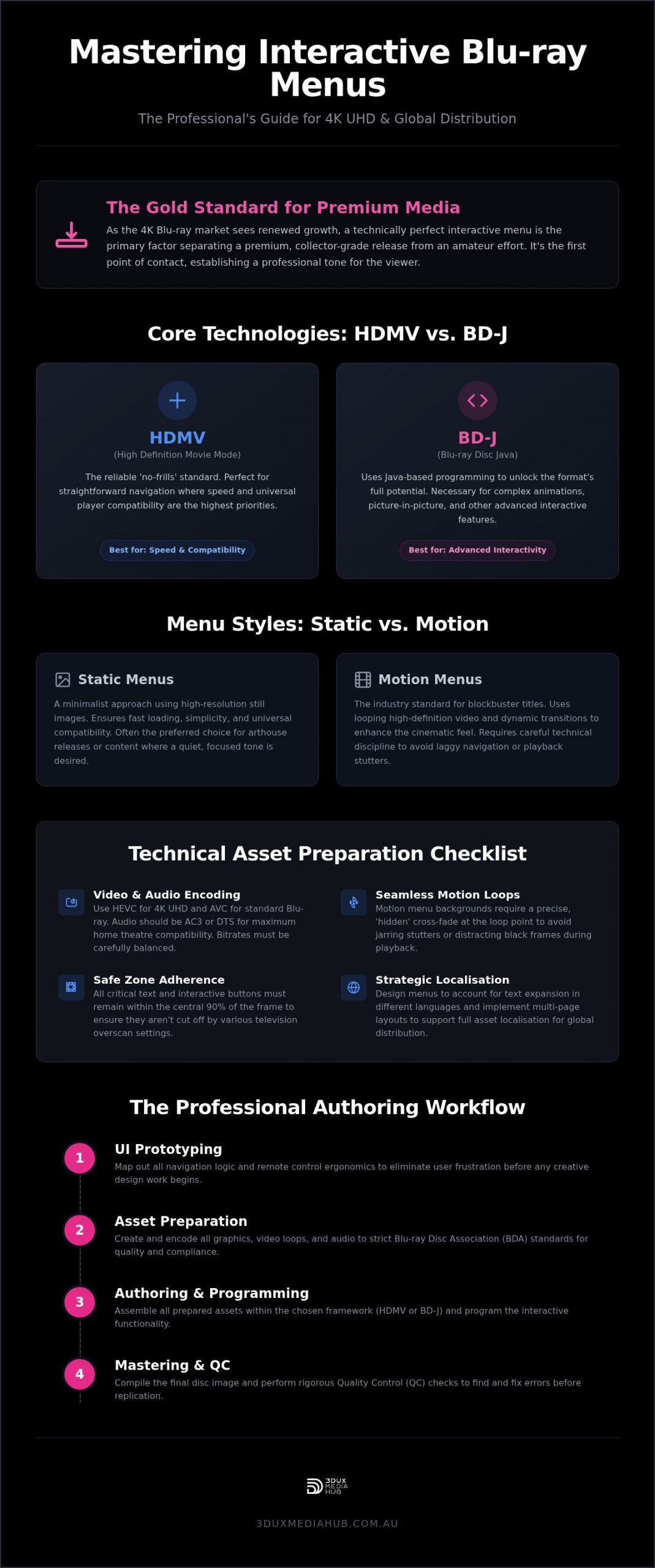
Distributors must choose between two primary technical architectures to drive their discs. HDMV (High Definition Movie Mode) is the reliable, “no-frills” standard. It is perfect for straightforward navigation where speed and universal player compatibility are the priorities. For projects requiring complex animations, picture-in-picture (PiP) features, or advanced interactivity, BD-J (Blu-ray Disc Java) is the necessary choice. This architecture uses Java-based programming to unlock the full potential of the format. Understanding the Blu-ray disc authoring process is essential when deciding which framework suits your project’s technical requirements and budget constraints.
Static vs. Motion Menus: Striking the Right Balance
The choice between a static or motion-based approach depends on the film’s genre and the intended brand identity. While static menu design for Blu-ray is often the preferred choice for minimalist arthouse releases, motion menus are the industry standard for blockbuster titles. Motion menus use high-definition video loops and dynamic transitions to enhance the cinematic feel. However, technical discipline is required. Managing video bitrates within the menu layer is critical to avoid playback stutters or “laggy” navigation. Every frame of video used in a motion menu consumes bandwidth that must be carefully balanced against the primary feature content to ensure a seamless viewer experience.
Motion Menu Design Services: Technical Frameworks and High-Efficiency Asset Prep
Professional motion menu design services ensure that the interactive layer of a disc doesn’t just look cinematic; it must function within the rigid hardware limits of physical players. While many designers focus solely on aesthetics, a technical expert prioritises the stability of the master. High-efficiency asset preparation is the only way to avoid the sluggish navigation that often plagues poorly authored discs. Every asset, from the background video to the button overlays, must be prepared according to the strict standards established by the Blu-ray Disc Association (BDA).
When working with 4K UHD HDR assets, the technical overhead increases significantly compared to standard HD projects. Motion menus require seamless, “hidden” loops in the background video. This involves a precise cross-fade at the loop point to avoid a jarring black frame or reset stutter. Additionally, designers must adhere to the “Safe Zone” rule. All critical text and interactive buttons must remain within the central 90% of the frame to ensure they aren’t cut off by various television overscan settings. Distributors seeking to mitigate these technical risks often partner with experts for motion menu design to guarantee global compliance.
Video and Audio Encoding for Menus
Encoding is a balancing act between visual fidelity and buffer management. For 4K UHD menus, HEVC (High Efficiency Video Coding) is the standard, while AVC is typically used for standard Blu-ray. The bitrate must be high enough to maintain detail but low enough to stay within the disc’s data-transfer limits. Audio background loops should be encoded as AC3 or DTS. These formats offer maximum compatibility across all home theatre systems. Managing the “Seamless Branching” effect is also vital. This ensures that when a user selects “Play Movie,” the transition from the menu to the feature is instantaneous and free of playback pauses. For projects that also require delivery to digital platforms, pairing your disc authoring with professional video encoding services for global distribution ensures your master assets maintain integrity across every delivery format.
Graphic Asset Optimisation
Graphic assets require meticulous preparation before they enter the authoring suite. Resolution standards are non-negotiable; you must design specifically for 3840×2160 (UHD) or 1920×1080 (HD) to avoid scaling artefacts. Colour space management is equally critical. HDR releases must be mastered in Rec.2020, while standard Blu-rays require Rec.709. Button overlays must include precise alpha channels. These transparency layers allow for clean “hit state” transitions, ensuring that when a viewer highlights a menu item, the graphic appears sharp and responsive. This level of detail is what defines a truly professional interactive Blu-ray menu design.
Optimising the User Experience: Why Navigation Logic Trumps Aesthetics
Aesthetics often distract from the primary purpose of a disc interface. While high-end graphics sell the “premium” feel discussed in previous sections, navigation logic is what prevents user frustration. Professional interactive Blu-ray menu design must prioritise an intuitive information hierarchy: Play, Chapters, Audio, Subtitles, and Special Features. This structure isn’t just about placement; it’s about remote control ergonomics. Unlike a web browser, a Blu-ray player relies on a directional pad. Every button movement must be predictable and follow a logical grid.
The “3-click rule” is a standard benchmark for quality authoring. A user should be able to access any major feature or bonus content within three button presses from the main menu. Speed is the goal. To ensure a responsive feel, button hit states must provide immediate visual feedback through distinct normal, selected, and activated graphic layers. If a viewer highlights a button and the change isn’t obvious, they’ll likely press it twice, causing navigation errors or accidental skips. This technical precision ensures the disc feels like a high-end product rather than a budget release.
Dealing with Menu Lag and Load Times
BD-J (Java) menus offer immense power but come with a “boot time” penalty. Poorly optimised Java stacks lead to significant delays during the “First Play” sequence. Distributors must balance the inclusion of studio logos and legal disclaimers with the user’s desire to reach the menu quickly. Efficient authoring uses the disc’s persistent storage for caching strategies. By storing menu states or assets in the player’s local memory, we speed up navigation for repeat visits. This makes the interface feel snappy rather than sluggish, even on older hardware.
Accessibility and Legibility
Designing for a “10-foot UI” requires a specific approach to legibility. Font selection is critical. Thin, serif fonts often shimmer or disappear on lower-resolution displays or when viewed from across a lounge room. Sans-serif typefaces with robust weights are the industry standard for a reason. Contrast ratios also demand attention. Menus must remain readable in both pitch-black home theatres and sunlit living areas. Subtitle selection logic should be equally transparent. It’s essential that non-English speakers can find their specific language settings without navigating through a maze of English-only sub-menus.
The Professional Authoring Workflow: Moving from Creative Concept to Final Master
Moving from a creative concept to a retail-ready master requires a multi-stage workflow that leaves no room for technical error. Professional interactive Blu-ray menu design is not a standalone task. It is a deeply integrated part of the disc assembly process. To ensure a stable and compliant release, authoring houses follow a modular approach that verifies every asset before it reaches the multiplexer. Precision at this stage is what prevents costly recalls during the replication phase.
- Phase 1: Creative Brief and Asset Gathering. We collect all source video, audio stems, and layered graphic files. This stage establishes the visual language and ensures all assets meet the required bitrates for the target format.
- Phase 2: UI/UX Prototyping and Navigation Mapping. This involves creating a logic flow that dictates how the remote control interacts with the menu. We define every “button link” to prevent navigation dead ends.
- Phase 3: Encoding and Muxing. This is the technical heavy lifting. We encode the menu assets and combine them with the primary feature data into a unified disc structure.
- Phase 4: Rigorous Quality Control (QC). The final master undergoes testing on a wide range of hardware players to ensure universal compatibility.
The Role of the Authoring House
Relying on DIY tools is a significant risk for commercial distributors aiming for a global market. Engaging professional 4K UHD authoring services is essential for achieving the stability required for high-volume replication. An authoring house manages the complex integration of the interactive Blu-ray menu design with the final HEVC video stream. This process culminates in the creation of a standardised Disc Image, typically a BDCMF or DDP file. These are the only formats accepted by professional replication facilities. For high-value assets, you need a partner who acts as a “safe pair of hands” throughout this technical transition.
Quality Control (QC) and Compliance
Compliance testing is where many independent releases fail. We focus heavily on “Dead End” testing to ensure a user can never get stuck in a sub-menu or special feature without a clear path back to the main interface. Player compatibility remains a major hurdle. A menu that functions perfectly on a modern PS5 might fail on a standalone player from 2015. Our team provides a no-nonsense QC report that identifies and resolves these issues before the replication stage. If you are ready to finalise your release, consider professional Blu-ray and DVD authoring to ensure your master meets every industry standard.
Strategic Localisation: Adapting Menus for Global Distribution Success
Global distribution success depends on more than just a great film; it requires a menu that speaks every target language perfectly. Strategic localisation for interactive Blu-ray menu design involves anticipating “Text Expansion”. German or French translations often require significantly more button space than their English counterparts. If your UI isn’t designed with these variances in mind, text will clip or overlap. This leads to immediate technical rejection from international distributors who demand a polished, region-specific experience.
We typically employ two primary technical solutions for international releases. The “Multi-Page” approach creates dedicated menu pages for each language, which is often the safest route for HDMV architectures. Alternatively, “Dynamic Text” uses BD-J programming to swap text layers on the fly. To manage encoding costs and save disc space, we recommend localising motion graphics using “text-less” backgrounds. By placing translated text on a separate graphic overlay rather than baking it into the video loop, we maintain high visual quality without needing multiple large video files. 3DUX Media Hub specialises in these high-efficiency workflows, ensuring your master meets the most stringent global film delivery specifications. Distributors managing simultaneous physical and digital releases can further protect their assets by working with video encoding services in Sydney that are purpose-built for international compliance standards.
Audio and Subtitle Conforming
Accuracy is paramount during the final conforming stage. The menu must precisely reflect the available audio streams and channel configurations for each specific region. We also ensure “forced subtitles” are flagged correctly within the menu logic. This ensures that non-English dialogue appears automatically even if the viewer has subtitles turned off. Additionally, we manage regional coding (ABC) to ensure menu access and playback are restricted or enabled based on the disc’s intended market. For productions targeting multiple territories, understanding the full scope of audio conforming for international film release is essential to prevent sync drift and loudness compliance failures that can stall your distribution timeline. This level of technical oversight prevents the “dead-end” navigation issues discussed in earlier sections.
The Final Polish: A Safe Pair of Hands
Choosing a partner with over 20 years of industry experience is your best insurance policy against technical rejection at the replication stage. We understand the high stakes involved in physical media releases. Our team provides the fast turnaround required by modern distributors without compromising on technical compliance or visual fidelity. We act as a “safe pair of hands” for your high-value assets, handling the complex authoring tasks so you can focus on the commercial side of your release.
Organise a technical consultation for your next release with 3DUX to ensure your project is mastered to a world-class standard.
Securing Your Place in the Global 4K Market
Mastering the technical nuances of interactive Blu-ray menu design is the only way to ensure your release survives the rigours of global distribution. You’ve seen how navigation logic must outweigh aesthetics and how strategic localisation prevents technical rejection in international markets. A stable master isn’t just about high-resolution assets; it’s about the precision of the underlying Java stack and the reliability of the authoring workflow. By prioritising remote control ergonomics and rigorous hardware testing, you protect your brand’s reputation with collectors and distributors alike.
3DUX Media Hub brings over 20 years of technical authoring expertise to every project. We specialise in 4K UHD and global distribution standards, providing fast turnaround with comprehensive QC. We act as your “safe pair of hands” for high-value media assets, ensuring every disc functions flawlessly on every player. It’s time to elevate your physical media strategy with a partner who understands the high stakes of the entertainment industry.
Maximise your film’s impact with professional menu design at 3DUX Media Hub. Let’s get your next release ready for the world stage.
Common Technical Questions for Distributors
What is the difference between a static and a motion menu on Blu-ray?
Static menus utilise a single high-resolution background image with interactive button overlays. They are fast to load and offer maximum reliability across all player types. Motion menus incorporate video loops and background audio to create a cinematic entry point for the viewer. While motion menus require more complex asset preparation and higher bitrates, they are the expected standard for premium 4K UHD and boutique studio releases.
Do I need a different menu design for 4K UHD compared to standard Blu-ray?
Yes, the technical specifications for each format are distinct. 4K UHD menus require a 3840×2160 resolution and must support the Rec.2020 colour space for HDR compatibility. Standard Blu-ray is restricted to 1920×1080 and the Rec.709 colour space. Your interactive Blu-ray menu design must be tailored to the target format’s specific buffer limits and resolution to prevent scaling artefacts or playback errors.
What is BD-J and why is it used for interactive menus?
BD-J stands for Blu-ray Disc Java. It is a robust programming environment that allows for advanced interactivity beyond the basic HDMV mode. It’s used to enable complex features like dynamic transitions, picture-in-picture commentary, and sophisticated animations. BD-J is the industry standard for feature-rich releases that demand a highly responsive and modern user interface.
How long does it take to design and author a professional motion menu?
Turnaround times vary based on the complexity of the navigation logic and the volume of assets. A standard motion menu project typically takes between five to ten business days from the receipt of assets to the delivery of a testable prototype. More complex BD-J projects with extensive localisation or multi-page structures may require additional time for thorough technical QC and hardware compatibility testing.
Can you update a Blu-ray menu after the disc has been mastered?
No, the menu structure is permanent once the final disc image is generated for replication. Any change to the graphics or navigation logic requires a complete re-authoring of the disc and the creation of a new master. This is why our “safe pair of hands” approach to quality control is vital. It ensures every link and asset is verified before you commit to the costs of physical production.
What are the most common technical reasons for a Blu-ray menu to fail QC?
Navigation dead ends and bitrate violations are the most frequent causes of failure. If a user navigates to a sub-menu and cannot return to the main interface, the disc is non-compliant. Additionally, if the combined bitrate of the menu video and audio exceeds the player’s buffer capacity, it will cause stuttering or player freezes. Our rigorous testing across multiple hardware generations identifies these issues early.
Do I need to provide the motion graphics, or can an authoring house create them?
Is it possible to have a ‘pop-up’ menu that works while the film is playing?
Yes, pop-up menus are a standard feature of the Blu-ray format. They allow viewers to access chapter navigation or audio settings without interrupting the feature film. We design these as transparent graphic overlays that sit above the primary video stream. This ensures the interface is legible and functional while the movie continues to play in the background.