The most elaborate motion menu on the market might be the very thing sabotaging your feature film’s visual integrity. While high-end animation looks impressive, every megabit per second allocated to a looping background is bitrate stolen directly from your primary encode. For independent distributors, choosing a professional static menu design for Blu-ray isn’t just a budget-saving measure; it’s a strategic decision to prioritise the viewer’s experience and the film’s bit-for-bit quality.
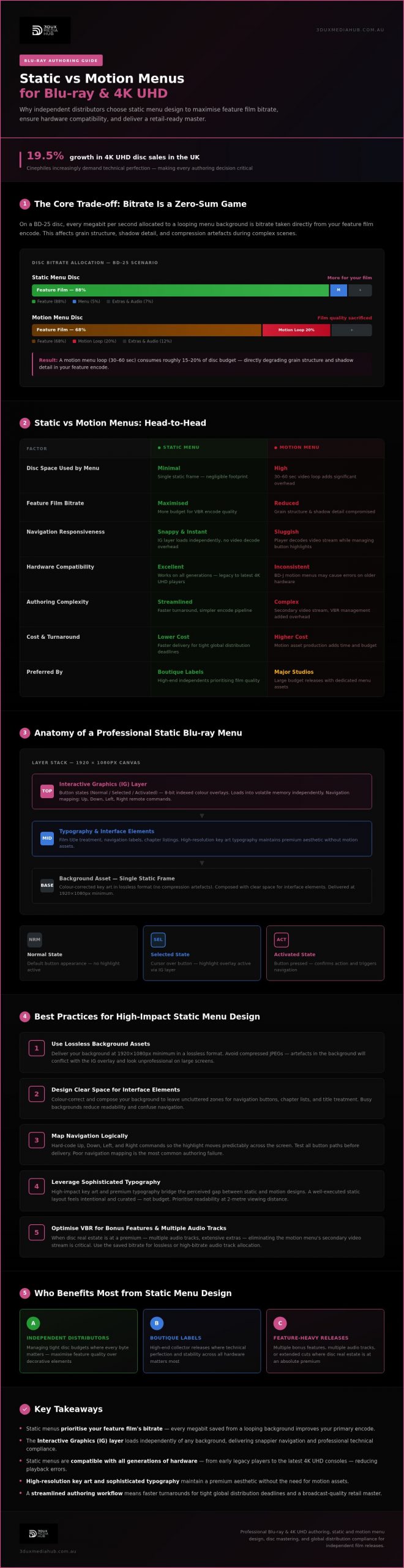
We know the frustration of balancing high authoring costs against the need for a compliant, retail-ready master. You want your release to stand out in a market where 4K UHD sales grew by 19.5% in the UK last year, driven by cinephiles who demand technical perfection. This article will show you how to optimise disc space for superior video encoding and clear up the technical confusion surrounding interactive graphics (IG) layers. We will compare the benefits of static versus motion assets so you can produce a professional disc that meets global distribution standards with total confidence.
Key Takeaways
- Learn why choosing static menu design for Blu-ray prioritises your feature film’s bitrate over unnecessary background loops.
- Understand the role of Interactive Graphics (IG) layers in ensuring rapid navigation and professional technical compliance across all players.
- Discover how to streamline your authoring workflow to achieve faster turnarounds for tight global distribution deadlines.
- Identify best practices for using high-resolution key art and typography to maintain a premium aesthetic without the need for motion assets.
- Optimise your disc space for superior 4K UHD and standard Blu-ray encoding to ensure a broadcast-quality master ready for retail.
Understanding Static Menu Design in Professional Blu-ray Authoring
Professional authoring houses often prioritise technical stability and bitrate allocation over decorative loops. A static menu serves as the primary interface, utilising a single-frame background for disc navigation. This approach is far from basic. It requires a deep understanding of how Blu-ray technology handles assets within the player’s buffer. By using a fixed image, you free up system resources and disc real estate that would otherwise be consumed by a repetitive video stream. It’s a calculated choice that favours the quality of the main feature above all else.
The functionality of a static menu relies on the Interactive Graphics (IG) layer. This layer operates independently of the background video or image. When a user navigates the disc, the player loads the IG data into its volatile memory. Because the background is static, the player doesn’t have to constantly decode a video stream while simultaneously managing button highlights and sounds. This results in snappier, more responsive navigation that feels premium rather than sluggish. It’s why many high-end boutique labels prefer this method for complex, feature-heavy releases.
The Anatomy of a Static Blu-ray Menu
Every professional static menu design for Blu-ray begins with a high-resolution canvas. For standard high-definition releases, this means a 1920×1080 pixel asset, usually delivered in a lossless format to avoid compression artefacts. The design must account for the following technical requirements:
- Background assets: Must be colour-corrected and composed to leave space for interface elements without cluttering the frame.
- Button states: Designers create three distinct visual states: Normal, Selected, and Activated. These are usually managed as 8-bit indexed colour overlays within the IG stream.
- Navigation mapping: This involves hard-coding the logical flow between buttons. We ensure the “Up”, “Down”, “Left”, and “Right” commands on a remote control move the highlight predictably across the screen.
Static vs Motion: The Fundamental Differences
The choice between static and motion menus is a commercial and technical trade-off. Motion menus require a dedicated video stream, often looping every 30 to 60 seconds. This adds complexity to the encoding process and eats into the total disc budget. If you’re pushing for a high-bitrate feature film encode on a BD-25, every megabit counts. You don’t want to sacrifice the film’s grain structure just to have a moving background on the menu.
Static menus offer a cleaner, faster workflow. They don’t just save money; they improve the user experience by eliminating the “wait time” associated with loading heavy video assets. While some distributors worry that static designs look “budget”, high-impact key art and sophisticated typography can bridge the gap. A well-executed static design provides a sophisticated aesthetic that feels intentional and curated, ensuring the viewer’s focus remains on the content they’ve paid to see.
The Strategic Advantages of Static Menus for Independent Releases
Independent film distributors often face a zero-sum game when managing disc space. Every byte spent on a looping motion background is a byte taken from the feature film’s visual fidelity. Choosing a high-quality static menu design for Blu-ray allows for a more efficient allocation of the total bit budget. This is particularly critical for projects with extensive bonus features or multiple audio tracks where disc real estate is at a premium. By minimising the data footprint of the interface, you ensure the primary content remains the priority.
Reliability is another often overlooked benefit. Older Blu-ray hardware can sometimes struggle with complex BD-J motion menus, leading to slow response times or frustrating playback errors. A static interface is lightweight and robust. It ensures a consistent user experience across all generations of hardware, from early legacy players to the latest 4K UHD consoles. This technical stability is vital for maintaining a professional reputation in the collector market.
Optimising the Bitrate Budget
Motion menus aren’t just decorative; they’re data-heavy. They require a continuous video stream that runs alongside the primary content. In 4K UHD and standard Blu-ray authoring, managing the variable bitrate (VBR) is essential to avoid compression artefacts during complex scenes. By using static assets, we eliminate the need for a secondary video stream in the menu background. This ensures that static menus allow for higher peak bitrates during the film’s climax, providing the headroom needed for explosive action or intricate textures without triggering buffer underflows.
Efficiency in the Mastering Process
Speed to market is a major factor for global distribution. Static menus drastically simplify the authoring workflow. Creating assets that follow established technical guidelines for menu graphics ensures that resolution and colour space are compliant from the start. This streamlining allows for a faster turnaround when hitting retail deadlines.
- Simplified QC: Quality control is faster when there are no video loops to check for seamless transitions or encoding glitches.
- Rapid Localisation: Translating menu text for international territories is more straightforward with static layers than re-rendering multiple motion backgrounds.
- Cost Efficiency: Reduced design and encoding hours keep independent projects within budget while maintaining high standards.
3DUX Media Hub utilises these streamlined designs to meet tight global release windows without compromising on technical excellence. If you need to hit a retail deadline with a rock-solid master, our Blu-ray authoring services provide the precision your project requires. We focus on getting your content ready for global delivery with zero technical friction.
Static vs Motion Menus: A Technical and Commercial Comparison
Choosing between these formats requires a balance of aesthetic intent and technical reality. A professional static menu design for Blu-ray offers a streamlined authoring timeframe that motion loops simply cannot match. While a motion menu might take days to render, encode, and test for seamless looping, a static interface is ready for quality control almost immediately after the graphics are finalised. This efficiency is a massive advantage for distributors managing multiple titles simultaneously.
The technical distinction often lies between HDMV (High Definition Movie Mode) and BD-J (Blu-ray Disc Java) authoring styles. HDMV is the standard for most static interfaces. It is robust, fast, and highly compatible. BD-J allows for advanced animation and complex interactivity, but it introduces a layer of complexity that can increase disc boot times. For many distributors, the “no-nonsense” reliability of HDMV is the preferred choice to ensure the curated content remains the focus. It eliminates the risk of Java-related playback issues on legacy hardware. For a deeper understanding of how these authoring modes affect your release, our interactive Blu-ray menu design technical guide covers the BD-J versus HDMV debate in full detail.
Audio integration is another area where static menus excel without the data overhead. We integrate high-fidelity audio streams into fixed screens to maintain atmosphere. You get the benefit of a film score or ambient soundscape without the bitrate penalty of a background video stream. It is a sophisticated way to keep the presentation premium while keeping the disc architecture lean and responsive.
Navigation Speed and User Interface (UI)
The primary advantage of a static architecture is the “instant-on” response. There is no loop-point lag. In motion menus, the player must often re-buffer the video at the end of a loop, which can cause a momentary stutter in button responsiveness. Static menus eliminate this friction entirely. High-end boutique labels frequently opt for this approach because it feels more responsive to the user. It is about providing a frictionless path to the film. Speed and stability are the hallmarks of a well-authored disc.
Commercial Considerations for Distributors
From a commercial standpoint, the return on investment for complex motion graphics is often negligible for niche or documentary releases. Collectors value the quality of the transfer and the depth of the extras over a spinning 3D menu. While a high-profile blockbuster might justify the expense of a fully animated interface, independent releases benefit from a leaner approach. Balancing aesthetic appeal with technical disc limitations is essential for professional mastering. You want a menu that looks premium but doesn’t compromise the high-bitrate video stream of your main feature.
Best Practices for Designing High-Impact Static Blu-ray Menus
A high-impact static menu design for Blu-ray relies on the quality of your source assets. Using high-resolution photography and original key art is the most effective way to establish a premium feel. Avoid using low-quality screen grabs from the feature film. Instead, prioritise high-contrast compositions that allow for clear, legible typography. Your navigation must be intuitive on every screen size, from a standard monitor to a cinema-sized projector. Consistency in colour theory ensures that the user always knows which button is selected, even in a dark viewing environment. Typography must be more than just stylish; it needs to be functional. Use sans-serif fonts for smaller text to prevent flickering on interlaced displays. High-contrast colour palettes for activated states help users navigate the disc with ease.
Creating a Professional Aesthetic
Technical precision starts in the design phase. Professional authoring-ready files require specific layering techniques in Photoshop. We use alpha channels to manage transparency for button highlights, ensuring edges remain crisp and free from “halo” effects. Every button state needs its own dedicated layer. This allows the authoring software to map the Interactive Graphics (IG) stream correctly. We ensure that the colour palette for these highlights is limited to the standard 8-bit indexed range to avoid playback glitches. The ‘Safe Zone’ for Blu-ray menus is a designated area within the 1920×1080 canvas, typically the inner 90%, that ensures critical text and buttons aren’t cut off by overscan on older television sets. Precision matters here. If your buttons sit too close to the edge, you risk a failed quality control (QC) check during the mastering process.
Audio and Atmosphere
Static doesn’t mean silent. Integrating high-quality LPCM or AC3 background audio is essential for maintaining the film’s atmosphere. We focus on looping this audio seamlessly to avoid audible “pops” or jarring silences that break the immersion. This audio should reflect the brand consistency of the entire disc package, from the retail sleeve art to the final credits. Maintaining a cohesive aesthetic across all assets builds trust with collectors and cinephiles. If you need a retail-ready master that balances technical compliance with high-end aesthetics, our team can deliver. Contact us to discuss your static menu design requirements today. We provide the technical expertise needed to ensure your physical release is compliant for global distribution.
Mastering Your Physical Release with 3DUX Media Hub
3DUX Media Hub bridges the gap between creative vision and technical delivery. With over 20 years of industry experience, we understand the high stakes involved in global film distribution. Our team doesn’t just provide static menu design for Blu-ray; we provide a comprehensive mastering strategy that protects your feature film’s bitrate while ensuring 100% player compatibility. We handle the heavy lifting of technical compliance so you can focus on your release schedule.
Integrating bespoke menu design with world-class video and audio encoding is our core strength. We operate as a proactive partner, ensuring your assets meet broadcast-grade quality control (QC) standards before they ever reach the replication plant. This “safe pair of hands” approach is why Australian and international distributors trust us with their high-value content. We specialise in fast turnaround times, meeting tight windows without sacrificing the precision required for a retail-ready master.
Comprehensive Authoring Solutions
Our authoring services scale to meet the needs of any project, from independent documentaries to high-profile 4K UHD collector’s editions. We manage the entire technical pipeline, including content localisation and subtitle integration for multi-territory releases. Our process ensures that your master is compliant with global standards and ready for seamless distribution.
- 4K UHD and Blu-ray Authoring: High-bitrate encoding for premium physical formats.
- Standards Conversion: Ensuring your content is ready for any global market.
- Content Localisation: Managing complex language tracks and localised menu layers.
- Broadcast Quality QC: Rigorous testing to eliminate playback errors.
Next Steps for Your Film
Preparing your film for a physical release requires meticulous asset management. We recommend starting with a technical consultation to determine the best path for your project, whether you require complex motion assets or a high-impact static menu design for Blu-ray. This early collaboration prevents technical bottlenecks and ensures your bitrate budget is used effectively.
To get started, ensure your master files, audio stems, and subtitle assets are organised according to industry standards. Contact 3DUX Media Hub today for a project-based quote or to discuss your specific authoring requirements. We’re here to ensure your film reaches its audience with the highest possible technical integrity.
Streamlining Your Next Global Release
Choosing a professional static menu design for Blu-ray is a strategic decision that prioritises the technical integrity of your film. By minimising the data footprint of your interface, you provide the necessary headroom for high-bitrate encoding and complex audio streams. This approach ensures your release is robust, responsive, and compliant across all legacy and modern hardware. It is about delivering a premium experience that focuses the viewer’s attention exactly where it belongs: on the feature content itself.
With 20+ years of technical expertise, 3DUX Media Hub specialises in 4K UHD and Blu-ray mastering for independent and international distributors. We provide fast turnaround for global distribution, ensuring your retail-ready master passes every quality control check with precision. Our team manages the technical complexities of authoring and localisation so you can meet your retail windows with total confidence. Contact 3DUX Media Hub for professional Blu-ray authoring and menu design to secure a compliant master for your upcoming project. We look forward to helping you bring your film to life on physical media.
Frequently Asked Questions
Are static menus considered lower quality than motion menus for Blu-ray?
No, static menus are a professional design choice often preferred for high-end mastering. While motion menus offer animation, a professional static menu design for Blu-ray prioritises bitrate for the feature film. Many boutique labels choose static interfaces to ensure maximum visual fidelity for the movie. It’s about allocating disc resources where they matter most for collectors and cinephiles who demand the highest possible transfer quality.
Can a static Blu-ray menu include background music and sound effects?
Yes, static menus fully support high-fidelity audio tracks and interactive sound effects. We integrate LPCM or AC3 audio streams that loop seamlessly behind the fixed background image. This maintains a cinematic atmosphere without the massive data overhead of a video loop. You get the benefit of the film’s score or ambient soundscapes while keeping the disc architecture lightweight and responsive for the user’s remote commands.
How much disc space can I save by using a static menu design?
You can save several hundred megabytes or even gigabytes depending on the length and complexity of a motion loop. A motion menu requires a dedicated video stream that runs constantly, whereas a static menu uses a single frame. This reclaimed space is vital for independent releases on BD-25 discs. It allows for a higher average bitrate for the feature film and prevents compression artefacts during complex scenes.
What is the standard resolution for a Blu-ray static menu?
The standard resolution for a high-definition Blu-ray static menu is 1920×1080 pixels. For 4K UHD releases, the resolution increases to 3840×2160 pixels to match the ultra-high-definition output. It’s essential to provide assets in a lossless format like PSD or TIFF. This ensures the graphics remain crisp and professional, avoiding the blocky artefacts often seen in low-resolution or heavily compressed source files provided by non-professionals.
Does a static menu work with 4K UHD Blu-ray authoring?
Yes, static menus are highly effective and common for 4K UHD Blu-ray authoring. In the 4K space, bitrate management is even more critical due to the massive data requirements of HDR and high-resolution video. Using a static interface ensures that the player’s buffer is focused on decoding the complex HEVC video stream of the film. It’s a reliable method for ensuring technical compliance and peak performance on all UHD players.
What file formats do I need to provide for a professional static menu design?
Layered Photoshop (PSD) files are the industry standard for professional authoring. Each button state, including Normal, Selected, and Activated, should be on its own layer with clear naming conventions. We also require high-resolution background art in a lossless format to maintain broadcast quality. Proper asset preparation in the design phase prevents technical errors and speeds up the mastering process, ensuring a faster turnaround for your global distribution deadlines.
Is it possible to switch from a static to a motion menu later in the authoring process?
Switching from static to motion mid-process is technically possible but usually leads to significant delays and additional costs. A motion menu requires a completely different encoding and testing workflow. It’s best to finalise your menu strategy during the initial technical consultation. Early decisions on static menu design for Blu-ray allow us to lock in the bit budget for your feature film and ensure a seamless path to the final master.
How do static menus affect the Quality Control (QC) process?
Static menus significantly streamline the Quality Control process. Because there are no video loops to check for seamless transitions or encoding glitches, the testing phase is much faster. We focus on verifying navigation logic, button highlights, and audio synchronisation. This simplicity reduces the risk of technical failures and ensures your master is retail-ready and compliant with global distribution standards with minimal friction during the final sign-off.