A 4K UHD menu is much more than a simple navigation overlay; it’s a high-bitrate video asset that requires the same HDR precision and colour accuracy as the feature film itself. If your interface doesn’t match the calibre of your content, the premium disc experience falls apart before the movie even starts. Mastering motion menu design for 4K UHD is the only way to ensure your project stands up to the scrutiny of global distributors and home cinema enthusiasts alike.
We know the technical headache of BD-J complexity and the constant worry about compatibility across different UHD players. It’s a high-stakes environment where a single authoring error can lead to expensive disc rejections and missed deadlines. You need a reliable workflow that guarantees flawless navigation and full compliance with UHD Alliance specifications.
This article provides a deep dive into creating high-impact menus that function perfectly on all 4K hardware. You’ll learn how to balance visual flair with technical stability, ensuring your next release delivers the seamless, professional interface your audience expects.
Key Takeaways
- Understand why modern audiences expect a seamless, cinematic transition from the “Insert Disc” moment to the feature film.
- Master the technical nuances of HEVC encoding and HDR colour matching essential for professional motion menu design for 4K UHD.
- Evaluate the cost and technical overhead of BD-J interactivity to choose the right menu strategy for your specific release.
- Apply industry-standard best practices for navigation clarity and safe zones to ensure a flawless user experience on any display.
- Learn the critical Quality Control protocols required to guarantee global compatibility across all major UHD hardware brands.
The Evolution of Motion Menu Design for 4K UHD
A 4K UHD motion menu is no longer a secondary consideration; it is a sophisticated, interactive video layer that serves as the technical gateway to the feature film. Unlike the static or low-bitrate interfaces of the DVD era, modern motion menu design for 4K UHD utilises high-resolution video assets to create a seamless transition from the “Insert Disc” moment. It’s about establishing the film’s visual language immediately. In a market where physical media is a premium choice, the interface must mirror the calibre of the content it holds.
The transition from standard Blu-ray to the Ultra HD Blu-ray format brought significant technical leaps. We’ve moved beyond 1080p limitations. Every background asset now requires 3840 x 2160 resolution. This shift isn’t just about pixel count; it’s about bit depth, colour space, and the complex interaction between the video layer and Java-based (BD-J) navigation. Audiences in 2026 expect a cinematic experience that starts the second the disc loads. They’re investing in a high-value physical asset, and a clunky or low-resolution menu instantly devalues that investment.
Why Motion Menus Matter for Film Distribution
Motion menus create a cohesive brand experience from the first frame. By using high-end motion graphics, you can tease the film’s visual style and tone before the viewer even presses play. This establishes professional credibility, which is particularly vital for independent releases. A polished, high-bitrate menu bridges the gap between a boutique project and a major studio title. It tells the distributor and the consumer that every detail of the authoring process has been handled with precision.
Technical Standards for the 2026 Market
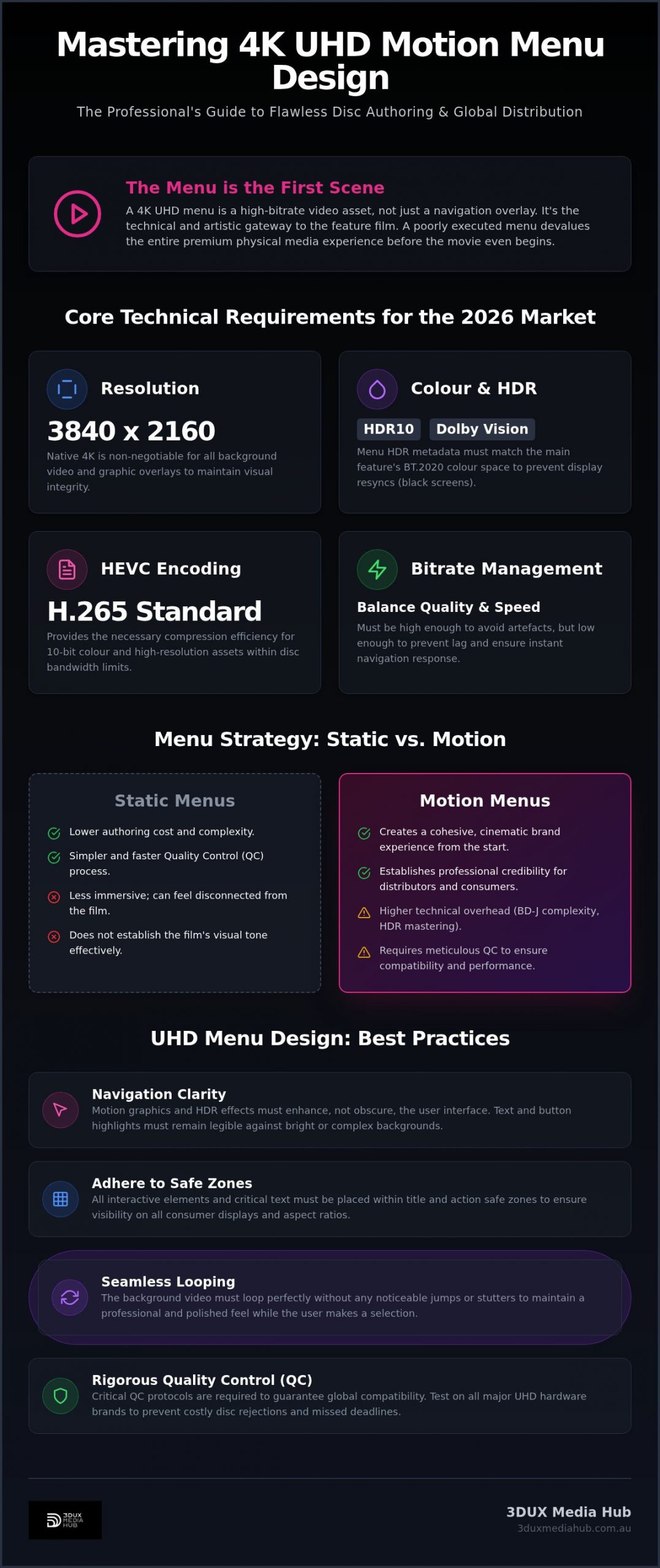
Adhering to UHD Alliance guidelines for interactive assets is mandatory for global distribution. Your menu background must be encoded with the same HDR precision as the feature film. This ensures the display doesn’t need to resync or “black out” when moving from the menu to the movie. Here are the core requirements for modern 4K menus:
- Resolution: Native 3840 x 2160 for all background video and graphic overlays.
- Colour Consistency: Matching the menu’s HDR metadata (HDR10 or Dolby Vision) with the main feature.
- Navigation Clarity: Ensuring the motion graphics don’t distract from the core user interface.
- Bitrate Management: Balancing high-quality video with the disc’s data transfer limits to prevent lag.
A well-designed menu shouldn’t just look good; it must function flawlessly across every hardware brand. Professional motion menu design for 4K UHD balances these aesthetic ambitions with rigid technical constraints. When executed correctly, the menu becomes an extension of the film itself, enhancing the viewer’s connection to the story before the opening credits roll.
Technical Requirements: HDR and HEVC Encoding in Menus
Effective motion menu design for 4K UHD relies on the High Efficiency Video Coding (HEVC/H.265) standard. Unlike the AVC codec used for standard Blu-ray, HEVC provides the compression efficiency required for 10-bit colour and high-resolution assets within strict disc bandwidth limits. Every menu background is essentially a high-bitrate video stream. It must be encoded with precision to ensure the player transitions instantly from the system splash screen to the interactive environment. Understanding the full pipeline from production master to final encode is critical; our ProRes to HEVC encoding guide for 4K delivery covers the essential technical specifications distributors need to maintain visual integrity throughout this process.
Matching the menu’s brightness and colour space with the feature film is a technical necessity. If the movie is mastered in HDR10 or Dolby Vision, the menu must follow suit. A mismatch in metadata causes the display to trigger a resync. This results in a frustrating black screen for the viewer. Utilising professional video encoding services Sydney ensures your menu assets maintain visual parity with the main programme, preserving the premium feel of the release.
Implementing HDR10 and Dolby Vision in Menus
Overlaying static text on high-dynamic-range video presents unique challenges. High peak brightness in HDR scenes can cause “blooming” around white text or button highlights, making navigation difficult. We master all menu assets in the BT.2020 colour space to ensure accurate reproduction on modern panels. This process involves careful luminance mapping to keep text legible without sacrificing the visual impact of the background motion graphics. It’s a delicate balance that requires deep technical expertise in UHD Alliance standards.
Bitrate Management and Seamless Looping
Finding the sweet spot between visual quality and navigation speed is critical. If the bitrate is too high, the disc may struggle to load the interactive layer, causing lag. If it’s too low, the background will show compression artefacts. We focus on creating seamless loops that don’t “hiccup” or pause when the video restarts. This is particularly important for older 4K players that may have smaller buffers. To ensure global compatibility and avoid playback errors, the maximum total bitrate for UHD interactive layers, including video and audio, should generally be capped at 15 Mbps.
Managing these complexities is what separates a standard release from a world-class product. If you need a technical partner to handle these specifications, consider our 4K UHD authoring solutions to ensure your project meets every global distribution requirement.
Static vs. Motion Menus: A Comparison for Distributors
Choosing between static and motion menus is a strategic decision that impacts both budget and brand perception. While 4K UHD is the gold standard for physical media, not every project requires a high-bitrate video loop. For boutique distributors, matching the interface to the film’s market position is vital. High-profile titles demand motion menu design for 4K UHD to meet consumer expectations, while niche catalogue releases might find better value in a minimalist static approach.
The transition from HD Blu-ray to 4K UHD menu architecture involves a significant increase in technical overhead. We’ve moved beyond simple button overlays. Modern UHD menus rely on robust BD-J (Blu-ray Java) scripting to manage HEVC video assets and HDR metadata simultaneously. If the Java code isn’t perfectly optimised, the menu will feel sluggish or “heavy” on older hardware. This complexity is why motion menus require a more substantial investment in both design and authoring time compared to their static counterparts.
One major advantage of motion menus is their superior support for content localisation. By designing “graphic-less” video backgrounds and keeping text layers separate, we can quickly adapt an interface for different global markets. This modular approach allows for faster turnaround on international versions without the need to re-encode the core video background. It’s an efficient way to maintain a consistent brand identity across multiple regions while keeping QC costs under control.
Static Menus: Simplicity and Speed
Static menus offer the fastest route to market. They’re the ideal choice for tight distribution deadlines or titles with limited production budgets. By focusing on high-resolution typography and bespoke graphic layouts, you can still achieve a premium look. Without the need for complex video encoding or multi-layered audio loops, the authoring process is streamlined, reducing the risk of technical rejections during the final QC phase.
Motion Menus: The Premium Choice
For a “Collector’s Edition” or a major blockbuster, a motion menu is non-negotiable. It provides an immediate sense of immersion, especially when integrating a 5.1 or Dolby Atmos audio loop into the background. These high-end assets require professional 4K UHD authoring services to handle the advanced Java scripting necessary for seamless interactivity. When motion menu design for 4K UHD is executed correctly, it transforms the disc into a high-value asset that justifies its premium price point.
Best Practices for UHD Disc Menu Design
Effective motion menu design for 4K UHD prioritises navigation clarity over complex visual effects. High-end motion graphics should enhance the experience, not obscure the user interface. If a viewer has to hunt for the “Play Movie” button, the design has failed. We focus on a clean, intuitive layout that works flawlessly with a standard remote control. Navigation must be invisible. It should just work.
4K displays vary in how they handle overscan. We adhere to strict “safe zones” to ensure all interactive elements remain visible on every panel size. This means keeping critical buttons and text within the inner 90 percent of the 3840 x 2160 canvas. Clear “Button Feedback” is also non-negotiable. Users need distinct visual cues for “Selected” and “Activated” states. Whether it’s a colour shift, an icon change, or a subtle animation, the feedback must be instantaneous. Lag in button response ruins the premium feel. We prevent this.
Organise sub-menus logically. “Special Features” and “Audio Settings” should be easily accessible from the main loop. Don’t bury critical options under multiple layers of navigation. A well-structured menu respects the viewer’s time.
Design Consistency and Asset Preparation
Standardising fonts and icons across the entire project ensures a professional finish. This consistency extends to linked assets. When preparing assets for film trailer preparation services, ensure the transition from the menu to the trailer is visually seamless. Organising your source files and graphic layers early in the process significantly speeds up the authoring workflow. Efficiency in asset prep leads to a more stable final build.
User Experience (UX) for Physical Media
When considering the UX of motion menu design for 4K UHD, we focus on reducing the number of clicks to get to the main feature. Most viewers want to start the film quickly. For mid-film navigation, 4K UHD supports sophisticated “Pop-up Menus” that allow users to change settings or select chapters without stopping the playback. Designing for the “10-foot UI” is critical. Use large, legible text and high-contrast icons that are easy to read from a couch across the room.
If you’re ready to elevate your next release with world-class interface logic, contact our 4K UHD authoring team today.
Mastering and QC: Ensuring Global Compatibility
Quality Control (QC) is the final, non-negotiable barrier between a successful release and a costly recall. In the high-stakes world of 4K distribution, the menu is often where technical failures occur. A flawless motion menu design for 4K UHD must be tested against a rigorous protocol that simulates real-world consumer behaviour. We don’t just check if the buttons work. We stress-test the Java environment to ensure the disc remains stable during long periods of inactivity or rapid user input. Every interactive state must be verified.
Global compatibility is only achieved through physical hardware testing. Emulators are useful, but they don’t replicate the specific firmware quirks of retail units. We verify every project across multiple hardware brands, including Sony, LG, and Panasonic. Each player handles HEVC menu assets and BD-J layers slightly differently. Identifying a navigation lag on a specific Panasonic model before the replication stage saves distributors from botched authoring and expensive disc rejections. It’s about ensuring a “safe pair of hands” for your high-value assets.
Choosing professional disc authoring in Australia is the safest bet for local distributors. It ensures your project is handled by experts who understand both local market requirements and global delivery standards. Proximity allows for faster technical support and a direct, no-nonsense approach to problem-solving. Once the final QC is passed, the project moves from the authoring suite to the creation of a replication-ready master, typically provided as a Cutting Master Format (CMF) image.
Avoiding Common Authoring Pitfalls
Broken links in sub-menus or “hidden” Easter egg navigation are common failures that QC must catch. We also look for audio/video sync issues in looping menu backgrounds. If the audio loop doesn’t match the video duration exactly, the player may stutter every time the loop restarts. Compliance with region coding and language settings is another critical check. Even for “Region Free” UHD discs, the internal flagging must be precise to avoid errors on international hardware. We catch these errors early to keep your project on schedule.
Partnering with 3DUX Media Hub
Leveraging over 20 years of industry experience, 3DUX Media Hub provides the technical precision required for high-value 4K releases. We don’t just author discs; we act as a proactive partner to create bespoke motion graphics that capture your film’s essence. Our team specialises in high-efficiency HEVC encoding and motion menu design for 4K UHD, ensuring a fast turnaround for major entertainment assets. We handle the technical complexity so you can focus on the creative vision. Your global delivery is our priority.
Future-Proof Your Next 4K Release
Mastering the technical nuances of motion menu design for 4K UHD is essential for any distributor aiming to deliver a truly premium disc experience. We’ve explored the necessity of HEVC precision, the critical role of HDR metadata matching, and the importance of rigorous hardware testing to ensure global compatibility. A well-executed interface doesn’t just look impressive; it guarantees a seamless transition from the first frame to the final credits, protecting your high-value assets from costly technical rejections.
With over 20 years of mastering expertise, 3DUX Media Hub specialises in Australian film distribution and UHD Alliance compliant workflows. We provide the technical stability and creative flair required for complex 4K authoring projects. Our team is ready to handle your next global delivery with the speed and precision the industry demands. It’s about providing a reliable, high-quality gateway to your content that functions flawlessly on every player.
Get a technical quote for your 4K UHD motion menu design and ensure your release meets the highest digital standards. We’re here to help you turn your creative vision into a flawless retail product.
Frequently Asked Questions
What is the difference between static and motion menus for 4K UHD?
Motion menus utilise high-bitrate video loops as a background, while static menus use a single high-resolution image. Motion menus provide a cinematic transition that increases the perceived value of a collector’s edition or blockbuster release. Static menus are faster to author and more cost-effective for niche catalogue titles. Both formats must be designed at a native 3840 x 2160 resolution to meet modern display standards.
Does a 4K motion menu require a separate HDR grade?
Yes, the menu background must be graded to match the feature film’s HDR metadata. If the movie is mastered in HDR10 or Dolby Vision, the menu assets must follow the same luminance and colour space specifications. This prevents the display from resyncing or blacking out when the viewer navigates from the menu to the film. Proper colour matching ensures a seamless visual experience from the moment the disc loads.
Will a motion menu designed for 4K work on a standard Blu-ray player?
No, a 4K UHD motion menu is technically incompatible with standard Blu-ray players. The Ultra HD Blu-ray format uses HEVC encoding and a specific disc structure that 1080p hardware cannot decode. To reach audiences without 4K hardware, you must author a separate standard Blu-ray disc using AVC-encoded assets and traditional navigation logic. We recommend a dual-format release for maximum market reach.
What video codec is used for 4K UHD motion menus?
HEVC (High Efficiency Video Coding), also known as H.265, is the mandatory codec for 4K UHD motion menus. This codec allows for the 10-bit colour depth and high bitrates required for HDR assets within the bandwidth limits of the disc. Professional motion menu design for 4K UHD relies on precise HEVC encoding to ensure smooth playback and instant response times across all hardware brands.
Can I include Dolby Atmos audio in my motion menu loop?
Yes, you can integrate Dolby Atmos or 5.1 surround sound into your motion menu loop. High-profile releases often use immersive audio to establish the film’s tone immediately upon disc loading. You must manage the audio bitrate carefully alongside the video layer to stay within the 15 Mbps interactive layer limit. This prevents playback lag and ensures the menu remains responsive during navigation.
How long does it take to author a professional 4K motion menu?
Authoring a professional 4K motion menu typically takes between one to three weeks depending on the complexity of the project. This timeline includes asset preparation, BD-J scripting, HDR encoding, and initial hardware testing. Complex interactive layers with multiple sub-menus and localised content require additional time for rigorous Quality Control. We focus on a fast turnaround while maintaining the strict technical standards required for global delivery.
Why is QC so important for 4K UHD menu navigation?
QC ensures the interactive Java layers function correctly across all hardware brands, including Sony, LG, and Panasonic. 4K UHD players have varying firmware that can cause navigation lag or button feedback errors if the code isn’t perfectly optimised. Comprehensive testing prevents expensive disc rejections at the replication stage. It guarantees a flawless experience for the consumer, regardless of their specific player model.
Can 3DUX Media Hub help with menu design if I already have the film encoded?
Absolutely, we can step in at any stage of the production process to provide expert motion menu design for 4K UHD. While we offer full-service authoring, we frequently work with distributors who provide pre-encoded film assets. Our team focuses on building the interactive environment and ensuring your existing video files integrate seamlessly with a high-end, HDR-compliant menu system. We handle the technical heavy lifting to get your project replication-ready.