
What if the best-looking export is still the wrong file to deliver? With video encoding for digital distribution, a technically sound file can miss a platform’s requirements or fail during playback. Start with the destination’s specification, not a familiar preset.
Platform requirements can be difficult to interpret, and compression involves trade-offs. Too much compression can affect picture quality, while using more data than needed can increase file size without improving the result. Getting delivery right means looking beyond the export settings.
This guide explains how the source master, codec and container work together, and how to prepare an encode for its intended destination. You’ll learn to organise a repeatable workflow around platform specifications, balance quality and file size, and check technical compliance and real-world playback before delivery. It also explains how standards conversion and broadcast-quality QC fit into a controlled mastering process, helping catch potential issues before a file reaches its audience.
Key Takeaways
- Start video encoding for digital distribution with the receiving platform’s current specification, not a familiar preset.
- Understand how the source master, codec, container, bitrate and resolution each shape the final deliverable.
- Choose encoding options for the destination, whether it requires a direct-delivery file, a distributor hand-off or an adaptive streaming package.
- Use a repeatable workflow to inspect sources, configure and encode files, then validate technical details and playback before delivery.
- For multiple deliverables or quality-sensitive projects, coordinate encoding with post-production, standards conversion and broadcast-quality QC.
What video encoding for digital distribution actually does
Video encoding for digital distribution converts video and audio from a source master into compressed files prepared for a specific platform or distribution partner. The encode determines how the source data is represented in each deliverable. Its settings affect file size, image and sound quality, compatibility and playback.
The source master is the high-quality reference used to create delivery files. It preserves material needed for downstream versions, but it isn’t necessarily suitable for uploading or playback as-is. An encoded deliverable is an output made from that master. Keeping the master as the source of truth gives you a clean route to create a different version when requirements change.
Encoding is a controlled step, not just a matter of choosing a preset and pressing export. Settings that reduce file size can also remove detail or introduce visible artefacts, particularly in fast motion, gradients and fine textures. The aim is to meet the destination’s requirements while retaining the quality the delivery calls for.
Encoding, transcoding and exporting: what is the difference?
Encoding creates a compressed representation of video and audio source data. Transcoding converts an already encoded file into another format or profile, which may involve decoding and encoding it again. Each lossy encode can affect quality, so it’s generally preferable to work from the highest-quality suitable source rather than repeatedly converting a compressed file.
Exporting describes outputting a file from editing or encoding software. It doesn’t establish that the result meets a platform’s delivery rules. A file can export successfully and still have unsuitable settings, incomplete audio or playback problems. Export is one step; validation against the intended delivery requirements determines whether the file is ready to hand over.
Why digital distribution needs destination-ready files
Each destination can set its own requirements for codec, container, resolution, audio configuration and other file properties. These choices affect how a file is stored, transferred, decoded and played. There isn’t one universal output that suits every platform and distribution partner.
For example, one approved master could be used to create a compressed file for a platform upload and a separate deliverable for a distributor with a different specification. The source stays the same, but each output is configured for its receiving workflow. Creating a version for each hand-off is more reliable than expecting one generic export to meet every requirement.
Streaming introduces another consideration: a service may prepare versions for different devices or network conditions. Adaptive Bitrate Streaming describes how playback can switch between available representations as conditions change. That differs from preparing a single delivery file, so identify whether the hand-off requires an individual encode or a set of streaming assets.
How codecs, containers and compression shape a distribution encode
Four settings shape how a video file is stored and experienced: the codec compresses the picture and sound, the container packages those streams and related information, the bitrate controls how much data is allocated over time, and the resolution sets the picture dimensions. These settings work together, but they aren’t interchangeable.
A container is not a codec: it holds the encoded video and audio streams, while the codec determines how those streams are compressed and decoded. For example, an MP4 file may contain video encoded with H.264/AVC, but the container name alone doesn’t tell you the full technical profile or guarantee compatibility.
- Codec: H.264/AVC, HEVC/H.265 and AV1 use different compression methods. The practical choice depends on what the receiving platform supports.
- Container: MP4 and MOV are examples of file containers. Each can hold media streams and metadata, but neither is right for every delivery.
- Bitrate: The amount of data allocated to the video over time. More data generally means a larger file, but doesn’t automatically produce a better-looking encode.
- Resolution: The picture dimensions, such as standard definition or 4K UHD. A higher resolution needs suitable source material and an appropriate encoding configuration to deliver its intended detail.
Frame rate and source quality also affect the result. Fast movement, fine texture or a noisy image can be harder to compress cleanly than a static shot. Frame rate affects how much picture information is encoded over time, while the source sets the detail available to preserve. Raising the bitrate can reduce compression pressure, but it can’t restore detail that isn’t present in the source.
Choosing a codec and container for the destination
The receiving party’s current specification determines which codec and container combinations are acceptable. H.264/AVC is widely compatible, while HEVC/H.265 and AV1 may suit destinations that support them. Don’t choose a codec based on compression efficiency alone: playback support matters too. Before making final files, check the latest platform or distributor requirements, including any required profile and audio configuration.
Balancing bitrate, resolution and image quality
Use test encodes to assess scenes most likely to reveal compression artefacts. Compare fast motion, fine detail and gradients at the intended playback size. If you see blocking, banding or lost texture, review the encode settings and source rather than increasing every setting by default. Testing representative material helps find a practical balance between image quality, compatibility and file size.
For video encoding for digital distribution, the right configuration is the one that meets the destination’s requirements and preserves the source appropriately, not simply the one that produces the largest file. When a project needs multiple formats or careful quality control, professional video and audio encoding can support a more controlled delivery workflow.
How to assess encoding options for different digital destinations
A file can encode without errors and still be unsuitable for delivery. The receiving platform, distributor or playback workflow determines what the deliverable needs to contain. Start with that requirement, then create and validate the asset against it. No single preset prepares a file for every destination.
First identify who receives the content and what they expect. A direct platform upload may call for one encoded file. A distributor may specify a separate delivery profile or additional assets. An adaptive streaming workflow uses a package of versions rather than one standalone file. These distinctions matter: a playable file is not automatically a compliant hand-off.
| Destination | Typical deliverable purpose | Specification source |
|---|---|---|
| Direct platform delivery | A single file for upload and processing by the receiving platform | The platform’s current delivery documentation |
| Distributor-supplied file | An asset prepared for the distributor’s ingest and onward delivery workflow | The distributor’s title or project delivery instructions |
| Adaptive streaming package | Multiple encoded versions prepared for playback across changing network conditions and devices | The platform or service’s packaging and encoding requirements |
Use the table as a starting point, not a substitute for the actual specification. Requirements can differ even between destinations that appear similar. Check the current documentation for accepted formats, technical parameters, audio configuration, file structure and naming rules. Record the version used so the encode and its checks can be traced to the correct delivery target.
A single-file delivery versus an adaptive streaming package
A single-file deliverable is one encoded asset intended for a defined hand-off. An adaptive streaming package is a different workflow: it contains multiple versions, or renditions, that can be selected during playback as network conditions and device needs change. The Adaptive Bitrate Streaming approach helps explain the difference. Don’t assume a request for a video file means a streaming package is required.
When resolution, frame rate or standards conversion matters
Assess the source and destination frame rates before encoding. A mismatch can affect motion, so make conversion decisions deliberately rather than leaving them to an export default. Choose a resolution based on the source’s usable detail and the receiving specification; enlarging a lower-resolution source doesn’t create new picture information. Where delivery crosses standards, broadcast standards conversion can be part of preparing the correct output.
For complex hand-offs, manage the encode, technical checks and delivery requirements as one controlled process. 3DUX Media Hub provides professional video encoding for projects that need destination-focused preparation across distribution formats.
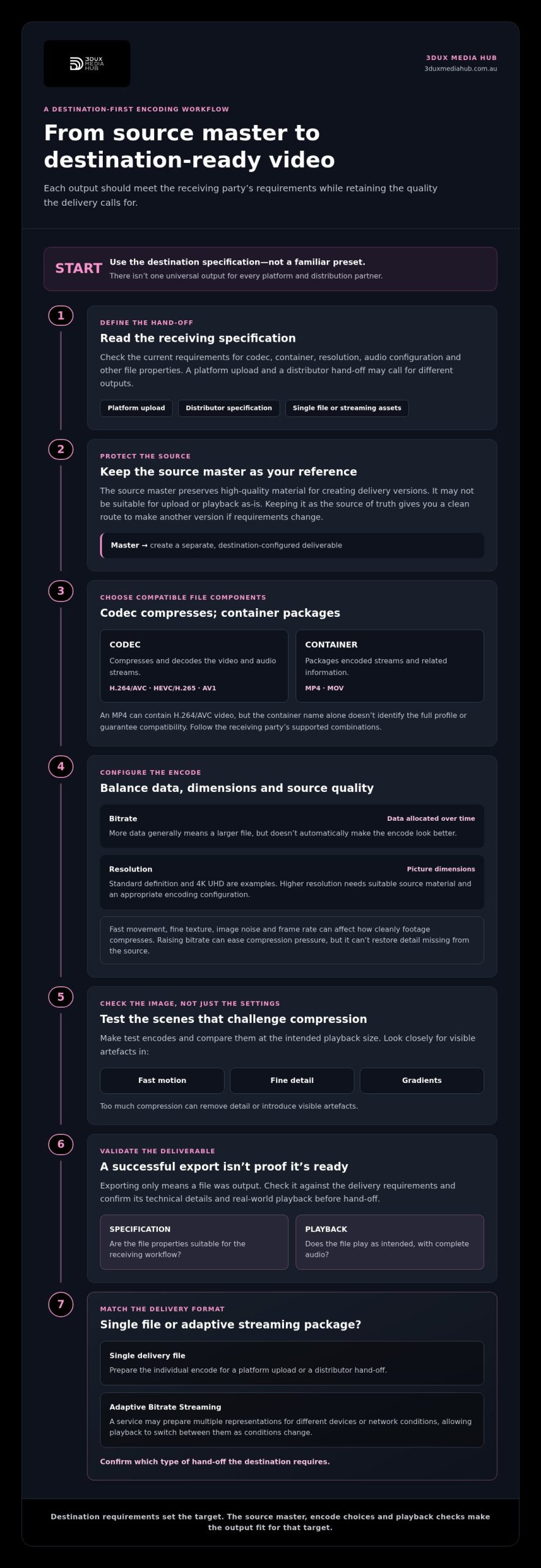
A reliable video encoding workflow, from specification to QC
A controlled workflow turns a source master into a delivery-ready asset, not just a file that exports successfully. The receiving party’s current specification is the reference for defining the output, configuring the encode and setting the checks required before hand-off. For video encoding for digital distribution, record the requirements and settings used for each deliverable.
Prepare the source and confirm the delivery brief
Before encoding, record the source characteristics, required outputs, naming rules and delivery method. Inspect picture and sound, and check synchronisation so source issues aren’t mistaken for encode defects. If requirements are missing or conflict, flag them and resolve them through the project workflow before configuring the output. Avoid filling gaps with assumptions.
- Collect the current specifications. Identify the receiving party and gather its requirements for file format, picture, audio, metadata, naming and delivery. Save the version used for the project.
- Inspect the source. Review its technical properties and watch and listen for existing picture faults, unwanted noise, audio drop-outs or sync issues. Note anything that may affect the encode.
- Configure each output. Match the codec, container, resolution, frame rate and audio settings to the relevant specification. Treat each destination as a distinct deliverable when its requirements differ.
- Encode and document. Create files from the approved source and record the settings for each version. This makes it easier to reproduce an output or investigate a problem at hand-off.
- Validate and review. Run file checks, then play the complete deliverable to assess picture, sound and synchronisation. Check required metadata and confirm the file opens and plays as expected.
- Deliver and retain a record. Follow the agreed transfer method and naming rules. Keep a clear record of the delivered files and completed checks so the hand-off can be traced.
Encode, validate and review the final deliverables
Automated checks can flag issues such as an unreadable file or technical properties that don’t match the delivery brief. They can’t judge every visible or audible defect. A viewing review is still needed to assess picture and sound in context, including sections likely to expose encoding artefacts.
Technical validation checks whether a file meets defined technical requirements; creative viewing review assesses whether the picture and sound look and play as intended. Both matter. A file can pass a technical check yet contain a distracting visual fault or an audio problem that only becomes apparent during playback.
Keep checks tied to the actual delivery specification rather than applying one format’s requirements to another. If your project needs coordinated encoding and quality control, 3DUX Media Hub’s video encoding and QC services can support the workflow.
When professional encoding support improves digital distribution
Professional support can be valuable when a delivery involves more than a straightforward export. Multiple versions, detailed or changing specifications, quality-sensitive source material and tightly managed hand-offs all call for a coordinated process. A technically valid file still needs to meet the receiving party’s requirements and play as intended.
Consider specialist support if your project includes:
- Several deliverables for different platforms, distributors or territories.
- Complex requirements that need to be interpreted and tracked across outputs.
- Source material where compression or conversion could expose picture or sound issues.
- A hand-off where naming, file structure, timing or technical checks are critical.
These factors don’t mean every project needs the same approach. They indicate where a specification-led workflow can help reduce avoidable rework and keep each version traceable to its source and destination.
What an experienced encoding partner contributes
An encoding partner can organise the work around the delivery brief: identify the required outputs, plan settings for each destination, encode from suitable source assets and conduct structured technical review. Coordinating these steps with related post-production helps keep deliverables consistent, particularly when a project needs more than one version.
Encoding can also sit alongside standards conversion and broadcast-quality QC. This joined-up approach treats format and quality requirements as parts of the same mastering process, rather than isolated tasks. At 3DUX Media Hub, the principals bring more than 20 years of industry experience. The company provides encoding across formats from SD to 4K, with support for global distribution.
Plan the next distribution encode
A useful project brief starts with three inputs: the source assets, the receiving party’s current requirements and the deliverables needed for hand-off. Add relevant notes about post-production, conversion or quality concerns. This defines the destination before encoding begins and helps plan reviews around the outputs that matter.
For a project with several destinations, keep each output’s requirements distinct. A shared source doesn’t mean every destination uses the same encode. Record the purpose of each file and the checks required before delivery.
- Source assets: Identify the approved master and note any picture, sound or synchronisation concerns.
- Destination requirements: Gather the latest technical and hand-off instructions from the receiving party.
- Required deliverables: List each output and any related mastering, post-production, standards conversion or QC needs.
With these inputs in place, 3DUX Media Hub can support project-based video and audio encoding and related mastering needs. Discuss your video encoding project when you’re ready to plan the next delivery.
Make your next delivery easier to manage
Think beyond the file you’re preparing today. A clear, versioned record of each approved deliverable can make future updates easier to manage, especially when content needs to be prepared again for a new release or hand-off. Keep the relationship between the source master, destination brief and final output clear. This gives your team a practical reference for planning the next delivery instead of relying on remembered settings or old exports.
This is useful for any video encoding for digital distribution project. Bring the source assets and delivery goals together early so the work can be planned around its intended use. 3DUX Media Hub supports projects that need professional encoding and related mastering expertise, with principals who bring more than 20 years of industry experience.
Plan your next distribution encode with the intended use and hand-off in mind. Clear preparation gives the delivery a more organised foundation.
Frequently Asked Questions
What is video encoding for digital distribution?
Video encoding for digital distribution prepares compressed video and audio files for a named delivery destination. The output is created from a source master, and its codec, container and settings influence playback, file size and compatibility. For example, a project may retain its approved master while creating a separate upload file for a distributor. Use the distributor’s current requirements as the brief and record which version guided the output.
Which video codec is best for digital distribution?
There’s no single best codec for every delivery. H.264/AVC, HEVC/H.265 and AV1 may suit different projects, depending on what the destination supports and its playback requirements. If a receiving platform specifies an accepted codec or profile, follow that rather than choosing solely for compression efficiency. Before creating all final files, test a representative encode in the intended playback workflow and check image quality and compatibility.
What is the difference between a video codec and a container?
A codec compresses and encodes video or audio data, while a container is the file structure that holds those streams and related information. For instance, an MP4 is a container that can hold encoded video and audio. The file extension alone doesn’t reveal every stream or setting inside it. A destination might accept MP4 files but still reject a file whose codec, profile or audio configuration falls outside its requirements.
How do I choose a bitrate for digital video distribution?
Choose a bitrate based on the destination’s guidance and the needs of the material, not a universal number. Bitrate affects file size and can influence perceived quality, but the result also depends on resolution, frame rate, codec and source complexity. A detailed, fast-moving sequence may behave differently from a simple interview shot. Test representative scenes, compare the encoded result at its intended playback size, and adjust after reviewing visible artefacts.
Can one encoded video file work across every distribution platform?
One file may be accepted by several platforms, but that doesn’t make it suitable for every delivery. Requirements can vary for codec, container, resolution, audio, captions and metadata. A distributor may also request separate versions or a group of related assets instead of a single file. Build a deliverables list for each destination before encoding, then compare each completed file against the relevant current specification.
How can I check whether an encoded video is ready for delivery?
Combine technical validation with a complete playback review. Check that the file opens and plays, then assess picture, sound, synchronisation, required metadata and each destination-specific requirement. Automated tools can identify structural or parameter issues, but they won’t reliably catch every distracting visual fault or audible problem. Review the file in its intended playback context, and document checks or corrections before hand-off.
Does video encoding reduce picture quality?
Lossy encoding can reduce picture quality because it removes some source data to make the file more manageable. The visible effect depends on the source, codec and settings. Excessive compression can cause artefacts such as blocking or lost texture, especially in demanding scenes. A careful encode aims to retain the intended viewing quality while meeting delivery requirements. It can’t recreate fine detail that wasn’t present in the source to begin with.