A theatrical Digital Cinema Package is the pinnacle of your film’s visual journey, but a botched down-conversion for festival screenings can undo months of post-production in seconds. Most filmmakers assume a simple export preset will suffice. The reality is that professional DCP to Blu-ray conversion is a technical re-mastering process, not a simple file export. If you’ve ever seen your deep cinema blacks turn to muddy grey or noticed a distracting judder in a slow pan, you’ve experienced the pitfalls of improper mastering.
We understand the pressure of delivering a retail-ready master that honours your original creative intent. You need a deliverable that meets strict international festival standards without sacrificing the high-bitrate detail of your theatrical grade. This article outlines the precise technical workflow needed to bridge the gap between XYZ and Rec.709 colour spaces while ensuring frame rate integrity. We’ll examine the encoding hurdles, bit-depth preservation, and the broadcast-level quality control essential for a flawless, distribution-grade Blu-ray master.
Key Takeaways
- Identify the critical technical differences between theatrical DCPs and consumer Blu-ray masters to avoid common distribution failures.
- Master the mapping of XYZ colour space to the Rec.709 gamut to ensure your film’s visual integrity remains intact.
- Learn why professional-grade encoding is necessary for high-bitrate results that eliminate motion judder and preserve high-contrast detail.
- Streamline your DCP to Blu-ray conversion workflow by correctly organising multi-language audio tracks and subtitle assets for mastering.
- Gain insights into achieving broadcast-quality compliance for international film festivals through rigorous quality control and technical standards.
Understanding the DCP to Blu-ray Conversion Process
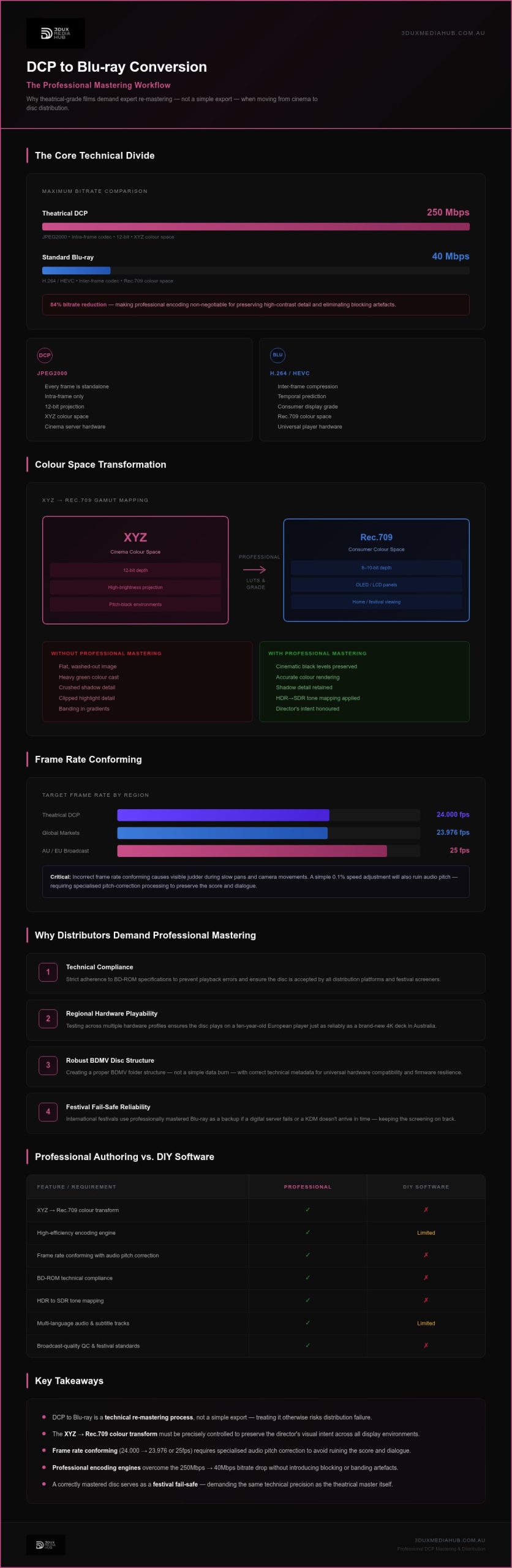
A theatrical Digital Cinema Package (DCP) is designed for high-end cinema servers and 12-bit projection systems. It’s a massive, data-heavy format that doesn’t translate directly to home or festival hardware. Transitioning from a cinema-grade master to a consumer-facing disc requires more than a simple file rewrap. Professional DCP to Blu-ray conversion ensures your film maintains its visual integrity when moved from a 250Mbps environment to the 40Mbps limit of a Blu-ray disc.
Filmmakers often try a “straight export” from their editing software, only to find the results lack the depth and fluidity of the original grade. This happens because standard export presets cannot account for the complex transformation from XYZ colour space to Rec.709. An authoring house acts as the final gatekeeper. We protect the filmmaker’s original vision by using high-efficiency encoding engines that prioritise detail in high-contrast scenes and eliminate motion artefacts.
DCP vs. Blu-ray: The Technical Divide
The core of the challenge lies in the codec shift. DCPs utilise JPEG2000, an intra-frame codec where every frame is a standalone image. Blu-ray relies on H.264 or HEVC, which uses inter-frame compression to manage storage. This shift requires a sophisticated understanding of how to manage data without introducing “blocking” in dark areas or “banding” in gradients. While a DCP runs at bitrates up to 250Mbps, a standard Blu-ray is capped at 40Mbps. Professional encoding is non-negotiable for high-motion content, ensuring every frame remains sharp even at a lower data rate.
Why Distributors Demand Professional Mastering
Reliability is the primary concern for global distributors. A disc must play perfectly on a ten-year-old player in Europe just as well as a brand-new 4K deck in Australia. DIY software often fails to write the technical metadata and disc structure required for universal hardware compatibility. Professional mastering involves several critical layers of technical oversight:
- Technical Compliance: Adhering to strict BD-ROM specifications to prevent playback errors.
- Regional Hardware Playability: Testing across various hardware profiles to ensure the disc isn’t “bricked” by older firmware.
- Robust Structure: Creating a proper BDMV folder structure rather than a simple data burn.
International film festivals still rely on Blu-ray as a robust backup format. If a digital server fails or a KDM hasn’t arrived in time, a professionally mastered disc is the only thing that keeps the screening on track. It’s a fail-safe that demands the same level of technical precision as the theatrical master itself.
Solving the Colour and Frame Rate Challenge
Gamut mapping is the process of adjusting colours to fit a smaller display range. It’s the technical bridge that ensures a film’s aesthetic remains consistent across different viewing environments. During DCP to Blu-ray conversion, the primary hurdle is translating the expansive XYZ colour space of cinema into the more restrictive Rec.709 gamut used by televisions and projectors. This isn’t a automated task; it requires precise technical oversight to prevent the visual degradation often seen in amateur exports.
The XYZ to Rec.709 Transformation
If you’ve ever opened a DCP in a standard media player, the image likely appeared flat and unnervingly green. This occurs because theatrical masters operate in the XYZ colour space, which contains data that simply doesn’t exist in the Rec.709 world. Without a controlled transformation, the result is a washed-out image with a heavy green cast. Professional mastering standardises these levels, ensuring the director’s intent survives the transition to the lounge room.
DCPs are mastered for high-brightness projectors in pitch-black rooms. When moving to home media, we must manage HDR to SDR tone mapping for standard releases. This preserves highlight detail that would otherwise clip on a standard display. We use professional LUTs and manual grading tweaks to ensure black levels remain cinematic on modern OLED and LCD panels without crushing vital shadow detail.
Frame Rate Conforming and Audio Pitch
Theatrical DCPs run at exactly 24.000 frames per second, but consumer Blu-ray players generally expect 23.976fps or 25fps for PAL regions. This shift is subtle but critical. A faulty DCP to Blu-ray conversion often results in “judder” during slow camera movements. This happens when the frame rate isn’t properly conformed to the player’s refresh rate. We solve this by ensuring every frame is correctly mapped to the target standard, whether it’s 23.976fps for global markets or 25fps for Australian and European broadcast standards.
Audio presents its own set of challenges during this shift. A simple 0.1% speed adjustment to match 23.976fps will ruin the pitch of the score and dialogue if not handled correctly. Professional standards conversion requires sophisticated resampling to ensure the audio remains in the correct key. We also manage the mapping of 5.1 and 7.1 surround sound, ensuring that the theatrical mix is correctly positioned for home theatre configurations without losing the clarity of the centre channel dialogue.
Professional Authoring vs. DIY Software
The democratisation of digital tools has led some filmmakers to believe that open-source software is sufficient for commercial deliverables. While these tools serve a purpose for internal reviews, they lack the precision required for high-stakes DCP to Blu-ray conversion. Professional authoring isn’t just about clicking ‘export’. It’s about deep-level bitstream control and technical compliance that DIY software simply cannot replicate. Relying on basic tools for a retail or festival master is a gamble with your film’s reputation.
Encoding Quality and Bitrate Management
Professional video encoding services Sydney utilise sophisticated multi-pass VBR (Variable Bitrate) engines. Unlike the single-pass encoding common in basic software, multi-pass analysis allows the encoder to allocate data where it’s needed most. This is vital for eliminating macroblocking in deep shadows and preserving the organic texture of high-grain film stocks. We ensure your 40Mbps Blu-ray master maintains the visual impact of your 250Mbps theatrical source without the “smearing” artefacts typical of amateur encodes.
Menu Design and User Experience
User experience is frequently an afterthought in DIY workflows. Basic tools are limited to static overlays and clunky navigation that can feel amateurish to distributors. Professional interactive Blu-ray menu design involves complex programming to ensure seamless transitions. This allows for:
- Dynamic Motion Graphics: High-definition video backgrounds that transition smoothly into the feature.
- Seamless Navigation: Pop-up menus that function during playback without interrupting the film.
- Localisation Support: Reliable multi-language subtitle and audio track selection that meets international standards.
The most significant “missing link” in DIY workflows is broadcast-quality QC. Automated software cannot spot a single frame of colour banding or a subtle audio sync drift. Professional mastering includes a frame-by-frame review by technical experts. Consider the cost-benefit ratio. The price of a professional fee is negligible compared to the reputational damage and financial loss of a festival rejection or a faulty retail batch. A professional master is an insurance policy for your film’s global distribution.
Preparing Your Assets for the Media Hub
Efficient DCP to Blu-ray conversion begins with meticulous asset preparation. A disorganised delivery can lead to technical inconsistencies and unnecessary delays in the mastering schedule. The asset manifest is the primary document used to track all elements of a master. Providing this detailed list alongside your source files ensures every audio track, subtitle stream, and video asset is correctly identified and mapped during the authoring process.
DCP Delivery Requirements
We generally require unencrypted DCPs to facilitate the most efficient ingestion workflow. If your theatrical master is encrypted, you’ll need to provide a Distribution KDM (DKDM) targeted specifically to our lab’s certificate. We recommend delivering assets on high-speed drives formatted to Ext2, Ext3, or NTFS. This ensures our servers can ingest the massive JPEG2000 data packets without file system errors. While the DCP contains the final mix, supplying your original 24-bit WAV audio stems is often the better choice. It gives our engineers the flexibility to ensure superior 5.1 or 7.1 surround sound mapping while maintaining the highest possible fidelity during the standards conversion stage.
Localisation and Subtitle Assets
Global distribution demands high-quality professional subtitle integration. We support all industry-standard formats, including SRT, STL, and XML. When you’re preparing these files, you should prioritise cinematic readability. Font choice, size, and screen positioning shouldn’t distract the viewer from the visual narrative. For multi-language releases, it’s vital to identify “forced narratives” where foreign-language dialogue or on-screen text needs translation even when the main subtitles are turned off. Clear organisation of these localisation assets prevents navigation errors in complex multi-language menus.
You must also provide clear technical specifications for your intended market. Whether you’re targeting a PAL-standard Australian release or a global NTSC-compatible master, the disc’s region coding and technical metadata must be defined before encoding begins. This level of preparation ensures a seamless transition from your theatrical master to a retail-ready product that performs reliably across all hardware. If you’re unsure about your specific delivery requirements, consult our technical team to ensure your assets meet the necessary standards for a flawless conversion.
Mastering for Global Distribution with 3DUX
3DUX Media Hub operates at the intersection of high-tech precision and practical industry experience. With over 20 years of expertise in technical mastering, we understand that a successful DCP to Blu-ray conversion is measured by its performance in the real world. We act as a reliable service partner for filmmakers and distributors who cannot afford technical failure. Our team provides the authoritative oversight needed to manage complex delivery requirements with ease. We prioritise efficiency to meet the demanding turnaround times of international film festivals and distribution windows.
The BDCMF Advantage
Most amateur workflows rely on ISO files, but professional replication plants demand a Blu-ray Disc Content Master File (BDCMF). This is a critical distinction for commercial releases. A BDCMF master includes the specific cutting master information and AACS encryption protocols required for high-volume disc manufacturing. We ensure your master is technically compliant with global BD-ROM specifications. This process secures your content with robust copy protection while ensuring the disc structure is optimised for error-free replication. It’s the difference between a simple data burn and a retail-ready product.
Final QC and Standards Compliance
Our commitment to excellence concludes with rigorous broadcast quality control services. We don’t rely on automated logs alone. Our technicians conduct a frame-by-frame inspection to identify subtle encoding artefacts, colour banding, or audio phase issues. This human-led QC is the only way to guarantee 100% playability across diverse hardware profiles. We also verify our broadcast standards conversion services to ensure your film meets the legal and technical requirements of every international territory.
We provide a “safe pair of hands” for your high-value assets. Our approach is direct and results-driven, focusing on the end goal of global consumer connection. We assume a high level of technical knowledge from our clients and match it with professional-grade solutions. If you’re ready to move from a theatrical master to a distribution-grade Blu-ray through a professional DCP to Blu-ray conversion, reach out to our team. Contact 3DUX today for a technical consultation on your next release and ensure your cinematic intent is preserved on every screen.
Protect Your Cinematic Legacy for Global Markets
Mastering your film for the home screen requires the same technical rigour as your original theatrical grade. A successful DCP to Blu-ray conversion hinges on precise colour space mapping and frame-accurate conforming. By moving beyond DIY software and adopting professional authoring standards, you eliminate the risks of motion judder and colour shifts. This process ensures your master is technically compliant for international film festivals and global retail distribution.
3DUX Media Hub offers over 20 years of industry experience in technical mastering. We provide the broadcast-grade quality control and fast turnaround times required to meet tight distribution windows. Our team manages the complex BDCMF requirements for global film and TV distributors, ensuring your assets are ready for high-volume replication without technical error. We act as a proactive partner, protecting your high-value assets through every stage of the mastering process.
Don’t leave your film’s visual integrity to chance. Secure your technical master with 3DUX Media Hub today and deliver a flawless viewing experience to audiences worldwide. We look forward to helping you bring your cinematic vision to every screen with precision and reliability.
Frequently Asked Questions
Can I convert a DCP to Blu-ray myself using free software?
You can use open-source tools, but they lack the professional colour science and encoding engines required for commercial deliverables. Free software often fails to correctly map XYZ colour space to Rec.709, resulting in washed-out images or a green cast. Professional mastering ensures technical compliance with global BD-ROM standards. This prevents playback errors on consumer hardware and ensures your film meets the strict quality requirements of international film festivals and distributors.
Will the colours on my Blu-ray look different from the cinema screening?
They shouldn’t if the conversion is handled by technical experts. Cinema DCPs operate in the XYZ colour space, while Blu-rays require Rec.709. A professional DCP to Blu-ray conversion utilizes precise gamut mapping to translate these colours accurately for home displays. We use calibrated monitoring and custom LUTs to preserve your original cinematic intent, ensuring black levels and highlight details remain consistent with your theatrical grade.
How long does a professional DCP to Blu-ray conversion take?
Turnaround times depend on the project’s complexity, but we specialise in fast delivery for tight festival and distribution windows. A standard feature film conversion typically takes several business days to complete. This timeframe allows for high-efficiency multi-pass encoding, interactive menu programming, and broadcast-grade quality control (QC). We prioritise technical precision to ensure your master is ready for immediate distribution or replication without the risk of costly technical rejections.
What is the difference between an authored Blu-ray and a data disc?
An authored Blu-ray is a structured media product designed for universal hardware compatibility. It includes interactive menus, technical metadata, and a BDMV folder structure that follows strict BD-ROM specifications. A data disc is simply a storage medium containing a video file. Professional authoring ensures the disc plays correctly on all consumer players and includes essential features like multi-language subtitle selection and seamless audio track toggling for global audiences.
Do I need to provide an unencrypted DCP for the conversion?
We prefer unencrypted DCPs to streamline the ingestion and mastering workflow. If your theatrical master is encrypted, you must provide a Distribution KDM (DKDM) targeted specifically to our lab’s certificate. This allows our engineers to access the JPEG2000 essence files for high-quality encoding. Providing an unencrypted source is the most efficient way to avoid delays during the initial technical assessment and preparation of your film’s assets.
Can 3DUX handle 4K UHD authoring from a 4K DCP master?
Yes, we provide comprehensive 4K UHD authoring services for high-end film releases. We utilise high-efficiency HEVC encoding to maintain the full resolution and dynamic range of your 4K theatrical source. This process includes managing HDR10 metadata to ensure peak performance on modern 4K displays. Our technical team ensures the final 4K master meets the rigorous bitrate and compliance standards required for error-free global UHD distribution.
What audio formats are supported for professional Blu-ray authoring?
We support all industry-standard formats, including DTS-HD Master Audio and Dolby TrueHD for lossless surround sound. During the DCP to Blu-ray conversion, we can map your theatrical 5.1 or 7.1 mix into these consumer-ready formats. We also handle audio conforming to ensure the pitch remains correct if a frame rate shift is required. This ensures a high-fidelity listening experience that perfectly matches the visual quality of your master.
How do I ensure my Blu-ray master is compatible with international players?
Technical compliance with BD-ROM standards is the only way to guarantee global playability. We utilise professional authoring suites to write the correct disc metadata, region coding, and file structures. Every master undergoes broadcast-quality QC to identify potential hardware conflicts before the master is finalised. This rigorous testing process ensures your film performs reliably on everything from legacy players to the latest 4K UHD decks in any international territory.