A high-end film release is often judged by the first five seconds of its menu, yet many distributors treat motion assets as a secondary concern until the disc fails a broadcast-grade QC check. You understand that a premium physical release demands a cinematic entry point that feels like a seamless extension of the film itself. However, the technical reality of motion graphics for Blu-ray menus is a minefield of bitrate caps and interactive layer constraints. Poorly planned assets don’t just look cheap; they lead to technical rejections and frustrating navigation lag for the end user.
Mastering these technical and aesthetic requirements is the only way to ensure your 2026 physical media releases stand out in a competitive global market. We’ll show you how to eliminate navigation lag and prevent the flicker that often ruins the user experience on modern hardware. This guide previews the precise workflow between design and authoring, covering everything from asset optimisation to full technical compliance. You’ll learn how to bridge the gap between creative ambition and the rigid standards of Blu-ray mastering to deliver a truly professional product.
Key Takeaways
- Understand why motion graphics for Blu-ray menus are essential for establishing a premium, boutique feel that resonates with modern collectors.
- Identify the technical bitrate and resolution requirements for both standard AVC and 4K UHD HEVC assets to ensure global compliance.
- Learn specific design tactics to eliminate display flicker and manage the complexity of Interactive Graphics layers over motion backgrounds.
- Optimise your authoring pipeline by synchronising background motion with precise button hit zones for a seamless user interface.
- Discover how integrated design and authoring services reduce turnaround times while guaranteeing a zero-lag, broadcast-quality final product.
Elevating the Viewer Experience with Motion Graphics
For high-value film titles, the menu is far more than a functional gateway; it is the first point of contact in a curated collector experience. In the boutique physical media market, distributors must provide a sense of luxury that justifies the premium price point. High-quality motion graphics for Blu-ray menus transform a static interface into a cinematic prelude, bridging the gap between the physical packaging and the feature film. When a viewer inserts a disc, the transition from the studio logo to a living, breathing menu sets a professional tone that streaming services often fail to replicate.
A seamless user interface relies on the psychological impact of continuity. Abrupt cuts or static pages can feel jarring, suggesting a lack of care in the production pipeline. By integrating motion assets early in the Optical disc authoring process, you ensure that the interactive layers and background video feel like a single, unified entity. This level of polish signals to the consumer that they are holding a definitive edition, which is vital for maintaining brand loyalty in 2026.
The Shift from Static to Dynamic Menus
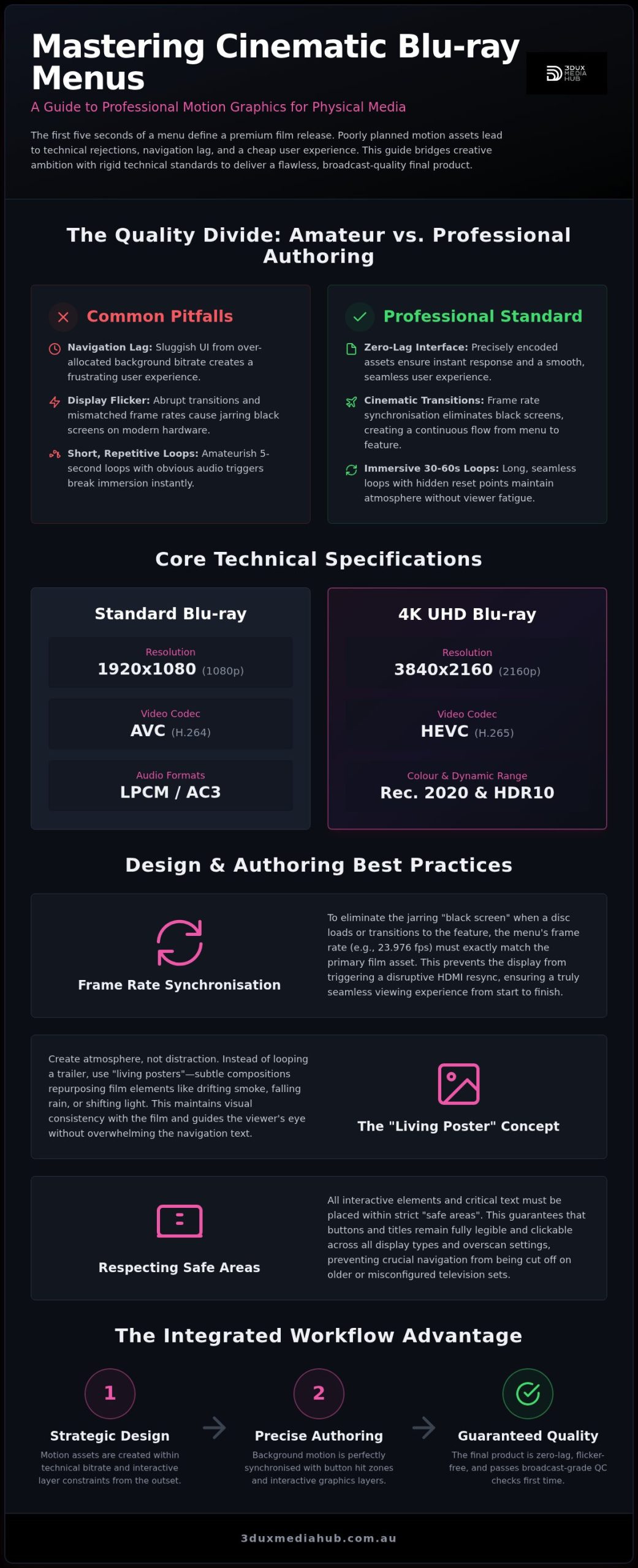
Static menus are functional, but they often feel cold and detached from the film’s narrative. Dynamic backgrounds use movement to guide the viewer’s eye toward specific content, such as exclusive bonus features or localised audio tracks. However, professional design requires a balance. We focus on loop length to ensure the motion feels natural without causing viewer fatigue. A short, five-second loop with a repetitive audio trigger is a hallmark of amateur authoring. Professional motion menus typically utilise 30 to 60-second loops with seamless “hidden” reset points to maintain immersion.
- Motion cues can highlight “Easter eggs” or hidden bonus content.
- Dynamic transitions between the main menu and sub-menus eliminate the “black screen” pause.
- Careful bitrate management ensures the motion background doesn’t steal bandwidth from the interactive graphics layer.
Defining the Cinematic Aesthetic
Creating a cinematic menu often involves repurposing original film plates to maintain visual consistency. Rather than simply looping a trailer, we recommend “living posters.” These are subtle compositions where elements like drifting smoke, falling rain, or shifting light create a sense of atmosphere without distracting from the navigation text. Precision is critical here. Our designers work within strict “safe areas” to ensure that buttons and titles remain legible across all display types, from high-end OLEDs to older LED panels. This technical foresight prevents the common issue of text being cut off or obscured by high-energy motion elements in the background video.
Technical Specifications for Professional Blu-ray Motion Menus
High-end motion graphics for Blu-ray menus must adhere to rigorous technical constraints that differ significantly from broadcast or web delivery. A common mistake in the design phase is over-allocating bitrate to the menu background, which can lead to buffer under-runs or sluggish navigation. Precise encoding is required to balance visual fidelity with the disc’s total data throughput. For standard 1080p Blu-ray, we utilise the AVC (H.264) codec, whereas 4K UHD releases require HEVC (H.265) to support the expanded Rec. 2020 colour space and HDR10 metadata.
Maintaining frame rate synchronisation between the menu and the feature film is another critical factor. If your film is mastered at 23.976 fps but the menu runs at 29.97 fps, the viewer’s display will likely trigger an HDMI resync, causing several seconds of black screen as the hardware adjusts. We ensure all assets match the primary feature’s timing to provide a seamless transition from the first frame of the disc to the final credits. This attention to detail is what defines a professional, distributor-grade release.
Codecs and Container Constraints
While H.264 remains the industry workhorse for standard releases, 4K UHD authoring demands a more sophisticated approach. The HEVC codec allows for higher efficiency at 2160p resolution, but it requires careful management of HDR metadata to prevent “washed out” colours on non-HDR displays. For audio, we typically recommend LPCM for its uncompressed quality or AC3 for broader compatibility with older soundbars. Consulting the Technical specifications for menu graphics is a good starting point for understanding these asset requirements before you begin the design phase.
Looping and Seamless Branching
Achieving a seamless loop requires more than just matching the first and last frames of your video. The authoring engine needs a specific “intro” segment that transitions into the main loop. This prevents the “black frame” gap that occurs when a player re-reads the data. We manage data buffers so that interactive buttons appear instantly upon loop restart, ensuring the user experience remains fluid. If you need assistance with complex assets, our team can provide expert video and audio encoding to meet these exact standards.
Overcoming Technical Constraints in Menu Design
Technical failure is the most significant risk when designing motion graphics for Blu-ray menus. While a menu might look perfect on a high-end workstation, it often stutters or lags when loaded into a hardware player’s restricted memory buffer. Lag isn’t an inherent flaw of the format; it’s a symptom of poor asset optimisation. Professional authoring requires a delicate balance between the background video bitrate and the complexity of the Interactive Graphics (IG) layer. If the IG assets exceed the player’s available memory, navigation becomes sluggish, frustrating the viewer and devaluing the product.
Flicker is another common hurdle. Thin horizontal lines or high-contrast patterns often trigger “interline twitter” on television displays. To solve this, we use a minimum line thickness of two pixels and apply vertical blurs or anti-aliasing to problematic edges. This ensures that the menu remains stable and easy on the eyes, even on older LED or plasma panels. Maintaining high contrast ratios for text is equally vital. We use drop shadows or semi-transparent backplates to ensure legibility against moving backgrounds, preventing the text from “washing out” during brighter scenes of the motion loop.
Designing for the 10-Foot Interface
Web-style design principles fail on a television because the user isn’t using a precise mouse. They’re using a remote control from across the room. Every button must have three distinct, high-contrast states: normal, focused, and selected. Without clear visual feedback, the user loses their place in the menu hierarchy. Safe areas are designated margins within the frame that guarantee critical text and interactive elements remain visible on all television sets, regardless of overscan settings. We strictly adhere to these boundaries to ensure a consistent experience across all hardware configurations.
Reducing Interlace and Compression Artefacts
Dark motion backgrounds are prone to “banding,” where smooth gradients break into blocky, visible steps. We mitigate this by adding a fine layer of dither or film grain, which helps the encoder maintain a smooth appearance. However, high-motion grain consumes significant bitrate, so it’s a trade-off that requires expert oversight. Integrating Blu-ray quality control services early ensures your assets meet these rigid standards before they reach the replication stage. This proactive approach prevents costly technical rejections and ensures your high-value film assets are presented in the best possible light.
The Authoring Pipeline: Integrating Motion Assets
Transitioning from creative design to the technical authoring suite is the most critical phase of production. Unlike digital streaming interfaces, motion graphics for Blu-ray menus require absolute synchronisation between the pre-rendered background video and the interactive graphics (IG) layer. We define button “hit zones” during the initial render to ensure that interactive highlights align perfectly with motion coordinates. This precision prevents the visual “drift” that often occurs when assets are handled by separate design and authoring teams.
Audio synchronisation adds another layer of complexity. Button sound effects must be triggered with zero latency to maintain the illusion of a tactile interface. We map audio cues to specific motion transitions, ensuring that a “click” or “whoosh” occurs precisely as the menu page changes. This level of integration is essential for high-end releases where the user experience must feel instantaneous and professional.
From After Effects to Authoring Suite
Successful integration begins with asset preparation. Exporting overlays with correct 8-bit alpha channels is mandatory for proper transparency in the IG layer. We maintain strict naming conventions and project structures to streamline complex UHD authoring workflows, especially for multi-page menus with branching paths. This methodical approach allows for faster revisions and ensures that every asset is optimised for the player’s memory buffer before the first test build.
Java (BD-J) vs HDMV Menu Logic
Choosing the right menu logic depends on the release’s complexity. BD-Java (BD-J) offers advanced capabilities, such as picture-in-picture and dynamic animations, making it the standard for “mega-set” releases. However, it carries a higher processing overhead. For standard boutique releases, HDMV (High Definition Movie Mode) is often the superior choice. It provides faster response times and broader compatibility with budget hardware players. We evaluate your specific feature set to determine which logic path provides the most reliable user experience.
Comprehensive testing is the final step. We verify every motion asset across multiple player profiles, from legacy Profile 1.1 machines to modern 4K UHD hardware. This ensures that your release remains functional and visually consistent for every consumer. If you require a partner to manage this complex integration, explore our professional 4K UHD and Blu-ray authoring services for your next project.
Expert Motion Graphic Services for Australian Distributors
3DUX Media Hub acts as the essential bridge between high-level creative vision and the rigid technical reality of physical media standards. Designing motion graphics for Blu-ray menus involves more than aesthetic flair; it requires a deep understanding of how assets behave within a restricted authoring environment. By acting as a single partner for design, disc authoring, and quality control, we eliminate the communication gaps that typically lead to navigation lag or technical rejections. This integrated workflow ensures that your motion assets are built for performance from the very first keyframe.
Speed is a critical factor in the modern entertainment cycle. Tight theatrical-to-home-media windows leave little room for error or technical delays. Our team specialises in fast turnaround times without compromising on broadcast-grade quality. We provide comprehensive global distribution support, ensuring your menus are technically compliant for every territory. This includes managing content localisation and regional standards conversion, allowing your release to reach a worldwide audience with a consistent, premium user experience.
Why 20 Years of Experience Matters
Two decades of industry experience allows us to anticipate and avoid the common pitfalls that lead to costly disc recalls. Minor errors in bitrate allocation or IG layer mapping can result in thousands of faulty units. We take a no-nonsense approach to complex technical specifications, providing a “safe pair of hands” for your high-value film assets. Our proven track record with major film and television distributors demonstrates our ability to handle high-stakes projects with precision. We don’t just deliver a file; we deliver a master that is guaranteed to pass the most rigorous QC checks.
Get Started with Your Motion Menu Project
We provide expert consultation on asset preparation and creative direction to ensure your project begins on the right technical footing. Our solutions are fully scalable, catering to everything from independent boutique film releases to major studio box sets. Whether you need a subtle living poster or a complex, multi-page interactive environment, we align our design process with your specific distribution goals. Contact 3DUX Media Hub today for a technical review of your next project and ensure your 2026 release meets the highest industry standards.
Future-Proofing Your Next Premium Disc Release
Achieving a boutique feel for physical media requires more than just high-resolution video. It demands a meticulous balance between cinematic motion graphics for Blu-ray menus and the rigid constraints of the hardware’s memory buffer. By synchronising the background motion with the interactive graphics layer early in the pipeline, you eliminate the navigation lag that can compromise a release’s perceived value. You don’t have to navigate these technical complexities alone.
3DUX Media Hub brings 20+ years of technical mastering expertise to every project. We provide broadcast-grade QC for all motion assets, ensuring full compliance for global distribution. As specialists in 4K UHD and Blu-ray authoring, we bridge the gap between creative ambition and technical reliability. Contact 3DUX Media Hub for professional motion menu design to guarantee your film assets are in a safe pair of hands. Your audience deserves a seamless, premium experience from the moment the disc loads.
Frequently Asked Questions
Can 4K UHD Blu-ray discs have motion menus in HDR?
Yes, 4K UHD Blu-ray supports High Dynamic Range (HDR) for menu backgrounds. This ensures visual consistency when the viewer moves from the menu to an HDR10 or Dolby Vision feature film. We utilise the HEVC codec and Rec. 2020 colour space to master these assets, preventing the “washed out” appearance that occurs when using standard dynamic range assets on high-end displays.
What is the maximum bitrate allowed for a Blu-ray motion menu?
While the physical limit for a standard Blu-ray disc is 48 Mbps, we typically cap motion graphics for Blu-ray menus between 15 and 25 Mbps. This conservative approach is necessary to reserve sufficient bandwidth and system memory for the Interactive Graphics (IG) layer. Exceeding these levels can cause the player’s processor to struggle, leading to unresponsive buttons or visual stuttering during playback.
Why do some motion menus feel laggy or slow to respond?
Navigation lag is usually the result of an unoptimised Interactive Graphics layer or a background video with a bitrate that is too high for the player’s buffer. If the IG assets exceed the hardware’s memory limits, the player cannot render button highlights instantly. Our integrated design and authoring workflow ensures that all assets are balanced to provide a zero-lag user experience across all hardware profiles.
What video codec is best for Blu-ray menu backgrounds?
AVC (H.264) is the industry standard for 1080p Blu-ray menus due to its universal compatibility and efficient compression. For 4K UHD projects, HEVC (H.265) is mandatory. It provides the necessary efficiency to handle 2160p resolution and HDR metadata within the disc’s technical constraints. We select the codec based on your target resolution to guarantee the highest possible visual fidelity for your release.
Do I need separate motion assets for PAL and NTSC territories?
No, Blu-ray is a global format that does not rely on the old PAL and NTSC television standards. Most professional releases are mastered at 23.976 or 24 frames per second, which is compatible with modern displays worldwide. However, if your original assets are in 50i or 60i, we may perform standards conversion to ensure the final disc meets global compliance and plays correctly in every territory.
How long should a motion menu loop be for a professional release?
A professional motion menu loop typically runs between 30 and 60 seconds. This length is ideal for avoiding viewer fatigue while providing enough time for a high-quality audio track to play without frequent, jarring resets. Short loops of five or ten seconds often feel repetitive and “cheap,” whereas a longer, carefully timed loop establishes the premium boutique feel that collectors expect from high-value titles.
Is it possible to have motion transitions between different menu pages?
Yes, we can implement seamless transitions between different menu pages using “intro” and “outro” video segments. This process involves authoring specific video paths that play when a user selects a sub-menu, creating a fluid, cinematic experience. It requires precise synchronisation between the motion graphics for Blu-ray menus and the disc’s navigation logic to ensure there are no black frame gaps during the transition.
Can I use Dolby Atmos or DTS:X audio in a Blu-ray menu?
While technically possible, we generally recommend using LPCM or AC3 audio for menus. Object-based formats like Dolby Atmos or DTS:X require the player and receiver to perform a “handshake” that can cause a delay in audio playback when the menu loads. For a fast and responsive interface, uncompressed LPCM provides the best balance of high-quality sound and instantaneous response times for button sound effects.