Did you know that 4K Ultra HD Blu-ray player sales jumped by 21 per cent in early 2026? This surge proves that the market for premium physical media isn’t just surviving; it’s thriving amongst collectors who demand absolute perfection. You likely already realise that a stunning feature film means very little if the user experience is hampered by a clunky or non-compliant interface. Mastering interactive menu design for 4K UHD is the difference between a prestigious global launch and a costly technical rejection at the QC stage.
This technical guide provides the roadmap you need to navigate the rigid constraints of the UHD Blu-ray specification. We’ll show you how to balance high-bitrate video with sophisticated overlays while maintaining the performance standards expected on high-end players. We’ll cover everything from BD-J limitations to the nuances of HDR10 and Dolby Vision integration. By the end of this article, you’ll understand how to deliver a flawless, high-performance menu that enhances your brand value and meets every global distribution standard with precision.
Key Takeaways
- Understand why 4K UHD requires higher processing power and how to implement Java-based environments for an immersive viewer experience.
- Master the asset resolution and HEVC encoding standards required to maintain 3840 x 2160 fidelity across global distribution platforms.
- Learn the precise workflow for interactive menu design for 4K UHD, from initial asset preparation to programming with BD-J or HDMV logic.
- Evaluate the commercial benefits of motion backgrounds versus static menus to align your release strategy with budget and audience expectations.
- Discover how to navigate complex broadcast-quality QC requirements to ensure your high-value assets pass inspection without costly delays.
The Evolution of Interactive Menu Design for 4K UHD
Interactive menu design for 4K UHD has undergone a radical transformation since the days of standard-definition physical media. We’ve moved far beyond simple static buttons and basic highlight overlays. Modern 4K releases demand immersive environments that mirror the cinematic quality of the feature film. This shift is driven by the need for a cohesive user experience that justifies the premium price point of physical collector’s editions. High-end consumers expect a seamless transition from the moment the disc spins up to the final credits.
Unlike legacy formats, the UHD specification allows designers to utilise Java-based environments to create fluid, high-performance interfaces. These menus require significantly more processing power than standard Blu-ray. A UHD player must simultaneously decode high-bitrate HEVC (H.265) video for motion backgrounds while rendering complex graphic layers at a 3840 x 2160 resolution. This technical demand is why professional authoring is non-negotiable for high-end releases. Precision in buffer management ensures that the interactivity remains snappy and responsive even with heavy video assets running in the background.
From DVD to UHD: A Technical Leap
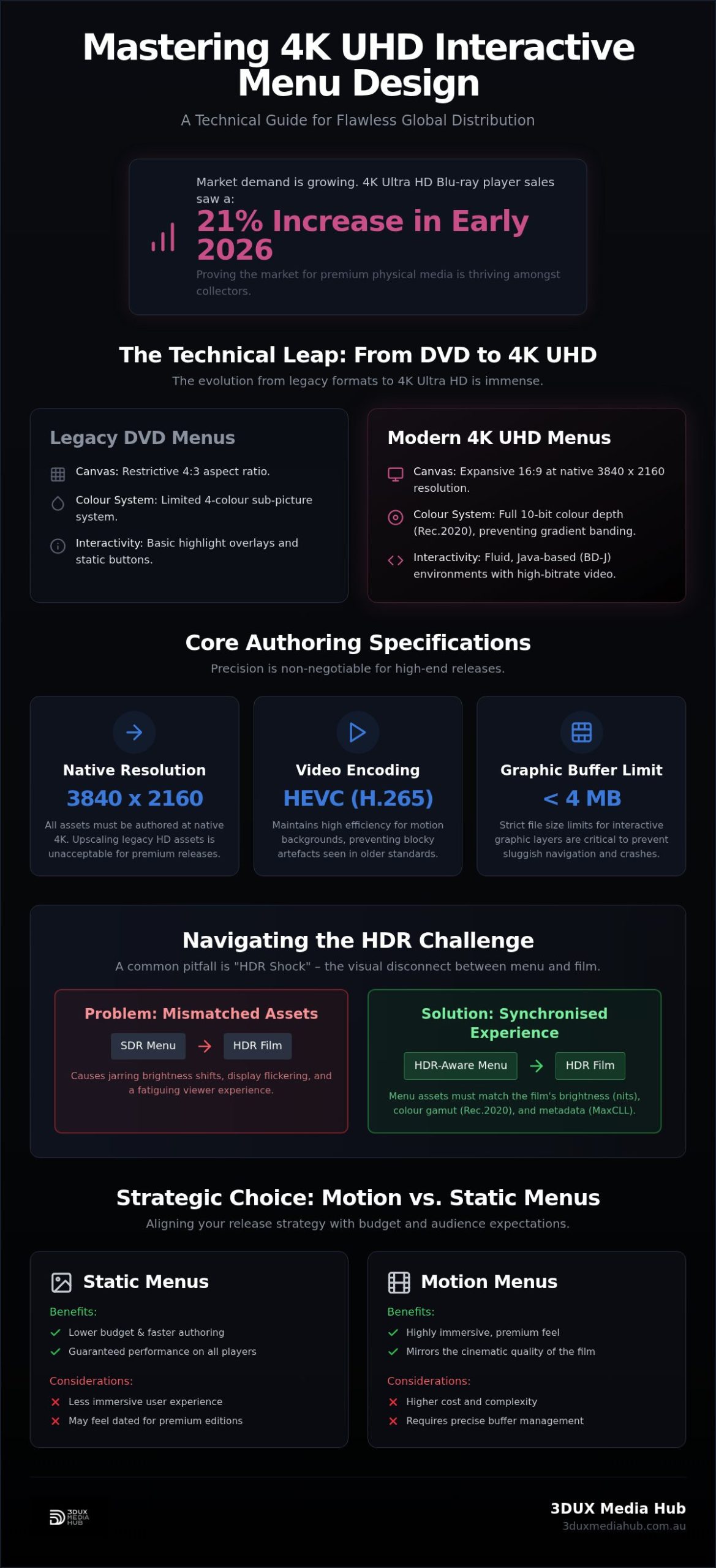
The technical gap between DVD and UHD is immense. DVD menus relied on a restrictive 4-colour sub-picture system on a 4:3 canvas. In contrast, 4K UHD provides a massive 16:9 canvas with 10-bit colour depth. This allows for integrated HEVC motion backgrounds that transition seamlessly into the film. Managing the authoring workflow at this level requires specialised software capable of handling BD-J (Blu-ray Disc Java) logic. Standard graphic design tools simply don’t have the architecture to program the interactive triggers and buffer management necessary for a stable disc. Every element must be optimised to prevent lag on hardware players.
The Role of HDR in Menu Assets
Technical Specifications for UHD Disc Menu Design
Delivering true 4K fidelity requires all assets to be authored at a native resolution of 3840 x 2160. Upscaling legacy HD assets is unacceptable for premium releases. We utilise HEVC (H.265) encoding for motion backgrounds to maintain high efficiency. This codec allows for bitrates that support complex textures without the blocky artefacts common in older standards. A key differentiator in interactive menu design for 4K UHD is the move to 10-bit colour depth. This shift is vital for preventing the “banding” often seen in complex gradients or subtle lighting transitions in 8-bit formats.
High-bitrate AC3 or DTS-HD audio integration for menu loops completes the premium experience. These tracks must be encoded to match the sample rate of the main feature to avoid sync issues or audio “pops” during the first play sequence. For distributors managing high-value titles, our 4K UHD authoring team handles these complex encoding requirements with absolute precision.
Layering and Graphic Constraints
The On-Screen Display (OSD) layer must be managed with extreme care. In a BD-J environment, button response times are tied directly to how these layers are cached within the player’s system memory. File size limitations for interactive assets are strict; exceeding the 4MB buffer for certain graphic layers can lead to sluggish navigation or hardware crashes. We focus on optimising transparency and alpha channels for 4K overlays to ensure crisp edges on interactive text. This prevents the “fuzziness” that occurs when assets are poorly scaled or compressed during the authoring process.
HDR10 and Dolby Vision Integration
Integrating HDR10 or Dolby Vision into the menu structure introduces significant metadata challenges. You must follow strict Technical Specifications for UHD Disc Menu Design to ensure the disc master is consistent. This level of technical rigour in interactive menu design for 4K UHD ensures that if the menu’s MaxCLL (Maximum Content Light Level) isn’t correctly tagged, the viewer’s display won’t flicker when transitioning to the film. Legibility is another critical factor. White text on high-contrast HDR backgrounds can cause visual “blooming” or haloing on certain OLED panels. We manage nit levels for all graphic elements to maintain readability while preserving the high-impact look of HDR.
Motion vs. Static: Selecting the Right Menu Strategy
Distributors must choose a strategy that aligns with the title’s market positioning and technical constraints. Motion menus offer an immediate cinematic atmosphere, setting the tone before the feature film even begins. These high-impact interfaces utilise 10-bit HEVC loops to provide a seamless visual experience. However, they demand more from the player’s hardware. High-bitrate motion backgrounds can increase seek times if the authoring isn’t handled with precision. Balancing this visual flair with quick navigation is essential for a premium user experience.
Static menus remain a vital tool for efficiency and speed. They are often the superior choice for niche releases or deep-catalogue titles where lower authoring costs are a priority. Static designs load instantly and require minimal buffer management. Many high-end releases now utilise a hybrid approach. This involves a short, high-energy motion intro that transitions into a static main navigation page. It provides the initial “wow” factor while ensuring the interface remains snappy and responsive for the user. This strategy is particularly effective for sets with extensive bonus features.
Developing Bespoke Motion Graphics
Creating a professional motion loop requires more than just clipping a scene from the movie. We use native film assets to build immersive, seamless backgrounds that enhance the overall brand value. Our motion menu design services are tailored for boutique labels that demand a bespoke aesthetic for high-end physical releases. Timing is the critical technical factor. We ensure that both audio and video transition points are imperceptible. This prevents the jarring “glitch” or pause often seen in poorly authored discs when a loop restarts or branches to a sub-menu.
User Interface (UI) Design Principles
Successful interactive menu design for 4K UHD adheres to the “Three Click Rule”. A viewer should be able to access any bonus feature, subtitle track, or audio setting within three clicks of the remote. We design specifically for the “10-foot experience”, ensuring all elements are legible from a typical viewing distance on a lounge. Accessibility is also a primary consideration. We implement high-contrast colour schemes and robust font weights to ensure the UI is functional across all 4K display technologies. Every graphic element is tested to ensure it remains clear on both massive projector screens and smaller UHD panels.
The 4K UHD Authoring Workflow: Design to QC
Authoring a compliant 4K disc is a methodical discipline that requires absolute technical precision. Unlike standard digital files, a physical disc master must function across a diverse range of hardware players with varying processing capabilities. The workflow begins with asset preparation and standards conversion. This ensures that every element, from the primary feature to the smallest sub-menu, is localised and formatted for global delivery. We then move to programming the interactive logic. This involves choosing between HDMV for straightforward navigation or BD-J for the complex, script-based environments required for high-end releases.
The middle stages of the workflow focus on the heavy lifting of data management. High-efficiency video encoding is applied to the menu backgrounds, followed by the multiplexing of interactive layers with the primary video and audio streams. This phase is where the technical stability of interactive menu design for 4K UHD is truly tested. Every asset must be perfectly synchronised within the BDMV structure to prevent navigation lag or buffer overruns. Our team manages this entire process with a focus on speed and reliability, ensuring your high-value assets are ready for the final mastering stage.
Precision Encoding and Mastering
Successful authoring requires careful management of the disc’s total bit budget. You cannot simply max out the bitrate for the feature film without considering the interactive assets. Our professional video encoding services ensure that menu backgrounds maintain 4K clarity without starving the main movie of necessary data. We create the final disc image (ISO or BDMV) with all metadata triggers intact. This precision prevents visual artefacts and ensures that the final product meets the rigid specifications required for replication.
Rigorous Quality Control (QC)
The final phase is the most critical: rigorous quality control. We test button navigation logic on a wide array of 4K hardware, from legacy first-generation players to the latest 2026 models. This step addresses a common gap in the industry where designs look perfect in a software emulator but fail on physical hardware. Utilising comprehensive Blu-ray quality control services is the only way to avoid costly recalls. We verify that HDR10 and Dolby Vision metadata triggers correctly across different display brands, ensuring the interactive menu design for 4K UHD remains legible and vibrant on every screen. To secure your release against technical failure, partner with us for professional 4K UHD authoring.
Partnering with 3DUX for High-End Media Authoring
3DUX Media Hub acts as a seasoned industry veteran for distributors who require technical perfection. We provide a safe pair of hands for high-value film assets. With over 20 years of industry experience, our team understands the high stakes of global entertainment distribution. We are specialised in HEVC encoding and HDR mastering, ensuring every project meets the most rigorous technical standards. Our professional 4K UHD authoring services bridge the gap between creative vision and strict hardware compliance. We maintain a no-nonsense approach to handling complex requirements with speed and precision.
Global film and TV distributors demand fast turnaround times without a reduction in quality. We’ve built our reputation on reliability and technical efficiency. From initial content localisation to the final broadcast-quality QC, we manage the entire lifecycle of your media assets. This comprehensive support allows your team to focus on marketing and sales while we handle the technical heavy lifting. Our proactive partnership model ensures that potential issues are identified and resolved long before the replication stage.
Global Distribution Support
Preparing assets for worldwide markets involves more than just basic encoding. We provide robust multi-language menu support and ensure your release complies with diverse regional technical requirements. Whether you are targeting North America, Europe, or the Asia-Pacific, we ensure your disc or digital master meets the standards of major global retailers. This expertise in interactive menu design for 4K UHD prevents regional playback errors and ensures a consistent consumer experience. We understand the specific nuances of different hardware ecosystems, ensuring your release is truly global-ready from day one.
Customised Authoring Solutions
We don’t believe in one-size-fits-all templates for premium media. Every film possesses a unique aesthetic, and your menu must reflect that cinematic identity. We offer bespoke interactive menu design for 4K UHD tailored to the specific needs of your title. Our services are fully scalable. We work with independent filmmakers producing boutique collector’s editions and major distributors managing high-volume franchises. This flexibility ensures that every project receives the same level of technical rigour and attention to detail. We focus on the end goal of global delivery and a flawless consumer connection.
Enquire about your next 4K UHD project with 3DUX Media Hub today.
Securing Excellence in Premium Media Distribution
Mastering the future of physical media distribution requires a precise blend of technical rigour and creative flair. The transition to 4K UHD isn’t simply about higher resolution; it involves managing complex BD-J environments and 10-bit HEVC assets without compromising the viewer’s experience. High-end interactive menu design for 4K UHD ensures your release functions flawlessly across all hardware while meeting strict global compliance standards. This level of technical precision is what defines a premium collector’s edition in the current market.
Partnering with a seasoned authoring team protects your high-value film assets from costly technical rejections and user frustration. With over 20 years of technical mastering experience, 3DUX Media Hub provides the specialised expertise needed for high-efficiency HEVC encoding and HDR mastering. We act as a reliable service partner, ensuring your content is localised and ready for worldwide markets with absolute precision. Our no-nonsense approach guarantees that your technical requirements are handled with speed and authority.
Contact the experts at 3DUX Media Hub for your 4K UHD authoring needs and secure a flawless experience for your audience today. Your next global release is in safe hands.
Frequently Asked Questions
What is the difference between BD-J and HDMV for 4K UHD menus?
BD-J is the industry standard for complex interactive menu design for 4K UHD, providing a scriptable Java environment for advanced animations. HDMV is more restrictive, using pre-defined button structures that are faster to author but less immersive. We utilise BD-J to manage the high processing demands of UHD players, ensuring navigation remains responsive even with 10-bit HEVC motion backgrounds. This approach is essential for boutique releases that require a bespoke user interface.
Can I use 4K UHD interactive menus for digital delivery platforms?
How do HDR10 and Dolby Vision affect the design of interactive buttons?
HDR standards introduce specific brightness constraints for graphic overlays. Buttons must be authored with nit levels that match the overall scene to prevent visual blooming or discomfort on high-contrast displays. We ensure metadata consistency between the menu and the feature film. This prevents the display from resynchronising or flickering when the viewer starts the movie. Rec.2020 colour gamut management is also vital to keep button colours accurate and vibrant across all display brands.
Do I need a specific bitrate for 4K UHD menu backgrounds?
We recommend a bitrate of 15 to 25 Mbps for HEVC-encoded motion backgrounds. This range ensures high-efficiency video quality without blocky artefacts while leaving sufficient bit budget for interactive layers. Managing these bitrates is a core part of professional interactive menu design for 4K UHD. It prevents player buffer overflows, which lead to sluggish navigation or hardware crashes. Our technical precision ensures that your menu remains stable across a diverse range of 4K playback devices.
Is it possible to have multi-language interactive menus on a single disc?
Professional authoring supports multi-language menus on a single disc master. We program the disc logic to detect the user’s player settings or provide a manual language selection menu. This allows for localised button graphics and subtitle triggers tailored to specific territories. It is a standard requirement for global film distribution, ensuring your release is accessible to international audiences while maintaining a single, cost-effective disc structure for replication and worldwide shipping.
What are the most common reasons for a 4K UHD menu failing technical QC?
Failure at the QC stage often stems from buffer management issues in the Java layer or HDR metadata errors. If the graphic assets exceed the player’s 4MB memory limit, the menu will lag or crash. Other common issues include colour space mismatches, where menus are incorrectly authored in Rec.709 instead of Rec.2020. We perform rigorous testing on multiple hardware brands to identify these technical flaws before the replication phase, ensuring your high-value assets are protected.
How long does the 4K UHD authoring and menu design process typically take?
The authoring and design process generally takes between two and four weeks. This timeline accounts for asset preparation, HEVC encoding, BD-J programming, and the final QC cycle. Complex projects with extensive bonus features or bespoke motion graphics may require additional time for technical mastering. We prioritise efficiency and precision to meet tight distribution windows, providing a safe pair of hands for your assets throughout the entire production lifecycle.
Can 3DUX Media Hub help with localising menus for international markets?
We specialise in content localisation for international film markets. Our services include translating interactive text, synchronising localised audio, and ensuring regional technical compliance. Leveraging over 20 years of expertise, we manage the complexities of global distribution so your title functions perfectly in any territory. From subtitle integration to regional metadata tagging, we provide the comprehensive support necessary for a successful worldwide release. Our team ensures your brand value is maintained across every global market.