
If a viewer notices your Blu-ray menu, you’ve already failed the authoring process. A truly premium physical release should feel invisible, moving the user from the main menu to the feature without a single stutter or logic loop. We all know the frustration of a disc that works perfectly in the studio but freezes on a customer’s five-year-old player in their lounge room. Implementing the best practices for Blu-ray menu navigation is the only way to ensure a broadcast-grade product that doesn’t end up in the return bin.
This guide will help you master the technical logic and design principles required to create seamless navigation that performs across all global playback hardware. You’ll learn how to build a foolproof navigation map, bypass complex BD-J coding errors, and deliver a zero-defect QC report every time. We will analyse the 2026 standards for motion menus, button routing, and the critical differences between HDMV and BD-J modes to ensure your next project is a technical success and a credit to your high-value assets.
Key Takeaways
- Prioritise command-based architecture over visual aesthetics to ensure your menu logic remains robust across all playback hardware.
- Select the correct authoring mode by weighing the reliability of HDMV against the complex interactivity offered by BD-J Java environments.
- Implement the best practices for Blu-ray menu navigation to create an intuitive “10-foot interface” optimised for remote control use.
- Eliminate retail rejections by identifying critical technical pitfalls like button overlap errors and regional coding logic failures.
- Secure a zero-defect QC report through rigorous testing protocols that guarantee seamless performance for global distribution.
The Fundamentals of Blu-ray Navigation: Why Logic Trumps Aesthetics
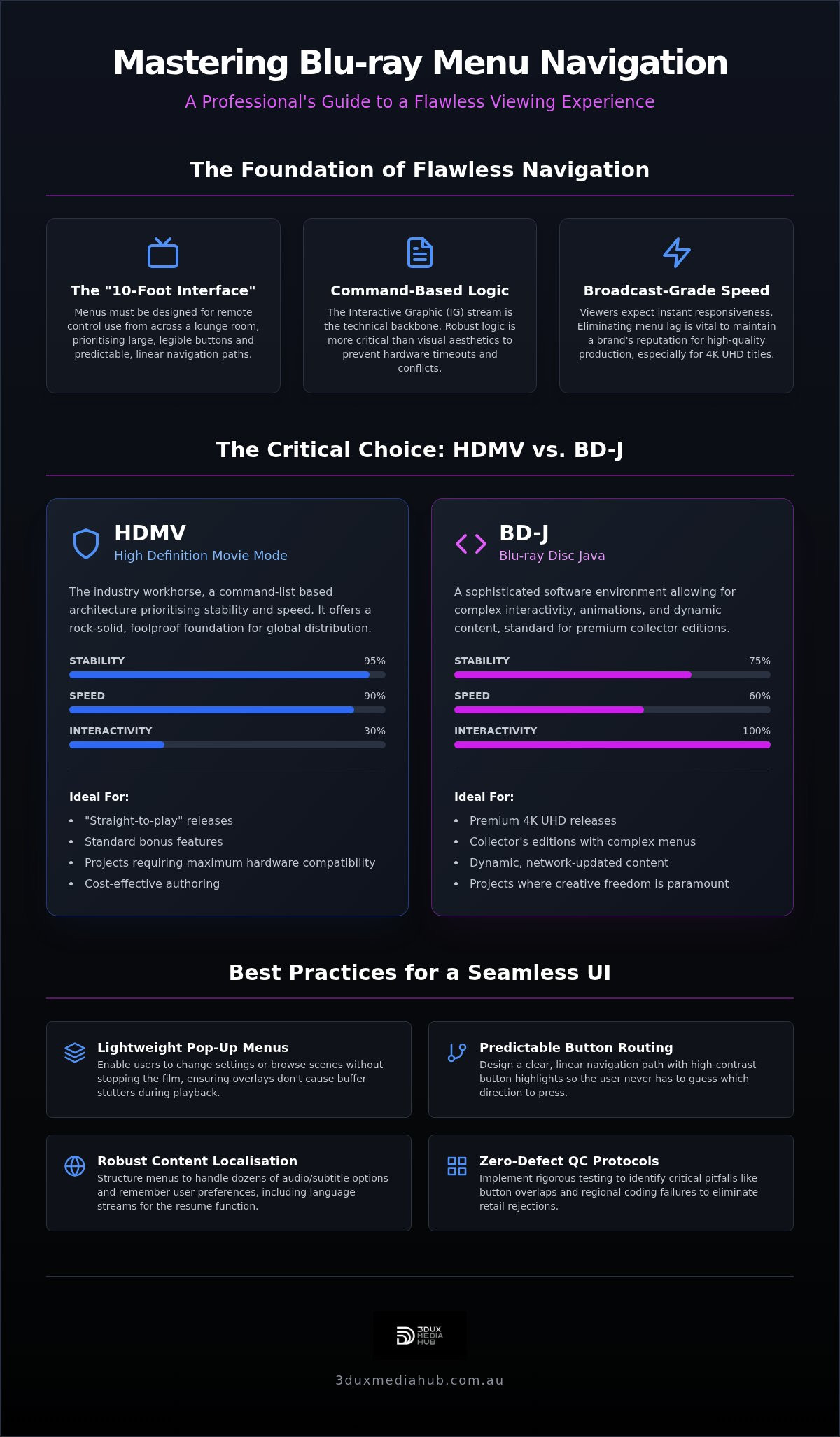
Professional Blu-ray navigation isn’t merely a collection of background images and buttons. It’s a sophisticated command-based architecture known as the Interactive Graphic (IG) stream. This stream dictates every user interaction, from the moment the disc boots to the final credit roll. While stunning motion graphics draw the eye, the underlying logic ensures the disc actually functions. Adhering to the best practices for Blu-ray menu navigation means prioritising this technical framework to prevent hardware timeouts and command conflicts.
The “10-foot interface” rule is the cornerstone of effective disc design. Unlike a website or a mobile app, a Blu-ray Disc format menu is operated via a remote control from across a room. This creates a specific set of constraints. Buttons must be large enough to be legible on various screen sizes, and the navigation path must be linear and predictable. If a user has to guess which direction to press to reach the “Chapters” menu, the UI has failed. Remote control latency is a reality; your menu logic must account for this by avoiding overly complex transition animations that can’t keep up with rapid button presses.
Menu lag is a silent killer for film distributors. When a viewer experiences a three-second delay after pressing “Play”, it creates a psychological disconnect. It suggests a low-budget production, regardless of the film’s actual quality. In 2026, the expectations for 4K UHD and standard Blu-ray have converged. Viewers don’t distinguish between the formats; they simply expect instant, broadcast-grade responsiveness. A “safe pair of hands” approach to authoring ensures that the IG stream is optimised for speed, keeping the brand’s reputation for quality intact.
The Evolution from DVD to Blu-ray Interactivity
Blu-ray technology revolutionised the user experience by moving beyond the clunky, static sub-picture limitations of the DVD era. The most significant advancement is the pop-up menu. This feature allows viewers to browse scenes or change audio settings without ever stopping the film. By 2026, this has become a baseline expectation. Modern authoring must ensure these overlays are lightweight and responsive, providing seamless transitions that don’t cause the player’s buffer to stutter during high-bitrate 4K playback.
The Role of Navigation in Content Localisation
Global releases require a robust menu structure that can handle dozens of audio and subtitle permutations. The navigation logic must be smart enough to remember user preferences throughout the viewing session. For instance, the “Resume” function shouldn’t just remember the timestamp; it must also recall the specific language stream the user was watching. Audio conforming is the vital technical step of synchronising localised audio assets to the master video timeline to ensure perfect menu integration. Without this precision, the navigation experience falls apart for international audiences.
Technical Architecture: Choosing Between HDMV and BD-J Modes
Authoring a professional disc requires a fundamental choice between two distinct technical paths. High Definition Movie Mode (HDMV) is the traditional, command-list-based architecture. It’s stable. It’s fast. Blu-ray Disc Java (BD-J) is a more sophisticated software environment. It allows for complex interactivity and dynamic content. Adhering to the best practices for Blu-ray menu navigation requires understanding how these modes interact with specific hardware chipsets. Budget players often struggle with heavy Java code, leading to disc rejections and consumer complaints.
Your choice depends on the project’s scale and the intended hardware audience. While BD-J offers more creative freedom, HDMV remains a robust choice for many standard releases. The goal is to balance technical ambition with rock-solid reliability. A “safe pair of hands” approach means selecting the architecture that ensures your content plays without a hitch on every player in the lounge room.
When to Organise Your Project in HDMV
HDMV is the workhorse of the industry. It’s ideal for “straight-to-play” releases or discs with a simple main menu and standard bonus features. This mode offers lower authoring costs and significantly faster loading times on legacy hardware. One of the best practices for Blu-ray menu navigation in HDMV is creating responsive button highlights. These must be clean and high-contrast to ensure the user knows exactly where they are on the screen. HDMV’s simplicity is its greatest strength, providing a foolproof foundation for global distribution.
Leveraging BD-J for Premium 4K UHD Releases
For collector editions and 4K UHD titles, BD-J is the industry standard. It enables complex animations, mini-games, and dynamic content like BD-Live. This mode handles advanced interactive Blu-ray menu design with ease, allowing for a more immersive user experience. However, this power comes with technical risk. You must manage memory allocation carefully. Poorly optimised Java code causes players to “freeze” during menu transitions. Our team provides professional Blu-ray authoring services that manage these complexities, ensuring your high-value assets perform perfectly on all hardware.
UX/UI Principles for Living Room Navigation
Mastering the technical logic is only half the battle. The user interface must be intuitive enough for a viewer to navigate without thinking. Establishing a clear visual hierarchy is essential. The “Play Movie” button should always be the primary focus, positioned and scaled to catch the eye immediately. This clarity prevents user fatigue and ensures the film remains the star of the show. If a viewer has to hunt for the start button, your design has already failed.
Reliable navigation relies on distinct button states. You must clearly distinguish between Normal, Selected, and Activated states. A subtle colour shift often isn’t enough for the living room environment. Use high-contrast overlays, bold outlines, or animated highlights to provide instant feedback. All navigation elements must also sit within “Action Safe” and “Title Safe” boundaries. This ensures your menus don’t get cropped on older displays or TVs with aggressive overscan settings, keeping your interface functional for every consumer.
Consistency ensures the menu feels like a professional extension of the film. Align your menu aesthetics with the film’s key art and motion graphics. Using the same typography and colour palette creates a cohesive brand experience. This attention to detail justifies the premium price of a physical purchase. It separates a standard retail release from a collector’s edition that fans will want to own.
Motion Menus vs. Static Overlays
Visual flair shouldn’t come at the expense of responsiveness. Motion backgrounds add a premium feel but require precise execution to avoid performance hits. One of the best practices for Blu-ray menu navigation is ensuring seamless looping. A single “black flicker” at the loop point shatters the illusion of quality and looks amateurish. By incorporating professional motion menu design services, you can achieve sophisticated transitions that feel integrated rather than tacked on. Static overlays can be used for secondary menus to keep loading times fast and the interface snappy.
Navigation Map Design and Flow
A cluttered menu is a technical failure. Your navigation map should follow a logical “tree” structure that prevents users from getting stuck in sub-menus. We adhere to the “Three-Click Rule”: every piece of content, from bonus features to audio settings, must be reachable within three remote presses. Implementing these best practices for Blu-ray menu navigation ensures your release feels like a high-end product. Handling the “Back” and “Root” commands correctly is vital. If a user presses “Menu” during a bonus feature, the disc should return them to the exact sub-menu they left, not the start of the disc. This level of precision is what defines a broadcast-grade user experience.
Avoiding Technical Pitfalls: QC and Global Compatibility
Technical errors in the final stages of production can lead to costly retail rejections. Implementing best practices for Blu-ray menu navigation requires more than just functional buttons; it demands a flawless boot sequence. Regional coding logic remains a critical factor for standard Blu-ray releases. You must ensure that “Region A/B/C” checks are executed correctly without breaking the first-play sequence. If the code loops or hangs during these initial checks, the disc is effectively a coaster for the end consumer.
Button overlap errors are another common pitfall. When the hitboxes of two interactive elements touch or overlap, hardware players often exhibit unpredictable behaviour. The cursor may jump randomly or refuse to move at all. Designing a clean first-play action is vital. This sequence should move logically from studio logos to trailers and finally to the main menu. To catch these complex navigation loops before they reach replication, the necessity of 2026 Blu-ray quality control services cannot be overstated.
Hardware Compatibility Testing
Success in the studio doesn’t guarantee success in the lounge room. We test across a fleet of “Plan A” players, such as Sony and Panasonic, alongside “Plan B” legacy and budget hardware. Physical media introduces command latency that software emulators simply cannot replicate. A laser must physically seek the data on the disc, adding milliseconds that can break poorly optimised code. Professional authoring software is superior to consumer-grade “burning” apps because it allows for precise control over the disc’s logical structure and IG stream compliance.
Managing Subtitle and Audio Selection Logic
Navigation logic must be intelligent enough to reflect the current state of the disc. If a user selects “English” audio, the menu highlight must stay on that selection when they return to the setup page. Handling “forced subtitles” is equally important. These must be triggered automatically by the navigation code during non-English dialogue sections, regardless of the user’s general subtitle settings. Integrating audio conforming for international film release ensures that every localised track aligns perfectly with these navigation commands. For a disc that performs flawlessly on a global stage, partner with our technical experts for your next release.
Professional Authoring: The 3DUX Media Hub Advantage
Delivering a high-value film asset to the global market requires more than just technical knowledge. It demands a partner who understands the high stakes of the entertainment industry. At 3DUX Media Hub, we take a no-nonsense approach to every project. We combine over 20 years of practical industry experience with the latest 2026-standard 4K UHD and HEVC encoding techniques. This ensures your disc isn’t just functional; it’s optimised for the best possible performance on all global playback hardware. We act as a safe pair of hands for your intellectual property, ensuring every byte of data serves the viewer’s experience.
Our workflow moves methodically from asset preparation to final master verification. We specialise in professional 4K UHD authoring services for complex titles that require high-bitrate video and intricate menu logic. By strictly adhering to the best practices for Blu-ray menu navigation, we eliminate the risk of hardware freezes or logic loops that often plague less experienced authoring houses. This precision is vital for meeting tight global delivery dates and avoiding the nightmare of retail rejections.
Fast Turnaround Without Compromising QC
Speed is essential in the modern distribution landscape. We provide a streamlined process that caters to both independent filmmakers and major distributors. Our team utilises high-efficiency video encoding to leave more “headroom” for complex menus and interactive features. This technical precision ensures compliance with global standards, including PAL/NTSC conversions and regional lock requirements. Every master undergoes rigorous broadcast-quality QC. We check every navigation path to ensure your release is defect-free before it reaches the replication stage.
Custom Menu Design vs. Template Solutions
A template menu might save costs upfront, but it rarely does justice to a cinematic production. Bespoke navigation logic gives your film a “fair go” in a crowded retail market. We tailor every motion graphic and button layout to match the specific tone of your production. This commitment to the best practices for Blu-ray menu navigation results in a premium user experience that justifies the physical purchase for collectors. Our menus feel like a natural extension of the film itself. If you are looking for a reliable partner to handle your next 4K UHD or Blu-ray release, contact our team to discuss your technical requirements and secure a professional finish.
Securing Your Global Release Strategy
Securing your release’s technical integrity is the final hurdle in the distribution process. Successful physical media depends on invisible logic that performs flawlessly across every hardware brand. We’ve explored how choosing the right architecture and mastering the 10-foot interface prevents the logic loops and hardware rejections that can sink a high-value project. Implementing the best practices for Blu-ray menu navigation ensures your film receives the premium treatment it deserves on the global stage.
With over 20 years of industry-leading expertise, 3DUX Media Hub acts as a safe pair of hands for your assets. We are specialists in 4K UHD and Blu-ray mastering, providing comprehensive global distribution support for every client. Don’t leave your disc’s performance to chance with consumer-grade tools or template designs. A professional finish is the only way to give your production a fair go in a competitive retail market.
Contact 3DUX Media Hub for professional Blu-ray authoring and menu design to guarantee a zero-defect release. Your audience deserves a seamless experience from the first play.
Frequently Asked Questions
What is the difference between static and motion menus on a Blu-ray?
Static menus use a single background image with interactive overlays, while motion menus feature full-motion video backgrounds. Motion menus provide a premium feel but require careful encoding to ensure seamless loops without black flickers. Static menus are faster to load and remain highly robust on older hardware. Both formats must adhere to the best practices for Blu-ray menu navigation to ensure button routing remains intuitive regardless of the background complexity.
How does BD-J impact the loading time of a Blu-ray disc?
BD-J significantly increases initial loading times because the player must initialise a Java Virtual Machine before displaying the menu. While it offers superior interactivity, this software layer can add several seconds to the boot sequence compared to the leaner HDMV mode. Optimised coding is vital to prevent the black screen delay that frustrates viewers. We focus on efficient memory management to keep these transitions as snappy as possible for the end user.
What are the best practices for designing a “Pop-up Menu”?
Pop-up menus must be lightweight and non-intrusive to avoid obscuring the feature film. Use semi-transparent backgrounds and high-contrast button highlights to ensure legibility against varying video content. Navigation should be restricted to a single axis where possible to simplify remote control use. Crucially, ensure the pop-up logic doesn’t trigger high-bitrate spikes that could cause the player’s buffer to stutter during playback of high-value 4K UHD assets.
Why does my Blu-ray menu work in a software player but freeze on a physical player?
Software players have massive processing power and memory compared to standalone hardware. Physical players rely on specific chipsets with limited buffers and slower laser seek times. Errors like button overlap or unoptimised IG streams often go unnoticed on a PC but cause a complete system hang on a lounge room player. This is why testing on diverse physical hardware is a non-negotiable part of our professional authoring and QC workflow.
Can I include multi-language navigation on a single Blu-ray disc?
Professional authoring allows for sophisticated multi-language navigation through conditional logic. The disc can detect the player’s system language and automatically boot into the corresponding menu. Alternatively, a language selection screen can set a global variable that dictates which audio, subtitle, and menu assets are active. This approach is essential for international releases where a single master master must serve multiple global territories without requiring separate disc pressings.
What is the “Action Safe” area for Blu-ray menu design in 2026?
Even with modern displays, we still observe a 5% margin for Action Safe and a 10% margin for Title Safe areas. While OLED and LED screens are precise, many consumer TVs still employ overscan that can crop the edges of your interface. Keeping all interactive buttons and essential text within the inner 80% of the frame ensures your navigation remains functional for every viewer, regardless of their specific hardware or display settings.
How many sub-menus can a standard Blu-ray support technically?
A Blu-ray can technically support thousands of sub-menus, but practical limitations are dictated by disc capacity and user experience. Each menu page adds to the IG stream data. Following the best practices for Blu-ray menu navigation, we recommend a shallow hierarchy. Keeping content within three remote presses of the main menu prevents user confusion. Overloading a disc with excessive sub-menus can also increase the risk of navigation command errors on legacy players.
Is professional QC really necessary for a simple Blu-ray release?
Professional QC is vital because even simple discs can fail due to minute IG stream non-compliance. A single broken link or a recursive loop can lead to thousands of disc returns and a damaged brand reputation. Our QC process checks for hardware-specific glitches that consumer-grade software simply cannot detect. For high-value film assets, a broadcast-quality report is the only way to ensure your release is truly ready for the global retail market.