Your theatrical DCP is a masterpiece in the cinema, but it becomes a technical liability the moment you treat it as a simple file conversion for home media. Most filmmakers believe the hard work ended in the grading suite, yet the transition from the big screen to the lounge room is where cinematic intent often fails. When navigating Blu-ray vs 4K UHD authoring for indie filmmakers, the difference between a professional release and a technical disaster lies in the precision of your colour space mapping and audio synchronisation. You have likely seen the horror stories of crushed blacks, blown-out highlights, or audio drifting out of sync after a frame rate conversion.
It doesn’t have to be a gamble. You can produce a bit-perfect master that looks exactly as you intended on every consumer screen. This 2026 roadmap masters the complex shift from theatrical masters to high-end physical discs. We will outline the exact technical requirements, asset lists, and encoding standards needed to ensure your film passes broadcast-grade QC and reaches your audience with its integrity intact. From mapping P3 to Rec.709 to managing HEVC bitrates, this guide provides the clarity you need to deliver a premium product.
Key Takeaways
- Understand why theatrical DCP containers are incompatible with consumer players and how to bridge the gap for a flawless home release.
- Master the critical shift from XYZ colour space to Rec.709 or Rec.2020 to prevent crushed blacks and preserve your cinematic grade.
- Evaluate the technical trade-offs between Blu-ray vs 4K UHD authoring for indie filmmakers to ensure your master meets 2026 distribution standards.
- Learn how to conform theatrical audio mixes for home loudness compliance, ensuring your 5.1 or Dolby Atmos tracks remain synchronised and impactful.
- Identify the essential assets required for a professional authoring house, from unencrypted DCPs to high-quality mezzanine files like ProRes 422 HQ.
Understanding the Fundamental Shift from Cinema to Home Media
The Digital Cinema Package (DCP) is a highly specialised container designed for one environment: the cinema. It’s a collection of digital files including image, sound, and data streams, all wrapped in Material Exchange Format (MXF) files. While this works perfectly for a DCI-compliant projector, it’s entirely incompatible with consumer hardware. Converting this theatrical master for physical media is less of a file transfer and more of a technical reconstruction. It’s a process often described as a “dark art” because it requires reverse-engineering a file meant for 50-foot screens into something that fits on a television without losing its soul.
DCP vs. Blu-ray: The Structural Differences
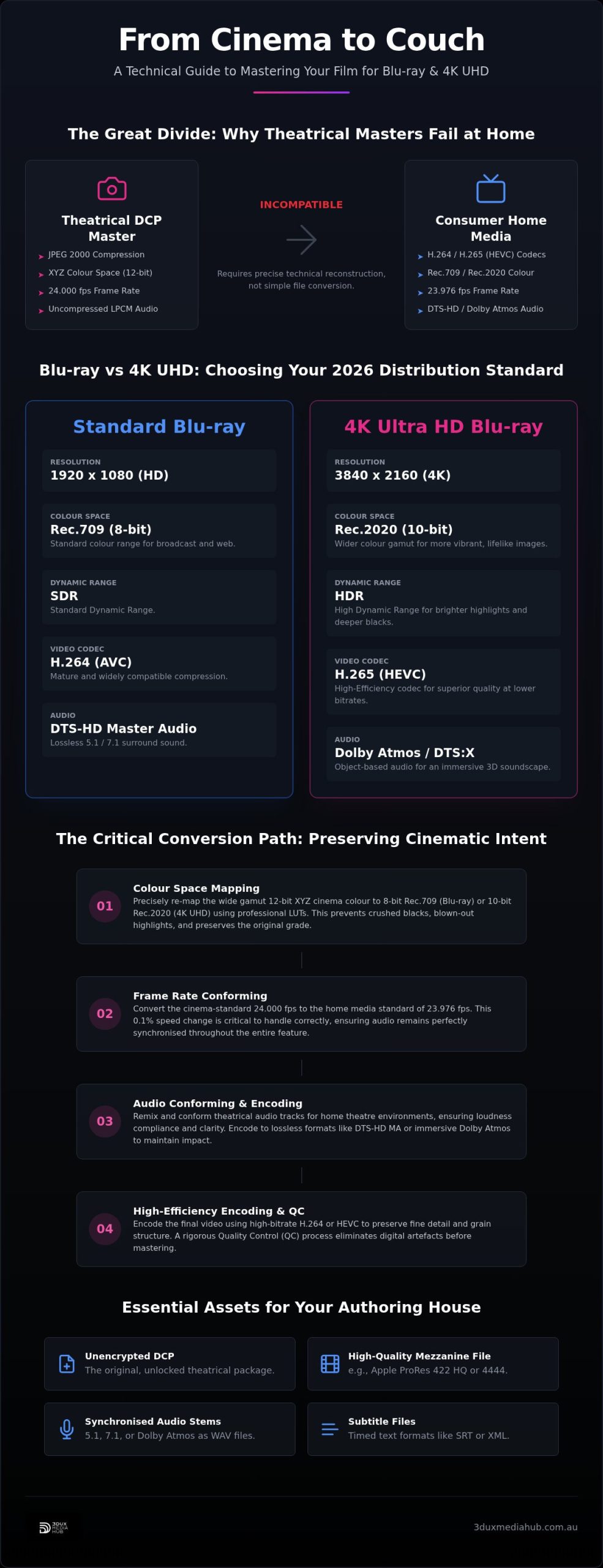
The core of the issue lies in compression and colour science. DCPs use JPEG 2000 compression, which offers incredible detail but requires massive processing power that a standard home player doesn’t possess. Consumer discs rely on H.264 (AVC) for standard Blu-ray or H.265 (HEVC) for 4K UHD. When weighing up Blu-ray vs 4K UHD authoring for indie filmmakers, you’re looking at two very different encoding paths. Standard Blu-ray is capped at 8-bit Rec.709, whereas 4K UHD allows for 10-bit Rec.2020 and High Dynamic Range (HDR). Audio also requires a shift. The uncompressed LPCM tracks found in a DCP are often mixed for large rooms; they need to be conformed to DTS-HD Master Audio or Dolby Atmos to maintain clarity and loudness compliance in a home theatre environment.
Why “Save As” Is Not a Professional Option
Amateur conversion tools often struggle with the XYZ colour space used in cinema. If you simply export a file from a consumer encoder, you’ll likely end up with a “washed out” look or crushed shadows where detail used to exist. Professional authoring involves a meticulous re-mapping of these values to ensure the high bitrate of the original master is preserved. We focus on several critical areas during this transition:
- Accurate conversion from 12-bit XYZ to 8-bit or 10-bit consumer standards.
- Elimination of digital artefacts that occur during frame rate re-sampling or resolution scaling.
- Maintaining the integrity of the grain structure and fine detail through high-efficiency encoding.
- Ensuring the audio remains perfectly synchronised after frame rate adjustments.
An experienced authoring house acts as a final gatekeeper. They ensure the high-value assets you worked months to perfect don’t lose their impact when viewed on a consumer screen. It’s about protecting your cinematic intent through every stage of the mastering process, identifying technical errors before they ever reach the replication plant.
Decoding Technical Specs: Resolution, Frame Rates, and Colour Space
Mastering the technical transition requires more than a simple resize. When evaluating Blu-ray vs 4K UHD authoring for indie filmmakers, the primary hurdle is the fundamental difference in how cinema and home hardware interpret light and motion. Understanding the DCP lifecycle and specifications reveals that a theatrical master is built for a controlled environment that doesn’t exist in the average lounge room. You’re moving from a 12-bit XYZ colour space to either an 8-bit Rec.709 or a 10-bit Rec.2020 container. This isn’t a linear move; it’s a destructive process if not handled with professional precision.
Colour Space Mapping: From Cinema XYZ to Home Standards
Theatrical XYZ encompasses a wider gamut than standard home displays can reproduce. Without professional LUTs and careful mapping, you’ll see immediate colour clipping in the highlights and a loss of detail in the shadows. For a 4K UHD release, we map the theatrical grade to Rec.2020, preserving the High Dynamic Range (HDR) metadata. For standard Blu-ray, the challenge is even greater. We must compress that wide gamut into the much narrower Rec.709 space while ensuring the black levels and white points remain consistent across various consumer devices. It’s about maintaining the “look” of the film, even when the technical ceiling is lower.
Frame Rate Conforming and Audio Drift
Cinema operates at a true 24.000 fps, but most consumer Blu-ray players and displays in 2026 still rely on the NTSC-legacy rate of 23.976 fps. This 0.1% speed difference sounds negligible, but it’s enough to cause massive audio drift over a feature-length film. We use high-precision standards conversion to adjust the video timing and then meticulously pitch-shift and conform the audio. This ensures the 5.1 or Dolby Atmos mix stays locked to the frame. If your project requires complex standards conversion, expert intervention is the only way to avoid the “stutter” often seen in amateur software conversions.
Resolution scaling presents its own set of challenges. Theatrical DCI 4K (4096 x 2160) must be scaled to UHD (3840 x 2160) for 4K discs or 1080p for standard Blu-ray. This involves managing aspect ratios to prevent letterboxing errors or unwanted cropping. When deciding on Blu-ray vs 4K UHD authoring for indie filmmakers, bitrate management becomes the final piece of the puzzle. We balance disc capacity with image fidelity, using HEVC encoding for 4K UHD to maintain a transparent master that reflects every detail of your original cinematography.
Audio Conforming and Subtitle Integration for Physical Media
Theatrical audio is built for calibrated rooms with immense headroom. When weighing up Blu-ray vs 4K UHD authoring for indie filmmakers, the audio conform is just as vital as the visual encode. A theatrical 5.1 or 7.1 mix usually sounds unbalanced on home systems without professional re-mastering. We take the uncompressed 24-bit PCM tracks from your DCP and encode them into lossless containers that meet the strict playback requirements of consumer hardware. This ensures the dynamic range is preserved without compromising dialogue clarity.
Loudness compliance is essential for 2026 distribution. Cinema mixes feature a dynamic range far wider than most home environments can support. We adjust the programme loudness to meet international standards. This keeps dialogue intelligible and prevents the audience from needing to adjust the volume during action sequences. Our technical process includes:
- Encoding uncompressed 24-bit PCM tracks into lossless DTS-HD Master Audio.
- Authoring immersive Dolby Atmos streams for high-end 4K UHD releases.
- Conforming LFE channels for consumer subwoofer crossover limitations.
- Adjusting programme loudness to EBU R128 or ATSC A/85 standards.
Mastering Audio for the Home Theatre
Discrete channel mastering provides a level of control that automated downmixing cannot match. We focus heavily on the Low-Frequency Effects (LFE) channel. Cinema sub-bass is designed for large spaces; for home media, we manage the crossover to prevent distortion on smaller consumer subwoofers. Maintaining dialogue clarity is our priority. We ensure the mix feels cinematic but remains practical for a lounge room acoustic profile. This meticulous approach prevents the common errors that lead to distributor rejections at the QC stage.
Subtitle and Localisation Requirements
DCP subtitles exist as SMPTE or Interop XML files, which are incompatible with physical media authoring. We extract and convert this data into BDN XML. This involves re-timing every subtitle line to align with the 23.976 fps master discussed earlier. Without this adjustment, the text will eventually drift out of sync with the audio. We also manage font rendering and screen positioning for maximum legibility on various display sizes.
For films targeting global distribution, we organise multiple subtitle streams and dubbed audio tracks. Our specialised workflow for audio conforming for international film release ensures every asset is correctly mapped and synchronised. Whether you are delivering a single-language indie feature or a multi-region 4K UHD epic, we guarantee your localisation assets are bit-perfect. We handle the technical heavy lifting so you can focus on the creative impact of your film.
Step-by-Step Checklist for Preparing Your DCP for Authoring
A ProRes 422 HQ or DNxHR file is the gold standard for current mastering. These formats provide a more flexible base for colour space mapping than the JPEG 2000 files found in a DCP. By starting with a mezzanine file, we avoid the double compression effect that can occur when transcoding from a heavily compressed theatrical master. This ensures the bit-perfect quality required for a premium physical release.
Precision is non-negotiable. Alongside your video master, you must provide clear channel mapping documentation for all audio stems. This includes discrete tracks for 5.1 or 7.1 mixes and any localisation assets for foreign markets. If you’re utilising our 4K UHD authoring services, ensure your metadata includes HDR10 or Dolby Vision sidecar files if they weren’t baked into the mezzanine master. When weighing up Blu-ray vs 4K UHD authoring for indie filmmakers, remember that 4K assets require significantly more rigorous metadata validation to pass QC.
- Unencrypted DCP or ProRes 422 HQ / DNxHR master.
- Final credit lists in a searchable text format (e.g., PDF or Word).
- Precise timecodes for chapter points, marked at the start of scenes.
- Separate audio stems (L, R, C, LFE, Ls, Rs) for multi-channel encoding.
- Subtitle files in SRT or XML format for re-timing.
Menu and Interactive Design Specs
Don’t treat menus as an afterthought. Professional discs require assets designed with safe area margins to prevent text or buttons from being cut off by consumer television overscan. For motion menus, provide background video loops of at least 30 seconds to avoid jarring transitions. Our technical guide on interactive Blu-ray menu design offers specific pixel dimensions and layout requirements for 2026 standards. We ensure your interface is as polished as your film.
Ready to finalise your master? Contact 3DUX Media Hub today to discuss your project requirements and secure your production slot.
Professional Mastering vs. Software Conversions: Why Quality Control Matters
Relying on consumer-grade software to finalise a feature film is a high-stakes gamble. While “smart rendering” tools promise speed, they often bypass the rigorous metadata validation required for physical media. A file that plays on a desktop media player isn’t necessarily a bit-perfect master ready for the replication plant. When comparing Blu-ray vs 4K UHD authoring for indie filmmakers, the final deliverable must be a strictly compliant BDCMF (for Blu-ray) or DDP image. Any deviation from these standards leads to costly disc rejections and delayed distribution schedules. Professional authoring ensures your film doesn’t just play, but performs perfectly on every licensed hardware device.
Avoiding the Costs of Failed Replication
A professional authoring house identifies digital glitches, buffer underflows, and multiplexing errors before they reach the glass master stage. We verify Advanced Access Content System (AACS) encryption and ensure region coding compliance for global markets. This isn’t just about playback; it’s about retail-readiness. Our Blu-ray quality control services involve a frame-by-frame inspection of the encoded stream to catch macroblocking or banding that automated software often misses. If a layer break is poorly placed or a bitrate spikes beyond the hardware ceiling, the disc will fail in the field. We catch these issues in the studio, not the shopfront.
The 3DUX Advantage: Speed without Compromise
We bring over 20 years of industry experience to every project. This depth of knowledge allows us to solve complex encoding hurdles, such as difficult grain structures or intricate multi-language subtitle streams, that would stall an amateur workflow. We understand the high stakes of the entertainment industry and provide a “safe pair of hands” for your high-value assets. Our no-nonsense approach prioritises efficiency. We ensure your film meets global broadcast and retail specifications without the unnecessary delays associated with less experienced vendors. We focus on the end goal: global delivery and consumer connection.
Choosing between Blu-ray vs 4K UHD authoring for indie filmmakers requires a partner who understands the 2026 technical landscape. Whether you’re targeting a boutique local release or a worldwide retail debut, our team ensures your cinematic intent survives the transition to disc. Contact us to organise your next professional disc authoring Australia project and experience a seamless path from DCP to bit-perfect master.
Finalise Your Film with Technical Precision
Transitioning from a theatrical master to a retail-ready disc defines your film’s commercial life. You’ve seen why professional colour space mapping and frame rate conforming are non-negotiable for preserving cinematic intent. When deciding on Blu-ray vs 4K UHD authoring for indie filmmakers, the choice between 1080p and 2160p should be backed by bit-perfect encoding and broadcast-grade quality control. These technical steps ensure your vision survives the jump from the cinema to the lounge room without compromise.
3DUX Media Hub brings over 20 years of technical mastering expertise to your project. We specialise in 4K UHD, Blu-ray, and DVD authoring, providing a safe pair of hands for your high-value assets. Our no-nonsense approach ensures your film meets all global delivery specifications with a fast turnaround. Don’t let technical glitches or audio drift undermine your hard work at the final hurdle. We focus on the precision required to pass every QC check the first time.
Secure your film’s legacy with professional Blu-ray authoring at 3DUX Media Hub. We are ready to help you deliver a master that looks and sounds exactly as you intended.
Frequently Asked Questions
Can I author a Blu-ray from an encrypted DCP?
You can author from an encrypted DCP, but you must provide a Key Delivery Message (KDM) specifically targeted to our authoring workstation’s certificate. This allows us to ingest the JPEG 2000 sequence for encoding. However, it’s often more efficient to provide an unencrypted mezzanine file like ProRes 422 HQ. This removes the decryption step and reduces the risk of ingestion errors during the mastering process.
What is the difference between Rec.709 and XYZ colour spaces?
XYZ is the native colour space for theatrical projection, while Rec.709 is the international standard for high-definition home media. Theatrical XYZ has a significantly wider gamut and a different gamma curve compared to consumer screens. Professional authoring involves a meticulous mapping process to ensure the vibrant colours of your cinema grade aren’t lost when compressed into the 8-bit Rec.709 space used on standard Blu-ray discs.
Why does my 24fps film need to be conformed for Blu-ray playback?
Most consumer Blu-ray players and displays in 2026 still follow the NTSC-legacy timing of 23.976 fps. If you leave your film at the theatrical rate of 24.000 fps, many players will skip frames or struggle with synchronisation. We perform a high-precision conform to 23.976 fps, which includes pitch-correcting the audio. This ensures a smooth, flicker-free experience that remains perfectly in sync for the entire duration.
Do I need to provide separate audio files or is the DCP audio enough?
While the uncompressed PCM audio within a DCP is high quality, providing separate audio stems is the preferred method for professional authoring. This allows us to manage loudness compliance and channel mapping more effectively for home theatre environments. We can ensure the LFE channel is correctly balanced and that dialogue remains clear against a wide dynamic range, which is critical for passing broadcast-grade quality control.
What subtitle formats are required for professional Blu-ray authoring?
Professional Blu-ray authoring requires subtitles in BDN XML or SRT formats rather than the theatrical XML found in a DCP. Theatrical subtitles are timed for 24fps and must be re-synchronised for the 23.976 fps disc master. We also handle font rendering and safe-area positioning to ensure the text is legible on all consumer display sizes. Providing clean, re-timed assets prevents the text from drifting out of sync.
Can 4K UHD Blu-rays be created from a standard 2K DCP?
You can create a 4K UHD disc from a 2K DCP, but the results depend on the quality of the upscale. When evaluating Blu-ray vs 4K UHD authoring for indie filmmakers, a 2K source won’t provide the same detail as a native 4K master. We use professional scaling algorithms to minimise artefacts. For the best 4K results, delivering a 4K mezzanine file with HDR metadata is always the superior choice.
How long does the DCP to Blu-ray authoring process typically take in 2026?
The timeframe for DCP to Blu-ray authoring depends on the complexity of your menus and the length of the film. Generally, a professional master can be finalised within five to ten business days. This includes encoding, menu design, and our rigorous QC process. We prioritise a fast turnaround while ensuring every asset meets strict global distribution standards. This methodical approach ensures your project stays on schedule for its retail release.
What is a BDCMF image and why is it necessary for disc replication?
A BDCMF (Blu-ray Disc Cutting Master Format) image is the industry-standard file structure required by replication plants. It contains all the encoded video, audio, and interactive menu data, along with necessary AACS encryption and region coding. You cannot simply send a playable file for mass production. Providing a compliant BDCMF image is the only way to guarantee that your finished discs will be 100% compatible with all hardware.