
One export rarely works everywhere. Cross-platform video encoding means preparing destination-specific outputs, not searching for one universal file. A master that plays cleanly on one platform may still miss another destination’s requirements for codec, container, picture settings or audio.
That uncertainty can make delivery feel like guesswork. Conflicting specifications complicate master preparation, while rushed conversions can introduce quality loss, playback failures or rejected files. The answer isn’t to create a new version blindly for every destination. Build a repeatable workflow around a reliable source master, documented delivery requirements and targeted quality control.
This guide explains how to plan platform-ready deliverables, compare encoding tools and approaches, and understand how destination-specific settings affect the final output. You’ll learn how to reduce avoidable re-encoding, protect picture and sound quality, and catch technical issues before delivery. It also explains how video and audio encoding, standards conversion and broadcast-quality QC fit together in a coordinated workflow for global distribution.
Key Takeaways
- Use each destination’s current delivery specifications to define the required output, rather than assuming one file will suit every platform.
- Build a repeatable workflow that checks the source, guides encoding choices and validates each deliverable before packaging.
- Compare desktop encoders, command-line tools and specialist workflows by control, automation, repeatability and oversight.
- When requirements conflict, prioritise destinations and test the settings that matter most to delivery acceptance.
- Coordinate cross-platform video encoding with audio encoding, standards conversion and broadcast-quality QC where the project calls for them.
What cross-platform video encoding means for film and TV delivery
In film and television delivery, cross-platform video encoding means preparing media files to meet the playback and technical requirements of different destinations, such as broadcasters, streaming services or physical media formats. The destinations are the key distinction. This isn’t about whether encoding software runs on Windows, macOS or Linux; it’s about whether each delivered asset suits its intended use.
One approved source can lead to several deliverables because destinations may specify different resolutions, codecs, audio configurations and containers. A platform might require a particular video codec, while another specifies a different file structure or audio track arrangement. Requirements can change, so use each destination’s current delivery specification to guide the output instead of relying on assumptions about general compatibility.
Cross-platform software versus cross-platform delivery
Software portability describes whether a tool runs across operating systems or computing environments. Delivery encoding means creating outputs for different playback destinations. The phrase cross-platform video encoding can refer to either idea in software discussions, but the focus here is delivery: preparing compliant assets from an approved source master.
The distinction matters in practice. A portable encoder may run on several operating systems without producing files that meet a platform’s delivery requirements. Conversely, a destination-ready file can be created by a tool that runs in only one environment. Check tool compatibility and output compatibility separately.
Why one source can produce multiple delivery files
The approved source master provides a consistent basis for every version. Each output can then be tailored to its destination while preserving the intended picture and sound. For example, one delivery may require a different resolution or codec from another, even though both originate from the same programme master. A codec defines how video is compressed and decoded; a container holds video, audio and related data together. The VP9 video coding format is one example of a video codec, distinct from the container used to package a file.
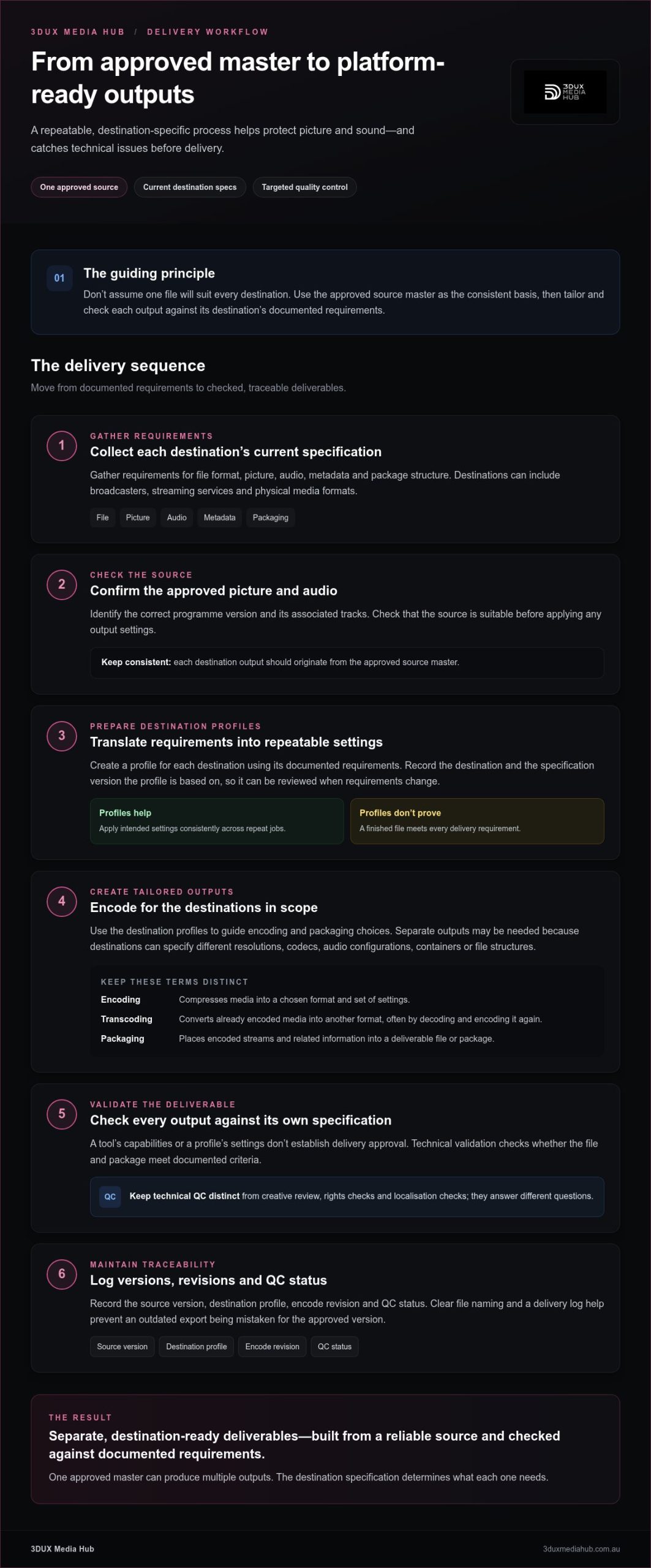
Keep these four terms separate:
- Encoding compresses media into a chosen format and set of settings.
- Transcoding converts already encoded media into another format, often by decoding and encoding it again.
- Packaging places the encoded streams and related information into a deliverable file or package.
- Delivery specification records what the destination requires, including applicable picture, sound, file and packaging criteria.
Destination-specific encoding creates separate outputs from an approved source master to meet each destination’s documented technical requirements. Cross-platform delivery doesn’t automatically mean one identical file will work everywhere. It means planning, producing and checking the right deliverables for the platforms in scope.
How cross-platform encoding turns a master into platform-ready outputs
A dependable delivery workflow starts with the approved source, not guessed output settings. Each destination profile translates its current delivery specification into practical encoding and packaging choices. Profiles make repeat jobs more consistent, but they don’t prove that a file meets every requirement. Validate each finished output against the destination’s own specification.
Build outputs from an approved source and destination profile
Before encoding, identify the approved picture and audio sources, including the correct programme version and associated tracks. Then gather each destination’s current requirements for file format, picture, audio, metadata and package structure. Record which destination and specification version each profile is based on, so it can be reviewed when requirements change.
A profile is a repeatable starting point, not an automatic compliance guarantee. It applies intended settings consistently, while a person checks that the source is suitable and the output is valid. Tools such as the FFmpeg cross-platform video solution can support encoding workflows, but tool capability alone doesn’t establish delivery approval.
Keep versions traceable through encoding and QC
Record enough detail to reproduce and review each output: the source version, destination profile, encode revision and QC status. Clear file naming and a delivery log help prevent an outdated export from being mistaken for the approved version. This is especially useful when a specification changes or a QC issue requires a revised encode.
Technical validation checks whether the file and package meet documented delivery criteria. Keep it separate from creative review, rights checks and localisation checks, which answer different questions about the content and its permissions. A technically valid file may still need creative approval or a language-version review before release. For broader context on mastering and delivery planning, see Professional Video Encoding Services: Mastering for Global Distribution in 2026.
Follow the workflow in order
- Collect specifications. Gather the latest requirements for every destination, including file, picture, audio, metadata and packaging details.
- Assess the source. Confirm the approved master, inspect its technical properties and establish whether it can meet each output requirement without an avoidable conversion.
- Encode. Apply the relevant destination profile, adapting settings to the source and documented requirements.
- Validate. Check the resulting streams and files against the specification, then review picture and sound for encoding issues.
- Package. Assemble the validated files and associated materials in the required delivery structure, then record the final QC status.
Standards conversion is a separate requirement when the source’s television standard or signal characteristics need to be adapted for a destination. It may form part of the overall workflow, but it isn’t another name for encoding. Determine whether it’s needed during source assessment, before committing to output settings.
Check every output against its own destination specification: passing one delivery’s requirements doesn’t establish compliance for another. 3DUX Media Hub provides video and audio encoding, standards conversion and broadcast-quality QC for delivery workflows from SD to 4K.
Compare cross-platform encoding tools, libraries and managed workflows
The right approach depends on more than the encoder. Consider how many outputs you produce, how often destination specifications change, how much automation you need and who will oversee technical QC. A desktop tool may suit occasional jobs; a scripted workflow can standardise recurring outputs; specialist support can bring encoding, standards conversion and QC together for more complex deliveries.
| Approach | Control and repeatability | Automation and oversight |
|---|---|---|
| Desktop encoder | Settings are visible and adjustable, while saved presets support repeat jobs. | Practical for hands-on work, but batch automation and specification tracking may be limited. |
| Command-line or library workflow | Offers detailed control and reproducible settings through scripts or application code. | Can automate larger job sets, but requires technical expertise, maintenance and output checks. |
| Specialist service workflow | Coordinates encoding decisions with destination requirements and delivery needs. | Can combine technical oversight, standards conversion and broadcast-quality QC. |
These are different operating models, not guarantees of compliance. A preset can save time, but it still needs to reflect the current specification. Automation applies settings consistently, yet a consistently wrong profile will repeat the same error. Research such as the National Science Foundation’s Optimizing Video Encoding for Video Analytics illustrates how encoding priorities can depend on the use case rather than a single universal target.
When encoding software or libraries suit an in-house workflow
Technically capable teams can use desktop encoders for direct control, or command-line tools and libraries to build repeatable pipelines. FFmpeg and FFMediaToolkit are third-party examples, not 3DUX Media Hub products. Templates and scripts help manage recurring outputs, but teams remain responsible for keeping profiles current, monitoring changes and validating each encoded file against its destination requirements.
When specialist encoding and QC support add value
Specialist support can help when a project has numerous deliverables, complex specifications or limited in-house capacity for encoding and QC. Coordinating video and audio encoding with standards conversion and broadcast-quality checks helps keep technical tasks aligned across the delivery workflow. For related context on format changes across markets, see Broadcast Standards Conversion: 2026 Global Media Guide.
In practice, cross-platform video encoding works best when the approach matches the workload and the team can maintain clear technical oversight. A small, stable set of outputs may suit an internal preset workflow. Frequent specification changes, multiple versions or demanding QC requirements call for stronger process controls and clearly assigned ownership.
Plan a reliable cross-platform encoding workflow
A reliable cross-platform encoding workflow starts before the first render. Gather destination requirements, confirm the source assets and assign responsibility for sign-off. This prevents avoidable re-encoding and gives everyone a clear record of which file is intended for which destination.
Prepare requirements before starting an encode
Create a destination matrix to compare requirements side by side. Record the required file type, picture parameters, audio tracks, subtitles and metadata for each destination. Include the source master’s identity and approval status. Requirements can change, so note where each specification came from and when it was reviewed.
- Source: Identify the approved picture and audio assets, version and any required supporting files.
- Destinations: List every platform or format receiving a deliverable, including any territory or language versions.
- Specifications: Record file, picture, sound, subtitle, metadata and packaging requirements from current destination documentation.
- Ownership: Assign who prepares profiles, approves source changes, runs technical QC and signs off delivery.
- Version control: Set consistent naming rules for source, destination, language and revision so files can be distinguished at a glance.
Don’t batch-encode while requirements conflict. First identify what differs, such as a requested picture format or audio configuration, then determine whether the destinations need separate outputs or whether the source itself needs attention. Prioritise tests by delivery risk: test the most restrictive or least familiar specification first, review a representative short section, then run the full encode only after the settings behave as expected. Treat codec, bitrate and other numerical examples as illustrative, not universal. Confirm actual values against the latest destination documentation.
Validate deliverables before distribution
Validation needs both automated checks and human review. Confirm that each file opens, its streams and technical parameters match the intended specification, and its duration and audio remain synchronised. Play the output from beginning to end where practical, checking for visible artefacts, unexpected audio changes, missing tracks, subtitle issues and playback faults. A file can pass a parameter check and still reveal a problem during playback.
Log the result against the exact output filename and revision. Record failures, corrections and final sign-off; don’t rely on memory or a folder containing several similar exports. Before transfer, compare the packaged files with the destination matrix and verify that each deliverable is assigned to the correct destination. For disc deliverables, apply the relevant authoring and QC checks; the article 2026 Blu-ray Quality Control for Film Distribution explores that area further.
Strong process control makes global delivery more manageable. 3DUX Media Hub coordinates encoding, standards conversion and broadcast-quality QC as part of video and audio delivery workflows.
How 3DUX Media Hub supports cross-platform video delivery
Planning multiple deliverables takes more than selecting export settings. The source, destination requirements, audio assets, standards conversion needs and quality checks all affect the final delivery. 3DUX Media Hub brings these elements together through video and audio encoding, standards conversion and broadcast-quality QC, supporting film and television projects prepared for global distribution.
Encoding support covers sources from SD to 4K. That range helps align output preparation with the approved material and each project’s delivery goals. Audio encoding is part of the process too, so picture and sound requirements can be considered together rather than handled as disconnected tasks. 3DUX Media Hub brings over 20 years of industry experience to this work.
Coordinate encoding with mastering and quality control
Cross-platform video encoding sits within a wider mastering workflow. When a project needs standards conversion, it can be planned alongside encoding; broadcast-quality QC then provides a technical review of the resulting deliverables. The workflow is guided by the source assets and destination specifications, rather than a one-size-fits-all profile.
Clear records help maintain control as files move through preparation and review. Track the approved source, destination output, version and QC status so the team can identify exactly what was encoded and assessed. This supports accurate revisions and reduces the risk of sending an outdated file. For projects involving UHD disc authoring, Professional 4K UHD Authoring Services for Australian Film Distribution explores related mastering considerations.
Move from delivery requirements to a project plan
A useful starting brief doesn’t need to be complicated. Gather the approved source details, list every destination and organise the specifications for each one. Include relevant picture and audio assets, language versions, subtitles or metadata where they apply. Flag conflicting requirements early so they can be addressed before outputs are prepared.
Those project details help shape an appropriate encoding and QC workflow. Destination requirements guide output preparation; source characteristics inform the technical approach; and planned checks establish how each deliverable will be reviewed. Standards conversion can be incorporated where required, while QC records provide a clear view of each file’s status. The result is a coordinated plan focused on reliable delivery, not just file creation.
- Source details: Identify the approved master and associated picture and audio assets.
- Destination list: Name each platform, format or market receiving files.
- Specifications: Assemble current delivery documents and note any open questions.
- Delivery goals: Outline required outputs, review needs and any relevant localisation or authoring requirements.
A clear brief helps shape the work: include your source assets, destination requirements and delivery goals when you discuss a project with 3DUX Media Hub.
Make your next delivery workflow more predictable
Make each release an opportunity to strengthen your delivery process. Keep destination requirements and approval records organised, then update them as project needs change. A clear record helps teams carry useful decisions forward, identify changes before they affect an encode and plan future deliverables with greater confidence.
That discipline makes cross-platform video encoding more manageable. It gives technical and creative teams a shared basis for preparing assets, reviewing outputs and tracking sign-off, while leaving room to adapt the workflow to each project.
For a new delivery or a refined existing process, bring your source details, intended destinations and available specifications together. Discuss your video encoding and delivery requirements with 3DUX Media Hub to plan an encoding and QC workflow around your project.
Frequently Asked Questions
What is cross-platform video encoding?
Cross-platform video encoding prepares video files for different playback destinations, rather than ensuring an encoding tool runs on multiple operating systems. The same programme may need distinct deliverables for separate platforms or release formats. The target determines which technical settings and supporting elements matter. That’s different from software portability, which concerns the environments where an application can run.
Can one video file work across every platform?
Sometimes a single file can meet the requirements of several destinations, but don’t assume one file will suit every delivery. A file may play successfully yet fail a platform’s checks for sound configuration, captions, metadata or packaging. Compare the current specifications first. If they align, a shared output may be practical; if they don’t, prepare separate versions and label each clearly to avoid misdelivery.
How do I choose a cross-platform video encoding workflow?
Choose based on workload, delivery complexity and the expertise available to manage settings and QC. For occasional, straightforward exports, a desktop encoder may be sufficient. Recurring batches may benefit from scripted automation, provided someone maintains the profiles and reviews results. If destinations have complex requirements or internal capacity is tight, coordinated specialist support may fit better. Decide who owns specification updates, validation and final approval before choosing an approach.
Does cross-platform video encoding reduce video quality?
Encoding can reduce quality, particularly when lossy compression is applied repeatedly or settings are poorly matched to the source. The process doesn’t automatically mean a visible loss: results depend on the source, codec, compression settings and number of encode generations. Start from the approved, highest-quality source available and avoid using an already compressed delivery file as the basis for new versions. Review fine detail, gradients and fast motion in test outputs.
What is the difference between encoding and transcoding?
Encoding compresses picture or sound into a chosen format. Transcoding takes media that’s already encoded, decodes it and creates a new encoded version, often with a different codec or settings. Converting an existing compressed video to a new delivery format is one example of transcoding. This distinction helps teams trace where an output came from and limit unnecessary generations that may affect quality. Keep the approved source identifiable in production records.
Is cross-platform video encoding the same as standards conversion?
No. Encoding creates compressed media streams using selected formats and settings, while standards conversion adapts material to a different television or signal standard where required. They can be coordinated within one delivery workflow, but they solve different technical problems. A project may need encoding without standards conversion, or both. Identify the source and target characteristics first, then establish which processes the destination requirements call for.
Which information should I prepare before encoding for multiple platforms?
Prepare the approved source file’s identity and version, its available picture and audio assets, and a list of intended destinations. Gather each destination’s current delivery documents, plus relevant subtitle, language and metadata details. Note known source issues or specification conflicts, and identify who can resolve questions and approve final outputs. Clear filenames and version labels also help distinguish test encodes from approved deliverables during review and handover.