What if a single bitrate spike on a Friday afternoon cost your production tens of thousands of dollars in wasted replication fees? For many studios, the gap between a cinematic masterpiece and a costly coaster is often just a few lines of mismatched metadata. You’ve likely felt the pressure of a looming global delivery date while wrestling with HDR compatibility issues. It’s a high-stakes environment where technical precision isn’t just preferred; it’s mandatory for success.
Identifying common UHD authoring mistakes early is the only way to protect your budget and your reputation. This professional guide teaches you how to rectify the technical pitfalls that lead to disc rejections, from HDR10 and Dolby Vision synchronisation to HEVC encoding limits. We’ll examine the essential QC standards required for global distribution, ensuring your master delivers optimised bitrates and flawless performance on everything from high-end home theatres to budget players.
Key Takeaways
- Master the technical constraints of HEVC encoding by strictly managing bitrate peaks to prevent playback stuttering on consumer hardware.
- Ensure global display compatibility by correctly synchronising Dolby Vision RPU files and HDR10 metadata to avoid visual artefacts.
- Identify and rectify common UHD authoring mistakes such as poor layer break placement that can disrupt the cinematic experience during high-action sequences.
- Implement a rigorous hardware-based QC workflow using reference players to catch tracking errors before committing to expensive replication runs.
- Optimise disc data distribution between layers to maintain signal integrity and prevent read errors at the physical edges of the disc.
Why 4K UHD Authoring is More Than Just “Higher Resolution”
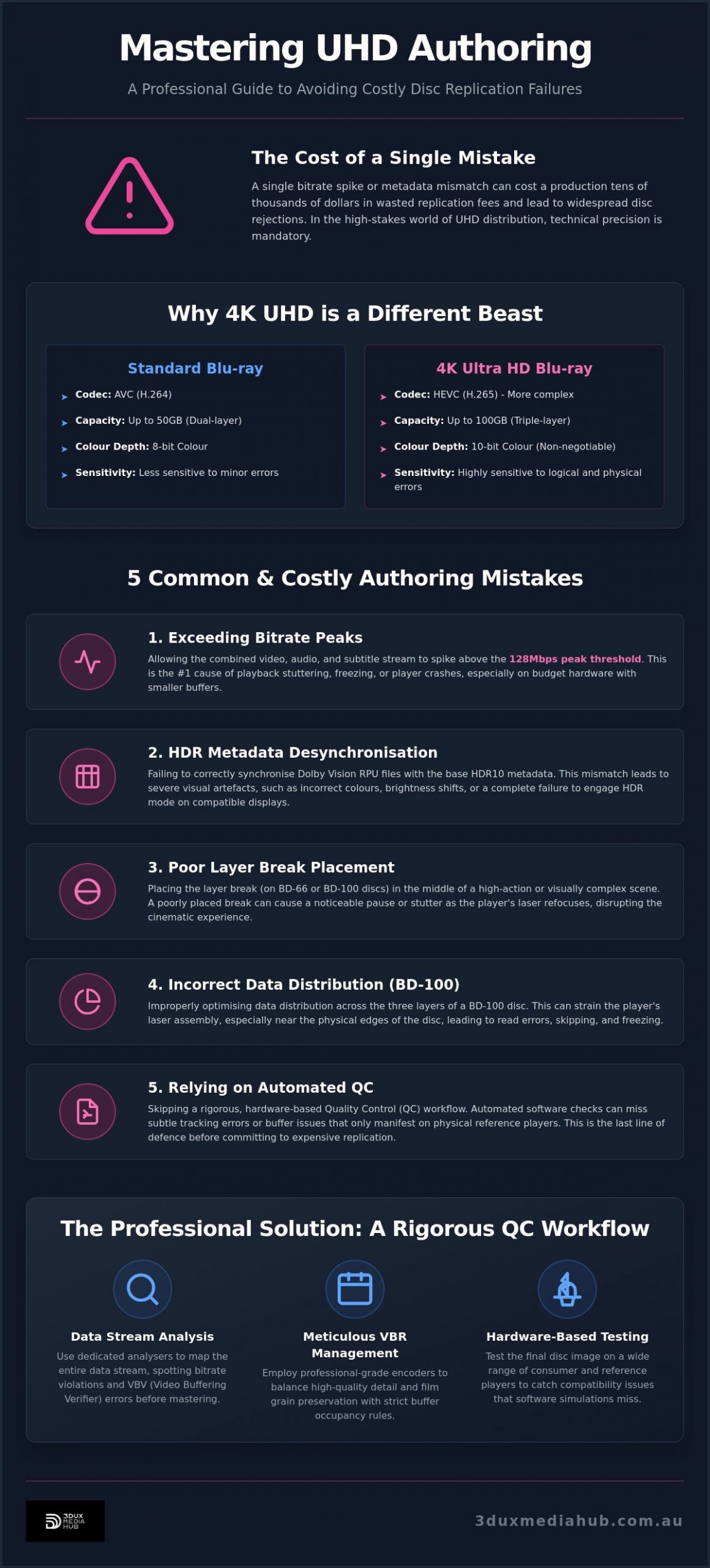
UHD is not merely a pixel count upgrade. It represents a total architectural shift in physical media. While standard Blu-ray discs rely on the AVC (H.264) codec, 4K discs utilise High Efficiency Video Coding (HEVC). This provides the compression required for 4K assets but introduces immense technical complexity. The Ultra HD Blu-ray specifications demand a level of precision that standard high-definition workflows simply don’t require. Small errors that would go unnoticed on a standard Blu-ray become fatal on a UHD disc.
Data density is the primary culprit. A UHD disc packs information much more tightly than its predecessors. This makes the format incredibly sensitive to physical imperfections and logical errors. Professional authoring houses serve as the critical bridge between the post-production suite and the consumer’s lounge room. We translate high-value master files into a format that early-generation hardware can actually read. Many common UHD authoring mistakes stem from ignoring the limitations of budget players or older firmware. These devices have smaller buffers and less tolerant laser assemblies, making them prone to freezing if the disc structure is anything less than perfect.
The Triple-Layer Challenge (BD-100)
Capacity is a major hurdle. While BD-66 discs offer 66GB across two layers, BD-100 discs provide 100GB using a triple-layer structure. Most feature-length films with immersive audio require the BD-100 format to maintain quality. However, BD-100 is the most frequent source of “skipping” complaints. The player’s laser must refocus across three distinct data layers with micro-millimetre accuracy. If the logical layout is poorly optimised, the drive will struggle to maintain tracking. This leads to the disc freezing or jumping, especially as the laser approaches the outer edge of the disc.
HEVC and the Bitrate Tightrope
Professional UHD requires 10-bit colour depth as a non-negotiable standard. This eliminates the “banding” often seen in digital sky gradients or dark shadows. The challenge lies in the bitrate. While high bitrates preserve cinematic grain and detail, they risk triggering a hardware buffer underflow. If the data peak exceeds the player’s processing capability, the video will stutter. Mastering the HEVC tightrope involves achieving high-efficiency encoding that keeps the bitrate high enough for quality, but low enough to ensure 100% hardware compatibility across all brands. Avoiding these common UHD authoring mistakes during the encoding pass is essential for a clean master.
Encoding Errors: The #1 Cause of Playback Stuttering
While internet forums often blame stuttering on physical scratches, the primary culprit is usually found in the encoding suite. Stuttering occurs when the data stream exceeds the hardware’s ability to process it. One of the most common UHD authoring mistakes is allowing bitrate spikes to exceed the 128Mbps peak threshold defined by the Blu-ray Disc Association. Even a momentary violation of this limit can cause a buffer underflow, resulting in a frozen frame or a total player crash.
Professional HEVC encoding requires meticulous Variable Bitrate (VBR) management. Poorly handled VBR passes frequently lead to “macroblocking” in low-light scenes. When the encoder starves dark areas of data to save space, the result is a blocky, digital mess that ruins the cinematic immersion. Relying on consumer-grade encoders is a significant risk. These tools often lack the deep optimisation required to balance complex visual textures with the rigid “Buffer Occupancy” rules of the UHD specification.
Managing Peak Bitrates for Stability
Stability begins with professional analysis. We use dedicated hardware and software analysers to map the entire data stream before replication. This allows us to spot bitrate violations that automated tools might miss. Managing the VBV (Video Buffering Verifier) is critical. It ensures the player’s buffer is never empty and never overfilled. When setting ceilings, you must account for the combined stream. This includes the primary video, multiple audio tracks, and subtitle streams. If the total aggregate exceeds the hardware’s throughput, the disc will fail. For complex projects, our professional video and audio encoding services ensure every byte is accounted for within safe limits.
The Impact of Grain and Noise on Encoding
Preserving film grain is the “final boss” of HEVC encoding. Grain is essentially random noise, which encoders naturally try to “clean” to save space. If you force the encoder to keep the grain without enough data, it will choke, creating “swimming” artefacts. The goal is to maintain the original texture while ensuring the encoder remains efficient enough to pass QC. HEVC bitrate management is the foundation of disc stability. Avoiding these common UHD authoring mistakes ensures that your high-value assets play back flawlessly on every device, from high-end reference players to entry-level hardware.
HDR and Dolby Vision Metadata Pitfalls
HDR metadata acts as the technical roadmap for the consumer’s display. It tells the television exactly how to interpret the high-dynamic-range information within the video stream. When this roadmap is flawed, the visual experience collapses. One of the most common UHD authoring mistakes involves a total mismatch between the visual assets and the metadata injected during the authoring phase. This isn’t just a minor visual quirk. It results in catastrophic tone-mapping failures that leave images looking either dangerously bright or unwatchably dark.
Mastering the HDR10 Static Metadata
HDR10 relies on static metadata, specifically MaxCLL (Maximum Content Light Level) and MaxFALL (Maximum Frame Average Light Level). These values must accurately reflect the actual grade of the film. Accuracy is paramount. If you default these values or use generic placeholders, you risk crushing the blacks or clipping the highlights on most consumer sets. Compliance with SMPTE ST 2086 standards is the only way to ensure the display understands the mastering display’s colour volume. Failing to provide these precise instructions leads to the washed-out look often complained about in consumer forums. It’s a failure of metadata, not the display itself.
The Complexity of Dolby Vision Authoring
Dolby Vision adds a layer of dynamic metadata, allowing for frame-by-frame adjustments. For 4K UHD Blu-ray, this requires a Profile 7 Dual-Layer delivery. The primary video essence must be perfectly synchronised with the Reference Processing Unit (RPU) file. If the RPU is even a single frame out of alignment, the dynamic tone mapping will cause visible flickering or sudden colour shifts. Integrating this into the menu structure is another area where common UHD authoring mistakes occur. Authoring suites must correctly flag the Dolby Vision enhancement layer to ensure the player activates the correct processing path. Without a rock-solid HDR10 fallback layer, users on non-Dolby Vision displays will be left with a broken image or a disc that refuses to load.
Incorrect colour space flagging is the final hurdle for global distribution. UHD assets must be flagged as BT.2020. If the authoring software incorrectly flags the stream as Rec.709, the player will apply the wrong colour matrix. The result is a total distortion of the filmmaker’s intent. Precision in metadata isn’t just about meeting a spec. It’s about ensuring consistent cinematic quality across every possible display technology.
Logical Structure and Layer Break Optimisation
Logical structure is the invisible architecture that determines whether a disc plays smoothly or fails at the two-hour mark. It’s a physical reality, not just a digital one. One of the most common UHD authoring mistakes is treating the disc like a linear file. The laser must physically move and refocus as it traverses the data pits. If the logical layout doesn’t account for this physical movement, the player will inevitably struggle. Poorly organised “VOB” or “m2ts” file structures are often to blame for menu lag and slow response times. When the player has to hunt for assets across different physical sectors, the user experience suffers.
Strategic Layer Break Placement
A seamless layer break is the hallmark of professional authoring. Placing a layer break in the middle of a high-action sequence is a critical error. Even with modern hardware buffers, the transition time required for the optical pickup to refocus can exceed the available data. This results in a visible pause or a total playback freeze. We identify low-motion scenes or black frames to hide these transitions. The challenge intensifies with BD-100 discs. These triple-layer discs require two separate transitions. Overfilling Layer 0 is a frequent mistake that leads to tracking errors. The outer edge of the disc is the most vulnerable to physical imperfections. By keeping the data density slightly lower at the edge, we ensure better reliability on older or budget-friendly players.
Menu Navigation and Java (BD-J) Errors
Modern UHD menus rely on BD-J (Blu-ray Java) to deliver interactive experiences. While this allows for sophisticated designs, it also introduces significant hardware strain. Overly complex motion menus are a common cause of disc rejections because they exceed the RAM limits of entry-level players. If your menu is too heavy, it will “hang” during the initial load, effectively “bricking” the disc for the consumer. We prioritise efficiency in our motion and static menu design. Testing across multiple hardware profiles is the only way to guarantee compatibility. If you want to avoid these common UHD authoring mistakes and ensure a seamless launch, our professional 4K UHD authoring services provide a safe pair of hands for your high-value assets.
The Professional QC Workflow: Avoiding Rejections
Quality control is the final barrier between a successful global launch and a catastrophic recall. While software validation tools are essential, they are not infallible. Many common UHD authoring mistakes pass automated checks only to fail during physical playback in a consumer’s lounge room. Software QC focuses on the logical syntax of the HEVC stream and metadata compliance. Hardware QC is different. It tests the physical limits of the disc structure on reference players from brands like Sony, Panasonic, and LG. We look for the real-world performance issues that code-checkers miss.
A physical “Check Disc” is your final insurance policy. Before committing to a 5,000-unit replication run, you must verify the master in a live environment. This is where we catch subtle layer break pauses or menu navigation hangs that only appear on specific hardware chipsets. It’s also where we distinguish between authoring rejections and replication errors. An authoring rejection is a failure in the master file logic or spec compliance, such as an illegal bitrate spike. A replication error is a physical manufacturing defect like a mastering laser fault or a stamping issue. Knowing the difference saves weeks of troubleshooting and protects your production budget from unnecessary costs.
The 3DUX Approach to 4K Mastering
With over 20 years of industry experience, we’ve developed a rigorous multi-point QC checklist that exceeds standard factory requirements. We don’t just encode. We master. This process involves verifying HDR10 and Dolby Vision synchronisation, checking audio-to-video alignment, and ensuring subtitle legibility across all hardware profiles. Our workflow is designed specifically for global distribution compliance. We meticulously organise complex assets for multi-language support and content localisation. This ensures your project meets the strict technical standards of every territory, from Australia to the United States and Europe.
Next Steps for Your Distribution Project
Preparing for a professional authoring session requires clean, high-bitrate mezzanine files and finalised metadata assets. We recommend providing your Dolby Vision RPU files and immersive audio stems early in the process to allow for thorough validation. Efficiency is our priority. We understand the fast-paced nature of the entertainment industry and the pressure of distribution deadlines. Our team provides a fast turnaround without compromising on the technical precision required for 4K media. We act as a proactive partner, identifying potential common UHD authoring mistakes before they reach the replication plant. If you’re ready to secure your master and ensure seamless playback, contact 3DUX Media Hub for professional 4K UHD authoring services. We provide the safe pair of hands your high-value film assets deserve.
Securing Your Global Distribution Master
Achieving a flawless 4K release requires more than just high-end software. It demands a rigorous understanding of the physical and logical constraints inherent in the Ultra HD Blu-ray format. By mastering HEVC bitrate management and ensuring precise HDR10 or Dolby Vision metadata synchronisation, you eliminate the risk of playback failure on consumer hardware. Identifying common UHD authoring mistakes early in the workflow is the only way to prevent the massive costs associated with plant rejections and stock recalls. Technical precision at the authoring stage is your final insurance policy for a successful global launch.
With over 20 years of technical mastering experience, 3DUX Media Hub provides the specialist HEVC encoding and global distribution support required for cinematic excellence. We ensure every asset meets strict technical compliance standards before it leaves our suite. Our “safe pair of hands” approach guarantees that your high-value assets are ready for the world stage without technical compromise.
Ready to finalise your next project? Get a Professional Quote for Your 4K UHD Authoring Project and ensure your content reaches its audience with absolute precision. We’re here to help you navigate the technical complexities of 4K delivery with confidence.
Frequently Asked Questions
What is the most common reason a 4K UHD disc skips?
Skipping is primarily caused by bitrate violations and physical layer transition failures. When the aggregate bitrate exceeds the 128Mbps specification, the hardware buffer underflows and the image freezes. Similarly, if a layer break occurs during a high-action sequence, the laser may fail to refocus in time. These common UHD authoring mistakes are often caught only during physical hardware testing rather than software simulation.
Can I author a 4K UHD disc using standard Blu-ray software?
You cannot use standard Blu-ray authoring software for 4K projects. UHD requires High Efficiency Video Coding (HEVC) and specific logical structures that legacy AVC-based tools don’t support. Professional suites are necessary to handle 10-bit colour depth, HDR metadata, and AACS 2.0 encryption. Attempting to force 4K files into standard Blu-ray templates will result in a disc that is unreadable by any commercial player.
What is the difference between BD-66 and BD-100 discs?
The difference lies in physical data layers and total capacity. A BD-66 disc uses two layers to store 66GB of data. A BD-100 disc adds a third layer, providing 100GB. While the BD-100 is essential for high-bitrate feature films with immersive audio, it is significantly more difficult to author. The laser must track across three distinct depths, making it highly sensitive to any logical or physical imperfections.
Why does my HDR content look washed out on certain 4K players?
Washed-out HDR is typically a metadata failure rather than a hardware fault. If the MaxCLL and MaxFALL values don’t accurately reflect the master grade, the television’s tone-mapping will fail. This often happens when default values are used during the authoring phase. Ensuring the colour space is correctly flagged as BT.2020 is also vital to prevent the player from applying the wrong colour matrix during playback.
How do I choose the best layer break for a 4K UHD movie?
Choose a point with minimal visual movement or a cut to black. This allows the optical pickup’s transition time to occur without interrupting the viewer’s experience. You must also ensure the data is distributed logically across the layers. Overfilling the first layer to the very edge of the disc can cause tracking errors on budget players, so strategic placement is a technical necessity for global distribution.
What is bitrate management in the context of UHD authoring?
Bitrate management involves balancing the HEVC data stream to provide cinematic quality without exceeding hardware processing limits. It requires setting strict ceilings for the combined video, audio, and subtitle streams. Effective management prevents macroblocking in dark scenes while ensuring the total aggregate stays under the 128Mbps peak. Avoiding common UHD authoring mistakes in bitrate allocation is the foundation of disc stability and hardware compatibility.
Do I need a professional QC check if my software says the file is valid?
Professional QC is mandatory because software validation cannot simulate physical hardware behaviour. A file might be spec compliant in a software environment but still cause a player to freeze during a layer transition. We use reference hardware from multiple brands to verify that the disc performs reliably in the real world. This process identifies physical tracking issues and buffer underflows that automated tools cannot detect.
How does 3DUX Media Hub handle global content localisation?
We manage complex asset structures by organising multi-language audio tracks, localised menus, and subtitle streams within the UHD disc architecture. This involves synchronising immersive audio formats like Dolby Atmos with regional text assets to ensure a seamless experience in every territory. Our workflow ensures that every version of the film meets global technical standards, providing a safe pair of hands for international distribution projects.