A disc that burns successfully isn’t necessarily a finished Blu-ray release. The choice in DIY vs professional Blu-ray authoring comes down to more than software: menus, chapter navigation, audio and subtitle tracks, and playback checks all affect the result.
It’s understandable to consider doing it yourself. Current tools can make a straightforward project achievable, especially when you have the time and technical confidence to build and test it. But gaps in authoring or quality control can leave navigation or playback problems undiscovered until the disc reaches its audience.
This guide compares the skills, workflow and quality-control demands of both approaches. Use it to match the process to your release, resources and available expertise. You’ll see where DIY can work, which tasks need careful testing, and when professional support can help manage a complex or high-stakes project.
We’ll also clarify the difference between burning video to disc and authoring a navigable Blu-ray. For releases that need a coordinated workflow, 3DUX Media Hub brings authoring, encoding, menu design and QC together, backed by more than 20 years of industry experience.
Key Takeaways
- Assess your release’s asset count, language versions and menu complexity before choosing a workflow.
- Use the DIY vs professional Blu-ray authoring comparison to match the project’s demands with your team’s skills and capacity.
- Organise source masters, audio, subtitles, artwork and chapter information before authoring begins.
- Build a readiness process that includes playback testing and documented sign-off, not just disc creation.
- Consider professional support when multiple versions, strict delivery requirements or limited in-house capacity raise the stakes.
DIY vs professional Blu-ray authoring: what is the real difference?
Blu-ray authoring prepares a release’s disc structure, navigation and playback assets. It brings approved video, audio, subtitles, menus and chapter points together as a navigable disc image or other specified deliverable. It’s more than putting a video file onto a disc: viewers need to find the content and use the features the release is designed to include.
Optical disc authoring describes the broader process of organising source material into a logical format for recording. In practical terms, keep these production tasks distinct:
- Video editing shapes or revises the picture and sound content.
- Encoding prepares video and audio assets in formats and settings suited to the intended delivery.
- Authoring assembles the prepared assets into a disc structure, with navigation and playback behaviour.
- Burning writes a completed disc image to a recordable disc. It doesn’t create the authoring structure itself.
- Physical disc replication is a separate manufacturing process for producing physical discs. Creating a disc image doesn’t mean replicated copies have been made.
The choice in DIY vs professional Blu-ray authoring is a trade-off. DIY offers hands-on control, but your team must manage the software, asset preparation and validation. Professional authoring brings a coordinated specialist workflow, which can be useful when a release has more moving parts or less room for rework.
What DIY Blu-ray authoring typically involves
With a DIY workflow, you assemble approved picture, audio, subtitle and menu assets in suitable authoring software, then configure navigation and build the disc image. A simple release with one feature and straightforward menus may be manageable in-house. The result depends on the software’s capabilities, the operator’s technical knowledge and the project’s delivery requirements. The image still needs to be tested. Burning it or arranging physical production is a separate step.
What professional Blu-ray authoring adds
Professional authoring coordinates connected tasks such as encoding, menu design, disc structure and quality control. This helps keep complex navigation and multiple assets aligned, from the supplied masters through to the tested deliverable. 3DUX Media Hub brings more than 20 years of industry experience to Blu-ray authoring, encoding, menu design and QC for film and television releases. For a closer look at project considerations, see the professional disc authoring buying guide.
Use these practical criteria to compare the approaches:
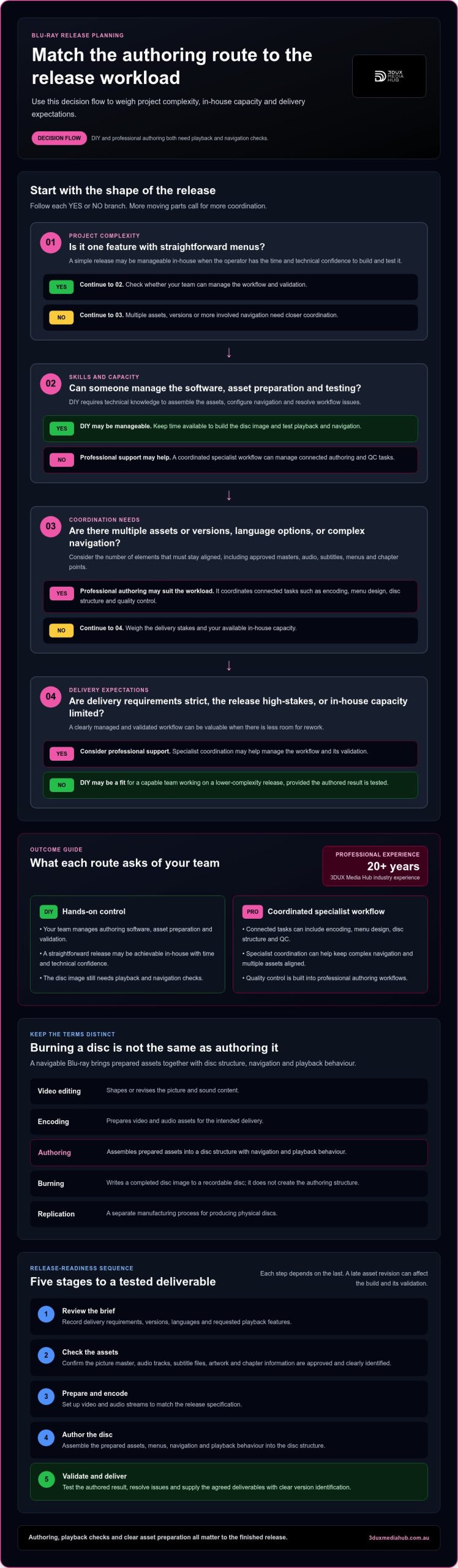
- Project complexity: One feature and simple navigation may suit a capable DIY operator. Multiple assets or versions need more coordination.
- Skills: DIY requires someone who can manage authoring software and resolve workflow issues. Professional support adds specialist experience.
- Testing: Either route needs playback and navigation checks. Professional workflows build QC into the authoring process.
- Delivery expectations: A personal or low-complexity release may allow more in-house iteration. A high-stakes release benefits from a clearly managed and validated workflow.
What a Blu-ray authoring workflow must get right
A reliable workflow starts before anyone opens authoring software. First, define the release specification and confirm which approved masters and supporting assets are ready. Then prepare the assets, author the disc structure, test the result and package the agreed deliverables. Each step depends on the last: a late subtitle revision, for example, can affect both the build and its validation.
- Review the brief: Record intended delivery requirements, versions, languages and requested playback features.
- Check the assets: Confirm the picture master, audio tracks, subtitle files, artwork and chapter information are approved and clearly identified.
- Prepare and encode: Set up video and audio streams to match the release specification, rather than applying a one-size-fits-all preset.
- Author the disc: Assemble the prepared assets, menus, navigation and playback behaviour into the disc structure.
- Validate and deliver: Test the authored result, resolve issues, then supply the agreed final deliverables with clear version identification.
Source quality sets the limits for the finished presentation. Authoring can’t restore detail missing from an approved master. Incorrect or incomplete audio and subtitle assets can lead to missing options or a poor viewing experience. Chapter points also need to match the intended programme structure. Provide them in a clear, reviewed list so the menu and navigation reflect the right moments.
Menus, navigation and language assets
Plan the menu map before building it. Note the route from the opening screen to the feature, chapters and any additional content, then check that each button leads where expected. Organise audio and subtitle options by language and purpose, using labels viewers can understand. For more on menu behaviour and design considerations, consult this interactive Blu-ray menu technical guide.
Authoring, encoding and validation are different tasks
Encoding prepares video or audio streams for the specified delivery. Authoring builds the navigable disc structure around those prepared assets. Quality control (QC) checks the completed authored result. A successful export alone doesn’t prove that menus, chapter links, language selections and playback behave as intended. The practical Authoring Blu-ray Discs guide also discusses compression as part of the preparation process.
Encoding settings should follow the release specification and the approved source, not a convenient preset. Requirements can vary by project, so verify standards-sensitive format, stream and delivery details against current Blu-ray documentation before building. Keep a record of the specification used and test the finished structure against it. In DIY vs professional Blu-ray authoring, a documented chain from approved assets to checked deliverables makes the workflow repeatable.
For a release with several assets or versions, a coordinated workflow can keep authoring, encoding and QC aligned. 3DUX Media Hub’s Blu-ray authoring and quality-control support brings those related tasks together for film and television releases.
DIY or professional Blu-ray authoring: which projects suit each route?
The right workflow depends on what the release needs and who can manage it. In a DIY vs professional Blu-ray authoring decision, weigh the number of assets and versions, menu complexity, delivery requirements, staff time and experience available in-house. No single route suits every project.
Use these scenarios as a starting point, then compare them with the actual delivery specification and rights-holder requirements.
| Project scenario | DIY may suit when… | Professional support may suit when… |
|---|---|---|
| Single feature, straightforward menu | There’s an experienced operator, a contained asset set and time to test the result. | The release has strict acceptance requirements or limited room for troubleshooting. |
| Several language versions | Each version is clearly organised and the team can track changes and verify every build. | Audio, subtitle and menu combinations create significant coordination and version-control work. |
| Complex navigation or bonus content | The in-house operator can implement the planned menu behaviour and validate every route. | Navigation is intricate, or the release needs a more coordinated authoring and QC workflow. |
| Distribution-ready master | The team understands the required delivery specification and can document its checks. | Delivery expectations are demanding and experienced oversight helps manage release risk. |
When a DIY workflow may be proportionate
DIY can be a practical fit for a contained project with a straightforward menu, a limited set of approved assets and a capable operator who can make time for testing. Set the authoring settings against the brief, record the choices made and define who accepts the final build. Even a simple disc needs checks: confirm menu routes, chapter selection and available language options behave as intended.
Base the decision on the actual specification, not assumptions about what a small release requires. Rights-holder requirements and delivery expectations can add checks even when the disc has one feature and a basic menu. If the in-house team can meet those requirements and complete a documented acceptance process, DIY may provide suitable workflow control.
When professional authoring is the stronger fit
Complex menus, multiple language assets and demanding distribution deliverables are useful signals to consider professional authoring. As versions and assets multiply, so does the coordination needed to keep them aligned. A connected workflow across authoring, encoding and QC can reduce avoidable hand-offs and clarify responsibilities. This matters when internal capacity is tight or the release carries substantial reputational stakes.
Think beyond disc appearance. A polished menu can conceal untested paths or a mismatch between the requested deliverable and the completed build. For a high-profile release, staff time spent resolving late-stage problems can also pull attention from other production work. The best route meets the specification, supports proper validation and fits the people and time available.
A release-readiness checklist for DIY Blu-ray authoring
A repeatable checklist helps catch gaps before they become last-minute rebuilds. Work through it in order, from confirming the delivery target to recording final approval. This turns the DIY vs professional Blu-ray authoring decision into a practical test of whether your team has the time and expertise to prepare, build and validate the release.
Prepare assets and agree the delivery target
Start with an agreed brief and a controlled asset inventory. Identify the approved version of every file, who owns approval, and how changes will be communicated. Settle the menu plan and language options before authoring begins, so late decisions don’t create avoidable rebuilds.
- Review the specification: Record required formats, language options, menu behaviour and intended deliverables. Note any rights-holder or distribution requirements that affect the build.
- Inventory the assets: List the approved source master, audio tracks, subtitle files, artwork, menu map and chapter information. Check that filenames and version details are clear.
- Confirm approvals: Identify who signs off the picture, sound, subtitles, artwork and final disc structure. Resolve competing or outdated versions before building.
- Check asset alignment: Match audio and subtitle files to the correct version and language. Confirm chapter points correspond to the approved programme and menu map.
- Build to the agreed target: Use settings that follow the project specification, and record the settings and software version used for the build.
- Test the authored result: Check menu links, chapter access, audio and subtitle selection, and picture and sound playback. Test across suitable playback scenarios for the intended release.
- Correct and sign off: Log issues, make corrections, retest affected functions and document final acceptance. Keep the approved deliverable and test record together.
Test the authored result before release
Make testing systematic. Follow each menu route, select each available chapter, and switch through the audio and subtitle options. Review the programme for authoring-related picture or sound issues, such as an unintended interruption or a selection that doesn’t behave as expected. A clean export doesn’t confirm that the finished structure works as intended.
Record what was tested, the playback scenario, any faults found and how each issue was resolved. This gives the release owner a clear basis for sign-off and makes corrections traceable. For a deeper look at release checks, use this Blu-ray quality-control guide.
If your team needs experienced support to coordinate authoring and QC against a release brief, explore Blu-ray authoring support from 3DUX Media Hub.
When to bring in professional Blu-ray authoring support
Professional support is worth considering when the release has more moving parts than your in-house team can confidently manage. The decision isn’t simply about how the disc looks. Consider the assets, delivery requirements, available expertise and level of review needed to prepare a release for its intended distribution pathway. If project complexity increases the risk of missed details or takes staff away from other work, a specialist workflow may be a better fit.
Look for these signals:
- Complex assets: Menus, bonus content or navigation require careful coordination.
- Multiple versions: Language, audio or subtitle combinations need reliable version tracking.
- Strict delivery requirements: The release brief calls for specific deliverables and documented checks.
- Limited in-house capacity: The team lacks authoring expertise or time for a thorough build and review.
- High release stakes: Errors could affect a significant distribution or reputational commitment.
A simple-looking disc can still carry demanding requirements. Base the choice in DIY vs professional Blu-ray authoring on the work behind the release, not the apparent simplicity of its menus. Professional support doesn’t remove the need for approved assets and clear decisions. It provides experienced coordination across the technical workflow.
How a specialist workflow supports distribution
A distribution-ready release depends on more than a completed menu. Authoring, encoding, menu design and QC need to work from the same project brief, with clear asset hand-offs and review points. Documented QC helps track what was checked and approved. 3DUX Media Hub brings these connected services together for film and television releases, drawing on more than 20 years of industry experience.
That coordination can keep decisions visible as a project moves from prepared assets to final deliverables. Teams can work from agreed versions, review the build at defined points and address issues before final approval. This is especially useful when several versions need consistent treatment or when internal staff would otherwise manage multiple technical hand-offs alongside other release work.
Move from comparison to a project brief
Prepare a concise brief covering the release format, approved source assets, language versions, menu requirements and intended delivery. Include any relevant technical specification, approval responsibilities and known dependencies. This gives the workflow a clear starting point and helps identify where authoring, encoding, menu design and QC need to align. 3DUX Media Hub tailors professional authoring support to the needs of each project.
If your release has complex assets, several versions or limited in-house capacity, take the next step with a project-specific discussion. Discuss your Blu-ray authoring project.
Set your release up for a confident next step
Before committing to a workflow, turn the release requirements into a clear brief. Identify who will own the build, what needs approval and how the final master will be assessed. That gives your team a practical basis for choosing between DIY vs professional Blu-ray authoring, rather than relying on assumptions about the disc’s apparent simplicity.
If your requirements stretch in-house capacity, or you want experienced input on a high-stakes release, 3DUX Media Hub can coordinate Blu-ray authoring with encoding, menu design and quality control. With over 20 years of industry experience, the team can tailor its support to your project’s needs.
Discuss your Blu-ray authoring project and take the next step with a workflow shaped around your release. A clear plan now puts a polished, dependable master within reach.
Frequently Asked Questions
Is Blu-ray authoring the same as burning a Blu-ray disc?
No. Authoring creates the disc’s structure and navigation, while burning writes a completed disc image to a recordable disc. Burning an image won’t add missing chapter links or create a menu. If you’re reviewing a delivery, distinguish the authored master from any physical copy: they’re separate outputs, and one doesn’t automatically include the other.
Can I create Blu-ray menus with DIY authoring software?
Yes, some DIY software can create menus, but the available controls vary. One tool may suit a simple static menu, while another may offer more options for motion or navigation. Before committing, map the viewer’s route from the opening screen to the feature and chapters, then confirm the software can build and test those interactions. Check the finished menu in the authored result, not just the software preview.
Can one Blu-ray master be used for every international market?
Not necessarily. The right deliverable depends on the intended markets and their distribution requirements, including requested language versions or technical specifications. A single master may suit a particular release plan, but don’t assume it covers every territory. Prepare a market-by-market brief that records required versions and deliverables. 3DUX Media Hub supports distribution workflows with authoring, encoding, localisation and standards conversion tailored to project needs.
Does Blu-ray authoring include physical disc replication?
No. Authoring prepares the disc structure and master deliverable. Physical disc replication is a separate manufacturing process. A completed authoring project doesn’t mean copies have been pressed or manufactured. Keep the hand-off clear by specifying whether the requirement is an authored master, a disc image or another agreed deliverable. This distinction helps production teams allocate the authoring and manufacturing stages separately.
What assets should be ready before Blu-ray authoring starts?
Have approved picture and audio masters, subtitle files, menu artwork, a menu plan, chapter details and metadata ready where the project requires them. Add a version label and approval status to each asset, so an outdated subtitle or picture master isn’t used by mistake. If an item is still being revised, note its owner and expected approval point in the brief before the build begins.
Can subtitles or audio tracks be changed after a Blu-ray master is authored?
Yes, but the change usually requires updating the relevant asset and rebuilding the affected authored master. The scope depends on whether the new track changes language selections, menu labels or other navigation. For example, adding an audio option may require a menu update as well as a revised build. Retest the updated master, and remember that changes to a master don’t alter physical discs already manufactured.