A file labelled “subtitles” may be the wrong asset for your delivery, even when every line of dialogue is translated correctly. That’s the question behind “closed captioning vs subtitles explained”: which track gives your audience the information they need? Choose according to audience, sound information and delivery specification, not the label alone.
Terminology varies across platforms and markets, so it’s easy to miss an important distinction. Captions can identify speakers and describe meaningful sounds, while standard subtitles typically render dialogue for viewers who can hear but need language support. SDH combines accessibility information with subtitle delivery. “Open” and “closed” describe whether text is embedded in the video or can be turned on and off.
This guide explains what each timed-text track communicates, how to brief the right asset for an audience and release, and what to check before integrating it into a master. You’ll also see where subtitle integration and timed-text QC fit into localisation and delivery, so the asset meets its specification rather than relying on its filename.
Key Takeaways
- Use this closed captioning vs subtitles explained guide to match the timed-text asset to your viewers, language needs and release requirements.
- Check the recipient’s delivery specification before choosing or briefing an asset. A filename or label may not tell you what the track contains.
- Review text accuracy separately from timing, readability and synchronisation.
- Validate the integrated asset in playback to catch problems that aren’t obvious from checking the text file alone.
- Plan localisation, subtitle integration, encoding and technical QC together where they intersect in your delivery workflow.
Closed captioning vs subtitles: what does each term mean?
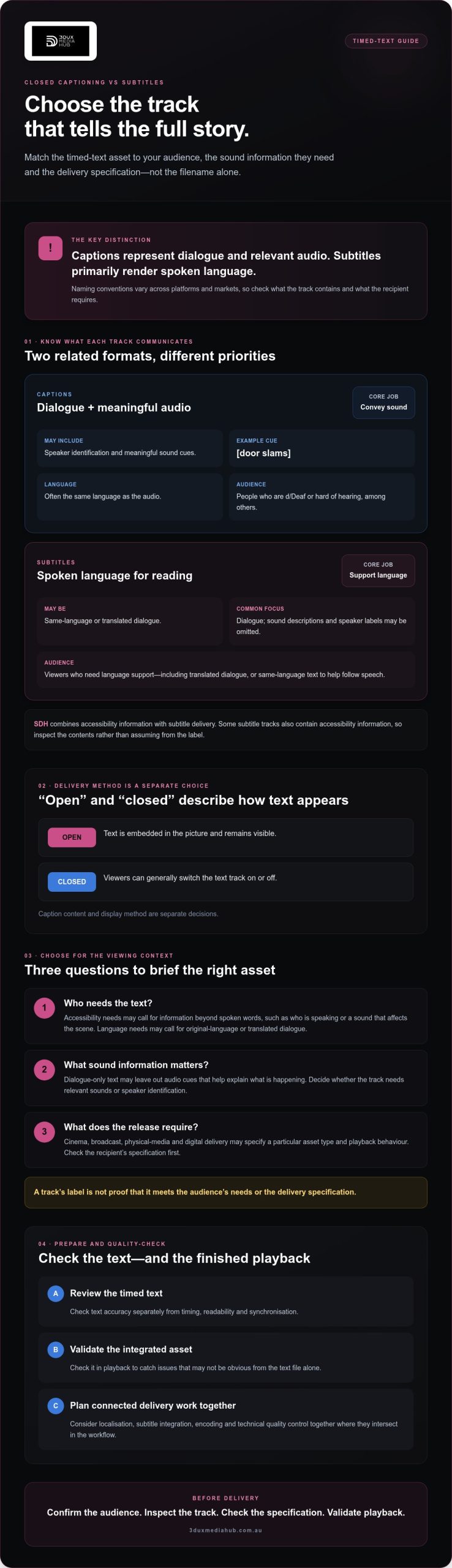
Captions represent dialogue and relevant audio, while subtitles primarily render spoken language. That’s the practical starting point for anyone looking to get closed captioning vs subtitles explained. The distinction describes intended function, not a universal naming rule: platforms, distributors and markets may use the terms differently. Check what the asset contains and what the recipient’s specification requires instead of relying on its label.
What information do closed captions include?
Closed captions are timed text that represents dialogue and relevant audio, and may identify speakers. For example, a caption might label a line “Mia:” when the speaker isn’t clear, or describe a significant off-screen sound as “[door slams]”. These cues help convey information that dialogue alone doesn’t provide. For background on the terminology and technology, see Closed captioning on Wikipedia.
“Closed” describes how the text is delivered, not what it says: viewers can generally switch a closed-caption track on or off. Open captions are embedded in the picture and remain visible. Caption content and display method are separate decisions.
What do subtitles show?
Subtitles are timed text that renders spoken language, often translating dialogue for viewers who don’t speak the source language. Same-language subtitles can also present dialogue in its original language, which may help viewers follow speech in noisy settings or read along. Translation involves more than replacing words: the wording needs to fit the timing and remain readable.
Subtitles commonly prioritise dialogue and may leave out sound descriptions or speaker labels. That isn’t a fixed rule. Some subtitle tracks include cues, and conventions differ across platforms and markets. A subtitle file can also carry accessibility information, so inspect its contents and delivery requirements before deciding what it’s for.
Closed captions vs subtitles: what changes for access and language?
Captions and subtitles are related forms of timed text, but they can serve different needs. Captions are generally designed to convey dialogue and relevant audio for viewers who can’t access the sound. Subtitles commonly support language access, whether by presenting dialogue in the original language or translating it. One track may not meet both needs.
Consider the viewing context before selecting an asset:
- Access: A Deaf or hard-of-hearing viewer may need information beyond spoken words, such as who is speaking or a sound that affects the scene.
- Language: A viewer who understands the audio may still need translated dialogue to follow the programme.
- Sound information: Dialogue-only subtitles may omit audio cues that help explain what’s happening. Access-oriented text can include relevant cues, depending on its conventions.
- Release context: A cinema, broadcast, physical-media or digital delivery may specify a particular asset type and playback behaviour.
Choose the timed-text asset for the audience and release requirements, not terminology alone. This is the core of closed captioning vs subtitles explained: assess what viewers need to receive and what the recipient will accept.
Are subtitles and closed captions interchangeable?
Sometimes the labels overlap, but that doesn’t make every subtitle track suitable as captions, or vice versa. Consumer platforms and regional conventions may use “subtitles” for different text tracks, including options that carry accessibility information. A filename is a clue, not proof of the track’s purpose or contents.
Check the recipient’s specification for the intended audience, required sound information, language, file type and display behaviour. For US equipment context, the FCC Closed Captioning Requirements guide explains display requirements for covered equipment. Its scope is distinct from the question of which timed-text asset a particular release needs.
When do SDH subtitles fit the brief?
SDH means “subtitles for the Deaf and hard of hearing”. The label commonly describes subtitle tracks intended to provide access information as well as dialogue. Depending on the brief and conventions, they may identify speakers and include relevant sound information, alongside dialogue in the original language or a translation.
SDH can bridge a subtitle workflow and accessibility needs when its content matches the delivery specification. Don’t assume every SDH track follows the same conventions or meets every recipient’s requirements. Confirm the requested asset and review its contents before integration. For releases involving language adaptation, content localisation and subtitle integration can form part of preparing the delivery asset.
How should you choose captions or subtitles for a release?
Start with the audience, not the asset label. Decide whether viewers need access to dialogue and relevant audio, a translation, or both. Then confirm the recipient’s delivery brief before commissioning, adapting or integrating timed text. This sequence helps keep the content, language version and final deliverable aligned.
- Identify the intended viewers and how they’ll access the release.
- Confirm the spoken language and whether same-language text, translation or multiple language versions are needed.
- Specify any access information, such as speaker changes or relevant sound cues.
- Check the recipient’s asset, format and playback requirements.
Which audience and language is the asset for?
Separate accessibility from localisation. A same-language track may need to make dialogue and meaningful audio accessible; a translated subtitle track adapts spoken language for viewers who don’t speak it. Some releases need both types. For multilingual delivery, establish which language and locale versions are required, who reviews each version, and how queries or changes will be handled before final delivery. The W3C Multimedia Accessibility Guidelines offer guidance on making audiovisual content accessible.
What should you confirm in the delivery brief?
Get the asset type, language and locale, accepted file format, frame rate and synchronisation expectations in writing. Check whether the recipient expects selectable timed text or text embedded in the image. Confirm any naming, versioning or playback-validation requirements too. These are project-specific details, not universal defaults. Ask the recipient to clarify examples rather than assuming one specification applies across platforms.
Before handover, match each asset to the correct picture version and confirm that timing remains in sync. Keep translation review and accessibility review distinct where both are required. This makes “closed captioning vs subtitles explained” practical: the right choice is the asset that serves the intended viewers and meets the release brief.
How do captions and subtitles get prepared and quality-checked?
A reliable timed-text workflow starts with approved source material, then checks how the text works against the final picture and delivery brief. For a translated track, use the approved translation; for an existing-language track, work from an approved transcript. Confirm the asset type and recipient requirements before timing begins. Changes to dialogue, edits or picture timing can affect the finished track, so review it against the correct master.
What does timed-text integration involve?
Timed-text integration aligns each cue with dialogue or relevant audio in the picture. The text is then prepared for the intended delivery format and integrated into the relevant authoring or mastering workflow. Subtitle integration is a technical step within content localisation and delivery, not simply a matter of placing text on screen. The required file type and technical parameters depend on the platform or distributor, so confirm them in the project brief rather than assuming one format will suit every release.
Selectable timed text is delivered as a separate track that viewers can turn on or off where the playback system supports it. Burnt-in text is permanently placed in the image. It remains visible as part of the picture, but can’t be switched off and may affect later localisation or picture changes. Confirm which approach the recipient expects before integration.
What should a caption or subtitle QC pass check?
Text accuracy is only one part of quality control. A track can contain the correct words yet still be difficult to use if cues appear too early or late, line breaks interrupt meaning, or text is hard to read against the image. Check the text in context against the final audio and picture, not just against a transcript.
A practical QC pass checks spelling, dialogue and speaker attribution, cue timing, line breaks, readability, synchronisation and playback in the intended workflow. Treat this as a checklist, not a universal standard: the recipient’s specification determines the required checks and acceptance criteria.
- Confirm dialogue and any required speaker or sound information against the final audio.
- Review cue timing and synchronisation through scene changes and edits.
- Check line breaks and on-screen readability, including against busy or high-contrast imagery.
- Test the delivered asset in the target playback or authoring workflow where applicable.
Each check catches a different issue. A text review can confirm wording, while playback validation can reveal a track that fails to display or falls out of sync after integration. For delivery workflows involving localisation, subtitle integration, encoding and technical QC, discuss your subtitle integration and QC requirements.
Preparing caption and subtitle assets for professional distribution
A timed-text asset is ready only when it matches the intended audience, language, asset type and recipient’s delivery specification. A translated subtitle track, for example, needs to correspond to the approved language version. It must also stay aligned with the final audio and picture edit. A late edit can shift cue timing or leave text that no longer matches the dialogue.
How do timed-text assets fit into localisation and mastering?
Localisation planning establishes which language versions are needed and which approved text belongs with each version. Subtitle integration then places the timed text into the relevant delivery workflow, where it can be checked against the correct master. Encoding and authoring may also be part of preparing that content for a specific release. Each step depends on confirmed recipient requirements; there isn’t one file type or integration method that suits every platform.
Keep version control clear. Identify the picture and audio version associated with each language asset, and record any changes that could affect timing or wording. This matters when a release includes multiple languages or delivery routes. Related guidance on film localisation and audio conforming can help teams understand how language work and picture or audio alignment connect.
When should a distributor involve a technical service partner?
Bring in technical support early if the delivery brief spans localisation, subtitle integration, encoding or QC. Early coordination gives the team a chance to confirm the required assets and technical parameters before final delivery. It can also clarify responsibilities: who supplies approved text, who checks the language, and who validates the integrated asset against the recipient’s specification.
3DUX Media Hub’s services include content localisation, subtitle integration, video and audio encoding, and broadcast-quality QC for film and television delivery. These services can support timed-text integration within a broader distribution workflow. They shouldn’t be confused with a claim that 3DUX Media Hub creates closed captions. For physical-media projects, Blu-ray and DVD authoring may also form part of the delivery plan. The guide to professional disc authoring in Australia is a related resource for teams considering that route.
As you put closed captioning vs subtitles explained into practice, carry the decision through to the delivery brief: document the audience, language, asset type, version and recipient requirements. If your release involves subtitle integration, localisation, encoding or QC, you can discuss your delivery requirements with 3DUX Media Hub.
Prepare the right timed-text asset for your release
The key to closed captioning vs subtitles explained is choosing by purpose, not label. Captions can communicate dialogue and relevant audio for access; subtitles typically render spoken language for language support. Some releases need both. Before delivery, confirm the intended audience, language, asset type and recipient’s specification, then check the text against the final audio and picture.
Quality depends on more than accurate wording. Timing, readability, synchronisation and playback all matter, particularly when timed text is integrated into a master or prepared for different language versions.
For film and television content prepared for global distribution, 3DUX Media Hub provides content localisation, subtitle integration, video and audio encoding, and broadcast-quality QC. Discuss your content delivery requirements with 3DUX Media Hub if your release needs technical support across these services. With the right asset and a clear brief, you can move towards delivery with confidence.
Frequently Asked Questions
What is the main difference between closed captions and subtitles?
Closed captions commonly represent dialogue and relevant audio information, while subtitles commonly display spoken dialogue, often in translation. The main point in any guide to closed captioning vs subtitles explained is that intended audience and delivery context matter as much as the label. Platforms and markets don’t always use the terms consistently. Check what the asset contains and what the recipient requires before deciding whether it’s suitable for a release.
Are subtitles suitable for Deaf and hard-of-hearing viewers?
They can be, if they include the information those viewers need. Dialogue-only subtitles may omit speaker identification or meaningful sound cues, leaving important parts of a scene unclear. Some releases use subtitles for the Deaf and hard of hearing, often called SDH, to include this information. Confirm the intended audience, required conventions and recipient’s delivery specification before selecting or commissioning an asset.
Can closed captions be translated into another language?
Yes, captions can be translated or adapted for another language, provided the resulting track still suits its audience and purpose. A translated access track may need dialogue, speaker identification and relevant audio cues. A standard translated subtitle track may focus on spoken language instead. Before production, agree on the asset’s function, the language or locale, who will review it, and what the recipient expects for delivery.
Do closed captions include sound effects and speaker names?
They commonly include relevant non-speech audio and speaker identification when those details help viewers understand the programme. For instance, a track may identify a speaker or describe an important sound. Wording and notation can vary by specification, platform and market, so there’s no single rule for every release. Check the brief and intended audience, then review the track for consistent, meaningful cues.
What is the difference between open captions and closed captions?
Open captions are permanently visible in the picture, while closed captions are generally supplied as a separate selectable track or asset. The distinction is about how viewers access the text, not simply what information it contains. Open text can’t be switched off, while closed-caption display depends on playback support and setup. Confirm the recipient’s technical requirements before deciding how captions should be integrated or delivered.
Do film distributors require captions or subtitles?
Requirements vary by distributor, platform, territory, title and release type. A delivery brief may request accessibility captions, translated subtitles, SDH, or several language assets. Check the current specification for the release and ask the recipient to clarify any ambiguous terminology, file requirements or technical parameters. Don’t assume an asset prepared for one platform or release will meet another recipient’s needs without review.
How do you check whether subtitles are synchronised correctly?
Review subtitles against the final approved picture and audio, checking that each cue appears and clears at the right time. Then assess text accuracy, relevant speaker attribution, line breaks and readability during playback. Validate the delivered asset in the intended authoring or playback workflow where applicable. A file may look correct on its own but still display poorly or fall out of sync after integration, so check it in context.