
A smaller 4K file can still be the wrong master. HEVC video encoding for 4K reduces file size through more efficient compression, but the result must meet the recipient’s playback and delivery requirements. Choosing a codec is only one part of the job.
If you’re weighing file size against picture quality, or sorting out how HEVC, H.265, resolution, bitrate, containers and HDR fit together, those questions have practical consequences. A setting that works for one destination may not suit another.
This primer explains how HEVC encodes 4K video, where compression choices can affect image quality, and what compatibility trade-offs to check before delivery. You’ll learn which details to confirm in the recipient’s current specification, including the required codec profile, level, bitrate, container and HDR format. The aim is to prepare a distribution master that’s efficient without making assumptions about where or how it will be played.
Key Takeaways
- HEVC video encoding for 4K can reduce file size, but the right settings depend on the delivery destination.
- Assess bitrate and encode settings against the footage’s complexity, then check the output for visible quality issues.
- Compare HEVC and AVC by the recipient’s playback support and delivery needs, not compression efficiency alone.
- Start your pre-delivery check with the recipient’s specification, then confirm picture, container, audio, subtitle and metadata requirements separately.
- For complex specifications or multiple versions, specialist encoding and broadcast-quality QC can help prepare and check distribution assets.
What is HEVC video encoding for 4K, and why use it?
HEVC, or High Efficiency Video Coding, is a video compression standard also commonly designated H.265. High Efficiency Video Coding (HEVC) describes how video is encoded and decoded; 4K describes the image’s resolution. These terms refer to different parts of a video file. A 4K image isn’t automatically HEVC, and HEVC isn’t limited to 4K.
A codec defines how video or audio is compressed and decompressed, while a container packages encoded video, audio and other tracks into a file. The codec and container are separate choices. A recipient may specify both, along with other requirements, so selecting HEVC alone doesn’t complete the delivery setup.
How are HEVC, H.265, and 4K related?
HEVC is the codec’s name; H.265 is its commonly used technical designation. 4K UHD refers to a resolution category, not a compression method. Confirm the exact raster and other picture characteristics against the recipient’s specification, as labels alone may not cover every delivery requirement.
A file can contain HEVC-encoded video inside a separate container format. The combination must suit the intended playback device or platform. Even a correctly encoded file may be unsuitable if its container or other delivery details don’t meet the destination’s requirements.
Why encode 4K video with HEVC?
4K pictures carry substantial image information. Compression represents that information more efficiently, helping manage the data needed to store or deliver the video while aiming to retain the intended picture quality. HEVC is designed for efficient compression, but it doesn’t guarantee a particular file size or identical results for every source.
The outcome depends on the source footage and encoding choices. A detailed, fast-moving scene can behave differently from a static shot, and bitrate and other settings affect the balance between data size and visible detail. An encode that looks acceptable in one scene may show artefacts elsewhere. Assess the actual output rather than relying on a preset or codec label.
Choose HEVC only after checking the intended playback device, platform or distribution specification. Confirm that the destination supports the required codec and file configuration. The key question isn’t simply whether HEVC is efficient, but whether this specific HEVC encode meets the delivery brief.
How does HEVC compress 4K footage while retaining picture detail?
HEVC reduces data by representing image information efficiently, not by preserving every original data value. The encoder analyses frames, identifies information that can be predicted or represented with fewer bits, then applies settings that balance data use against visible detail. A typical delivery encode is lossy: some information is discarded, so the result isn’t a bit-for-bit copy of the source.
HEVC can also support lossless coding modes, but don’t assume a file is lossless just because it uses this codec. Confirm whether the workflow is lossy or lossless, then assess the encoded output against the source and delivery brief.
What do bitrate and compression settings change?
Bitrate is the amount of video data used over time. It affects the encoded video’s data size, but it isn’t a standalone quality guarantee. Results also depend on encoder decisions, settings and what’s happening in the footage. Higher data use may help retain detail, while a more constrained encode may need to simplify or discard more image information. Encoding choices can also affect processing time.
Consider a still landscape beside a fast, detailed sequence of leaves moving in the wind. The landscape may be easier to represent efficiently; the shifting detail in the second shot can demand more data to avoid visible artefacts. That’s why identical bitrates can produce different visual results: the footage and encoder decisions shape how those bits are allocated.
There’s no universal bitrate for every 4K source or destination. Test the encode using representative scenes, including motion, fine texture and gradients, then review the result at an appropriate viewing size. The right balance depends on the required picture quality, file constraints and intended use.
Why do source quality and encoder configuration matter?
Compression can’t restore detail that’s missing from the source master. Noise, existing artefacts or limited detail in the original can also affect the encode. Start with the best suitable source, then judge the encoded result rather than expecting HEVC to repair it.
Profiles, levels, bit depth and chroma format influence how video is represented and what playback systems can support. They’re not interchangeable quality labels. Each parameter must suit the material and the destination’s playback or distribution requirements. Verify the exact profile, level, bit depth and chroma format against the recipient’s current specification before encoding.
For a workflow with defined delivery requirements, professional video and audio encoding can help align encode choices with the brief and check the resulting asset.
HEVC vs AVC for 4K: which codec fits your delivery?
HEVC and AVC, also known as H.265 and H.264, are both video codecs. HEVC can encode 4K video more efficiently in some workflows, which may help manage data requirements. AVC is often chosen when broader playback compatibility is a priority. Neither option is automatically right for every delivery, and a more efficient codec doesn’t guarantee a better-looking result. Source quality, encode settings and the recipient’s requirements still matter.
| Factor | HEVC (H.265) | AVC (H.264) |
|---|---|---|
| Compression | Designed for efficient compression, including for high-resolution video. | Less compression-efficient in some comparable workflows; the result depends on settings and footage. |
| Compatibility | Check support for the required profile and file configuration. | Often has mature support across a broad range of playback systems, but confirm for the destination. |
| Delivery fit | May suit a specification that accepts HEVC and prioritises data efficiency. | May suit a specification that requires AVC or prioritises established playback support. |
When might HEVC be the better fit than AVC?
HEVC may be suitable when a recipient accepts it and reduced data requirements matter for the delivery. That can be useful for 4K distribution, but the intended playback path matters as much as encoding efficiency. Don’t assume every platform, device or physical-media workflow accepts the same HEVC profile, level or container. Follow the approved specification rather than choosing a codec based on its age or reputation.
HEVC video encoding for 4K is a delivery decision, not a quality shortcut. An HEVC file can look worse than an AVC encode if it comes from a weaker source or uses unsuitable settings. Compare representative output, not codec names alone.
What compatibility checks should happen before selecting a codec?
Ask the recipient to confirm the supported codec, profile, level and container, along with audio and playback requirements. Where practical, test a representative file on the intended playback or delivery system. Check for playback faults as well as image quality. A file that encodes successfully may still fail the destination’s technical checks.
Keep HDR requirements separate from codec selection. Confirm whether HDR is required and which format or metadata the delivery specification calls for. Don’t assume that choosing HEVC automatically makes a file HDR-compatible. If the specification is unclear, resolve it with the recipient before encoding.
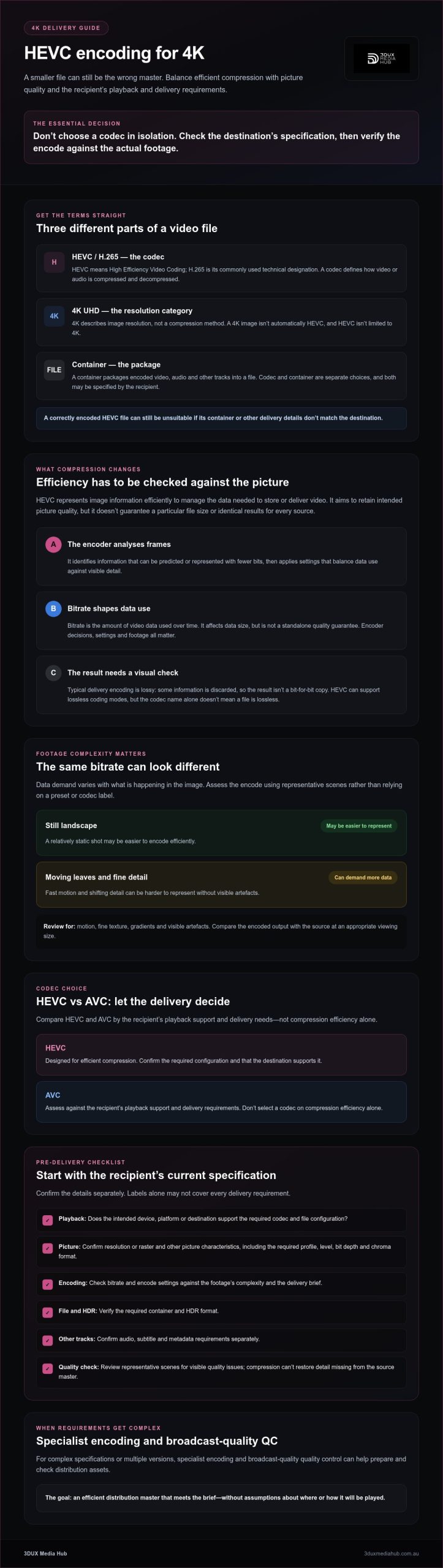
4K HEVC Encode: Practical Pre-delivery Checklist
Start with the recipient’s delivery specification, not a guessed preset. A technically valid encode can still be rejected if it misses a required parameter or packages the tracks incorrectly. For HEVC video encoding for 4K, keep picture-encoding choices distinct from container, audio, subtitle and metadata requirements.
Which requirements should be confirmed before encoding?
- Obtain the current delivery specification. Confirm the destination and ask the recipient to clarify missing or conflicting requirements before work begins.
- Record the picture-encoding parameters. Check the required codec, profile, level, frame rate and bitrate constraints. Confirm colour, bit depth, chroma format and HDR requirements where specified. Don’t assume a preset matches the brief.
- Check the file and track requirements separately. Confirm the accepted container, audio format and track layout, subtitle format and language requirements, and required metadata. Treat these as distinct from the HEVC picture encode.
- Prepare a representative test encode. Use material that reflects the programme’s demanding scenes and intended delivery settings. Review the test before committing to the final encode.
- Run playback and file checks before handover. Verify the file against the recipient’s requirements, including playback, duration, audio synchronisation, metadata and file integrity.
- Record the approved settings and results. Keep a clear record so later encodes or versions can follow the same confirmed workflow.
How should an HEVC test encode be checked?
Don’t judge the test from an easy scene alone. Review motion, fine textures, gradients and dark scenes, where compression issues can be easier to spot. Check for visible artefacts and confirm the picture remains acceptable across the programme, not just in a brief sample.
Then, where practical, check that the file plays as intended on the target delivery or playback system. Confirm duration, audio synchronisation, track selection, metadata and file integrity against the brief. A successful encode is only one part of delivery; the complete file must meet the recipient’s requirements.
For a broader view of the workflow, read the guide to professional video encoding services. If the specification is complex or the master needs careful checking, ask about professional video encoding and QC to help prepare and assess distribution assets.
HEVC for professional 4K distribution: when to bring in an encoding partner
Specialist support can be useful when the delivery specification is detailed, the programme needs multiple versions, or the source master is too valuable to risk an unchecked encode. HEVC video encoding for 4K involves more than selecting a codec: the output must match the brief and be reviewed for technical and picture-quality issues before handover.
An encoding partner can also help coordinate related requirements. Confirm early whether the job needs encoding only, or also authoring, localisation or standards conversion. These are distinct tasks, and agreeing the scope upfront helps keep responsibilities and deliverables clear.
What should a professional encoding and QC handover cover?
Provide the source master and the recipient’s current approved specification. State the intended destination and list each required version, including differences in language, audio, subtitles or technical format. Flag unclear or inconsistent requirements so they can be resolved before encoding begins.
Agree how test encodes will be reviewed, which playback checks are expected, and how QC findings and approvals will be recorded. Clarify whether authoring, audio requirements, localisation or standards conversion are in scope. Confirm which files and documentation are expected at handover.
How can 3DUX Media Hub support 4K encoding and distribution preparation?
3DUX Media Hub provides video and audio encoding from SD to 4K, broadcast-quality QC, 4K UHD authoring and content localisation. These are separate capabilities that can support distribution preparation when a project needs more than an encode. Scope the work against the recipient’s specification; no encoding or QC process can guarantee acceptance by a particular platform or distributor.
If the project includes disc authoring, see the information on 4K UHD authoring services. Authoring requirements are distinct from encoding requirements, so confirm both against the intended delivery. Confirm any HDR-specific requirements separately with the recipient.
To help scope an enquiry, have the source format, delivery specification, intended destination, version list and any related authoring or localisation needs ready. Discuss your 4K encoding requirements with 3DUX Media Hub.
Prepare your next 4K delivery with confidence
HEVC video encoding for 4K can help manage data requirements, but the codec alone doesn’t determine picture quality or delivery readiness. The source material, bitrate and encode settings all shape the result. The right choice also depends on the recipient’s playback support and current technical specification.
Before encoding, confirm the required codec and file configuration, then test and check the output against the delivery brief. For complex specifications, multiple versions or high-value masters, specialist encoding and QC can help keep preparation and review on track.
3DUX Media Hub provides professional video and audio encoding from SD to 4K, broadcast-quality QC, authoring and content localisation. If you’re preparing a distribution asset, discuss your 4K encoding requirements and share the destination, specification and versioning needs. With those details clear, you can move towards delivery with greater confidence.
Frequently Asked Questions
Is HEVC the same as H.265?
Yes. HEVC is the same video coding standard commonly referred to as H.265. HEVC stands for High Efficiency Video Coding, while H.265 is its technical designation. Both names refer to the compression method, not the file container or resolution. A 4K file can use HEVC, AVC or another codec, and the encoded video is packaged separately in a container selected to meet the recipient’s playback and delivery requirements.
Does HEVC encoding reduce 4K video quality?
It can, depending on the encoding workflow. Typical lossy HEVC encoding discards some image information, so the output isn’t an exact copy of the source. Whether the difference is visible depends on factors such as the source material, bitrate and encoder settings. Check a test encode using demanding scenes, including motion and fine detail, and compare it with the source at a suitable viewing size before approving the final file.
What bitrate should I use for 4K HEVC video?
There’s no single bitrate for every 4K HEVC encode. Start with the recipient’s delivery specification, including any bitrate limits, then assess the source footage and intended playback conditions. Fast movement and detailed textures may need different encoding decisions from a relatively static scene. Test representative sections and review the resulting picture and file size. If the specification doesn’t state a bitrate, confirm an acceptable target with the recipient rather than guessing.
Can every 4K device play HEVC files?
No. A device’s ability to display 4K doesn’t automatically mean it can decode every HEVC file. Playback support can depend on the device, software, codec profile and level, container and other file parameters. Before delivery, check the recipient’s supported formats and, where practical, test a representative file on the intended playback system. This helps catch compatibility issues that may not be obvious from the file extension or resolution alone.
Is HEVC suitable for 4K UHD distribution?
Yes, HEVC can be suitable for 4K UHD distribution when the recipient’s specification accepts it and the encoded file meets the required technical and playback conditions. Confirm the codec parameters, container and any separate audio, subtitle or HDR requirements before encoding. HEVC video encoding for 4K isn’t a universal delivery preset: each destination may have different requirements, so verify the current specification and check the completed file before handover.
What is the difference between HEVC and AVC for 4K?
HEVC, also known as H.265, is designed to compress video efficiently, while AVC, or H.264, is an established codec with broad playback support. The practical choice depends on the delivery brief. HEVC may suit a specification that prioritises data efficiency and supports it; AVC may be preferable where the recipient requires it or compatibility is the priority. Neither codec guarantees better-looking video, which also depends on the source and encode settings.
Does choosing HEVC automatically make a 4K file smaller?
No. HEVC doesn’t guarantee a smaller file by itself. File size also depends on bitrate, duration, source complexity, encoder configuration and other settings. A high-bitrate HEVC encode could be larger than a more constrained AVC encode, for example. Compare outputs made from the same source and review both file size and picture quality against the recipient’s requirements. Don’t select a codec expecting a fixed reduction.