
What if the problem with your delivery file isn’t its format, but a technical requirement hidden in the specification? Broadcast file format conversion can mean changing the container, re-encoding the video or audio, or converting between broadcast standards. These are distinct tasks, and choosing the wrong one can affect picture quality, sound or playback.
It’s easy to treat a delivery sheet as a list of settings to match. But reliable conversion starts by identifying the mismatch between your source file and the broadcaster or distributor’s requirements, not by selecting a familiar preset. Re-encoding may be unnecessary if only the container needs to change. Standards conversion may be required if the source and delivery formats use different broadcast systems.
This guide explains how format conversion differs from encoding and standards conversion, what to check in delivery specifications, and how to choose an approach that preserves the intended picture and sound. It also explains why technical review matters before delivery, so the finished file can be checked against the receiving organisation’s current requirements and avoidable rejections or revisions are less likely.
Key Takeaways
- Start with the receiving broadcaster or distributor’s latest specification, and clarify any requirements that are unclear.
- Check the media streams as well as the file extension to pinpoint what actually needs to change.
- Understand how rewrapping, transcoding and standards conversion differ before choosing a broadcast file format conversion approach.
- Gather the source file details and exact delivery destination before preparing a conversion request.
- Assess whether your in-house workflow can verify the deliverable, or whether specialist expertise and QC would help.
What broadcast file format conversion changes and what it does not
Broadcast file format conversion adapts a media file to meet a specified delivery requirement. It may change the container, re-encode video or audio, convert broadcast standards, or combine these operations. The receiving broadcaster or distributor’s current specification determines what needs to change.
Conversion means changing a media file as needed to meet a delivery specification. It doesn’t automatically mean re-encoding, and it isn’t always lossless. A filename extension is only a clue. It doesn’t reveal every detail of the file’s video and audio streams, metadata or technical properties. Two files with the same extension may still differ in ways that affect acceptance or playback.
Container, codec and encoding are different parts of the file
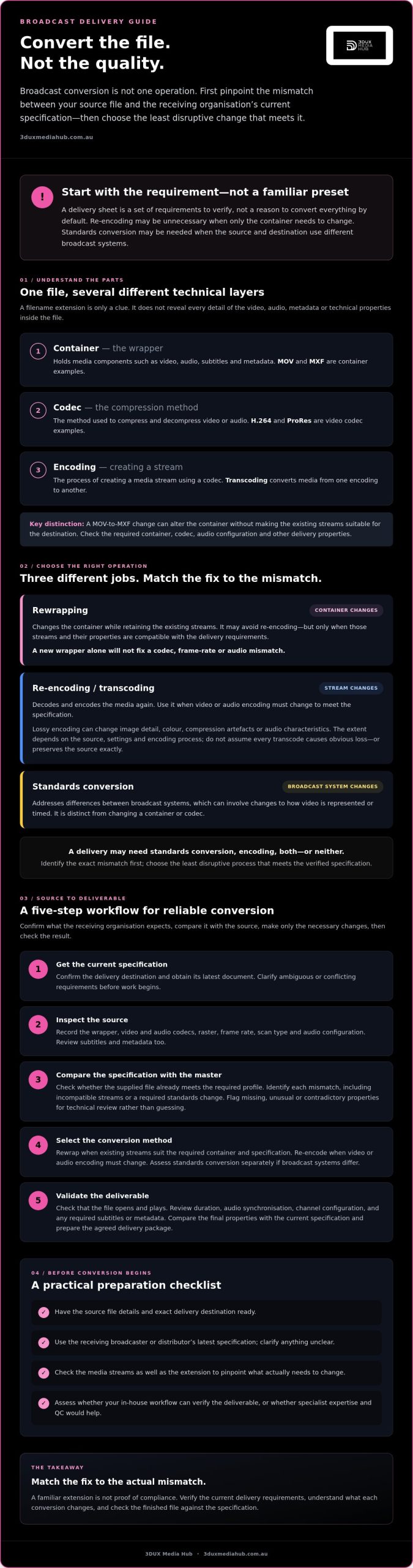
A container is the structure that holds media components such as video, audio, subtitles and metadata. MOV and MXF are examples. A codec is the method used to compress and decompress video or audio. H.264 and ProRes are examples of video codecs. Encoding is the process of creating a stream using a codec; transcoding converts media from one encoding to another.
A MOV file, for example, might contain video encoded with H.264 or ProRes. Changing MOV to MXF may change the container, but that doesn’t mean the existing streams are suitable for the destination. Check the specification for the required container, codec, audio configuration and other delivery properties. Don’t assume a familiar extension or codec will be accepted.
When conversion can affect picture or sound quality
Rewrapping changes the container while retaining the existing streams. It may avoid re-encoding, but only if those streams and their properties are compatible with the delivery requirements. A new wrapper alone won’t fix a codec, frame rate or audio mismatch.
Re-encoding decodes and encodes the media again. With lossy encoding, that process can change image detail, colour, compression artefacts or audio characteristics. The extent depends on the source, settings and encoding process. Don’t assume every transcode causes obvious loss, or that every output preserves the source exactly.
Standards conversion addresses differences in broadcast systems, which can involve changes to how video is represented or timed. It is distinct from simply changing a container or codec. A delivery may require standards conversion, encoding, both or neither. Identify the exact mismatch first, then choose the least disruptive process that meets the verified specification.
How a broadcast file conversion workflow moves from source to deliverable
A reliable workflow begins with the delivery requirement, not an export preset. For broadcast file format conversion, confirm what the receiving organisation expects, compare it with the source, apply only the necessary changes, then check the result.
- Get the current specification. Confirm the destination and obtain its latest delivery document. Clarify ambiguous or conflicting requirements before work begins. Technical standards support interoperability, as outlined in SMPTE’s overview of broadcast standards.
- Inspect the source. Record the wrapper, video and audio codecs, raster, frame rate, scan type and audio configuration. Review subtitles and metadata too. Don’t rely on the extension or an earlier delivery sheet as proof that the file is compliant.
- Compare requirements with the master. Check whether the supplied file already meets the required profile. Identify each mismatch, such as an incompatible stream or a required standards change. Flag missing, unusual or contradictory properties for technical review rather than guessing.
- Select the conversion method. Rewrap only when the existing streams are suitable for the required container and specification. Re-encode when the video or audio encoding must change. If broadcast standards differ, assess whether standards conversion is required. This is a separate decision from changing the wrapper.
- Validate the deliverable. Check that the file opens and plays, then review duration, audio synchronisation, channel configuration and any required subtitles or metadata. Compare the final properties with the current specification and prepare the agreed delivery package.
Assess the source before selecting an output format
Source inspection helps prevent unnecessary processing and surfaces problems early. Compare the measured file properties with the delivery profile, including video, audio, subtitles and metadata. A master may already be suitable, or it may need one targeted change. If the specification doesn’t explain how to handle a source property, pause and request clarification before converting.
Convert, validate and prepare the delivery package
Choose settings only after confirming compatibility. Then check both technical properties and practical playback. A file that passes a settings check can still have an issue with synchronisation or missing components. Review the specification, apply only the required conversion, then run QC against the same requirements.
If the source, audio configuration or delivery brief needs careful assessment, specialist review can help clarify the appropriate scope. 3DUX Media Hub provides video and audio encoding, standards conversion and broadcast quality QC. Explore broadcast encoding and QC as an option when you need technical support aligned with the receiving organisation’s requirements.
Compare rewrapping, transcoding and standards conversion before choosing
These approaches solve different delivery problems. A container mismatch may call for rewrapping; a codec or encoding profile mismatch may require transcoding; a difference in broadcast systems may call for standards conversion. The right choice for broadcast file format conversion depends on the receiving specification and the source file, not on which method seems simplest.
| Approach | Purpose | Likely impact | Checks before proceeding |
|---|---|---|---|
| Rewrapping | Change the container while retaining suitable existing streams. | Doesn’t re-encode the streams, but may affect how components and metadata are packaged. | Confirm the target container supports the source codecs and required audio, subtitles and metadata. |
| Transcoding | Decode and re-encode media when the required codec or encoding profile differs. | Can change image or sound characteristics, particularly with lossy encoding. | Check the required codec, profile and other specified settings, then review the encoded result. |
| Standards conversion | Adapt media for a different broadcast standard or frame-rate requirement. | May affect timing or picture characteristics, depending on the source and conversion. | Confirm the required standard and assess the source before selecting a method. |
Rewrapping versus transcoding: which change does the specification require?
Rewrapping is appropriate only when the existing streams are compatible with the destination. For example, a request to change the container doesn’t establish that the video codec, audio streams or metadata will be accepted. Compare source and target properties first. If the specification requires a different codec, bitrate or encoding profile, transcoding may be necessary. Neither method is universally faster, smaller or higher quality. The result depends on the file, settings and workflow.
File format conversion versus broadcast standards conversion
A wrapper change doesn’t automatically alter frame rate, raster or scan characteristics. Changing a codec doesn’t necessarily convert one television standard to another either. PAL-to-NTSC work or a frame-rate change is a standards-conversion question, not simply a container adjustment. Check which properties the receiving organisation requires, then refer to this guide on broadcast standards conversion for more detail on frame-rate and regional television-standard changes.
Keep the decision tied to the brief: identify the specific mismatch, choose the least disruptive suitable process, and verify the output against the delivery requirements.
Prepare source files and specifications to reduce conversion problems
A clear brief helps prevent avoidable rework. Start with the latest delivery specification and name the exact receiving broadcaster or platform. Requirements can vary between recipients and may change, so don’t rely on an old preset or a specification from another delivery.
What to include in a conversion brief
For broadcast file format conversion, provide enough information to compare the source with the target, rather than asking for a generic format change. Include:
- Source file: file name, wrapper, codec, raster, frame rate, scan characteristics and audio configuration, if known.
- Target requirements: required wrapper and codec, frame rate, audio layout, subtitle format and any metadata requirements stated in the specification.
- Receiver’s instructions: the exact broadcaster or platform, which settings are mandatory or optional, file-naming rules and required package contents. Ask the receiver to resolve any ambiguity.
- Project details: delivery deadline, version number, language variants and any supplied reference files, such as a previous accepted file or technical document.
Keep an untouched copy of the source master. Record the approved output settings and link them to the relevant delivery specification and version. This gives the team a clear reference if revisions are requested, without confusing the original with a converted deliverable.
Common conversion issues to catch before delivery
Check the finished file against the brief, not just its filename or export settings. Confirm the duration and frame-rate interpretation, and look for unexpected changes to aspect ratio or scan characteristics. For audio, verify channel mapping, synchronisation, clipping and language identification against the delivery instructions. Check subtitles and required metadata too.
Finally, confirm that the file opens and plays, then run the technical checks required by the recipient. A successful export alone doesn’t establish that every delivery requirement has been met. If a setting is unclear, get confirmation before creating multiple versions or making a speculative change.
For encoding decisions that affect delivery, read about professional video encoding services. If you need help assessing source media or aligning encoding with a distributor’s specification, discuss your encoding and QC requirements with 3DUX Media Hub.
When to use a specialist for broadcast file format conversion
A verified in-house export may be suitable when the delivery specification is clear, your team can match it confidently, and you have a reliable way to check the finished file. Consider specialist support when requirements conflict or are unfamiliar, the source has unusual characteristics, or the work involves complex audio or standards changes. The aim isn’t to outsource every conversion. It’s to match the level of technical review to the delivery risk.
Compare options by asking who interprets the specification, what quality control is included, and who is responsible for confirming the agreed deliverable. An internal workflow may offer direct oversight if your team has the right expertise and checks. A specialist can provide focused specification knowledge and an independent review. In either case, clarify the scope and acceptance criteria before work starts.
Questions to ask a conversion provider
- How will you inspect the source assets and confirm the receiving organisation’s current requirements?
- Does the agreed scope include video and audio encoding, standards conversion, broadcast-quality QC, or delivery preparation? Which of these are needed for this project?
- What outputs and QC reports will be supplied? How are revisions handled, and which source files, specifications or reference assets must we provide?
Clear answers help prevent assumptions about what “conversion” covers. Confirm the deliverables, checks and responsibilities in writing, including how any issue found during QC will be raised and resolved.
How 3DUX Media Hub supports broadcast delivery
3DUX Media Hub provides video and audio encoding, broadcast-grade standards conversion and broadcast-quality QC for film and television delivery. Its principals bring more than 20 years of industry experience, and the business supports global distribution. The appropriate service scope depends on the source material and the receiving organisation’s specification.
If you’re weighing up in-house work against specialist support, share the delivery requirements and source details so the project’s needs can be assessed clearly. Discuss your broadcast conversion requirements with 3DUX Media Hub.
Prepare your next delivery with confidence
Reliable broadcast file format conversion starts with the receiving organisation’s current specification. Match the source file to those requirements before choosing a process, and don’t treat a container change, transcoding and standards conversion as interchangeable. Then check the completed deliverable, including picture, sound and required file components, before distribution.
For complex specifications, unusual source material or audio that needs careful assessment, a technical partner can help clarify the work required. 3DUX Media Hub provides video and audio encoding across formats from SD to 4K, broadcast-grade standards conversion and quality control. The business supports global distribution, with more than 20 years of industry experience through its principals.
Have a delivery specification and source file ready to discuss. Discuss your broadcast file conversion requirements with 3DUX Media Hub and take the next step towards a technically checked deliverable.
Frequently Asked Questions
What is broadcast file format conversion?
Broadcast file format conversion adapts a media file to meet a broadcaster’s or distributor’s delivery requirements. The work depends on the mismatch. It might involve changing the container, re-encoding video or audio, or adjusting technical characteristics. The receiving organisation’s specification defines the required result. Not every part of a file needs to change, so inspect the source and compare its properties with the current delivery requirements before choosing a conversion method.
Is changing a video file extension the same as converting its format?
No. Renaming a file extension changes its label, but not necessarily the media structure or the encoded streams inside it. A genuine format change may require rewrapping compatible streams in another container, or decoding and re-encoding them. Check the file’s actual properties, including its video and audio streams, against the receiver’s specification. A filename alone can’t confirm that the file is suitable for delivery or playback.
Does broadcast file format conversion reduce picture quality?
It can, particularly if video is decoded and re-encoded using lossy compression. The result depends on the source, codec, settings and delivery requirements, so quality loss isn’t automatic or uniform. Rewrapping compatible streams may avoid re-encoding, but it’s appropriate only when those streams meet the destination requirements. Review the specification and check the resulting file rather than assuming conversion will always preserve quality or necessarily damage it.
Can I convert a media file without re-encoding it?
Sometimes. Rewrapping changes the container while retaining compatible video and audio streams. It’s suitable only if the streams, metadata and other relevant file characteristics meet the destination requirements. If the required codec, encoding profile or another encoded property differs, re-encoding may be needed. Confirm compatibility against the receiving organisation’s current specification before selecting a workflow. Changing the extension alone won’t perform either operation.
What is the difference between transcoding and standards conversion?
Transcoding changes how video or audio is encoded, often to meet a codec or profile requirement. Standards conversion addresses differences in broadcast standards, such as frame-rate or television-system requirements. Changing the container alone does neither. A delivery may need one operation or several, depending on the source and target specification. Identify the specific mismatch first, then choose the required work rather than treating these processes as interchangeable.
What information do I need before requesting broadcast file conversion?
Provide the latest delivery specification, the intended recipient and details of the source file, including its video and audio properties if known. Include required output settings, subtitles, language variants, naming conventions and package requirements. State the deadline and identify any reference files or versions. If instructions conflict or a requirement is unclear, ask the receiving organisation to confirm the correct interpretation before conversion begins.
When should I use a professional broadcast conversion service?
Consider specialist support if the requirements are unclear, the source has technical complications, multiple outputs are needed or a failed delivery could create substantial rework. Ask whether the agreed scope includes specification review, encoding or standards conversion, and quality control. A simple in-house export may be appropriate when the source already meets confirmed requirements and your team can verify the finished file. Choose support based on the project’s needs, not the assumption that every file needs professional conversion.