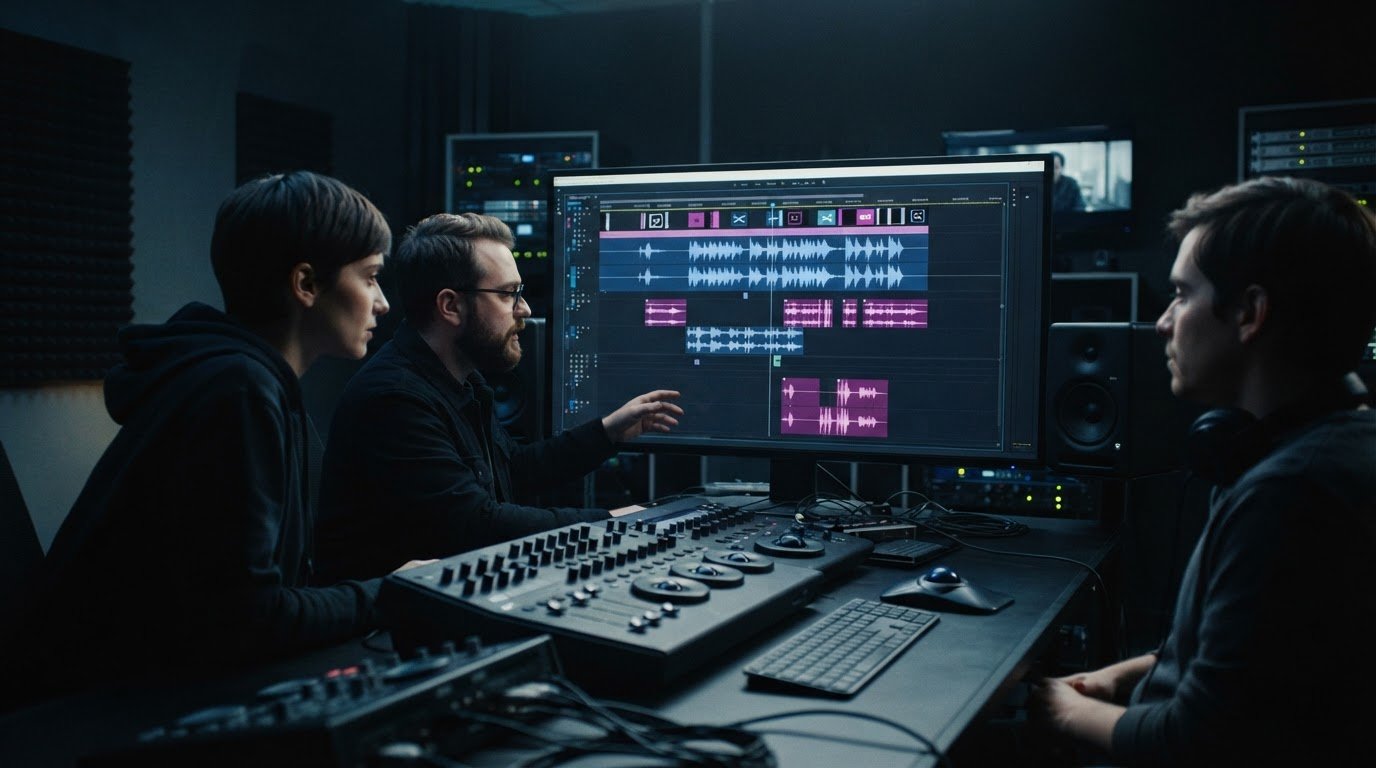
Dialogue is aligned at the opening, then drifts against the picture by the final scene. Is the cause a fixed offset, timing drift or an edit mismatch? Identifying the pattern matters: applying the wrong correction can shift the problem rather than solve it. Audio track synchronisation services help align film and television assets with their approved picture versions before release.
It’s easy to expect one adjustment to fix audio that feels late or early. Accurate synchronisation depends on checking the relationship between audio and picture across the full programme, not just at one point. Timecode and other reference points help locate discrepancies. The right correction depends on whether the audio stays consistently offset, gradually slips or diverges after an edit.
This guide explains how synchronisation works, how common sync faults are diagnosed and corrected, and what to check when preparing audio masters for distribution. It also covers how audio conforming, encoding and quality control fit together to keep approved audio and picture aligned in delivery assets.
Key Takeaways
- Understand how audio track synchronisation services fit into preparing film and television assets for release.
- Use picture and audio references to establish intended timing before making corrections.
- Identify a fixed offset, progressive drift or edit-point mismatch by noting where the issue appears and how it changes.
- Use a pre-delivery checklist to verify the correct version, track identity and timing across the full programme.
- See how audio conforming, encoding and broadcast-quality QC support distribution-ready assets.
What are audio track synchronisation services, and when are they needed?
Audio track synchronisation is the process of aligning dialogue, music and sound effects with their intended moments in a picture edit. Audio track synchronisation services address timing across a programme’s audio and video assets, so the soundtrack matches the approved version of the film or television programme.
This differs from troubleshooting a viewer’s television, speakers or playback device. If a persistent issue appears across prepared versions of a programme, the cause may lie in the media asset. If it occurs only on one device or playback setup, it may be specific to that system. Distinguishing between the two helps focus diagnosis on the right part of the workflow.
Timing affects more than visible speech. A delayed impact can weaken the connection between an action and its sound, while music that enters too early or late can alter a scene’s rhythm. For an overview of the viewer-facing concept, see Audio-to-video synchronization (also known as lip sync). In professional preparation, the aim is to align each audio element with the intended picture and edit.
Which film and television projects need synchronised audio?
Synchronisation matters whenever audio and picture follow separate paths through post-production. Production sound may be recorded separately from the camera picture, then brought together during editing. Later picture edits can change the timing or duration of scenes, so audio prepared against an earlier cut may no longer fit the approved edit.
Distribution preparation adds another layer. A programme may have one picture master and several audio versions, such as the original-language mix and alternate-language tracks. Each track must correspond to the relevant picture edit. A version with a different opening, scene order or duration may need its own matching audio asset.
- Separately recorded sound: Dialogue or other production audio needs to match the corresponding picture.
- Edited picture: Changes to shot or scene timing can affect where audio elements belong.
- Distribution versions: Each language or delivery asset needs to match its intended programme version.
A single programme master is not the same as a complete set of language and delivery assets. The master establishes one version; localisation and distribution may require additional tracks conformed to their matching edits.
What does an audio sync problem look like?
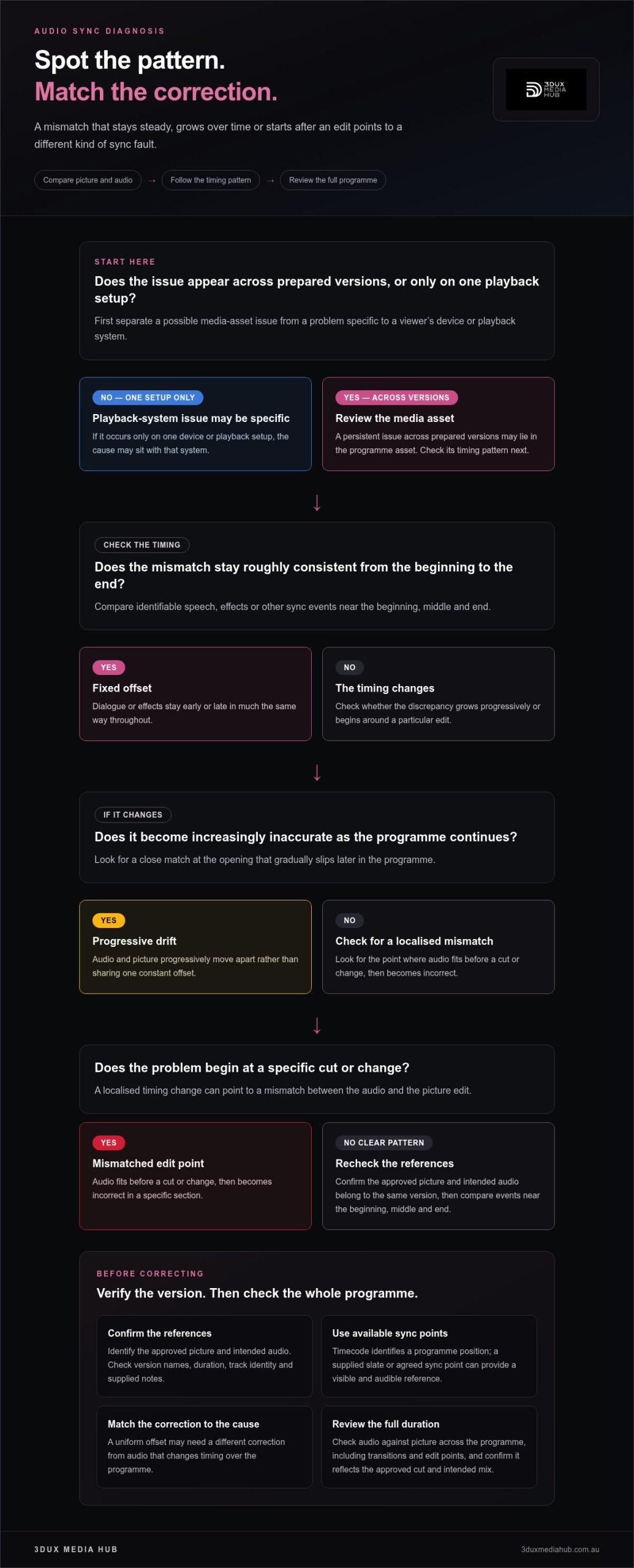
Look and listen for the pattern, not just the first moment that feels wrong. A fixed timing error tends to remain consistent: dialogue starts before visible speech near the beginning and stays early later on. Effects can show the same pattern when their sounds repeatedly land ahead of or behind the corresponding action.
Sometimes the opening appears aligned, but the discrepancy grows as the programme continues. That can indicate timing drift, where audio and picture progressively move apart rather than sharing one constant offset. A localised error has a different pattern:
- Consistent offset: Speech or effects are early or late in much the same way throughout.
- Progressive drift: Sync looks close at first, then becomes increasingly inaccurate.
- Mismatched edit point: Audio fits before a cut or change, then becomes incorrect in a specific section.
These clues help distinguish a programme asset issue from a playback-device problem and provide a practical starting point for technical review.
How professional audio track synchronisation works
A reliable sync workflow starts with the correct materials, not an adjustment made by eye or ear alone. The approved picture version must guide synchronisation because each cut determines where dialogue, effects and music are meant to occur. Matching audio to a different edit can introduce new errors, even if the track seemed aligned to an earlier version.
A sound workflow establishes the reference, locates the discrepancy, applies a suitable correction and reviews the result. Each step helps protect the intended edit and mix.
- Review the references. Identify the approved picture file and the audio assets intended for that version. Check version names, duration, track identity and any supplied notes before comparing timing.
- Diagnose the behaviour. Compare identifiable events near the beginning, middle and end. This helps show whether the audio is consistently early or late, progressively moving out of sync, or misaligned only around an edit.
- Correct the cause. Apply an adjustment suited to the diagnosed issue. A uniform offset may call for a different correction from audio that changes timing over the programme.
- Check the programme. Review audio against picture across the full duration, including transitions and edit points. Confirm the result still reflects the approved cut and intended mix.
Establishing the reference for picture and sound
Start by identifying the approved picture version and its corresponding audio tracks. Timecode can identify a position in the programme, while a slate or another agreed sync point can provide a visible and audible reference when supplied. These references help establish intended timing, but they don’t replace checking that the files belong to the same edit.
Check for version differences before making a full-programme correction. A revised opening, shortened scene or changed shot sequence can shift the relationship between picture and audio from a particular point onward. Aligning against the wrong cut may make one section appear correct while leaving other sections out of place.
Correcting timing and checking the result
A fixed offset means the audio is early or late by a consistent amount. Timing that changes over the programme behaves differently, so a single shift may not resolve it. Corrections should address the observed pattern while preserving the approved edit, dialogue content and intended mix balance.
Frame rate and sample rate are separate properties. Frame rate describes how picture is timed in frames; sample rate describes how digital audio is sampled. They’re not interchangeable settings, and changing one doesn’t automatically correct the other. Consider both in the context of the project’s source materials and delivery requirements.
After adjustment, review the start, middle and end, then check scenes with dialogue, effects, music and transitions. A clean opening doesn’t prove that the whole programme is aligned. For distribution preparation, audio conforming and encoding can be combined with project-specific quality control as part of the wider asset workflow.
Fixed offset, drift, or edit mismatch: how to diagnose audio sync
A sync problem’s pattern can point towards its cause. Does the audio seem equally early or late throughout? Does the discrepancy grow as the programme plays? Or does it begin around one particular cut? These clues help narrow the diagnosis before any correction is applied. A single uniform adjustment won’t resolve every case and may make an edit-specific problem worse.
Compare recognisable events at several points, such as dialogue, a sound effect or a music cue. Note where the issue starts and whether its size changes. Use the same picture and audio references for each comparison.
| Symptom pattern | Likely indication | Diagnostic clue |
|---|---|---|
| Fixed offset | Audio is consistently early or late across the programme. | The displacement is broadly similar at the start, middle and end. |
| Progressive drift | The timing relationship changes as playback continues. | Sync is closer at one point, then increasingly off at later points. |
| Edit mismatch | Audio and picture diverge around a local section or cut. | Material may align before a particular edit, then no longer match. |
How to recognise a fixed offset versus progressive drift
A fixed offset is a broadly consistent displacement: if speech starts late near the opening, it also starts late by a similar amount in later scenes. Drift behaves differently. The timing relationship changes during playback, so an event that appears aligned early may be noticeably out of place further on.
Check more than one point before assigning a cause. Compare a clear event near the beginning with others around the middle and end. If the discrepancy stays similar, that supports an offset pattern; if it changes, investigate drift or another timing issue. This comparison is a diagnostic clue, not a substitute for reviewing the source assets.
When an edit mismatch causes local sync errors
A local error can arise when the audio and picture references represent different cuts or durations. For example, a scene shortened in the approved picture may leave audio timed for the longer version. Material can appear aligned before the changed section, then diverge at the edit, even though the rest of the programme hasn’t shifted by the same amount.
Compare version identity, duration and edit points across the picture and audio references. Treat a local discrepancy separately from a full-programme timing shift. Applying a global adjustment to compensate for one changed scene could throw previously aligned sections out of sync.
The correction depends on the source assets and approved delivery version. Compare the pattern against those references before adjusting the material, to help preserve the intended edit and mix. Use the table to focus the investigation, not to assume a cause: confirm the diagnosis against the actual programme assets.
Preparing synchronised audio tracks for distribution and quality control
A correctly aligned track still needs to be packaged and checked against the delivery brief. Version labels, track identity and programme timing all matter. A mismatch in any of these can make an otherwise sound asset difficult to use or unsuitable for its intended delivery. Keep the handover clear, and assess audio and picture together rather than treating them as separate files.
What to verify before a synchronised master is handed over
Use a pre-delivery checklist to confirm that the files belong together and that timing holds across the programme. Compare the picture version and audio asset names with the delivery package, then review representative dialogue, effects and music cues from beginning to end. Record version changes, exceptions and relevant notes clearly so the recipient understands what the package contains.
- Version: Confirm the picture corresponds to the approved edit and intended delivery version.
- Track identity: Check that each audio file is labelled for its intended language, mix or other role.
- Timing: Review dialogue, effects and music against picture at representative points, including around edits and transitions.
- Full-duration review: Check beyond the opening to catch timing changes later in the programme.
- Handoff notes: Document known changes, exceptions and distinctions between assets in the package.
A final sync check before delivery helps confirm that the audio matches the intended picture version across the programme.
How synchronisation fits into localisation and QC
Alternate-language audio needs to match the picture edit it was prepared for. If a localised track is paired with a different cut, timing may diverge around changed or removed material. Content localisation and audio conforming therefore sit alongside sync review when preparing assets for distribution. The film localisation and audio conforming workflow connects these steps to global release preparation.
Quality control checks whether prepared assets are consistent and ready for the intended handover. Review audio and picture together, then compare the package with the distributor’s applicable delivery requirements. These may specify the required file format, track configuration, audio characteristics or other technical details. The current brief for the destination and project determines which requirements apply.
Audio encoding is another part of asset preparation. Encoding settings should follow the delivery brief, and a sync review should assess the resulting asset against its matching picture, rather than relying only on a check made before encoding. This helps identify whether the delivered version remains aligned and correctly identified.
Synchronisation, localisation, encoding and QC can be coordinated as part of a distribution workflow. 3DUX Media Hub’s audio preparation services bring these checks into the wider asset process, guided by the requirements of the intended release.
How 3DUX Media Hub supports audio preparation for global release
Preparing audio for release involves more than placing a track against a picture. The audio must correspond to the intended edit, language version and delivery brief. 3DUX Media Hub includes audio conforming within its broader post-production and content-localisation workflows, coordinating audio preparation with the assets required for distribution.
This matters when one programme is prepared for multiple territories or delivery formats. Each version needs the right audio and picture combination, with project requirements guiding the work. 3DUX Media Hub supports global distribution workflows, and its principals bring more than 20 years of industry experience to the preparation of film and television assets.
Coordinating audio conforming with release assets
Audio conforming prepares a track to match the relevant picture version and release requirements. That may include aligning an alternate-language track with its intended edit, rather than assuming one audio version will fit every cut. Coordinating conforming with localisation helps keep language assets associated with the correct picture versions throughout preparation.
The delivery brief provides context for those decisions. It identifies the intended release assets and applicable requirements, so the audio work can be organised around the project rather than a generic template. Explore audio conforming for international film release to see how conforming and localisation relate to global distribution preparation.
Audio track synchronisation is one part of preparing distribution assets. The aim is to prepare the right audio for the right version, then carry that relationship through encoding and quality checks where the project calls for them.
Moving from prepared audio to checked delivery
Once audio has been conformed, video and audio encoding can prepare assets for the specified delivery path. Broadcast-quality QC can then assess the prepared material against relevant project requirements. These steps work together but serve different purposes: conforming addresses the relationship between audio and picture, encoding prepares media assets, and QC checks them for delivery readiness.
Requirements depend on the destination and delivery brief, so there isn’t one universal format or specification for every release. For projects involving Blu-ray delivery, broadcast quality control for Blu-ray distribution is relevant to the final asset checks. This concerns preparation and QC, not physical disc replication.
3DUX Media Hub combines audio conforming with localisation, encoding and quality control according to project requirements. This helps keep prepared audio aligned with its intended release assets across distribution workflows.
Have a film or television release to prepare? Discuss your media post-production project with 3DUX Media Hub and outline the assets and delivery requirements involved.
Plan your next release with confidence
Use the next delivery milestone to clarify which picture versions and audio assets need to move together. An asset map can make version relationships visible early, especially when a release involves multiple edits or language tracks. It gives the post-production team a clear basis for preparing and checking materials before handover.
Bring the delivery brief, available asset details and known version differences into the planning conversation. 3DUX Media Hub’s audio conforming, localisation, encoding and quality control services support a coordinated approach to film and television distribution. The workflow can then be shaped around the project instead of relying on assumptions about a one-size-fits-all delivery.
If you’re planning a release or resolving a sync concern, discuss your project requirements with 3DUX Media Hub. Set out the versions and intended delivery to plan the audio preparation pathway for your release.
Frequently Asked Questions
What are audio track synchronisation services?
Audio track synchronisation services align a programme’s sound with the corresponding picture so events happen at their intended moments. The work can apply to dialogue, music, effects or a complete mix. For example, a dubbed line needs to begin at the right point in the scene, while an impact effect should match the action that produces it. The work depends on the source assets and release version.
How do you synchronise audio tracks with video?
Start with the correct picture edit and the audio intended for it. Use a clear reference, such as a slate, timecode or identifiable event, to compare their timing. Then check whether the discrepancy is consistent, changes over time or appears only around a particular section. Apply a correction suited to that pattern, and review the resulting asset in context before it’s used in a delivery package.
Can audio that gradually drifts out of sync be corrected?
Often, yes, but the correction depends on why the timing changes. Gradual divergence may call for a different approach from moving the whole track by a fixed amount. Compare sync at several points and check that the audio and picture represent the same version. The source files and intended delivery also matter, so avoid stretching or shifting a track until the cause is understood.
What causes audio to be out of sync with picture?
Sync discrepancies can arise when audio and picture are recorded or handled separately, when an edit changes, or when the wrong assets are paired. A conversion or export can also affect how media lines up if the source and output are interpreted differently. In a viewer’s setup, playback processing or a device issue may be involved instead. Comparing the same title on another playback path can help isolate the source.
How can I tell whether audio is out of sync or the edit is different?
Compare the programme’s content, not just its opening. Check scene order, duration, cut points and distinctive events against the approved picture reference. If the audio matches until a scene that has been shortened or removed, the assets may belong to different edits. If the content and cuts match but dialogue appears consistently displaced, investigate a timing error. Version labels and edit notes can help clarify the comparison.
Does audio synchronisation change the original mix?
Synchronisation is primarily a timing task, so a timing correction doesn’t automatically require a creative remix. Preserve the intended balance between dialogue, music and effects unless the project specifically calls for a mix change. If an edit has removed or added material, the affected section may need attention to maintain a coherent transition. Clear instructions about the approved mix help distinguish timing work from audio revision.
Why check audio sync across the entire programme before distribution?
A check at the opening only confirms that the start is aligned. It won’t reveal drift that develops later or an error introduced at a mid-programme edit. Review points across the full runtime, including transitions and the closing section, to catch issues before handover. This is especially useful when separate audio assets are paired with a particular picture version for encoding or localisation.