What if your entire production timeline collapses because of a single bitrate spike during the final QC check? It is a nightmare scenario that occurs when producers underestimate the rigour of physical media standards. You’ve poured your budget into high-end cinematography and a pristine sound mix. The last thing you need is a technical rejection from the replication plant. Understanding exactly how to prepare files for Blu-ray authoring is the only way to protect your investment and ensure a seamless global release.
We understand the frustration of chasing audio sync issues across varying frame rates or second-guessing the capacity limits of a BD-25 versus a BD-50. This guide provides the professional 2026 checklist for a clean technical handover. You will master the technical requirements to deliver superior picture and audio quality that beats streaming every time. We will cover essential encoding specifications, bitrate management, and the mandatory file structures required for a distribution-ready master.
Key Takeaways
- Master the technical distinctions between H.264 and HEVC encoding to ensure your assets fit perfectly within BD-25 or BD-50 capacity limits.
- Learn how to prepare files for Blu-ray authoring using high-fidelity audio standards like DTS-HD Master Audio and 24-bit/48kHz LPCM.
- Avoid localisation errors by using specialised .STL or image-based subtitle formats while strictly adhering to Title Safe margins for global compliance.
- Streamline your project handover by implementing precise Photoshop layer naming conventions and preparing a comprehensive sidecar metadata file.
- Understand why a broadcast-quality QC process is the final line of defence against costly technical errors before your master reaches the replication plant.
Video Mastering Specifications for Blu-ray Compliance
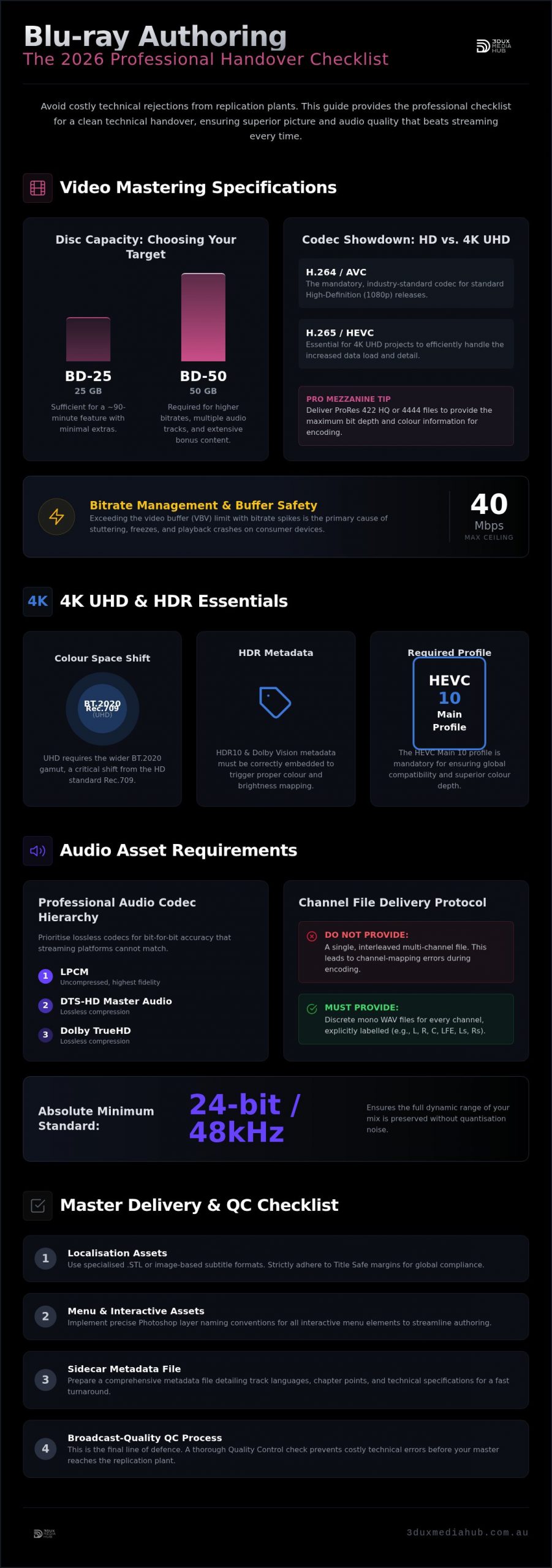
Mastering video for physical media requires a shift in mindset. You aren’t just exporting a file for a web player; you are preparing a compliant asset for a rigorous Optical disc authoring process. Professional mastering begins with knowing exactly how to prepare files for Blu-ray authoring to meet strict hardware specifications. For standard high-definition releases, H.264/AVC remains the mandatory codec. However, 4K UHD projects demand HEVC (H.265) to handle the increased data load. While many independent filmmakers attempt to export finished Blu-ray files directly from their NLE, professional results require a high-quality mezzanine handover. We typically recommend ProRes 422 HQ or ProRes 4444. This ensures the encoding stage has the maximum bit depth and colour information to work with.
The industry standard for cinematic releases is 1080p at 23.976fps. This frame rate provides the correct “film look” while ensuring compatibility across global NTSC and PAL territories without complex standards conversion. You must also decide between a BD-25 or a BD-50 early in the process. A BD-25 offers 25GB of single-layer capacity, which is often sufficient for a 90-minute feature with minimal extras. A BD-50 provides 50GB on a dual-layer disc, allowing for higher bitrates, multiple audio tracks, and extensive bonus content. Choosing the wrong target can force a last-minute re-encode that compromises visual quality.
Bitrate Management and Buffer Safety
Bitrate management is where most DIY projects fail. A standard Blu-ray disc can technically reach higher peaks, but professional houses enforce a 35-40 Mbps ceiling for the primary video stream. This isn’t an arbitrary limit. It provides a safety margin for the VBV (Video Buffering Verifier). If your bitrate spikes too high during a high-motion sequence or a scene with heavy film grain, the player’s buffer will empty. This leads to stuttering or a complete playback crash. Managing these spikes requires a multi-pass encoding strategy that balances visual transparency with hardware stability. Our encoders prioritise the VBV to ensure your master plays perfectly on everything from high-end players to entry-level consoles.
4K UHD and HDR Considerations for 2026
The 2026 standard for high-end releases is 4K UHD with High Dynamic Range (HDR). Our 4K UHD authoring services utilise specific HEVC Main 10 profiles to ensure global compatibility and superior depth. When considering how to prepare files for Blu-ray authoring in 4K, you must account for the colour space shift. Standard HD uses Rec. 709, but UHD requires the wider BT.2020 gamut. If your project includes HDR10 or Dolby Vision, the metadata must be exported correctly within the mezzanine file. Without this, the disc won’t trigger the correct brightness and colour mapping on the consumer’s display. We verify that all HDR metadata is intact and compliant with the latest UHD Alliance standards before the encoding process begins.
Audio Asset Requirements: Beyond Simple Stereo
Audio quality is the primary reason many collectors still prefer physical media over streaming. While streaming platforms rely on lossy compression, a professional Blu-ray master offers bit-for-bit accuracy. When you are planning how to prepare files for Blu-ray authoring, you must prioritise lossless codecs. The hierarchy of professional audio includes LPCM, DTS-HD Master Audio, and Dolby TrueHD. We insist on 24-bit / 48kHz as the absolute minimum standard for mastering. This bit depth ensures the full dynamic range of your mix is preserved without the introduction of quantisation noise. If your project features a high-fidelity 96kHz score, we can master that too, provided the capacity of the disc allows for the increased bitrate.
Don’t provide a single interleaved file for multi-channel configurations. Professional workflows require discrete mono WAV files for every channel in a 5.1 or 7.1 setup. Each file must be explicitly labelled with its position, such as Left, Right, Centre, LFE, Left Surround, and Right Surround. This prevents channel-mapping errors during the encoding stage. If your assets are currently unorganised, our audio conforming services for film can help you align and label your stems for technical compliance. It’s a critical step that ensures the dialogue stays in the centre channel where it belongs. For a broader look at how audio metadata fits into the wider UHD ecosystem, the Dolby Vision Authoring Guide provides excellent technical context for modern disc standards.
Immersive Audio and Object-Based Mixing
Delivering an immersive experience through Dolby Atmos or DTS:X requires specialised asset preparation. You need to provide an ADM BWF (Audio Definition Model Broadcast Wave Format) file that contains both the audio “beds” and the positional “objects”. Managing Dialogue Normalisation (Dialnorm) is also essential here. Unlike web video, Blu-ray audio is designed for calibrated home theatre environments with high headroom. You don’t need to squash your dynamic range. We recommend keeping your mix breathable to take full advantage of the format’s capabilities. If you have questions about your mix’s compatibility, you can reach out for a technical review of your audio assets.
Audio Conforming for Global Distribution
Sync issues are the most frequent cause of technical rejection. When you are localising a film for different territories, dubbed tracks must match the master video’s frame rate precisely. If your film is 23.976fps but the localisation track was recorded against a 25fps reference, you will face sync drift. There is also the issue of pitch shift. A 4% speed increase for PAL conversion will make your actors sound slightly higher in pitch if not corrected. We use advanced resampling algorithms to maintain the original pitch while ensuring the audio remains locked to the picture. Technical compliance for international delivery is a game of precision, not guesswork.
Localisation Assets: Subtitles and Closed Captions
Many independent filmmakers assume a basic SRT file is sufficient for a global release. It isn’t. When planning how to prepare files for Blu-ray authoring, you must understand that professional players render subtitles as bitmap images rather than simple text streams. This allows for precise control over typography, colour, and positioning. Amateur text files often fail to account for the technical overhead required for BD-J (Blu-ray Java) menus or complex multi-stream configurations. Professional authoring houses require .STL files or, more commonly, XML/PNG image sequences. These formats ensure that your subtitles appear exactly as intended, regardless of the player’s internal font library.
Title Safe margins are a critical technical requirement. Subtitles must be positioned within the inner 90% of the screen area to avoid being cut off by overscan on certain displays or projection systems. If you are managing a multi-language release with 10 or more subtitle streams, organisation is paramount. Each stream must be delivered with a clear language code and a corresponding frame rate that matches your master video. Misaligned frame rates are the leading cause of subtitle drift, where the text slowly falls out of sync with the dialogue over the course of a two-hour feature.
There is also a significant distinction between standard subtitles and Subtitles for the Deaf and Hard of Hearing (SDH). Standard subs only translate foreign dialogue. SDH includes descriptive text for sound effects and speaker identification. Providing both options is a hallmark of a professional release and is often a mandatory requirement for major distribution deals. We verify that all localisation assets meet these rigorous standards before they enter the authoring environment.
Subtitle Formatting and Timing
Timing must be frame-accurate. A delay of even three frames can be jarring for an audience. We recommend a maximum reading speed of 15 to 20 characters per second to ensure readability. For non-Latin scripts such as Japanese, Arabic, or Thai, the XML/PNG approach is the only way to guarantee that complex glyphs render correctly. This method bakes the text into a graphic overlay, removing the risk of font substitution errors that can occur with text-based formats. Every line must be checked for character limits, typically capped at 35 to 40 characters per line across a maximum of two lines.
Closed Captions vs. Subtitles
Closed Captions (CC) are technically distinct from bitmap subtitles. While subtitles are graphics, CC is often delivered as Line 21 data or CEA-708/608 bitstreams embedded within the video. Compliance with Australian and international broadcast standards often requires these specific formats for accessibility. The technical rendering differs because the player or the television itself generates the CC text based on the data stream. Our expertise in film localisation audio conforming for global release ensures that these captions remain perfectly synchronised with both the primary audio and any dubbed tracks. This level of precision is what separates a professional master from a standard export.
Menu Design and Interactive Asset Preparation
Professional menus are more than just graphic overlays; they are complex software interfaces. When you are determining how to prepare files for Blu-ray authoring, the structure of your Photoshop (PSD) files is the most critical factor. Unlike web design, Blu-ray authoring software requires specific layer naming conventions to recognise buttons and background elements. Each button must include three distinct states: Normal, Selected, and Activated. These states are typically managed through colour mapping or sub-picture highlights. If your PSD layers aren’t correctly prefixed and organised, the authoring engine won’t be able to map the navigation logic correctly.
You also need to choose between ‘IG’ (Interactive Graphics) and ‘Out-of-Mux’ menus. IG menus are rendered as a separate layer that can appear over the video, which is essential for pop-up menus that function during feature playback. Out-of-Mux menus are separate video streams entirely. This distinction impacts how you manage your disc’s bitrate and seamless branching. For a deeper dive into these technicalities, see our interactive Blu-ray menu design guide. Getting this right during the design phase prevents costly re-works during the assembly stage.
Motion Menus and Transitions
Motion menus add a premium feel but require precise asset preparation. Background video assets must be exported as seamless loops. If the loop point isn’t perfect, the viewer will experience a frame drop every time the menu resets. Audio loops are equally sensitive. You must ensure the audio track has a clean loop point to avoid audible ‘pops’ or clicks. Pop-up menus are another layer of complexity. These must be designed to remain legible against various background colours, often requiring a semi-transparent ‘plate’ behind the text to ensure the user can always navigate the disc.
Static Menu Layouts for Efficiency
Static menus are a reliable, budget-conscious choice for many releases. Even without motion, legibility is the priority. You must optimise font sizes and weights for various screen sizes, from 32-inch monitors to 100-inch projection screens. High-contrast designs work best for remote control navigation. While we focus on modern standards, we also provide DVD authoring services Sydney for legacy projects that require similar attention to menu hierarchy. Whether you are targeting 4K or standard definition, the user experience must be intuitive and fast.
Ready to ensure your interactive assets are technically compliant? Contact our Sydney hub to discuss your menu design and technical handover requirements.
The Master Delivery Checklist: Ensuring a Fast Turnaround
The final stage of asset handover is where projects either succeed or stall. Precision at this juncture is non-negotiable. A “Sidecar” metadata file is the most overlooked yet essential component of a professional delivery. This document acts as a technical blueprint, clearly outlining track assignments, language codes, and aspect ratio flags. Without it, the authoring house is left to guess your intentions, which inevitably leads to delays. When considering how to prepare files for Blu-ray authoring, you must view your assets as a single, cohesive package rather than a collection of disparate files. At 3DUX Media Hub, we insist on a rigorous QC process because even a minor oversight in the metadata can trigger a technical rejection at the replication stage.
Your final check must confirm that frame rates are identical across every single asset. If your video is 23.976fps, your audio stems and subtitle XMLs must match that exact timebase. Even a fractional discrepancy will cause sync drift that becomes more pronounced as the film progresses. Before you ship your drive or upload your master, consult our 2026 Buying Guide to ensure your project scope aligns with the latest industry standards and hardware requirements. This level of preparation ensures a fast turnaround and a master that is compliant with global distribution specs.
Final File Structure and Naming
Organising your assets into a logical folder hierarchy is the simplest way to accelerate the authoring process. We recommend a structure that separates Video, Audio, Subs, and Menus into clearly labelled subdirectories. Use industry-standard naming conventions; avoid vague filenames like “final_v2_fixed.mov”. Instead, use descriptive strings that include the project title, version, and technical specs. A “Master Cue Sheet” is also vital. This document should list every chapter marker with its exact timecode, ensuring the interactive navigation matches your creative vision perfectly. This organisation reduces manual sorting time and minimises the risk of the wrong asset being ingested into the authoring timeline.
Quality Control and Technical Compliance
The “Check Disc” review is your final line of defence. This is a physical or digital emulated version of the final disc that allows you to test navigation, audio switching, and subtitle rendering in a real-world environment. It is the only way to catch logic errors in the menu or bitrate spikes that were missed during the encoding phase. You must also finalise your requirements for AACS encryption and region coding. Whether you are releasing a Region A/B/C “All Region” disc or a territory-locked master, these flags must be set correctly in the cutting master. Professional Blu-ray authoring for film festivals is vital for on-screen reliability, ensuring your film plays back without a hitch in high-pressure screening environments. Following this checklist guarantees that your master is technically sound and ready for the global market.
Secure Your Master for Global Distribution
Mastering for physical media is a high-stakes technical exercise where precision determines the success of your release. We’ve covered the critical requirements for bitrate safety, lossless audio configurations, and the necessity of frame-accurate localisation. Successfully navigating the complexities of how to prepare files for Blu-ray authoring ensures your project bypasses the common pitfalls of technical rejection and playback instability. A clean technical handover is the difference between a fast turnaround and a costly production delay.
With over 20 years of technical mastering experience, 3DUX Media Hub specialises in the high-end HEVC and 4K UHD encoding required for modern standards. We apply global distribution-ready QC standards to every project, acting as a proactive partner for your high-value assets. Our Sydney-based team understands the technical heavy lifting required to deliver superior picture and audio quality that beats streaming every time.
Request a technical consultation for your Blu-ray project with 3DUX Media Hub to ensure your film meets the highest industry benchmarks. Your production deserves a master that reflects its quality. Let’s ensure your film is ready for the world stage.
Frequently Asked Questions
What is the best video codec for Blu-ray authoring in 2026?
H.264/AVC is the mandatory codec for standard high-definition Blu-ray, while HEVC remains the gold standard for 4K UHD projects. These codecs ensure maximum compatibility across hardware players while maintaining high visual fidelity. When considering how to prepare files for Blu-ray authoring, always deliver a high-bitrate mezzanine file like ProRes 422 HQ. This provides the encoder with the necessary depth to produce a clean, artifact-free final stream.
How many GB can a standard BD-50 actually hold?
A standard BD-50 has a decimal capacity of 50GB, but the usable space in a binary computing environment is approximately 46.6GB. You must also account for the technical overhead required for the disc’s file system and interactive features. We recommend leaving a safety margin of at least 1GB to 2GB. Overfilling the disc can lead to mastering errors or playback issues on older consumer players.
Do I need to provide separate files for 4K and 1080p versions?
Yes, you must provide distinct master files for 4K UHD and 1080p versions because they utilise different colour spaces and codecs. A 4K master typically uses the BT.2020 colour gamut and HEVC encoding, whereas a 1080p version relies on Rec. 709 and H.264. Providing separate mezzanine files ensures each version is optimised for its specific disc format without compromising the intended visual aesthetic or technical compliance.
What audio format should I use for a high-end Blu-ray release?
Lossless formats such as DTS-HD Master Audio or Dolby TrueHD are essential for any high-end release. These formats provide bit-for-bit accuracy compared to the original studio master, which is a major selling point for physical media collectors. Always deliver your audio as 24-bit / 48kHz discrete mono WAV files. This allows the authoring house to encode the audio with maximum headroom and dynamic range for home theatre systems.
Can I use an SRT file for professional Blu-ray subtitles?
No, SRT files are generally unsuitable for professional authoring because they lack the necessary formatting and positioning data. Professional workflows require .STL or XML/PNG image-based subtitles to ensure consistent typography and colour across all players. When you learn how to prepare files for Blu-ray authoring, you’ll find that bitmap graphics are the only way to guarantee your subtitles stay within Title Safe margins and look professional.
What is the difference between Blu-ray authoring and burning?
Blu-ray authoring is the complex process of assembling video, audio, and interactive menus into a compliant file structure. Burning is simply the act of recording data onto a physical disc. Authoring involves software engineering, bitrate management, and logic programming to ensure the disc functions correctly on any player. It is a specialised service that turns raw assets into a distribution-ready master for commercial replication.
How do I ensure my Blu-ray is region-free for global distribution?
To make a Blu-ray region-free, the authoring engineer must set the region flags to include Regions A, B, and C during the final master creation. This is a software-level setting rather than a physical disc characteristic. You should specify your regional requirements in your Master Delivery Checklist. Most independent releases opt for “Region All” to maximise their global sales potential and avoid compatibility issues in international territories.
Why is professional QC necessary if my files look fine in Premiere Pro?
Premiere Pro doesn’t simulate the physical hardware constraints of a Blu-ray player or the complexities of the VBV buffer. Professional QC identifies bitrate spikes, buffer underflows, and navigation logic errors that an NLE simply cannot detect. A master might look perfect on your computer but fail to play or stutter on a consumer console. Rigorous QC is the only way to prevent costly errors before the replication run starts.