The best video format for film festival submission isn’t one universal file type: the festival’s own technical specifications decide what to deliver. For an online screener, an MP4 encoded with H.264 at 1080p and 10-20 Mbps is a common option, while theatrical exhibition may call for a 2K or 4K Digital Cinema Package (DCP). Match the export to the festival, not just your preferred settings.
It’s easy to assume a high-resolution export will suit every submission. But resolution is only one part of delivery: codec, frame rate, audio configuration, file size and caption requirements can all determine whether your film is ready to screen.
This guide explains how to read festival specifications and prepare the right master, screener and supporting files. Learn what to consider when choosing a format, setting export options and packaging your submission, so you can avoid common technical mistakes and meet the festival’s requirements.
Key Takeaways
- Build each submission around the festival’s own delivery specifications, including file type, size, audio and caption requirements.
- Prepare a screener for online review and a separate exhibition master when the festival requires a DCP.
- Keep resolution and frame rate aligned with the source material and the festival’s stated settings.
- Review the finished export and submission package to catch playback, audio and file-delivery problems before uploading.
- Use professional encoding or authoring support when you need festival-ready files or a 4K UHD master.
Festival-specific technical requirements
Festivals may accept closed captions as separate sidecar files or embedded in the video file. Follow the festival’s stated option so captions remain available and display correctly during review and exhibition.
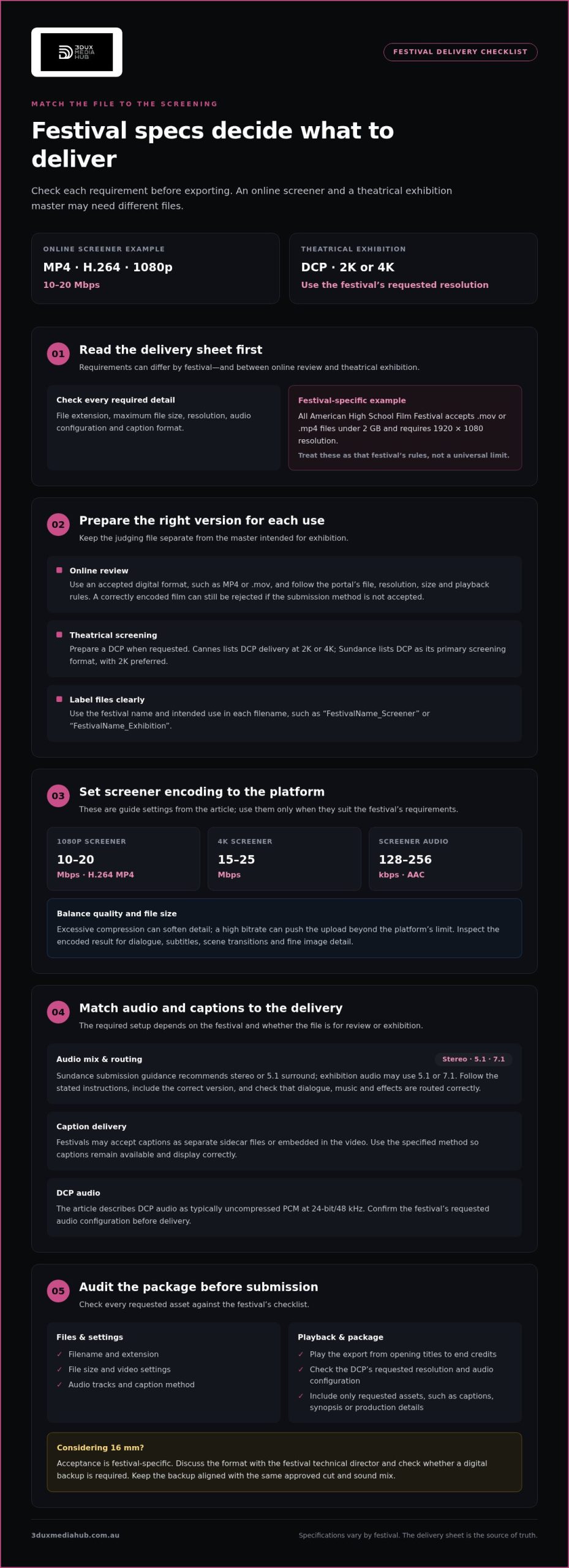
- Read the technical specifications for each festival before exporting. Requirements can differ between festivals and even between online review and theatrical exhibition. Create a delivery checklist with the accepted file extension, maximum file size, resolution, audio configuration and caption format. For example, the All American High School Film Festival accepts .mov or .mp4 files under 2 GB. Treat that as a festival-specific rule, not a universal limit.
- Prepare a separate export for each distinct delivery requirement. The All American High School Film Festival requires submissions at 1920×1080 resolution, alongside its file type and size limits. A festival with different specifications may need another encode. Label each output clearly with the festival and intended use, such as “FestivalName_Screener” or “FestivalName_Exhibition”, to avoid uploading the wrong version.
- Identify whether the festival wants a digital file or a Digital Cinema Package (DCP) for exhibition. The page lists Cannes DCP delivery as 2K or 4K, while Sundance lists DCP as its primary screening format, with 2K preferred. Export the requested format and resolution. An MP4 screener and a DCP exhibition master serve different delivery needs, so don’t treat them as interchangeable.
- Match the mix to the festival’s audio instructions. Some festivals require a 5.1 surround-sound mix. Sundance submission guidance recommends stereo or 5.1 surround, while exhibition audio may use 5.1 or 7.1 configurations. Don’t assume a stereo screener will meet an exhibition requirement. Include the correct audio version for each delivery, and make sure dialogue, music and effects remain correctly routed.
- Discuss 16 mm projection with the festival technical director before choosing it as your exhibition format. Some festivals accept 16 mm, but acceptance is festival-specific. Ask whether the format suits the programme and venue, then prepare any digital backup the festival requests. Keep the film and backup aligned so the backup represents the same approved cut and sound mix.
- Complete a final delivery audit against the festival checklist. Confirm the filename, extension, file size, video settings, audio tracks and caption delivery method for every requested asset. Play the exported file from beginning to end, including opening titles and end credits. For a DCP, check that the package matches the festival’s requested resolution and audio configuration before submission.
Film screeners and submission packages
Keep the judging file separate from the master intended for exhibition, as their specifications may differ.
Identify accepted online submission formats
Start by matching the upload to the festival’s accepted file types. Smaller festivals commonly allow digital submissions, including MP4 and .mov files. An MP4 encoded with H.264 is a practical screener option when the platform accepts it; some online submissions set a 1080p resolution and a file limit under 2 GB. Don’t assume those settings apply everywhere. Submission formats govern the file used for review, while screening-copy requirements may call for a separate exhibition master.
Check the submission portal’s rules for file extension, resolution, size and playback method. A festival may reject a link even when the film is correctly encoded.
Prepare screener codecs and bitrates
Export an H.264 MP4 at 1080p and 10-20 Mbps when those settings suit the festival’s screener platform. For a 4K screener, the page recommends 15-25 Mbps. Keep the encode balanced: excessive compression can soften detail, while a high bitrate can create an upload that exceeds the platform’s limit.
Use AAC audio at 128-256 kbps for a screener, following platform instructions. AI-assisted preprocessing can help flag issues or prepare a review copy, but inspect the encoded result yourself. Check dialogue, subtitles, scene transitions and fine image detail for processing errors before submission.
Assemble the submission package
Build the package from the festival’s requested assets rather than sending every available file. Include the screener, correctly timed caption or subtitle files, and any requested synopsis or production details. Label versions clearly so reviewers can distinguish the film from alternate cuts or language versions.
For audio, use the festival’s requested codec, sample rate, channel layout and loudness target. Screener guidance recommends AAC at 128-256 kbps; a DCP typically uses uncompressed PCM audio at 24-bit/48 kHz. Stereo or surround requirements depend on the intended screening, so don’t substitute a mix without checking the stated delivery specification.
Create a DCP screening format
Prepare a DCP when the festival requests a theatrical screening package. Sundance lists DCP as its primary screening format, with 2K preferred. A film intended for theatrical screenings may be delivered as a 2K or 4K DCP; the correct choice depends on the festival’s requirements and the master’s resolution.
The final screening master should preserve the approved picture, sound and captions. If the deliverable needs precise encoding for review or exhibition, professional video and audio encoding can help prepare files for the intended format.
Video resolution, frame rate, and color space
Set export properties using the festival’s delivery sheet and your finished master. Resolution, frame rate and colour handling need to work together.
Set the video file format and resolution
Choose the file container and pixel dimensions specified for the delivery. A digital screener may require an MP4, while theatrical exhibition may require a DCP. Treat those as separate deliverables, not simply different file extensions. Record the accepted container, resolution and frame rate in your export checklist before rendering.
Use the source master’s actual dimensions as your starting point. If the festival accepts 4K and your film has a true 4K master, submit 4K. A 4K master can also produce 2K and 1080p derivatives for other requirements. Don’t upscale a lower-resolution source just to create a larger file; added pixels don’t restore detail absent from the original image.
Choose HD resolution for digital files
Set a 1080p export to 1920×1080 pixels when that matches the festival’s specification. The All American High School Film Festival asks entrants to export submissions at 1920×1080 resolution. Use that as an example of a specific festival requirement, rather than assuming every digital submission uses identical dimensions.
For a 4K UHD file, the resolution is 3840×2160 pixels, four times the pixels of 1920×1080. Keep the distinction between UHD 4K and DCP dimensions clear: DCP options listed here are 2K at 2048×1080 or 4K at 4096×2160. Check the delivery target before selecting a preset. A preset labelled “4K” may not match the required DCP dimensions.
Set frame rate and colour space
Preserve the project’s native frame rate unless the festival specifies another rate. The listed DCP frame-rate options are 24, 25 or 30 fps. Select the matching option during export and review motion on fast pans, titles and credits. Converting frame rates can affect motion cadence, so avoid changing settings without a delivery reason.
Keep colour management consistent from the graded master to the export. Confirm that the project’s colour space, export settings and embedded metadata agree, as a mismatch can change how colour and contrast appear on another display. Don’t guess at an unrequested colour-space conversion. Compare the rendered file with the approved master using a calibrated workflow, then inspect dark scenes, saturated colours and skin tones for visible shifts.
For digital submissions, optimize audio for the festival you are attending. Filmmakers submitting 16 mm film are advised to send any digital backups the festival requests. Some digital cinema package services offer conversion for 750 – 1,500, while standard-quality digital cinema package services for film festivals cost between 2,500 – 5,000.
Common submission mistakes
Use this preflight sequence to catch avoidable delivery errors before submitting a festival package.
- Don’t reuse one export for every festival. A file accepted by one submission portal may fail another festival’s size, format or resolution rules. For example, the All American High School Film Festival accepts .mov or .mp4 files under 2 GB and requests 1920×1080 resolution. Keep a separate delivery checklist for each festival, then match the export to its specifications.
- Don’t submit a streaming link when the festival requires a file. The All American High School Film Festival says teams submitting with a YouTube or Vimeo link will be disqualified. Confirm whether the portal expects an upload or permits a screener link. Test access through the submitted link, and avoid passwords or expiry settings that could prevent reviewers from watching the film.
- Don’t upscale a 1080p master to claim 4K. Upscaling adds pixels but cannot recreate source detail. A film shot natively at 1080p should be submitted at native 1080p rather than upscaled. If the festival accepts 4K and you have a true 4K master, submit that master. Keep the source resolution and final export settings aligned.
- Don’t change frame rate without a delivery reason. DCP options include 24, 25 or 30 fps, and the festival’s specification should guide your selection. An unnecessary conversion can alter motion cadence, especially in pans or rapid movement. Review those sequences after export, then compare them with the approved master before sending the file.
- Don’t leave captions out of the package. Festivals may accept closed captions embedded in the video or delivered as a separate sidecar file. Follow the required method and test synchronisation from the opening scene through the end credits. A missing, mistimed or ambiguously named caption file can make the intended access version difficult to identify.
- Don’t assume stereo meets an exhibition mix requirement. Some festivals require 5.1 surround sound, while others recommend stereo or 5.1. Check the requested channel layout and listen to the completed file. Confirm that dialogue remains clear and that channels are routed correctly, rather than relying on the sound of a stereo playback alone.
- Don’t choose 16 mm without planning its delivery. Some festivals accept 16 mm projection, but acceptance depends on the festival. Confirm acceptance with its technical director and prepare any requested digital backup. Match that backup to the approved cut, including its captions and audio, so it remains a reliable alternative for the screening team.
Technical specifications, codecs, and video file formats
Choose the codec and container for delivery, then test the rendered file. A correct extension alone doesn’t prove compatibility. The best video format for film festival submission depends on the festival’s codec, container and delivery requirements.
Review technical specifications and codecs
Start by separating the container from the codec. An MP4 or MOV is a container; H.264 or ProRes is the video codec inside it. A festival may accept a specific container while setting separate requirements for codec, resolution, bitrate, frame rate and audio. Record every required field before exporting, rather than relying on a preset’s name.
For a high-quality master, ProRes 422 HQ is listed at 220 Mbps for 1080p and 880 Mbps for 4K. ProRes 4444 is listed at 330 Mbps for 1080p and 1.3 Gbps for 4K. Those figures illustrate why mezzanine files can be much larger than compressed screeners. Choosing the best video format for film festival submission means matching the requested profile to your approved master, not assuming a larger bitrate guarantees compliance.
Converting formats can introduce softness, compression artefacts, colour shifts or altered motion, particularly after repeated lossy encodes. To limit quality loss, return to the highest-quality approved master and make a fresh derivative for each delivery. Avoid upscaling or unnecessary frame-rate and colour-space conversions. A 4K master can generate 2K and 1080p versions without repeatedly transcoding a lower-quality copy.
Check file compatibility before submission
Compare the exported file’s actual properties with the festival’s specification. Inspect its container, codec, dimensions, frame rate, bitrate and audio tracks, then confirm the file size and extension match the portal’s requirements. For a DCP, check the requested resolution and frame rate; listed options include 2K (2048×1080) or 4K (4096×2160), at 24, 25 or 30 fps.
Play the complete export in a separate playback application. Check the opening frames, scene changes, end credits, dialogue synchronisation and every audio channel. Scrub through the timeline and inspect dark scenes, fine detail and saturated colours for compression or conversion problems. Confirm that embedded captions display correctly, or that sidecar files are included and synchronised.
Compatibility checks catch mismatched metadata and playback faults before upload. For an additional technical review, use professional video and audio encoding to prepare festival-specific deliverables.
Follow the technical specifications of each film festival. Use the festival’s own requirements to prepare each delivery rather than assuming a file accepted elsewhere will be suitable. Check the requirements before choosing a container, codec or other export settings, and resolve any uncertainty with the festival before sending the finished file. This ties your delivery decisions to the event receiving the film, not to a general preference or previous submission.
Filmmakers considering 16 mm film should confirm with the festival technical director that the format is accepted. Make that confirmation before choosing the format for a submission, and do not treat experience with another festival as confirmation for this one. If 16 mm is being considered, acceptance by the intended festival is the point to establish; then prepare the delivery in line with that festival’s technical specifications.
3DUX Media Hub: 4K UHD Authoring
3DUX Media Hub can help prepare video deliverables when a festival requires a specific encode or a separate 4K UHD master. Its Video and Audio Encoding supports delivery across file formats from SD to 4K, while 4K UHD Authoring, Blu-ray and DVD Authoring, and Content Localisation address other approved distribution needs.
Turn to 3DUX Media Hub when your submission workflow calls for professionally encoded files, an authored home-video master or localised content. Share the festival’s technical specifications and the intended use of each deliverable so the work can be aligned with your project requirements.
For details about your project, contact 3DUX Media Hub.
Prepare your film for its next screen
A festival submission can also be the start of a longer delivery plan. Consider how the approved master may serve future screenings, home-video editions or audiences in other markets. Keeping those uses in mind helps you organise source files and versions for the film’s next stage, not just its first upload.
The best video format for film festival submission is the one that fits the festival’s technical requirements and preserves a dependable path back to your approved master. If you need production-ready deliverables, 3DUX Media Hub offers Video and Audio Encoding, 4K UHD Authoring, and Blu-ray and DVD Authoring. The right workflow depends on the formats and uses your project requires.
Share your delivery needs with 3DUX Media Hub and discuss the technical work involved. Contact 3DUX Media Hub to take the next step with your film.
Frequently Asked Questions
What are the standard festival screening formats: DCP, ProRes, and H.264?
These formats serve different purposes. A DCP is designed for cinema exhibition, ProRes is commonly used as a high-quality master or intermediate, and H.264 is a compressed option for online screeners. A festival might accept an H.264 screener for judging but request a DCP for theatrical playback. Keep the approved master as the source for derivatives, rather than repeatedly converting already-compressed copies.
What video codec, container, resolution, and frame rate should a festival submission file use?
Use the exact combination in the festival’s delivery instructions. For an online screener, MP4 with H.264 at 1080p and 10-20 Mbps is one stated option. Set the frame rate to match the project or the festival’s requested value. Treat container and codec as separate settings: selecting an MP4 container doesn’t automatically select the required video codec, dimensions or frame rate.
Do film festivals require DCP, and what are the typical DCP specifications?
No, DCP isn’t required for every festival or submission stage. Some festivals accept digital files for review, while theatrical exhibition may call for a DCP. Listed DCP resolutions include 2K (2048×1080) and 4K (4096×2160), with frame rates of 24, 25 or 30 fps. DCP audio is typically uncompressed PCM at 24-bit/48 kHz; match the festival’s specified configuration.
What are the maximum file size and upload requirements for film festival submissions?
Limits depend on the festival and its submission platform. For example, the All American High School Film Festival accepts .mov or .mp4 files under 2 GB. Its rules also say teams submitting with a YouTube or Vimeo link will be disqualified. Check the portal’s accepted extension, upload method, size limit and resolution for each entry, then test that the completed file plays correctly after export.