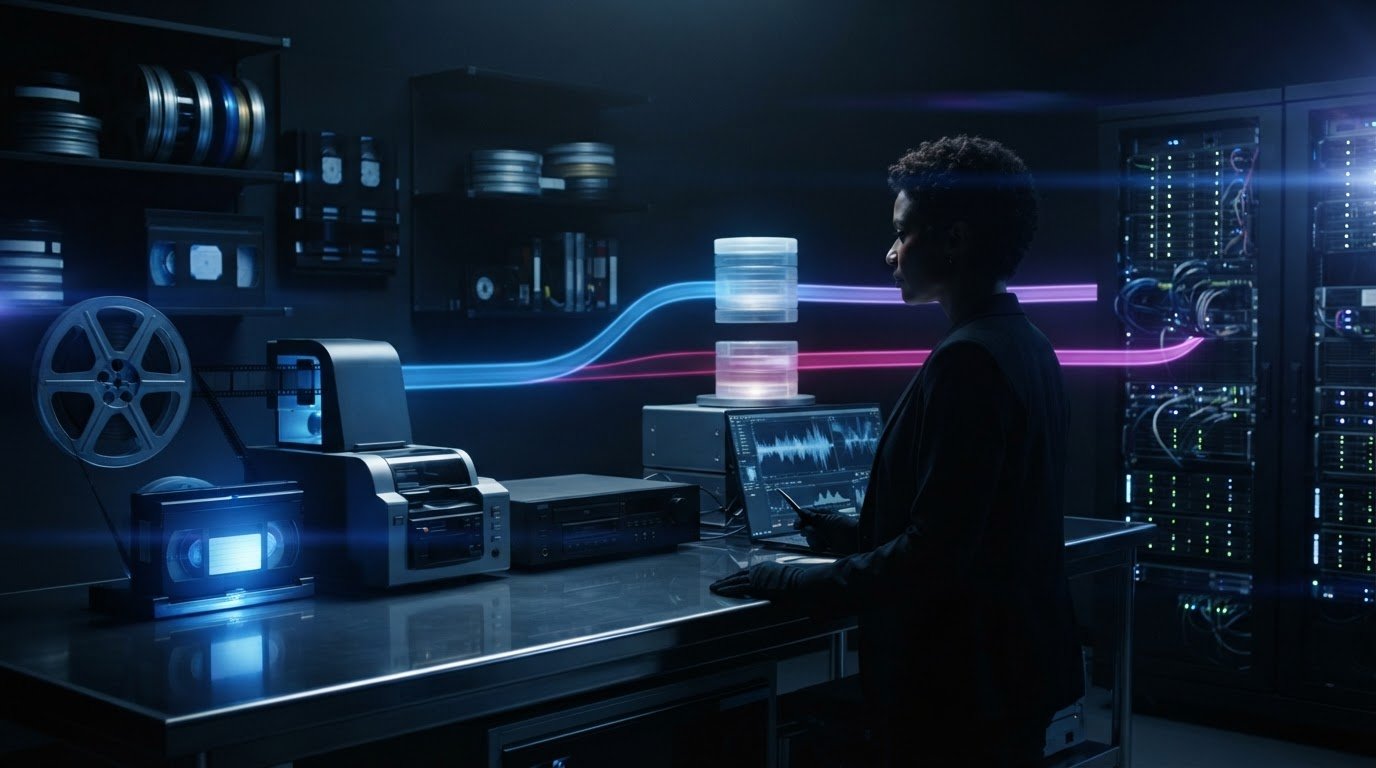
The best format for video archival isn’t one-size-fits-all. For file-based preservation, the Library of Congress prefers FFV1 Version 3; ProRes in a QuickTime container and Interoperable Master Format (IMF) are also options for different workflows. The right choice depends on the source, intended use and balance between preservation quality and practical access.
It’s easy to focus on the file extension, but the container, codec and compression all affect what a video file preserves and how it can be used. A smaller file is easier to store and share, while a preservation master should retain as much of the source quality as practical.
This guide explains the difference between lossy and lossless compression, the role of containers such as MOV and MKV, and how common file-based formats compare. Learn which formats suit preservation masters, viewing copies and cinema packages, so you can choose with long-term access in mind.
Key Takeaways
- Choose a preservation format by weighing image quality, compression, openness and future software support, not just the file extension.
- Lossless compression preserves the encoded video data; lossy compression discards information that converting or repackaging later can’t restore.
- A container such as AVI, MOV or MKV holds video and audio streams, while the codec determines how those streams are encoded.
- Compare preservation masters, access copies and cinema delivery packages as distinct needs; one format may not suit them all.
- Plan for ongoing access by keeping useful metadata and migrating files when formats or playback software become difficult to use.
Which is the Best Archive File Format for Films and Video?
The best format for video archival depends on the source, preservation goal and intended use. Keep a high-quality master that retains the original production characteristics, then create access copies or cinema packages to meet specific delivery needs.
Original resolution and frame rate
Preserving the original resolution and frame rate means retaining the production’s native image dimensions and playback cadence. This avoids discarding image detail or changing the motion during preservation.
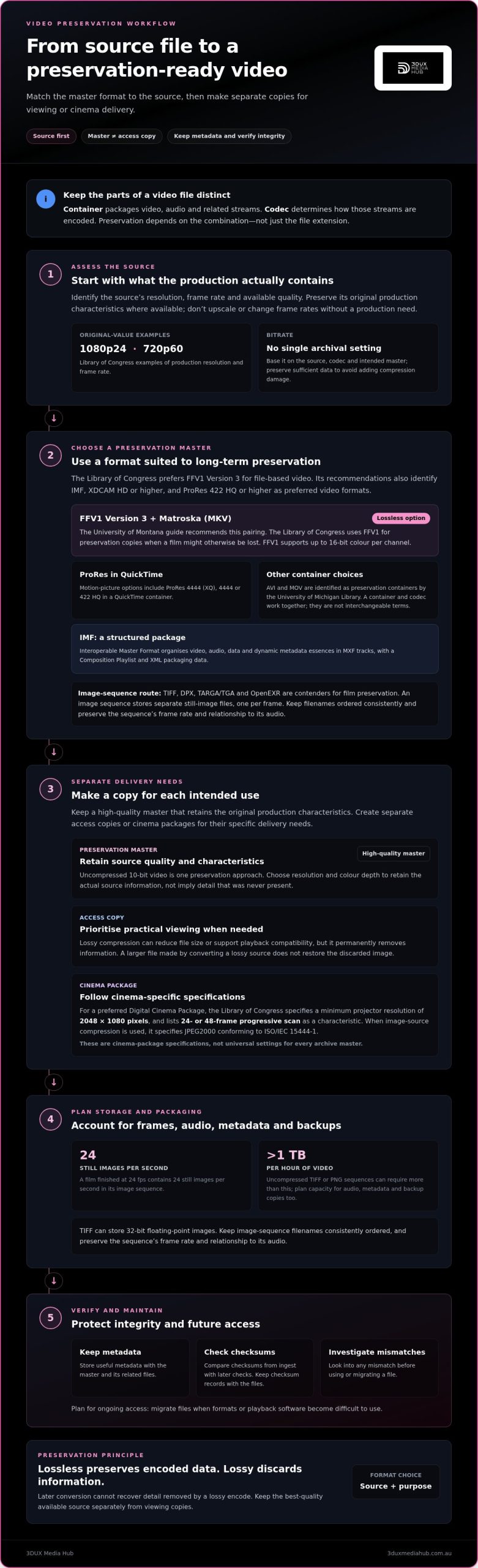
The Library of Congress gives 1080p24 and 720p60 as examples of original production resolution and frame rate. Keep the source’s original values where available, rather than upscaling or converting frame rates without a production need. For a preferred Digital Cinema Package, the Library of Congress specifies a minimum projector resolution of 2048 by 1080 pixels and lists 24- or 48-frame progressive scan as a characteristic. These are cinema-package specifications, not universal settings for every archive master.
There is no single archival bitrate for every source. Preserve sufficient data to avoid adding compression damage, and base the bitrate on the source, codec and intended master. Uncompressed 10-bit video is one preservation approach; FFV1 supports up to 16-bit colour per channel. Choose resolution and colour depth to retain the actual source information, not to imply detail that was never present.
Image-sequence preservation formats
An image sequence stores a film as separate still-image files, one per frame. This preserves individual frames without encoding them into a conventional video stream.
TIFF, DPX, TARGA/TGA and OpenEXR are image-sequence contenders for film preservation. A film finished at 24 fps contains 24 still images per second in its sequence. TIFF can store 32-bit floating-point images, while uncompressed TIFF or PNG sequences can require more than 1 TB of storage per hour. Factor in audio, metadata and backup copies when planning capacity. Keep filenames ordered consistently, and preserve the sequence’s frame rate and relationship to its audio.
Video containers and preservation formats
A video container packages encoded video with related audio and other streams. A preservation format combines an appropriate container, codec and file structure.
AVI and MOV are identified by the University of Michigan Library as preservation containers. MKV, also called Matroska, is another container used with FFV1. Yes, FFV1 in Matroska is a good archival option: the University of Montana guide recommends FFV1 Version 3 in an MKV container, and the Library of Congress uses it for preservation copies when a film might otherwise be lost.
Store the master with its metadata and maintain separate backup copies. Compare checksums created at ingest with later checks to verify file integrity. Investigate any mismatch before using or migrating the file, and keep checksum records with the files for future verification.
Library of Congress format recommendations
Library of Congress recommendations identify preferred file-based formats and technical characteristics that support preservation and access.
The Library of Congress prefers FFV1 Version 3 for file-based video and identifies RFC 9043 as its definition. It also lists IMF, XDCAM HD or higher, and ProRes 422 HQ or higher as preferred video formats. ProRes options for motion pictures include 4444 (XQ), 4444 or 422 HQ in a QuickTime container. IMF packages organise video, audio, data and dynamic metadata essences in MXF tracks, alongside a Composition Playlist and XML packaging data.
MPEG-2 appears in the Library of Congress recommendations because of its historical use for television broadcast delivery, although it is not advised for newly created or archived material in the preservation guidance covered here. For a preferred Digital Cinema Package, the Library of Congress specifies JPEG2000 image source compression conforming to ISO/IEC 15444-1 when image source compression is used. These choices serve different purposes, so match the format to the master, access copy or cinema package.
Lossy versus lossless compression
Lossy compression reduces file size by permanently removing some image or audio information. Lossless compression reduces or packages data without discarding information needed to reproduce the encoded file. This distinction matters for preservation: later software cannot restore details discarded by a lossy encode.
Lossy compression
Codecs such as DivX use lossy compression to create smaller video files. Depending on the encoder settings, information is removed and artefacts such as softened detail or blockiness may appear. These effects can be subtle in one scene and more visible in another, particularly after further encoding.
Converting a lossy DivX file to an uncompressed or original-source format doesn’t recover the original image. It only changes how the remaining information is stored. Re-encoding it with another lossy codec can discard more information, so a larger output file is not a restored master.
Use lossy compression for access copies when smaller files or playback compatibility matter, and keep the best-quality available source separately as the preservation master. If only a compressed source remains, retain it as received and document its codec, resolution and frame rate. A new encode can support viewing, but it shouldn’t replace the source.
Lossless compression
Lossless compression encodes data so it can be reconstructed without the compression step removing information. FFV1 is an example of a lossless video codec used for preservation; ZIP and RAR are file-archive formats, not video codecs.
That distinction affects the result. Putting an already compressed DivX video in a ZIP or RAR archive generally adds little compression because the video data is already compacted. Extracting it doesn’t reduce the video or audio bitrate. The archive bundles or stores the existing file, then restores it when extracted.
Choose the video codec and settings before packaging files for an archival master. Preserve the encoded master unchanged, then create separately identified access copies if needed. Record which file is the master and which is a derivative, so a smaller viewing encode isn’t mistaken for the highest-quality preservation copy.
Storage per hour
Uncompressed video and TIFF or PNG image sequences can require more than 1 TB of storage per hour. Actual file size depends on resolution, frame rate, colour depth, audio and compression settings; FFV1 storage size is described as similar to ProRes. Include audio, metadata and backup copies in capacity planning.
Practical compression choices
Match compression to the file’s purpose. Retain a lossless or uncompressed master when preserving the highest available image data is the priority. Use a lossy encode for a smaller access copy, not as a substitute for source-quality material. Compare the result with the source and verify that the audio and video play correctly.
For deliverables that need encoding across different formats, professional video and audio encoding can help produce files suited to their intended use.
Why file formats matter for long-term access
A preservation format is a file structure and encoding choice intended to keep digital content usable over time. A video file can remain intact yet become difficult to open if software stops supporting its format. The University of Michigan Library notes there’s no guarantee a currently used format will remain accessible in 10 years. Format selection is therefore part of preservation planning, not a decision to leave until playback fails.
Format sustainability
Format sustainability is the likelihood that a file can still be interpreted using available software and technical knowledge. The University of Montana guide notes that formats may become obsolete when software is discontinued or newer versions stop opening older files. Open, documented formats can make encoded data easier to understand, but openness alone doesn’t guarantee future access. Consider documentation, software support, compatibility and the practical ability to migrate files.
The University of Michigan Library recommends choosing stable formats when creating digital files, rather than waiting for later conversion. Apply that principle at ingest: record the codec, container, resolution, frame rate and audio characteristics alongside the master. This helps future staff identify the file’s contents and choose a suitable playback or migration path.
Metadata and identifying information
Metadata describes a video file and its production, content or technical properties. It helps distinguish versions and interpret a file without relying on memory or filenames alone. The Library of Congress recommends including relevant unique identifiers, such as EIDR or ISAN, for moving-image works. It also recommends retaining final production audio in its original channel structure and audio resolution as delivered to the distributor.
Keep descriptive and technical metadata with the video, not solely in a catalogue that may be separated from it. A practical record can identify the title, version, source, encoding, audio layout and preservation actions. Store a UTF-8-encoded text sidecar with the file where that suits the archive’s workflow. Use clear filenames and consistent field labels so another system can interpret the record.
Migration and access checks
Migration is the planned transfer of preserved content to a newer format or storage environment while maintaining its meaning and usable quality. The University of Michigan Library advises creating files in suitable stable formats early. The University of Montana guide recommends periodically resaving files in the newest version of their software format, then saving inactive files in a preservation format.
Use a repeatable workflow:
- Retain the highest-quality master and its descriptive and technical metadata.
- Maintain separate backup copies, and keep their locations and file identities recorded.
- Check file integrity periodically with checksums, then investigate any mismatch against the recorded value.
- Review whether the format still opens correctly in available software, and migrate before access becomes impractical.
Where possible, preserve the original file alongside the new copy and a record of the change. This history distinguishes an unchanged source from a later derivative and keeps access decisions clear through software and format changes.
AVI and MOV containers
A container is a file structure that holds encoded video, audio and related information together. The University of Michigan Library identifies AVI and MOV as preservation container formats. Neither extension alone tells you which codec was used, how the video was compressed or whether the file suits a particular preservation purpose.
AVI container
AVI is a digital video container that can hold video and audio streams in one file. Its contents depend on the codecs used to encode those streams, so AVI files can behave differently despite sharing an extension. One may use a codec supported by current playback software, while another may need different software to decode its video or audio.
For preservation, record the codec alongside the AVI filename. Include the original resolution, frame rate, audio characteristics and relevant metadata. These details help identify the file’s contents if a future system cannot interpret the extension alone. Treat AVI as a container choice, not a guarantee that every file inside it will remain easy to play.
MOV container
MOV is a container associated with QuickTime that can package video and audio streams. A QuickTime MOV file can hold ProRes video, so the codec and its settings are central to understanding what the file preserves. The same MOV extension can contain different encoded streams, meaning the extension alone doesn’t identify image quality.
Use a technical inventory to distinguish MOV files with different contents. Record the codec, resolution, frame rate, audio layout and file role, such as master or viewing copy. For example, identify a ProRes MOV master separately from a compressed access copy. This provides more useful information than a filename ending in “.mov” alone.
Container choice and codec choice
A codec encodes and decodes video or audio, while AVI or MOV organises those encoded streams into a file. Changing the container doesn’t automatically change the encoded picture. Repackaging a stream may preserve its encoded data, but transcoding to another codec can alter it, depending on the codec and settings.
Assess each file in two steps. First, identify its container and the streams it holds. Next, identify the video and audio codecs, then check whether playback software can interpret them. This helps distinguish a container problem from a codec-support problem and makes migration decisions more precise.
Practical preservation checks
Before accepting an AVI or MOV file into an archive, open a representative file and confirm that its video and audio play correctly. Compare playback with the source or an established reference, and inspect the recorded technical properties. Store this information with the file so the archive retains context beyond its extension.
Keep the original file unchanged when creating a new preservation copy or access version. Record each conversion as a separate derivative, including its container and codecs. This helps prevent a newly encoded MOV or AVI from being mistaken for the original master and supports clearer format decisions as software changes.
Preferred file-based video formats
Preferred file-based formats are digital encodings and packages selected for preservation, continued use and access. The right choice depends on the master’s role, the required image quality and the systems expected to read it.
File-based preservation choices
A file-based preservation choice specifies how video, audio and related data are encoded and organised. The Library of Congress lists IMF, XDCAM HD or higher, and ProRes 422 HQ or higher among preferred video formats.
These options serve different workflows. IMF packages video, audio, data and dynamic metadata essences in MXF tracks, with a Composition Playlist and XML packaging data. XDCAM in an MXF container is another preservation option. For a viewing proxy, the Library of Congress identifies MPEG-4 in an MP4 container as an example.
The Library of Congress prefers FFV1 Version 3 for file-based video and identifies RFC 9043 as its definition. FFV1 is an open-source, non-proprietary codec used by some archives and museums. It supports up to 16-bit colour per channel, making it suitable where high image fidelity matters.
MPEG-2 may suit existing broadcast material, but guidance advises against choosing it for newly created or archived content. If it is used, the Library of Congress specifies that MPEG-2 video should comply with ISO/IEC 13818. Distinguish an existing file’s preservation needs from the format chosen for a new master.
ProRes, FFV1 and uncompressed video
ProRes, FFV1 and uncompressed video are different encoding approaches for retaining and working with image data. ProRes can balance quality and practicality for facilities working with Macs or exporting masters from a Mac. ProRes 422 HQ is considered sufficient for many projects.
FFV1 offers an open, non-proprietary alternative, with storage size described as similar to ProRes. Uncompressed video avoids compression at the video-stream level, and uncompressed 10-bit streams are one preservation recommendation. Uncompressed video or image sequences can exceed 1 TB per hour, so storage capacity becomes a significant planning factor.
Choose based on the source and the archive’s use. Select FFV1 where an open codec and high bit depth suit the workflow; consider ProRes where its quality and practical editing support fit. Uncompressed video can retain a high-quality stream, but demands substantially more storage. Keep the original production characteristics and document the selected codec, container and audio layout.
For masters or deliverables requiring a defined codec and container, arrange professional video and audio encoding for the intended format and use.
3DUX Media Hub: 4K UHD Authoring
3DUX Media Hub is a practical next step when a preserved film needs a distribution-ready master or deliverable. Its 4K UHD Authoring, Blu-ray and DVD Authoring, and Video and Audio Encoding support projects moving from approved picture and sound to a specified output format.
Use authoring and encoding when you need viewing or delivery versions alongside a preservation master. These services address the technical requirements of the intended format, but don’t replace the need to retain source files, metadata and preservation copies. Content Localisation can also adapt a release for different language audiences.
For your next film or video deliverable, contact 3DUX Media Hub or visit 3duxmediahub.com.au.
Prepare your next master for its full lifecycle
Start with a clear deliverables plan. Decide which file is the preservation master, which versions are for viewing or distribution, and what technical specifications each must meet. This connects the choice of the best format for video archival to the film’s intended uses, rather than treating one file as the answer to every need.
When a project moves from preservation planning to finished deliverables, 3DUX Media Hub can support the technical work through 4K UHD Authoring, Blu-ray and DVD Authoring, and Video and Audio Encoding. These services address format preparation and authoring, while your preservation master remains part of a separate long-term access plan.
Bring your intended formats and delivery requirements together before production of the final files. Contact 3DUX Media Hub to discuss the authoring or encoding needs for your project, and move ahead with a deliverables plan built around its intended use.
Frequently Asked Questions
What about Audio?
Preserve audio as a distinct, documented part of the video asset. For an uncompressed audio master, WAV files can be organised as separate files for each channel, such as left and right. Keep the original channel arrangement and resolution rather than downmixing a multichannel source for convenience. Name each audio file so its relationship to the film, language and channel is clear during later editing or playback.
What about Metadata?
Metadata should explain how a video relates to its associated assets and versions. For example, document whether a subtitle file belongs to the original-language cut or a localised edit, and identify caption files, alternate audio and artwork. Record the aspect ratio, colour space, scan type and starting timecode where available. Clear relationships between picture, sound and supporting files help prevent the wrong assets being paired during a future reissue.
What do I mean by “archive”?
An archive is a managed collection retained for continued access, not simply a compressed folder. A ZIP file can bundle a film and supporting documents, but it doesn’t preserve them by itself or ensure they remain playable. An archive record can connect a master, its access copy and associated assets, while a documented preservation workflow tracks storage, integrity checks and future migration.
What video formats are best for long-term archival?
The best format for video archival depends on whether you need a preservation master, an editing file or a viewing copy. For example, FFV1 in MKV suits a preservation workflow, while ProRes in MOV may suit facilities that need a practical master for editing. IMF packages can suit structured delivery workflows. Keep distribution copies separate from the master, and identify each file’s role in the archive record.
Should archival video files be lossless or visually lossless?
Use a lossless or uncompressed master when retaining the encoded source information is the priority. “Visually lossless” describes a result that appears unchanged under viewing conditions, but it still uses lossy compression and may discard data. This matters if the file will be edited or encoded again. If storage constraints require a visually lossless copy, retain the highest-quality source separately and label both files clearly.
What metadata and documentation should be saved with archived video?
Keep documentation of the file’s provenance and any work performed on it. For a digitised film, record the source element or tape identifier, digitisation method, software used, operator and quality-control observations. Note any repairs, missing sections or known image and sound issues. The Library of Congress recommends relevant unique identifiers such as EIDR or ISAN for moving-image works, helping distinguish a title from related versions.
What are the risks of using MP4, H.264, or other lossy formats for long-term video storage?
The main risk is treating a convenient viewing file as a source-quality master. MP4 is a container, while H.264 is a codec; the container alone doesn’t tell you how much image information was discarded. If a lossy H.264 file is the only surviving copy, later conversion cannot restore removed detail. Keep it unchanged, document its role, and avoid replacing it with repeatedly transcoded derivatives.