
A disc that plays perfectly can still be the wrong handover for replication. BDCMF file creation for replication prepares an authored Blu-ray project in the format used for a production handover. It doesn’t physically press discs. A playable BD-R or BDMV folder is not the same deliverable, and that distinction can catch release teams out late in a project.
To plan the handover, you need to know what the deliverable is for, how authoring and encoding fit together, and what to review before delivery. This guide explains how BDCMF fits into a Blu-ray release workflow, which project materials shape the authoring work, and how to prepare for a clear handover.
Picture, audio, menus, subtitles and other supplied assets all affect the authored title. 3DUX Media Hub brings Blu-ray and DVD authoring, video and audio encoding, and broadcast-quality QC together, using professional platforms including Sony Blu-print. The BD-CMF / Cutting Master Format deliverable is sent via secure digital delivery for the next stage of the release process.
Key Takeaways
- Understand where the BDCMF deliverable fits in the release workflow and what it is intended to hand over.
- See how BDCMF file creation for replication brings picture, audio, menus and other supplied assets into an authored title.
- Distinguish the authored deliverable from the source materials used to create it and the physical disc produced later.
- Prepare source assets, release requirements, menu direction and delivery contacts to support a clear authoring handover.
- Learn how 3DUX Media Hub connects authoring, encoding and broadcast-quality QC, with BD-CMF delivered via secure digital delivery.
What is a BDCMF file and its role in Blu-ray replication?
A BDCMF file is an authored Blu-ray Cutting Master Format deliverable prepared as a production handover for the next stage of a release. It is not a consumer-playable disc or a physical disc. It represents the authored title after preparation and before physical disc production.
That distinction matters because a finished programme, its sound, subtitles and menu design need to be brought together through Blu-ray authoring before a production handover can be prepared. Treating authoring and physical disc production as separate stages makes it easier to assign responsibilities and track progress. BDCMF file creation for replication is part of the release workflow, not the replication process itself.
What does BDCMF stand for?
BD-CMF stands for Blu-ray Disc Cutting Master Format. It describes a technical deliverable used to pass an authored Blu-ray title into the next stage of the release workflow. It is not simply a video file that a viewer can open or a disc intended for playback at home. It is a prepared handover from authoring.
How is BDCMF different from physical Blu-ray replication?
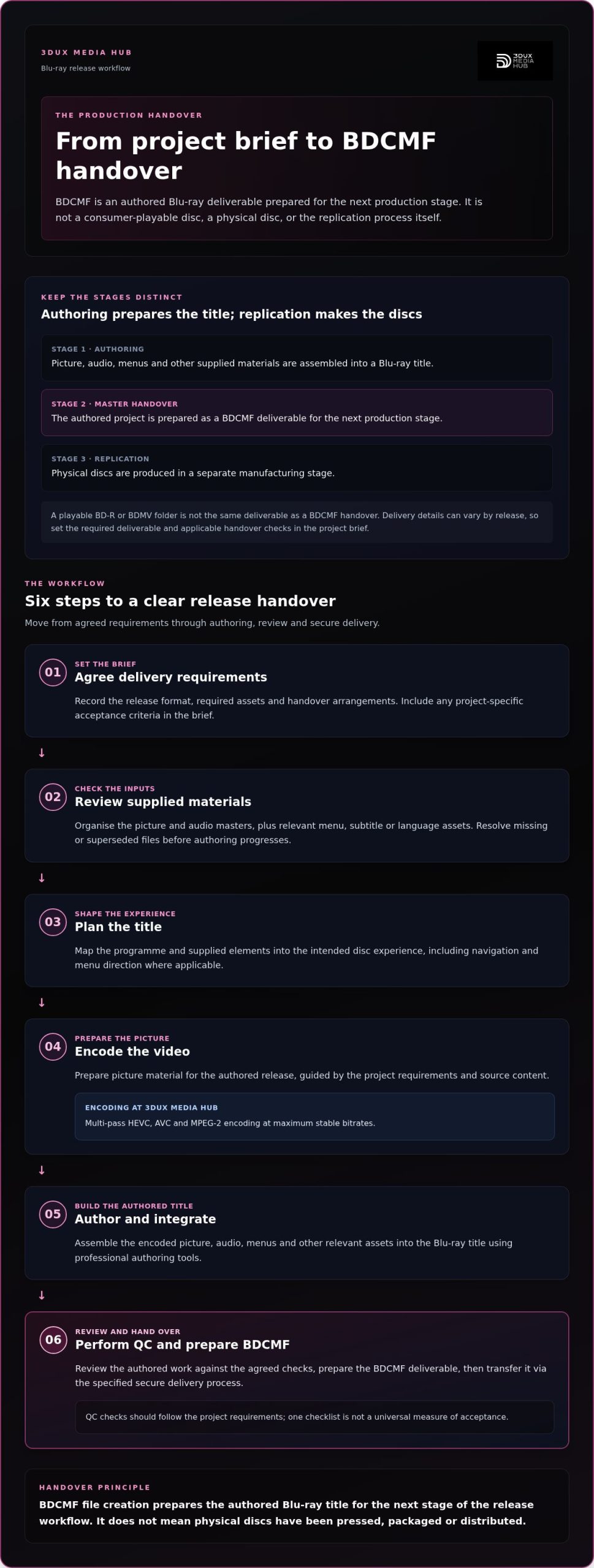
Authoring organises and prepares the title for disc production. Replication is a separate manufacturing stage in which physical discs are produced. Creating a BDCMF deliverable does not mean the discs have been pressed, packaged or distributed. Those steps are distinct from authoring and have separate handovers.
In practical terms, the authored master is the output of technical preparation. The physical disc is the manufactured product that follows. A release team can use this distinction to plan the workflow clearly:
- Authoring: picture, audio, menus and other supplied materials are assembled into a Blu-ray title.
- Master handover: the authored project is prepared as a BDCMF deliverable for the next production stage.
- Replication: the physical discs are produced in a separate manufacturing stage.
Delivery details can vary by release, so the project brief should set out the required deliverable and any applicable handover checks. Avoid assuming that every title follows identical requirements. Blu-ray supports a range of disc technologies and data formats; the Blu-ray Disc technology and data formats overview provides useful background, while project delivery should follow the applicable specification.
Clear ownership of each stage reduces ambiguity: authoring prepares the deliverable, while replication is a separate manufacturing process. That is the core distinction behind BDCMF file creation for replication.
How does BDCMF creation fit into the Blu-ray authoring workflow?
BDCMF creation sits near the end of a connected authoring process. First, the project materials are assembled into a finished title. The work is then reviewed against the release requirements before the deliverable is prepared. Recording those requirements up front gives the team a clear basis for authoring decisions and the final handover.
A practical workflow moves through these stages:
- Agree delivery requirements. Record the release format, required assets and handover arrangements. Include any project-specific acceptance criteria in the brief.
- Review the supplied materials. Organise the picture and audio masters, along with relevant menu, subtitle or language assets. Resolve missing or superseded files before authoring progresses.
- Plan the title. Map the programme and supplied elements into the intended disc experience, including navigation and menu direction where applicable.
- Encode the video. Prepare picture material for the authored release, with encoding choices guided by the project requirements and source content.
- Author and integrate. Assemble the encoded picture, audio, menus and other relevant assets into the Blu-ray title using professional authoring tools.
- Perform QC and hand over. Review the authored work against the agreed checks, prepare the BDCMF deliverable, then transfer it via the specified secure delivery process.
This sequence makes BDCMF file creation for replication a defined production handover, rather than an isolated export step. It also helps teams see where decisions, assets and review responsibilities sit across the release.
Which project inputs shape the authoring work?
The picture and audio masters establish the core of the title. Menus, subtitles and language versions can add authoring requirements when they are part of the release. Before work begins, document which files are approved, how each asset is intended to be used, and the project’s delivery requirements. A clear record helps the team identify the current version if files change during production. For a broader view of how this work is structured, explore this professional disc authoring guide.
Where do encoding and quality control fit?
Encoding prepares video for the selected authored release. 3DUX Media Hub provides multi-pass HEVC, AVC and MPEG-2 encoding at maximum stable bitrates. QC gives the team a review stage for the authored title and delivery elements. Checks should follow the project requirements, rather than relying on one checklist as a universal measure of acceptance.
For release teams planning this workflow, 3DUX Media Hub connects authoring, encoding and broadcast-quality QC with secure digital delivery. Learn about Blu-ray authoring and encoding support as part of preparing a clear handover.
BDCMF, authored masters, and other deliverables: what is the difference?
Release teams handle several kinds of material, and the labels can sound interchangeable. They are not. Source assets are the inputs, the authored BDCMF deliverable is a prepared handover, and a replicated disc is the physical product made later. Keeping those roles distinct helps teams track what has been supplied, what has been authored and what remains in production.
This comparison describes each item by function, not by a universal package structure. The release brief sets out which handover formats and checks apply. Make those requirements clear in the project documentation rather than assuming one process or set of files suits every release.
How does an authored master differ from source media?
Source media is the material supplied for a project. Authoring organises that material into a release deliverable. For example, a picture master and its associated audio assets can be brought together with the title’s menu design to form an authored Blu-ray release. If subtitles or language elements are part of the brief, they can also inform the authoring work. The key distinction is that the inputs are not, on their own, the completed authored title.
For BDCMF file creation for replication, clear asset identification helps prevent confusion between working materials and the intended handover. Keep a record of which source versions are approved and which elements belong in the release. That gives the authoring and review teams a useful reference without assuming a particular file extension or folder structure.
How does the deliverable differ from a replicated disc?
The authored BDCMF output comes before physical disc production. It is the handover from authoring, not a pressed disc, packaged release or distribution service. Physical replication is a separate production stage. This distinction helps release teams assign ownership clearly: authoring prepares the deliverable, while replication concerns manufacture.
Quality control supports the review of the authored release before handover, with checks guided by the project requirements. For related context on review processes, see the Blu-ray quality control guide. Keeping source assets, authored deliverables and manufactured discs clearly labelled makes status and responsibility easier to track across the release.
What should a team prepare before BDCMF creation?
A clean handover starts before authoring. Gather the approved materials, document the release brief and identify who can resolve questions about creative choices or delivery requirements. Separate confirmed details from requirements specific to the release. This gives the authoring team a reliable starting point without treating project-specific requirements as universal rules.
Which assets and creative decisions should be organised?
Prepare the picture and audio masters, plus menu materials and any relevant subtitle or language assets. Record the approved version of each item, its intended use and who supplied it. Menu direction should be clear enough to guide design and navigation, including which elements are required and how the release should present them. Flag creative decisions that still need approval.
- Picture and audio: identify the approved masters and note any version changes.
- Menus: supply available artwork or direction, and document outstanding design decisions.
- Language elements: identify relevant subtitle or language materials for the release.
- Ownership: record who supplied each asset and who can approve its use.
Consistent labels and version notes help distinguish current approved materials from earlier drafts. This is practical coordination, not a formal technical standard. It is especially useful when several teams supply assets at different stages.
How can teams reduce handover confusion?
Use one written delivery brief as the working reference for outputs, project requirements, delivery contacts and any known handover instructions. Keep confirmed inputs separate from items that depend on the release specification. Note unresolved creative or technical decisions, who owns each one and when it needs to be resolved for authoring to proceed.
- Use consistent filenames and include clear version notes.
- List the required deliverables as stated in the release brief.
- Record the receiving and project delivery contacts, including who handles questions or approvals.
- Mark specification-dependent items clearly instead of assuming a universal requirement.
- Track outstanding decisions and the person responsible for resolving each one.
Quick checklist: approved picture and audio masters; menu direction and relevant language assets; clear version labels and asset ownership; a written release brief separating confirmed inputs from specification-dependent requirements; named delivery contacts; and a record of outstanding decisions.
These preparation steps make BDCMF file creation for replication easier to coordinate and give the authoring work a clearer brief. 3DUX Media Hub brings authoring, encoding and broadcast-quality QC together for releases ranging from simple titles to high-end complex projects. Plan your BDCMF authoring handover with a clear set of project inputs.
How 3DUX Media Hub creates BDCMF deliverables for release teams
BDCMF file creation is part of a connected authoring and post-production workflow. 3DUX Media Hub prepares the authored deliverable and sends BD-CMF / Cutting Master Format via secure digital delivery. Physical disc replication is a separate production stage and is not part of this service.
What does 3DUX Media Hub bring to a BDCMF project?
3DUX Media Hub brings Blu-ray and 4K UHD authoring, video and audio encoding, and broadcast-quality QC together. Blu-ray authoring can use Sony Blu-print, while KITe UHD is used for UHD authoring. Encoding includes multi-pass HEVC, AVC and MPEG-2 at maximum stable bitrates. Supported HDR profiles include Dolby Vision, HDR10+ and HDR10. Supported audio formats include Dolby TrueHD (Atmos), DTS-HD Master Audio and LPCM.
The format choices and delivery checks should follow the release requirements rather than being assumed for every title. This project-led approach connects technical preparation to the intended release and helps the team account for the required elements as the title is authored.
How can release teams take the next step?
For an initial project discussion, bring together the title, intended release, available picture and audio assets, relevant menu or language materials, and delivery requirements. A concise brief gives the authoring team a practical view of the project scope and helps identify which decisions are settled and which depend on the release requirements.
3DUX Media Hub has over 20 years of experience taking film and television products to market, supporting projects from simple vanilla titles through to high-end complex titles. That experience spans the authoring and post-production workflow, from supplied assets and encoding through QC and secure handover. The aim is a clearly prepared deliverable for the next production stage, with responsibilities understood by the release team.
To discuss your title, intended release and delivery requirements, discuss BDCMF authoring with 3DUX Media Hub.
Set your release up for a clear handover
Use the project planning conversation to align the release team around the intended outcome. Confirm who owns creative approvals, who is responsible for the technical handover and how decisions will be recorded as the project progresses. Clear ownership gives the work direction and helps the team manage changes without unnecessary confusion.
With BDCMF file creation for replication, the handover is one milestone in a larger release plan. Coordinate the authoring work with the people responsible for the next stage. A shared understanding of priorities and responsibilities helps everyone focus on preparing a release for its next step.
Bring your project requirements to 3DUX Media Hub. Plan your BDCMF authoring project with the team.
Frequently Asked Questions
What does BDCMF stand for in Blu-ray authoring?
BD-CMF stands for Blu-ray Disc Cutting Master Format. It names a technical handover used in the Blu-ray release workflow, rather than a viewing format for audiences. In a project brief, use consistent terminology so the authoring and delivery teams understand which deliverable is intended.
Is a BDCMF file the same as a replicated Blu-ray disc?
No. A BDCMF deliverable is prepared for the production handover, while a replicated Blu-ray is a physical disc made later. Receiving an authored deliverable does not mean retail copies have been manufactured or packaged. Treat these as separate milestones in a release plan, with distinct owners and status updates, so the project team can track the master handover separately from physical production.
Can an existing Blu-ray master be turned into a BDCMF deliverable?
An existing project can provide a starting point, but the source materials and release requirements determine what work is needed. A playable BD-R or BDMV folder is not the same as a replication handover; the title may need to be prepared or re-authored into the required deliverable. For BDCMF file creation for replication, identify what the existing master contains and whether its assets and release design are current.
Does BDCMF creation include physical disc replication?
No. BDCMF creation covers preparation of the authored deliverable, not manufacturing physical discs. Replication follows as a separate production stage. This distinction helps release teams set milestones and assign responsibilities, even when the same team oversees both stages. Keep the master handover and planned manufacturing stage separate in schedules and project records.
What assets are needed to create a BDCMF deliverable?
Start with the approved picture and audio masters, then include menu materials and any subtitle or language assets required for the release. For example, a film master may be supplied with its final audio mix and approved menu artwork. Add a note identifying the current version of each item and its intended use. The release brief sets out which additional materials or requirements apply.
How is a BDCMF deliverable sent to the release team?
3DUX Media Hub delivers BD-CMF / Cutting Master Format via secure digital delivery. For a clear handover, name the intended recipient in the project record and include the relevant release reference, so the delivered material can be matched to the correct title. Document the destination and delivery arrangements as project details.
Can BDCMF authoring include HDR and advanced audio formats?
Yes. 3DUX Media Hub’s authoring capabilities include Dolby Vision, HDR10+ and HDR10, alongside Dolby TrueHD (Atmos), DTS-HD Master Audio and LPCM audio. The formats used depend on the intended release and its requirements. Identify the selected HDR and audio options in the project brief so the authoring workflow can account for them as the title is prepared.