A moving menu isn’t automatically a better menu. Motion can establish a film’s tone and give a release a more considered feel, but it needs to support clear navigation rather than compete with it. Choosing motion menu design services starts with the release, the disc format and the experience you want viewers to have.
It’s understandable to be cautious. Creative ideas need to fit the technical requirements of disc authoring, and unclear assets or approval stages can lead to avoidable rework. First decide whether motion or a static menu best serves the title. Then brief the design and authoring teams with the creative direction and technical requirements aligned.
This guide explains when motion adds value, what to clarify about deliverables, and how to prepare assets and approvals for a disc release. It also covers how menu design fits into the wider authoring workflow, so you can plan for a cohesive result across Blu-ray, DVD or 4K UHD. 3DUX Media Hub provides menu design alongside disc authoring, helping distributors coordinate creative and technical work. The company reports more than 20 years of industry experience.
Key Takeaways
- Assess the release’s tone, navigation needs and available assets before deciding whether animated elements will serve the menu.
- Use the brief to distinguish creative decisions from authoring requirements, and confirm who approves each stage.
- Ask motion menu design services providers to clarify format-specific deliverables, scope and final hand-off before work begins.
- Prepare approved artwork, video assets, menu copy and technical requirements so the design and authoring teams can work from a clear brief.
- Compare proposals on relevant disc-format experience, workflow clarity and how menu design connects with authoring and quality control.
Motion menu design services: what distributors are commissioning
A motion menu is an authored disc interface that uses moving visual elements to present navigation options. It helps viewers access a title, chapters and other available features while giving the release a visual identity that can complement the film.
Motion menu design services cover the design of this interface and its moving visual treatment. They’re distinct from film production, which creates the film itself; physical disc replication, which makes copies of finished discs; and streaming, which delivers content online. Menu design is one part of preparing a physical-media release, so the agreed scope should specify how it connects to disc authoring.
What can a motion menu include?
Depending on the brief, a design may use an animated background, transitions between screens or other moving treatments. Supplied key art, stills, logos, typography and colour direction can help establish a look that feels consistent with the title. These are possibilities, not a standard package. Confirm which assets and deliverables are included for the specific format and release.
Movement should have a clear purpose. It can reinforce tone or draw attention to navigation, but it shouldn’t make options difficult to locate or read. The distributor sets the creative direction and priorities; the design and authoring provider can advise how those choices fit the format and project requirements.
Where motion menus fit in a disc release
Menu design sits within a wider workflow: the distributor supplies approved assets and requirements, the design direction is developed, and agreed elements are prepared for integration during authoring. The interface is then reviewed as part of the authored disc. Technical requirements depend on the release format and brief, so confirm them with the authoring provider before finalising assets.
For a foundational overview of the DVD authoring process, see Wikipedia. For Blu-ray-specific interactivity, consult this guide to interactive Blu-ray menu technical guidance. These formats can involve different authoring considerations, so don’t assume one set of menu assets or requirements will suit every release.
3DUX Media Hub provides motion and static menu design alongside Blu-ray, DVD and 4K UHD authoring. Coordinating these services can help align the creative brief with authoring input and review. Before work starts, agree on the intended navigation, supplied assets, format-specific requirements, approval points and what the final hand-off includes. This helps keep the menu cohesive and suited to the release, without assuming every project needs animation or the same features.
How professional motion menu design moves from brief to authored disc
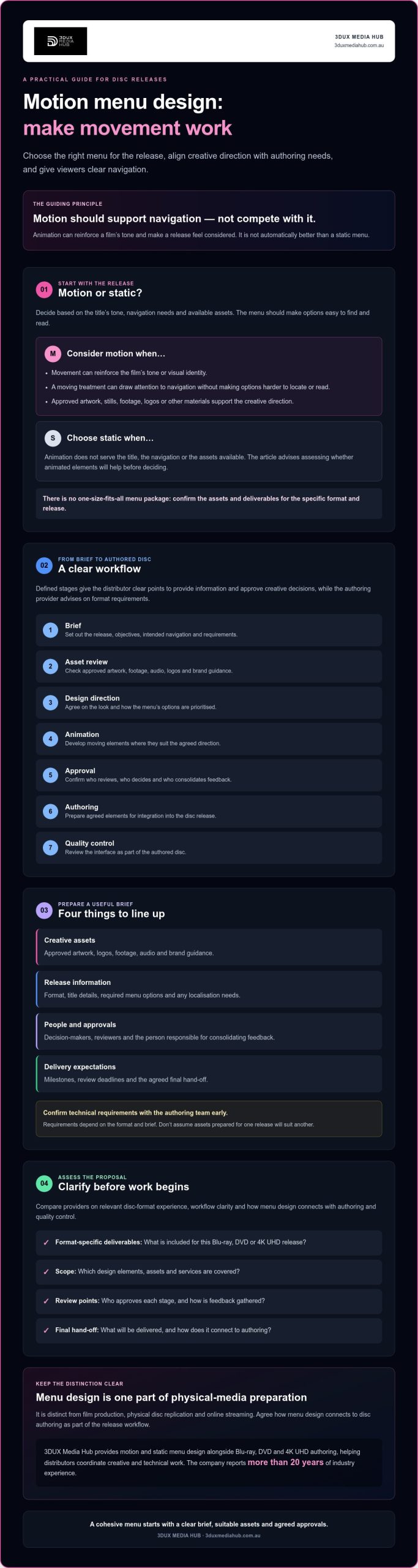
A clear workflow connects the creative brief to the finished authored menu. It typically moves through these stages: brief, asset review, design direction, animation, approval, authoring and quality control. These stages give distributors defined points to supply information and approve creative decisions, while the authoring provider advises on requirements for the chosen format.
What to include in a motion-menu brief
Set out the release format, title details, intended audience and objectives. For example, clarify whether the menu should foreground the feature, chapters or other available options. Then list the approved materials and identify who can make decisions.
- Creative assets: Artwork, logos, approved footage, audio and brand guidance.
- Release information: Format, title details, required menu options and any localisation needs.
- Project contacts: Decision-makers, reviewers and the person who consolidates feedback.
- Delivery expectations: Key milestones, review deadlines and the agreed final hand-off.
These details help the provider assess the available assets before design begins. Confirm format-specific requirements with the authoring team early, rather than assuming files prepared for one release will suit another.
How review and authoring integration fit together
Once assets have been reviewed, the parties can agree on a design direction. The distributor owns the creative brief and approves whether the look fits the title. The provider contributes guidance on preparing and integrating that direction for disc authoring. Motion should clarify hierarchy or provide useful feedback, not distract from selection. Google’s motion design principles offer a helpful reference for assessing purposeful movement.
Animation follows the agreed direction, then the distributor reviews the visual treatment against the brief. That creative approval is separate from technical review during authoring. The authoring team checks the prepared menu in the context of the release and confirms any required changes or outstanding issues. Early coordination can help identify mismatched assets or requirements before they lead to avoidable rework. Confirm the workflow and review stages for each project.
Design-to-authoring hand-off: Approved menu assets and agreed requirements pass to the authoring team for integration and technical review.
3DUX Media Hub provides motion and static menu design alongside Blu-ray, DVD and 4K UHD authoring. To clarify the scope and workflow for a release, review the motion-menu project information.
Motion versus static menu design: which suits this release?
Choose the menu treatment that best serves the title and its viewers. Motion can reinforce a film’s identity or provide visual context, while a static menu can offer a restrained presentation with fewer moving elements to coordinate. Neither is automatically the better option. Consider the creative direction, navigation needs, approved assets and format requirements together.
| Project condition | Potential benefit | Trade-off to consider | Question to resolve |
|---|---|---|---|
| Approved footage or artwork supports the title’s tone | Motion may give the menu a stronger visual connection to the release. | Movement can compete with navigation if it’s too prominent. | Does the animation reinforce the title while keeping options clear? |
| The brief calls for a simple, restrained presentation | A static design can keep the menu focused and straightforward to review. | It may provide less opportunity for animated visual treatment. | Does the static direction still express the release’s identity? |
| Assets, approvals or format requirements are still being confirmed | Clarifying these first helps the team assess a suitable approach. | Late changes may require design or authoring adjustments. | What assets and deliverables can be approved for this format? |
When motion supports the release experience
Motion is worth considering when animation adds useful context or strengthens the connection between the menu and the title. It might draw on approved footage, artwork or a visual treatment developed from the film’s identity. Check that the selected material is cleared for use and suitable for the intended menu. Most importantly, movement shouldn’t make buttons, chapter options or other navigation harder to see and use.
When a static menu may be the stronger choice
A static approach can suit a release whose creative direction favours simplicity, or where approved assets and review constraints make animation less practical. It still needs a deliberate visual hierarchy and clear navigation. Discuss the format and delivery requirements with the authoring provider before settling the design. For UHD releases, see the guidance on professional 4K UHD authoring services.
As you compare motion menu design services, ask what each approach requires from your team, which assets are included and how the menu will be reviewed in the authored release. Project costs vary according to scope, format, assets and agreed deliverables, so request a proposal based on the specific brief rather than relying on generic estimates. Let the release plan guide the decision, not a blanket preference for animation or stillness.
How to prepare assets and evaluate a motion menu design proposal
A strong proposal should make the creative scope and authoring hand-off clear before production begins. Prepare the release information, assets and decision-making process first. Then assess whether the provider explains how design, format requirements and quality control fit together.
Assets and decisions to have ready
Use this checklist to prepare a practical brief. If an item is not ready, identify who will supply or approve it and by when.
- Release details: Confirm the title, disc format and any language versions required.
- Approved assets: Gather artwork, logos, title information and authorised footage or other motion material. Include relevant brand guidance.
- Menu content: List the required labels and navigation structure, such as access to the feature, chapters or other options.
- Technical requirements: Ask the authoring provider which specifications apply to the format and project. Don’t assume assets prepared for one format are suitable for another.
- Approvals and milestones: Name the people responsible for creative and technical decisions, set out how feedback will be consolidated, and record delivery expectations.
Clear ownership matters. If several stakeholders can comment but no one has final approval, feedback can conflict or arrive in stages. Nominate a decision-maker and agree how changes to assets or requirements will be raised.
Questions to ask a motion menu provider
Evaluate motion menu design services on more than the visual concept. Ask how the proposed design will be coordinated with disc authoring and technical review, and what information the authoring team needs before animation starts. A provider should clarify project-specific requirements rather than assume every format or release follows the same workflow.
- What design and final hand-off deliverables are included?
- Which review stages are planned, and how many feedback rounds are in scope?
- Who checks the menu during authoring, and how is quality control handled?
- Which tasks sit with the distributor, designer and authoring provider?
- How could late asset changes or revised requirements affect the agreed production plan?
Look for a proposal that connects its creative direction to your approved assets and navigation needs, with responsibilities, milestones and review points stated plainly. Confirm the scope in writing before work starts, including what happens if the brief changes. 3DUX Media Hub provides motion and static menu design alongside Blu-ray, DVD and 4K UHD authoring, as well as broadcast quality QC.
For information about assets, format requirements and menu workflows, read about discussing a motion menu project.
Choosing motion menu design services for a coordinated disc release
A menu is one component of a disc release, so assess a provider on how well its design process connects with authoring and quality control. A strong fit is not just a compelling visual concept. It’s a clear workflow, relevant experience for the intended format and communication that makes responsibilities and decisions easy to track.
Signs a provider can support the whole workflow
Look for clear ownership from design through to authoring integration. The provider should explain who reviews supplied assets, who confirms format-specific requirements and how approved menu elements move into the authoring workflow. Ask how creative feedback is gathered and how technical review and quality-control steps are handled. These checkpoints help you understand the process without assuming a particular number of review rounds or a guaranteed outcome.
Check relevant experience against your release, not just general design credentials. Ask about work involving the format you’re commissioning, such as DVD, Blu-ray or 4K UHD, and confirm which capabilities apply to your project. The provider should identify what needs to be confirmed with the authoring team before the scope is locked in.
- Workflow clarity: Are responsibilities, approvals and hand-offs explained?
- Format experience: Can the provider discuss the requirements relevant to your disc release?
- Communication: Is there a clear way to manage feedback, changes and decisions?
- Quality control: Are review steps and the provider’s role in them set out?
Coordinating menu design with authoring and quality control gives the teams a shared view of the creative brief and technical requirements. That can make it easier to identify questions early and keep reviews aligned. You still need to confirm deliverables, responsibilities and project-specific requirements before work begins.
Next steps for commissioning 3DUX Media Hub
3DUX Media Hub provides motion and static menu design alongside Blu-ray, DVD and 4K UHD authoring. The company reports more than 20 years of industry experience and supports global distribution. To prepare for a project discussion, gather the disc format, release scope, available assets and delivery requirements. This helps establish what the project needs and what should be confirmed for the chosen format.
For a release discussion, review motion menu design services from 3DUX Media Hub.
Plan a menu that fits your release
Choose motion or static design based on the title, navigation needs, approved assets and disc format. Motion should support the viewing experience, not distract from it. A clear brief, confirmed deliverables and agreed review stages help keep creative decisions aligned with authoring requirements.
When assessing motion menu design services, look for a provider that can explain how design, disc authoring and quality control connect. Coordinating these elements can help clarify responsibilities and identify format-specific questions early.
3DUX Media Hub offers motion and static menu design alongside Blu-ray, DVD and 4K UHD authoring, with more than 20 years of industry experience. Share the release format, scope, assets and delivery requirements to start a focused discussion.
Discuss your motion menu design requirements and take the next step towards a cohesive disc release.
Frequently Asked Questions
What are motion menu design services for Blu-ray or DVD?
Motion menu design services create the visual interface viewers use to navigate an authored Blu-ray or DVD. The design may include moving backgrounds or transitions, alongside clear options for accessing the feature, chapters and other available content. The exact elements depend on the release brief and format. Menu design is part of disc preparation, not film production, disc replication or streaming delivery.
Are motion menus better than static menus?
No. The right choice depends on the title, audience, approved assets and intended viewing experience. Motion can reinforce a film’s identity, but it shouldn’t make navigation harder to follow. A static menu may better suit a restrained creative direction or a project with limited suitable assets. Compare both approaches against the brief, then confirm the production and authoring requirements with the provider.
Can motion menu design be included in Blu-ray authoring?
Yes. Motion menu design can be coordinated with Blu-ray authoring, provided the project scope and format-specific requirements are agreed. 3DUX Media Hub offers motion and static menu design alongside Blu-ray, DVD and 4K UHD authoring. Ask what menu elements and deliverables are included, how approved assets will be integrated, and how the authored result will be reviewed. Confirm the details for your release before production starts.
What assets do I need to provide for a motion menu?
Prepare approved artwork, logos, title information, brand guidance and any authorised footage or audio you want considered for the menu. Include the required menu labels, navigation structure and language versions. Also identify who can approve creative direction and technical decisions. The authoring provider should confirm the required asset specifications for your disc format, so check those before preparing or adapting files.
How long does motion menu design take?
There’s no fixed timeframe that applies to every project. Timing can depend on the format, design scope, readiness of approved assets, stakeholder feedback and how the menu fits into authoring. Ask the provider to set out expected milestones, review stages and delivery requirements for your release. Confirm how changes to the brief or assets may affect the project schedule before work begins.
How do I choose a motion menu design provider?
Look for relevant experience with your disc format, a clearly defined scope and a practical workflow from design through authoring and quality control. Ask who manages asset preparation, approvals, technical review and changes. Check that the provider explains project-specific capabilities rather than assuming every release is the same. 3DUX Media Hub reports more than 20 years of industry experience and provides menu design alongside disc authoring.
Planning a disc release? Discuss your motion menu design requirements with 3DUX Media Hub.