There’s no single broadcast preset that guarantees acceptance. That’s the practical reality of broadcast video standards Australia: the recipient’s current delivery specification, not legacy PAL terminology or a familiar export setting, determines how a master should be prepared.
Frame rates, interlacing, colour space, audio levels and file formats can vary between delivery briefs, so check requirements before mastering begins. Technical delivery requirements are shaped largely by broadcaster specifications and industry practice. Regulation covers separate areas, such as captioning and content obligations.
This guide explains how to identify the right specification for an Australian release and what to verify before creating picture and audio masters. It covers the broadcast context, common technical requirements, and the difference between regulatory rules and recipient-specific instructions. You’ll also learn when standards conversion or specialist quality control may be needed, helping you reduce avoidable delivery issues and rework.
Key Takeaways
- Use the latest delivery document from the intended broadcaster to guide your master, rather than relying on a generic preset.
- Check raster, frame rate, scan type and aspect ratio separately. They describe different picture characteristics and each can affect delivery compliance.
- Compare overseas destination requirements for frame rate, raster, HDR and file wrapper before preparing separate masters.
- Use this guide to make sense of broadcast video standards Australia and identify the picture, audio, caption, metadata and file details to confirm before encoding.
- Compare source and destination requirements to assess whether standards conversion or specialist QC may be needed.
What do broadcast video standards in Australia cover?
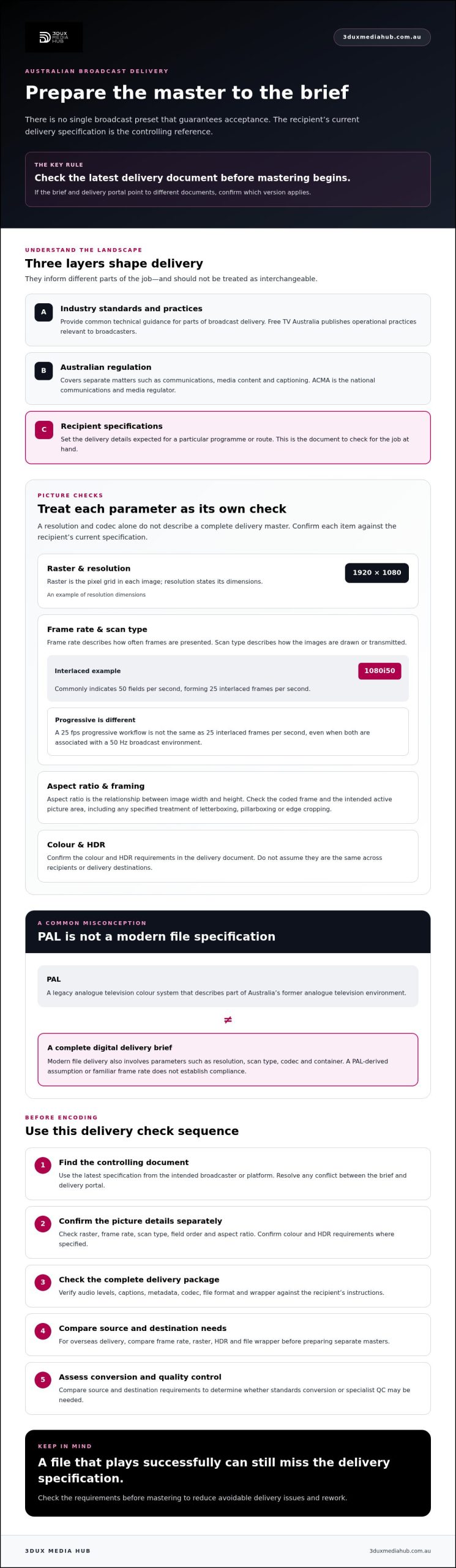
Broadcast video standards are the technical rules and delivery requirements used to prepare, transmit and assess television content. They can cover picture format, audio, captions, metadata and the file itself. In practice, broadcast video standards Australia isn’t one universal export preset. Requirements can vary by broadcaster, programme type, platform and delivery route.
It helps to separate three layers:
- Industry standards and practices provide common technical guidance for parts of broadcast delivery.
- Australian regulation governs matters such as communications, media content and captioning. It isn’t the same as a broadcaster’s file-encoding instructions.
- Recipient specifications set the delivery details a broadcaster or platform expects for a particular programme or route.
The recipient’s current specification is the controlling delivery reference. Check it before mastering. If the brief and delivery portal point to different documents, confirm which version applies.
Who sets or publishes the requirements?
The Australian Communications and Media Authority (ACMA) is the national communications and media regulator. Its regulatory role should not be confused with setting every technical parameter for programme masters. Much practical technical guidance comes from industry practice. Free TV Australia, an industry body representing commercial free-to-air television, publishes operational practices relevant to broadcasters. Those documents don’t replace the recipient’s own delivery instructions.
Does Australia still use PAL?
PAL is a legacy analogue television colour system. It helps describe Australia’s former analogue television environment, but it isn’t a complete specification for a modern digital broadcast file. Australia’s transition to digital terrestrial television brought different transmission standards. The digital television standards in Australia overview provides useful historical context.
Keep the terms distinct. PAL refers to an analogue colour system. Frame rate describes how often images are presented over time, while digital delivery also involves parameters such as resolution, scan type, codec and container. These may be related through broadcast history, but they aren’t interchangeable. A PAL-derived assumption or familiar frame rate won’t, by itself, establish that a master meets a broadcaster’s current file-based requirements.
Which technical picture parameters matter for Australian broadcast video?
A delivery master involves more than a resolution and codec. Raster and resolution define the image’s pixel dimensions, while frame rate, scan type, aspect ratio and colour describe how it is timed, displayed and represented. For broadcast video standards Australia, the exact combination depends on the recipient’s current specification.
Frame rate, scan type and raster
Raster is the grid of pixels that makes up each image; resolution states its dimensions, such as 1920 × 1080. Frame rate describes how often complete frames are presented, usually expressed in frames per second (fps). Scan type indicates how those images are drawn or transmitted.
With progressive scanning, each frame contains a complete image. With interlaced scanning, each frame is divided into two fields that carry alternating lines. Notation such as 1080i50 commonly indicates 50 fields per second, forming 25 interlaced frames per second. A 25 fps progressive workflow is different, even though both may be associated with a 50 Hz broadcast environment.
These are examples, not a universal Australian delivery mandate. Confirm the required frame rate, raster, scan type and field order in the recipient’s latest specification. A mismatch can affect motion, field handling or image geometry, even when the file plays successfully.
Aspect ratio, colour and HDR
Aspect ratio describes the relationship between an image’s width and height. Check both the coded frame and the intended active picture area. Confirm whether the recipient specifies a particular framing, clean aperture, or treatment of letterboxing, pillarboxing and edge cropping. Don’t assume that placing the right image inside the right-sized raster preserves the intended composition.
For standard dynamic range (SDR), Rec. 709 is a common colour reference, but verify the recipient’s required colour space, levels and related settings before encoding. HDR is a distinct picture pipeline, not simply a brighter SDR master. Confirm the accepted transfer function, colour primaries and metadata, and whether a separate SDR version is required.
A correct codec cannot guarantee a compliant master if the raster, scan, timing, colour or framing is wrong. Picture compliance sits alongside other delivery and regulatory checks. ACMA’s broadcasting codes and standards provide a reference for the regulatory framework, including requirements separate from image encoding.
If source and delivery parameters differ, a technical review can establish whether standards conversion is needed. Broadcast quality QC and standards conversion can help assess picture requirements alongside encoding.
How do Australian broadcast requirements compare with overseas delivery?
A master prepared for one territory may not meet another recipient’s requirements, even if the picture looks and sounds correct. Compare the Australian delivery brief with the overseas recipient’s current specification. Don’t assume either territory has one standard preset. The Free TV Australia Operational Practices provide industry guidance for Australian broadcasting, while the broadcaster’s own instructions set the practical requirements for its delivery route.
| Check | Australian recipient | Overseas recipient |
|---|---|---|
| Frame rate and raster | Confirm the requested frame rate, scan type, field order and raster in the current brief. | Check the same parameters independently. A nominal frame rate or raster used for one destination may not be accepted by another. |
| HDR and colour | Establish whether the recipient requires SDR or accepts HDR, then verify its colour and metadata instructions. | Confirm the accepted HDR format, transfer function, colour primaries and metadata, or whether SDR is required. |
| File wrapper | Check the specified container, codec and file structure. Don’t infer them from the territory. | Verify the target’s accepted wrapper and encoding requirements. They may differ even when picture parameters are similar. |
| Other deliverables | Confirm audio mapping, captions, metadata and naming rules. | Check these requirements again for the overseas recipient, including any localisation or subtitle instructions. |
Why a master from another territory may need adaptation
A technically sound source can still fall outside the target recipient’s accepted format. Compare source characteristics with the delivery specification before deciding whether to convert. A change in frame rate can affect motion cadence and programme duration. Any proposed conversion also needs qualified review of picture cadence and audio synchronisation.
Conversion isn’t automatic. If the source already meets the target requirements, another conversion may not be needed. For a deeper overview of the decision process, see Broadcast Standards Conversion: 2026 Global Media Guide.
What to compare before approving a regional master
Review picture format alongside audio channel mapping, caption or subtitle files, metadata and naming conventions. Confirm that every deliverable matches the recipient’s brief, not just the video essence. A broadcast file’s requirements differ from those for physical-media authoring or a streaming platform, so don’t transfer assumptions between them.
Use territory summaries as background, not as approval criteria. The current recipient documentation takes precedence. This is the practical rule behind broadcast video standards Australia: assess the destination and delivery route, then determine whether the existing master is suitable or needs specialist standards conversion and QC.
How should you prepare a video master for Australian broadcast delivery?
Build the master from the delivery brief, not from an export preset used on a previous job. This workflow helps teams apply broadcast video standards Australia requirements consistently and catch mismatches before encoding and handover.
- Identify the destination. Record the recipient, delivery route, programme type, version and required delivery date. Obtain the latest applicable specification and confirm that it covers this programme and route.
- Build a delivery checklist. Capture the required raster, frame rate, scan type, aspect ratio, colour space and HDR status. Record audio layout and loudness requirements, captions or subtitles, metadata, container, codec and file-naming rules. Take these values from the recipient’s documents rather than assuming a familiar setting applies.
- Document the source and planned changes. Note the source file’s technical properties and identify any approved changes, such as a required standards conversion. Keep a version history for each deliverable so the team can trace which master was checked against which specification.
- Encode to the approved requirements. Confirm the settings before processing. Check that the encoded file, audio tracks and supporting assets match the checklist, including any required language or programme version.
- Run technical checks before handover. Verify file integrity, duration, picture continuity and audio sync. Test any technical tolerances specified by the recipient. Check captions, subtitles and graphics against the approved picture and language versions, then review metadata and naming.
- Record the handover. Retain the final checklist, QC results and version details with the delivery record. If the recipient changes the specification or identifies an issue, this documentation helps establish what was prepared and checked.
Make the checklist specific to the recipient
A useful checklist is more than a list of technical labels. It links each value to its source document and exact deliverable. If a programme has multiple edits or language versions, track each separately. For more guidance on interpreting recipient requirements, consult Understanding Broadcast Delivery Specifications and QC. Confirm the applicable specification directly before relying on any general overview.
Physical-media authoring has its own QC considerations, separate from broadcast file delivery. A Blu-ray quality-control guide is relevant only if the project also includes a physical-media deliverable. It isn’t a substitute for broadcast checks.
Need support with the technical preparation? Explore broadcast quality QC and video and audio encoding from 3DUX Media Hub.
When should you use broadcast standards conversion and specialist QC?
Consider standards conversion when the source format and the recipient’s current delivery specification don’t align. Differences in frame rate, raster, scan type, colour pipeline or file requirements may indicate that a change is needed, but a technical review should determine the right approach. Not every international master needs conversion.
Conversion changes technical characteristics to suit a delivery requirement. It can’t restore picture detail that isn’t present in the source, and it doesn’t replace editorial approval of the resulting images, timing or content. Define the target first, then assess what the source can support.
What a conversion and QC brief should specify
Give the technical team a clear brief before work begins. Include:
- Source and destination: source format, target recipient, delivery route and the applicable current specification.
- Required versions: output formats, programme edits and any language versions needed.
- QC scope: the picture, audio, subtitle, caption and metadata checks required for each deliverable.
- Exceptions: how non-compliant, damaged or ambiguous source material should be reported for review.
Agreeing the scope upfront helps distinguish a technical issue that can be addressed during conversion from a source limitation or editorial decision that needs client approval.
Choosing a technical delivery partner
An internal workflow can suit a team with the right encoding and QC capability, current recipient documentation, and time to record and review each version. Specialist support may be useful when conversion expertise, delivery coordination or traceable QC is needed. Compare options against the same criteria:
- Capability: experience with broadcast-grade encoding, standards conversion and QC relevant to the required formats.
- Specification control: how current recipient requirements are confirmed before mastering.
- Traceability: how checks, version history, exceptions and review outcomes are documented.
- Scope and coordination: which elements are included, and how the team manages multiple outputs or delivery requirements.
These checks make broadcast video standards Australia requirements easier to assess without treating every mismatch as an automatic conversion job. 3DUX Media Hub provides standards conversion, video and audio encoding, and broadcast quality QC for film and television distribution, supporting global delivery with more than 20 years of industry experience.
Preparing a master for a specific recipient? Contact 3DUX Media Hub to discuss the source, target specification and QC scope for your delivery.
Prepare your next broadcast master with confidence
Reliable delivery starts with the recipient’s current specification. Confirm the required picture, audio and file parameters before encoding, then document the checks for each version. If the source and destination differ, assess whether standards conversion is needed rather than relying on a familiar preset.
That’s the practical approach to broadcast video standards Australia: verify the destination requirements, check the complete master, and use specialist QC where the technical scope calls for it. A codec alone won’t confirm that every element is ready for handover.
3DUX Media Hub supports film and television distribution with broadcast-grade quality control, video and audio encoding, and standards conversion. The company brings more than 20 years of industry experience and supports global distribution.
Discuss your broadcast delivery requirements with 3DUX Media Hub and take the next step towards a master prepared for its intended recipient.
Frequently Asked Questions
What video standard is used for broadcast in Australia?
There isn’t one universal video-master format for Australian broadcast delivery. Australia uses digital television systems, while picture and file requirements for a programme are set by the receiving broadcaster or platform. Check its current specification for raster, frame rate, scan type, codec, container, audio and captions. The phrase broadcast video standards Australia covers a mix of industry practice, regulation and recipient-specific technical instructions, not a single preset.
Does Australia still use PAL for television?
PAL is a legacy analogue colour television system, not the governing format for modern digital broadcast files. The term may still appear in older workflows or discussions of television history, but it doesn’t define a complete delivery master. Frame rate, scan type, raster, codec and container are separate technical properties. Don’t assume a PAL-derived setting meets a broadcaster’s current requirements. Check the recipient’s specification before preparing the file.
What frame rate should a video master use for Australian broadcast?
Use the frame rate specified by the intended broadcaster, rather than selecting one based only on the programme’s Australian destination. A 25 fps progressive workflow and a 50 Hz environment aren’t interchangeable requirements, and interlaced delivery may specify field rate and field order. Check how the recipient expresses its requirements, then compare them with the source before encoding. If they differ, seek technical review before changing frame rate or cadence.
Can I deliver a US video master to an Australian broadcaster?
Possibly, but acceptance depends on whether the master meets the Australian recipient’s current specification. A technically sound US master may differ in frame rate, raster, scan type, colour pipeline, codec or file wrapper. Compare the source properties with the target requirements before delivery. If conversion is considered, review potential effects on motion cadence, programme duration and audio synchronisation. Don’t assume that successful playback means the file is compliant.
What is the difference between a broadcast standard and a delivery specification?
A broadcast standard or industry practice provides a technical framework or guidance. A delivery specification sets out what a particular recipient expects for a programme and delivery route. Regulation is a separate layer, covering matters such as captioning or content obligations. For mastering, the recipient’s current specification is the practical reference. Check its requirements for picture, audio, captions, metadata, file format and naming instead of relying on a general standard alone.
Do Australian broadcast video files need to be HDR?
Not necessarily. HDR is a specific picture pipeline, and acceptance depends on the recipient and delivery purpose. Free-to-air broadcast delivery is primarily focused on HD in standard dynamic range, but that doesn’t establish a requirement for every programme or platform. Confirm whether the brief calls for SDR or HDR. For HDR, check the required transfer function, colour primaries and metadata, and whether a separate SDR version is also needed.
When is broadcast standards conversion necessary?
Conversion may be needed when the source’s technical properties don’t match the destination’s current specification. Compare frame rate, raster, scan type, colour and file requirements first. A mismatch doesn’t automatically mean every parameter must be converted. Technical review can identify a suitable approach and check cadence, duration and audio sync. Conversion changes technical characteristics, but it can’t restore detail absent from the source or replace editorial approval.