A Blu-ray release can have excellent bonus content and still feel unfinished if the extras don’t integrate cleanly with the feature and disc navigation. Blu-ray special features authoring is a release-design decision, not simply a disc-burning task. It brings together supplied assets, encoding, menu design and quality checks. The requirements need to be clear before authoring begins.
It’s understandable to be unsure what to supply, how to compare in-house software with a specialist workflow, or how to check that each element works as intended. The right approach depends on the release specifications, the complexity of the feature set and your team’s available resources.
This guide explains what special-features authoring includes and how to scope a workable brief. You’ll learn what to confirm about formats, source files, navigation and approvals, how to assess different workflows, and what to check during QC. The aim is a disc where the bonus features sit cleanly alongside the main programme, with deliverables and responsibilities clear before authoring starts.
Key Takeaways
- Understand what Blu-ray special features authoring covers, and how it differs from producing the bonus footage itself.
- Map each extra to an agreed title, language, version and playback destination for a coherent disc experience.
- Compare in-house and specialist workflows against project complexity, team capability, revision needs and QC ownership.
- Prepare approved assets and a clear brief, including who provides feedback and who gives final sign-off.
- Consider Blu-ray and DVD authoring, encoding, menu design, localisation and QC together where they’re part of the same project.
What Blu-ray special features authoring includes in a distributor release
Authoring prepares supplied extras for presentation and playback on a Blu-ray disc. It involves organising approved video and audio, defining how viewers access each item, and integrating those elements with the main feature and release requirements. It isn’t filming, editing or producing bonus footage. 3DUX Media Hub provides authoring and post-production services, not film production.
In practical terms, Blu-ray special features authoring connects content, playback and navigation. Depending on the project scope, the work may involve video and audio encoding, menu design, localisation and quality checks. Confirm the required formats and interactive functionality against the supplied assets and project specifications rather than assuming they’re supported.
What counts as a Blu-ray bonus feature?
Extras might include a commentary, interviews, deleted scenes, trailers or a gallery. There’s no standard package for every release. The distributor or rights holder selects the approved content and defines how it should be presented. The authoring workflow prepares and integrates that material.
This distinction matters. Content selection and creative production happen upstream. Authoring works from supplied, approved assets and instructions, including the title, language, version and intended playback destination for each extra. A gallery needs a defined presentation, for example, while an interview needs to be identified and placed appropriately in the disc’s navigation.
Where authoring fits in the release workflow
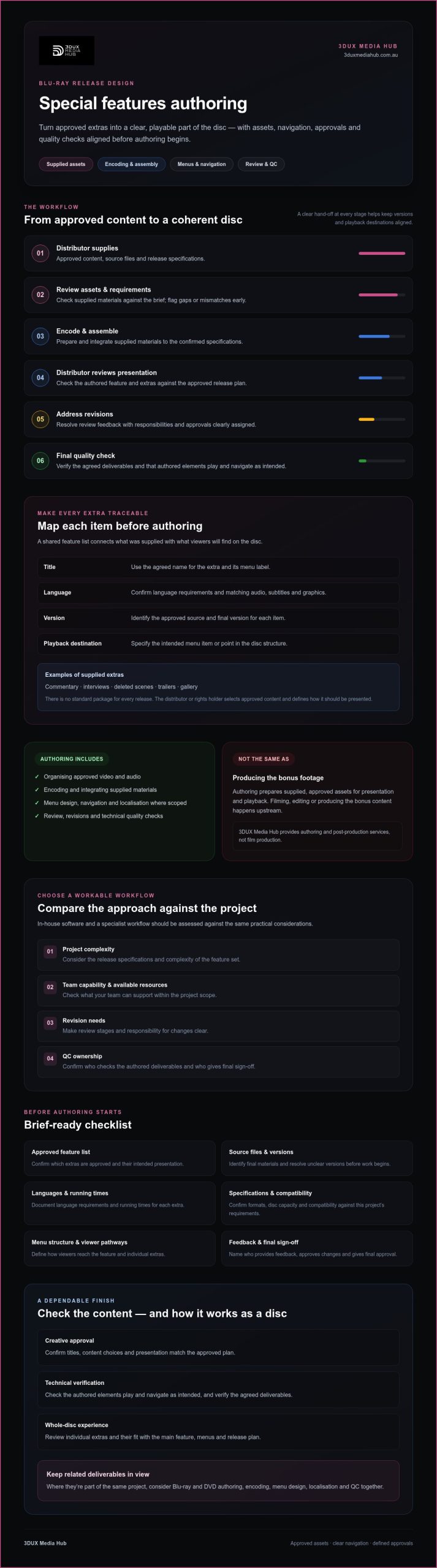
The hand-off typically follows agreed stages: the distributor supplies approved content and specifications; the authoring team reviews the assets and requirements; the feature and extras are encoded and assembled; the distributor reviews the authored presentation; revisions are addressed; and final QC checks the agreed deliverables. Clear approvals at each stage help prevent confusion over versions and playback destinations.
For distributors, Blu-ray special features authoring prepares approved extras for playback and clear navigation alongside the main feature. Menus give viewers a route to the feature and individual extras, so labels and navigation should reflect the approved content and release plan. The broader optical disc authoring process also involves assembling source material into a disc-ready structure.
Keep the specification and asset list aligned. Confirm which audio, subtitles, languages and versions are required, and make sure review covers both individual extras and how they fit into the complete disc experience. Authoring integrates the supplied materials. It doesn’t replace the distributor’s responsibility to approve content and define its intended use.
How Blu-ray special features authoring turns supplied assets into a coherent disc
A coherent disc experience starts before authoring. The distributor’s brief, approved assets and technical specifications need to align. Give each extra an agreed title, language, version and playback destination, such as a menu item or a specific point in the disc structure. Without that mapping, the team may need to pause to resolve missing files or conflicting instructions.
Briefing and preparing bonus-feature assets
Start with an approved feature list and source files. Document language requirements, running times and intended navigation, and identify which materials are final and who can approve changes. If a file’s version, language or destination is unclear, ask the distributor to confirm it rather than making an assumption.
Review the assets against the brief before authoring begins. Check that audio, subtitles and graphics correspond to the approved source and version, and flag gaps or mismatches early. Specify the menu structure and viewer pathways too. For more detail on navigation decisions, consult a dedicated guide to interactive Blu-ray menus.
Authoring, review and technical QC
The workflow moves through a defined sequence: brief, asset intake, specification review, authoring, review, revision and final QC. During authoring, supplied materials are prepared and integrated according to the confirmed requirements. Check formats, disc capacity and compatibility requirements against the project specification rather than assuming they’ll match a previous release.
Separate creative approval from technical verification. Creative reviewers can confirm that titles, content choices and presentation match the approved plan. Technical QC checks whether the authored elements play and navigate as intended, and whether audio, subtitles, graphics and timing remain consistent with the approved materials. Feedback is more useful when reviewers identify the asset, version and issue clearly.
Allow time for revisions and a final check of the updated build. Confirm who consolidates feedback and who gives sign-off, so conflicting notes don’t leave the authoring team guessing. A separate 2026 Blu-ray quality-control guide can provide deeper QC coverage. For project-specific authoring, encoding, menu design or QC requirements, see Blu-ray authoring services from 3DUX Media Hub.
In-house software or a specialist: comparing Blu-ray bonus-feature workflows
The right workflow depends on the release, your team’s authoring experience and who can manage review through final acceptance. In-house software may suit a defined, manageable scope. Specialist support is worth assessing when requirements span multiple deliverables or need coordinated encoding, menu design, localisation and QC. Compare the work involved, not just the software.
| Decision point | In-house workflow | Specialist support |
|---|---|---|
| Project complexity | Can suit a limited feature set and an established process. | Consider when delivery requirements are more involved or several elements need to be coordinated. |
| Internal capability | Requires suitable tools and staff who know how to use them. | Can add authoring expertise when internal resources or experience are limited. |
| Revision needs | The team needs capacity to manage feedback, updates and rechecks. | Agree how revisions are submitted, handled and approved before work begins. |
| QC ownership | Assign someone to verify playback and confirm final acceptance. | Define which technical checks the provider performs and what remains the distributor’s responsibility. |
| Delivery coordination | Internal teams coordinate assets, approvals and deliverables across departments. | A specialist may coordinate agreed authoring and related services within the project scope. |
When an in-house workflow may be appropriate
In-house authoring can be a practical fit when the extras are limited, internal processes are established and staff are familiar with the chosen tools. Account for the full workload, not just assembly: testing, approvals, revisions and playback verification all need time and clear ownership. Decide who troubleshoots issues and who can accept the final disc before work starts.
When specialist authoring support may add value
Assess specialist support if the release needs Blu-ray special features authoring alongside encoding, menu design, localisation or broadcast-quality QC. Ask prospective providers to specify deliverables, review stages, communication channels and responsibilities. Confirm which formats and functionality can be supported for the project, and who supplies approvals and source assets.
Neither approach is automatically better. Match the choice to the scope, risk and available resources. For a closer look at the requirements, see Blu-ray authoring support from 3DUX Media Hub.
What to prepare before commissioning Blu-ray special features authoring
A clear brief makes Blu-ray special features authoring easier to scope and review. Before transferring media, align the approved content, technical requirements and delivery expectations with the authoring provider. Confirm which source formats and interactive features can be supported, which specifications apply to the release, and what outputs are included. Check suitability rather than assuming a file or deliverable will meet the requirements.
Build a usable brief and asset inventory
List every extra and record the information the authoring team needs to identify and place it correctly. For each item, include:
- Content details: approved title, language, version and running time.
- Asset details: source file and format, plus any associated audio, subtitles or graphics.
- Disc placement: intended menu label and playback destination.
- Delivery notes: artwork, relevant rights or usage restrictions, and any language or version requirements.
Mark assets awaiting approval or replacement as pending. Keep them separate from final materials, and flag unclear versions rather than asking the authoring team to infer which file is correct. A wider provider-evaluation framework can help you assess scope and responsibilities; consult a professional disc-authoring buying guide alongside your project brief.
Agree review, revisions and final deliverables
Set the approval process before work starts. Name the decision-maker, identify who gathers feedback, agree the review window and confirm who has final sign-off authority. Ask reviewers to provide consolidated notes that identify the relevant extra and version. This gives the authoring team a clear path through revisions.
Define what completion means too. Confirm which playback checks and QC activities are included, whether a QC report is supplied, and which final files or other deliverables are expected. Keep creative approval separate from technical verification: reviewers can assess whether the presentation matches the brief, while technical checks assess playback and navigation against the agreed requirements.
With these details in place, both parties can work from the same scope and identify gaps before they affect review. See how 3DUX approaches project scoping for a discussion of assets, technical specifications, approvals and deliverables.
How 3DUX Media Hub supports Blu-ray special features authoring
3DUX Media Hub supports film and television distribution projects with Blu-ray and DVD authoring. For distributors, that means technical support to prepare supplied, approved material for disc presentation. 3DUX doesn’t film or produce bonus footage, and it doesn’t replicate physical discs. Work starts with your content and release requirements, then the project scope is established around the services needed.
A coordinated technical workflow for supplied content
Depending on the brief, authoring can be considered alongside video and audio encoding, motion or static menu design, content localisation and broadcast-quality QC. Discussing these requirements together helps clarify how the supplied extras, menus and language versions need to work with one another. 3DUX’s principals bring over 20 years of industry experience, relevant to technical planning and delivery. Project outcomes depend on the agreed scope, assets and approvals.
Confirm the specifics before commitments are made. These include:
- Which source assets and approved versions are available, and which technical specifications apply.
- Which bonus-feature formats and interactive functionality can be supported for the project.
- Which authoring, encoding, menu design, localisation and QC deliverables are required.
- Who reviews the work, how approvals are managed and what schedule is achievable.
This project-by-project approach keeps expectations grounded. A distributor can identify what’s needed without assuming every release requires the same combination of services or that every requested function is supported by the available assets and specifications.
Start with a clear project conversation
To scope Blu-ray special features authoring, share the release requirements, current asset status, languages and target delivery expectations. Include the approved feature list, relevant technical specifications and any known gaps or pending approvals. These details give the project team a practical starting point for confirming what can be supported and which services belong in the brief.
A scope discussion can establish the next steps before media is transferred or deliverables are assumed. Review Blu-ray special-features authoring with the 3DUX team.
Set your release up for a clean authoring process
Strong Blu-ray special features authoring starts with clear scope: approved assets, defined versions and languages, agreed technical requirements, and a review process with named decision-makers. These details help keep the extras, menus and main feature aligned through authoring and QC.
Choose an in-house or specialist workflow based on project complexity, internal expertise and capacity to manage testing, revisions and final acceptance. No single approach fits every release. Confirm deliverables and supported functionality with your authoring provider before transferring media or setting expectations.
3DUX Media Hub provides Blu-ray and DVD authoring, with encoding, menu design and broadcast-quality QC capabilities. Its principals bring over 20 years of industry experience. For relevant services, see Blu-ray authoring with 3DUX Media Hub.
A well-scoped workflow gives your team a clearer path from approved content to a coherent disc release. Start with the brief and confirm the details before authoring begins.
Frequently Asked Questions
What is Blu-ray special-features authoring?
Blu-ray special-features authoring prepares supplied, approved extras for presentation and playback on a Blu-ray disc. It involves organising the content, preparing it to the agreed technical requirements, and integrating it with the disc’s menus and navigation. It’s separate from choosing which extras to include or producing the footage. The distributor or rights holder defines the content and intended presentation; the authoring team works from those instructions and assets.
What bonus features can be included on a Blu-ray disc?
A Blu-ray release might include a commentary, interviews, deleted scenes, trailers or a gallery. The available features depend on the approved content, supplied assets and release requirements, so there’s no set package for every title. Before authoring, confirm each extra’s title, language, version and intended menu destination. Check that the supplied audio, subtitles and graphics correspond to the correct version of the content.
Can I author Blu-ray special features with consumer software?
Consumer software may suit a straightforward project if your team has the appropriate tools, technical knowledge and time to test the authored disc. Assess the full workload, including menu setup, review, revisions and playback checks, rather than software capability alone. For a release with complex requirements or several deliverables, confirm that the chosen workflow supports the required formats and functionality before committing to it.
What assets do I need to provide for Blu-ray bonus-feature authoring?
Prepare an approved feature list and the corresponding source files. For each extra, provide its approved title, language, version, running time and intended playback destination. Include associated audio, subtitles and graphics, plus artwork or relevant usage restrictions. Identify the source format and clearly mark any asset awaiting approval or replacement. Confirm technical specifications, delivery requirements and which file versions the authoring team should use before transferring media.
Does a Blu-ray authoring company create the bonus content?
Not necessarily. Blu-ray authoring prepares and integrates supplied material; it doesn’t automatically include filming, editing or producing bonus footage. The distributor or rights holder selects and approves the content, then supplies the assets and instructions for authoring. 3DUX Media Hub provides Blu-ray and DVD authoring, but it doesn’t produce bonus-feature footage. Confirm the division of responsibilities with your provider before commissioning the work.
How is a Blu-ray special-features authoring project quality-checked?
Quality checks should follow the agreed project specification and scope. They can include verifying that the feature and extras play, that menu navigation leads to the intended content, and that audio, subtitles, graphics and timing match the approved materials. Separate creative approval from technical verification so reviewers know what feedback to provide. Confirm which playback checks, QC reporting and final deliverables are included with the authoring provider.
When should a distributor use a specialist Blu-ray authoring service?
Consider specialist support when the release requirements exceed your team’s in-house tools, expertise or review capacity. It may also help when authoring needs to be coordinated with encoding, menu design, localisation or broadcast-quality QC. Compare providers by their relevant services, deliverables, review process and responsibilities. 3DUX Media Hub offers Blu-ray and DVD authoring alongside these technical capabilities, with over 20 years of industry experience across its principals.
Planning a Blu-ray release? Discuss your special-features authoring scope with 3DUX Media Hub, including your assets, technical requirements and approval process.